ApsaraVideo VOD propose des API de téléchargement côté serveur. Cette rubrique fournit des exemples de code Java pour le SDK permettant d'obtenir des informations d'identification de téléchargement, de les actualiser et d'enregistrer des ressources multimédias.
Cas d'utilisation et API associées
Cette rubrique présente uniquement des exemples d'appels d'opérations d'API, telles que l'opération permettant d'obtenir des informations d'identification et une URL de téléchargement. Le tableau suivant décrit les scénarios dans lesquels vous pouvez appeler des opérations d'API pour télécharger des fichiers multimédias.
Opération d'API | Scénario |
| |
| |
|
Prérequis
Le SDK est installé. Installation.
Une instance de client est initialisée. Initialisation.
Remarques relatives à l'utilisation
Tous les exemples de cette rubrique utilisent une paire AccessKey pour initialiser une instance de client.
Pour obtenir des détails sur les paramètres de requête et de réponse, accédez à Alibaba Cloud OpenAPI Explorer et ouvrez l'onglet API Documentations.
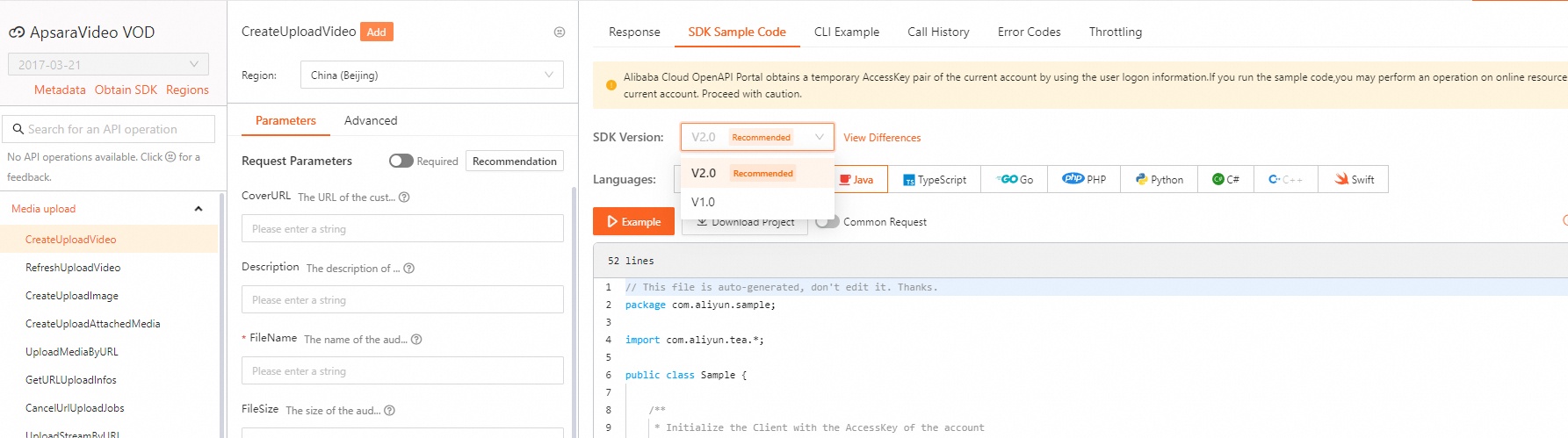
Pour consulter des exemples de SDK pour d'autres opérations d'API, accédez à Alibaba Cloud OpenAPI Explorer. Dans l'onglet Parameters, spécifiez les paramètres et lancez l'appel. Sélectionnez ensuite la version du SDK et le langage dans l'onglet SDK Sample Code pour afficher et télécharger le code.
Les exemples de cette rubrique utilisent le SDK V1.0. Pour les exemples V2.0, sélectionnez la version correcte du SDK dans OpenAPI Explorer.
Exemples d'appels d'API
Obtention des informations d'identification de téléchargement pour les fichiers audio et vidéo
Appelez CreateUploadVideo pour obtenir une URL de téléchargement et des informations d'identification pour un fichier audio ou vidéo.
Alibaba Cloud OpenAPI Explorer : CreateUploadVideo.
Exemple de code :
import com.aliyuncs.DefaultAcsClient;
import com.aliyuncs.auth.AlibabaCloudCredentials;
import com.aliyuncs.auth.EnvironmentVariableCredentialsProvider;
import com.aliyuncs.exceptions.ClientException;
import com.aliyuncs.profile.DefaultProfile;
import com.aliyuncs.vod.model.v20170321.CreateUploadVideoRequest;
import com.aliyuncs.vod.model.v20170321.CreateUploadVideoResponse;

/**
 *
 * Example of obtaining an upload credential for an audio or video file.
 */
public class AudioOrVideoCreateUploadDemo {

    /**
     * Initializes the AcsClient.
     */
    public static DefaultAcsClient initVodClient() throws ClientException {
    // The service region for ApsaraVideo for VOD.
    String regionId = "cn-shanghai";
    // An AccessKey of an Alibaba Cloud account has full permissions on all API operations. For better security, we recommend that you use a RAM user to make API calls.
    // Do not hard-code the AccessKey ID and AccessKey secret in your project code. Otherwise, the AccessKey pair may be leaked and compromise the security of all your resources.
    // This example shows how to obtain an AccessKey pair from environment variables to authenticate API requests. Before you run the code, configure the ALIBABA_CLOUD_ACCESS_KEY_ID and ALIBABA_CLOUD_ACCESS_KEY_SECRET environment variables.
    DefaultProfile profile = DefaultProfile.getProfile(regionId, System.getenv("ALIBABA_CLOUD_ACCESS_KEY_ID"), System.getenv("ALIBABA_CLOUD_ACCESS_KEY_SECRET"));
    DefaultAcsClient client = new DefaultAcsClient(profile);
    return client;
    }

    /**
     * Get an upload URL and credential for an audio or video file.
     * @param client The client that sends the request.
     * @return CreateUploadVideoResponse The response that contains the upload URL and credential for an audio or video file.
     * @throws Exception
     */
    public static CreateUploadVideoResponse createUploadVideo(DefaultAcsClient client) throws Exception {
        CreateUploadVideoRequest request = new CreateUploadVideoRequest();
        request.setTitle("this is a sample");
        request.setFileName("filename.mp4");

        // Optional. The user data. Set this parameter if you want to specify a callback URL and enable transparent data transmission.
        //JSONObject userData = new JSONObject();

        // Callback settings in UserData.
        // The callback settings for event notifications. If you specify these settings, they override the global event notification settings.
        //JSONObject messageCallback = new JSONObject();
        // Set the callback URL.
        //messageCallback.put("CallbackURL", "http://192.168.0.1/16");
        // Set the callback method. Default value: http.
        //messageCallback.put("CallbackType", "http");
        //userData.put("MessageCallback", messageCallback.toJSONString());

        // Transparent data transmission settings in UserData.
        // A custom-defined extended field that is returned in the callback.
        //JSONObject extend = new JSONObject();
        //extend.put("MyId", "user-defined-id");
        //userData.put("Extend", extend.toJSONString());

        //request.setUserData(userData.toJSONString());

        return client.getAcsResponse(request);
    }

    /**
     * Request example.
     */
    public static void main(String[] argv) throws ClientException {
        try {
            DefaultAcsClient client = initVodClient();
            CreateUploadVideoResponse response = new CreateUploadVideoResponse();
            response = createUploadVideo(client);
            System.out.print("VideoId = " + response.getVideoId() + "\n");
            System.out.print("UploadAddress = " + response.getUploadAddress() + "\n");
            System.out.print("UploadAuth = " + response.getUploadAuth() + "\n");
            System.out.print("RequestId = " + response.getRequestId() + "\n");
        } catch (Exception e) {
            System.out.print("ErrorMessage = " + e.getLocalizedMessage());
        }
    }
}
Actualisation des informations d'identification de téléchargement pour les fichiers audio et vidéo
Appelez RefreshUploadVideo pour actualiser des informations d'identification de téléchargement expirées pour un fichier audio ou vidéo.
Alibaba Cloud OpenAPI Explorer : RefreshUploadVideo.
Exemple de code :
import com.aliyuncs.DefaultAcsClient;
import com.aliyuncs.auth.AlibabaCloudCredentials;
import com.aliyuncs.auth.EnvironmentVariableCredentialsProvider;
import com.aliyuncs.exceptions.ClientException;
import com.aliyuncs.profile.DefaultProfile;
import com.aliyuncs.vod.model.v20170321.RefreshUploadVideoRequest;
import com.aliyuncs.vod.model.v20170321.RefreshUploadVideoResponse;

/**
*
* Example of refreshing an upload credential for an audio or video file.
*/
public class AudioOrVideoRefreshUploadDemo {

    /**
     * Initializes the AcsClient.
     */
    public static DefaultAcsClient initVodClient() throws ClientException {
    // The service region for ApsaraVideo for VOD.
    String regionId = "cn-shanghai";
    // An AccessKey of an Alibaba Cloud account has full permissions on all API operations. For better security, we recommend that you use a RAM user to make API calls.
    // Do not hard-code the AccessKey ID and AccessKey secret in your project code. Otherwise, the AccessKey pair may be leaked and compromise the security of all your resources.
    // This example shows how to obtain an AccessKey pair from environment variables to authenticate API requests. Before you run the code, configure the ALIBABA_CLOUD_ACCESS_KEY_ID and ALIBABA_CLOUD_ACCESS_KEY_SECRET environment variables.
    DefaultProfile profile = DefaultProfile.getProfile(regionId, System.getenv("ALIBABA_CLOUD_ACCESS_KEY_ID"), System.getenv("ALIBABA_CLOUD_ACCESS_KEY_SECRET"));
    DefaultAcsClient client = new DefaultAcsClient(profile);
    return client;
    }

    /**
     * Refresh the upload credential for an audio or video file.
     * @param client The client that sends the request.
     * @return RefreshUploadVideoResponse The response that contains the refreshed upload credential for the audio or video file.
     * @throws Exception
     */
    public static RefreshUploadVideoResponse refreshUploadVideo(DefaultAcsClient client) throws Exception {
        RefreshUploadVideoRequest request = new RefreshUploadVideoRequest();
        // The ID of the audio or video file.
        request.setVideoId("<VideoId>");
        return client.getAcsResponse(request);
    }

    /**
     * Request example.
     */
    public static void main(String[] argv)  {

        try {
            DefaultAcsClient client = initVodClient();
            RefreshUploadVideoResponse response = refreshUploadVideo(client);
            System.out.print("VideoId = " + response.getVideoId() + "\n");
            System.out.print("UploadAddress = " + response.getUploadAddress() + "\n");
            System.out.print("UploadAuth = " + response.getUploadAuth() + "\n");
            System.out.print("RequestId = " + response.getRequestId() + "\n");
        } catch (Exception e) {
            System.out.print("ErrorMessage = " + e.getLocalizedMessage());
        }
    }
}
Obtention des informations d'identification de téléchargement pour une image
Appelez CreateUploadImage pour obtenir une URL de téléchargement et des informations d'identification pour une image.
Alibaba Cloud OpenAPI Explorer : CreateUploadImage.
Exemple de code :
import com.alibaba.fastjson.JSONObject;
import com.aliyuncs.DefaultAcsClient;
import com.aliyuncs.auth.AlibabaCloudCredentials;
import com.aliyuncs.auth.EnvironmentVariableCredentialsProvider;
import com.aliyuncs.exceptions.ClientException;
import com.aliyuncs.profile.DefaultProfile;
import com.aliyuncs.vod.model.v20170321.CreateUploadImageRequest;
import com.aliyuncs.vod.model.v20170321.CreateUploadImageResponse;

/**
 * Example of obtaining an upload credential for an image.
 *
 */
public class ImageCreateUploadDemo {

    /**
     * Initializes the AcsClient.
     */
    public static DefaultAcsClient initVodClient() throws ClientException {
    // The service region for ApsaraVideo for VOD.
    String regionId = "cn-shanghai";
    // An AccessKey of an Alibaba Cloud account has full permissions on all API operations. For better security, we recommend that you use a RAM user to make API calls.
    // Do not hard-code the AccessKey ID and AccessKey secret in your project code. Otherwise, the AccessKey pair may be leaked and compromise the security of all your resources.
    // This example shows how to obtain an AccessKey pair from environment variables to authenticate API requests. Before you run the code, configure the ALIBABA_CLOUD_ACCESS_KEY_ID and ALIBABA_CLOUD_ACCESS_KEY_SECRET environment variables.
    DefaultProfile profile = DefaultProfile.getProfile(regionId, System.getenv("ALIBABA_CLOUD_ACCESS_KEY_ID"), System.getenv("ALIBABA_CLOUD_ACCESS_KEY_SECRET"));
    DefaultAcsClient client = new DefaultAcsClient(profile);
    return client;
    }

    /**
     * Get an upload URL and credential for an image.
     * @param client The client that sends the request.
     * @return CreateUploadImageResponse The response that contains the upload URL and credential for an image.
     * @throws Exception
     */
    public static CreateUploadImageResponse createUploadImage(DefaultAcsClient client) throws Exception {
        CreateUploadImageRequest request = new CreateUploadImageRequest();
        // Set the image type.
        request.setImageType("default");
        // Set the image file extension.
        request.setImageExt("gif");
        // Set the image title.
        request.setTitle("this is a sample");

        // Optional. The user data. Set this parameter if you want to specify a callback URL and enable transparent data transmission.
        JSONObject userData = new JSONObject();

        // Callback settings in UserData.
        // The callback settings for event notifications. If you specify these settings, they override the global event notification settings.
        JSONObject messageCallback = new JSONObject();
        // Set the callback URL.
        messageCallback.put("CallbackURL", "http://192.168.0.0/16");
        // Set the callback method. Default value: http.
        messageCallback.put("CallbackType", "http");
        userData.put("MessageCallback", messageCallback.toJSONString());

        JSONObject extend = new JSONObject();
        extend.put("MyId", "user-defined-id");
        userData.put("Extend", extend.toJSONString());

        request.setUserData(userData.toJSONString());

        return client.getAcsResponse(request);
    }

    /**
     * Request example.
     */
    public static void main(String[] argv)  {

        try {
            DefaultAcsClient client = initVodClient();
            CreateUploadImageResponse response = createUploadImage(client);
            System.out.print("ImageId = " + response.getImageId() + "\n");
            System.out.print("ImageURL = " + response.getImageURL() + "\n");
            System.out.print("UploadAddress = " + response.getUploadAddress() + "\n");
            System.out.print("UploadAuth = " + response.getUploadAuth() + "\n");
            System.out.print("RequestId = " + response.getRequestId() + "\n");
        } catch (Exception e) {
            System.out.print("ErrorMessage = " + e.getLocalizedMessage());
        }
    }
}
Obtention des informations d'identification de téléchargement pour des médias annexes
Appelez CreateUploadAttachedMedia pour obtenir une URL de téléchargement et des informations d'identification pour une ressource multimédia annexe, telle qu'un filigrane ou un fichier de sous-titres.
Alibaba Cloud OpenAPI Explorer : CreateUploadAttachedMedia.
Exemple de code :
import com.alibaba.fastjson.JSONObject;
import com.aliyuncs.DefaultAcsClient;
import com.aliyuncs.auth.AlibabaCloudCredentials;
import com.aliyuncs.auth.EnvironmentVariableCredentialsProvider;
import com.aliyuncs.exceptions.ClientException;
import com.aliyuncs.profile.DefaultProfile;
import com.aliyuncs.vod.model.v20170321.CreateUploadAttachedMediaRequest;
import com.aliyuncs.vod.model.v20170321.CreateUploadAttachedMediaResponse;

/**
 * Example of obtaining an upload credential for an auxiliary media asset.
 *
 */
public class AttachedMediaCreateUploadDemo {

     /**
     * Initializes the AcsClient.
     */
    public static DefaultAcsClient initVodClient() throws ClientException {
    // The service region for ApsaraVideo for VOD.
    String regionId = "cn-shanghai";
    // An AccessKey of an Alibaba Cloud account has full permissions on all API operations. For better security, we recommend that you use a RAM user to make API calls.
    // Do not hard-code the AccessKey ID and AccessKey secret in your project code. Otherwise, the AccessKey pair may be leaked and compromise the security of all your resources.
    // This example shows how to obtain an AccessKey pair from environment variables to authenticate API requests. Before you run the code, configure the ALIBABA_CLOUD_ACCESS_KEY_ID and ALIBABA_CLOUD_ACCESS_KEY_SECRET environment variables.
    DefaultProfile profile = DefaultProfile.getProfile(regionId, System.getenv("ALIBABA_CLOUD_ACCESS_KEY_ID"), System.getenv("ALIBABA_CLOUD_ACCESS_KEY_SECRET"));
    DefaultAcsClient client = new DefaultAcsClient(profile);
    return client;
    }

    /**
     * Get an upload URL and credential for an auxiliary media asset, such as a watermark or subtitle file.
     * @param client The client that sends the request.
     * @return CreateUploadAttachedMediaResponse The response that contains the upload URL and credential for the auxiliary media asset.
     * @throws Exception
     */
    public static CreateUploadAttachedMediaResponse createUploadAttachedMedia(DefaultAcsClient client) throws Exception {
        CreateUploadAttachedMediaRequest request = new CreateUploadAttachedMediaRequest();
        // Set the business type.
        request.setBusinessType("watermark");
        // Set the file extension.
        request.setMediaExt("gif");
        // Set the title.
        request.setTitle("this is a sample");

        // Optional. The user data. Set this parameter if you want to specify a callback URL and enable transparent data transmission.
        JSONObject userData = new JSONObject();

        // Callback settings in UserData.
        // The callback settings for event notifications. If you specify these settings, they override the global event notification settings.
        JSONObject messageCallback = new JSONObject();
        // Set the callback URL.
        messageCallback.put("CallbackURL", "http://192.168.0.0/16");
        // Set the callback method. Default value: http.
        messageCallback.put("CallbackType", "http");
        userData.put("MessageCallback", messageCallback.toJSONString());

        JSONObject extend = new JSONObject();
        extend.put("MyId", "user-defined-id");
        userData.put("Extend", extend.toJSONString());

        request.setUserData(userData.toJSONString());

        return client.getAcsResponse(request);
    }
    /**
     * Request example.
     */
    public static void main(String[] argv) {

        try {
            DefaultAcsClient client = initVodClient();
            CreateUploadAttachedMediaResponse response = createUploadAttachedMedia(client);
            System.out.print("mediaId = " + response.getMediaId() + "\n");
            System.out.print("mediaURL = " + response.getMediaURL() + "\n");
            System.out.print("UploadAddress = " + response.getUploadAddress() + "\n");
            System.out.print("UploadAuth = " + response.getUploadAuth() + "\n");
            System.out.print("RequestId = " + response.getRequestId() + "\n");
        } catch (Exception e) {
            System.out.print("ErrorMessage = " + e.getLocalizedMessage());
        }
    }
}
Téléchargement groupé par URL
Appelez UploadMediaByURL pour télécharger des fichiers multimédias par URL par lots.
Alibaba Cloud OpenAPI Explorer : UploadMediaByURL.
Exemple de code :
import com.alibaba.fastjson.JSON;
import com.alibaba.fastjson.JSONArray;
import com.alibaba.fastjson.JSONObject;
import com.aliyuncs.DefaultAcsClient;
import com.aliyuncs.auth.AlibabaCloudCredentials;
import com.aliyuncs.auth.EnvironmentVariableCredentialsProvider;
import com.aliyuncs.exceptions.ClientException;
import com.aliyuncs.profile.DefaultProfile;
import com.aliyuncs.vod.model.v20170321.UploadMediaByURLRequest;
import com.aliyuncs.vod.model.v20170321.UploadMediaByURLResponse;

import java.net.URLEncoder;

/**
 * Example of the URL-based batch upload feature.
 *
 */
public class AudioOrVideoUploadByUrl {

    /**
     * Initializes the AcsClient.
     */
    public static DefaultAcsClient initVodClient() throws ClientException {
    // The service region for ApsaraVideo for VOD.
    String regionId = "cn-shanghai";
    // An AccessKey of an Alibaba Cloud account has full permissions on all API operations. For better security, we recommend that you use a RAM user to make API calls.
    // Do not hard-code the AccessKey ID and AccessKey secret in your project code. Otherwise, the AccessKey pair may be leaked and compromise the security of all your resources.
    // This example shows how to obtain an AccessKey pair from environment variables to authenticate API requests. Before you run the code, configure the ALIBABA_CLOUD_ACCESS_KEY_ID and ALIBABA_CLOUD_ACCESS_KEY_SECRET environment variables.
    DefaultProfile profile = DefaultProfile.getProfile(regionId, System.getenv("ALIBABA_CLOUD_ACCESS_KEY_ID"), System.getenv("ALIBABA_CLOUD_ACCESS_KEY_SECRET"));
    DefaultAcsClient client = new DefaultAcsClient(profile);
    return client;
    }

    /**
     * URL-based batch upload.
     *
     * @param client The client that sends the request.
     * @return UploadMediaByURLResponse The response of the URL-based batch upload operation.
     * @throws Exception
     */
    public static UploadMediaByURLResponse uploadMediaByURL(DefaultAcsClient client) throws Exception {
        UploadMediaByURLRequest request = new UploadMediaByURLRequest();
        String url = "http://video_01.mp4";
        String encodeUrl = URLEncoder.encode(url, "UTF-8");
        // The URL of the source video file.
        request.setUploadURLs(encodeUrl);

        // The metadata of the video to upload.
        JSONObject uploadMetadata = new JSONObject();
        // The URL of the source video file to upload. This must match a URL in the UploadURLs parameter.
        uploadMetadata.put("SourceUrl", encodeUrl);
        // The video title.
        uploadMetadata.put("Title", "upload by url sample");

        JSONArray uploadMetadataList = new JSONArray();
        uploadMetadataList.add(uploadMetadata);
        request.setUploadMetadatas(uploadMetadataList.toJSONString());

        // Optional. The user data. Set this parameter if you want to specify a callback URL and enable transparent data transmission.
        JSONObject userData = new JSONObject();

        // Callback settings in UserData.
        // The callback settings for event notifications. If you specify these settings, they override the global event notification settings.
        JSONObject messageCallback = new JSONObject();
        // Set the callback URL.
        messageCallback.put("CallbackURL", "http://192.168.0.0/16");
        // Set the callback method. Default value: http.
        messageCallback.put("CallbackType", "http");
        userData.put("MessageCallback", messageCallback.toJSONString());

        JSONObject extend = new JSONObject();
        extend.put("MyId", "user-defined-id");
        userData.put("Extend", extend.toJSONString());

        request.setUserData(userData.toJSONString());

        return client.getAcsResponse(request);
    }

    /**
     * Request example.
     */
    public static void main(String[] argv) {

        try {
            DefaultAcsClient client = initVodClient();
            UploadMediaByURLResponse response = uploadMediaByURL(client);
            System.out.print("UploadJobs = " + JSON.toJSONString(response.getUploadJobs()) + "\n");
            System.out.print("RequestId = " + response.getRequestId() + "\n");
        } catch (Exception e) {
            System.out.print("ErrorMessage = " + e.getLocalizedMessage());
        }
    }

}
Enregistrement d'une ressource multimédia
Appelez RegisterMedia pour enregistrer des ressources multimédias.
Alibaba Cloud OpenAPI Explorer : RegisterMedia.
Exemple de code :
import com.alibaba.fastjson.JSONArray;
import com.alibaba.fastjson.JSONObject;
import com.aliyuncs.DefaultAcsClient;
import com.aliyuncs.auth.AlibabaCloudCredentials;
import com.aliyuncs.auth.EnvironmentVariableCredentialsProvider;
import com.aliyuncs.exceptions.ClientException;
import com.aliyuncs.profile.DefaultProfile;
import com.aliyuncs.vod.model.v20170321.RegisterMediaRequest;
import com.aliyuncs.vod.model.v20170321.RegisterMediaResponse;

/**
 * Example of media asset registration.
 *
 */
public class MediaRegisterDemo {

    /**
     * Initializes the AcsClient.
     */
    public static DefaultAcsClient initVodClient() throws ClientException {
    // The service region for ApsaraVideo for VOD.
    String regionId = "cn-shanghai";
    // An AccessKey of an Alibaba Cloud account has full permissions on all API operations. For better security, we recommend that you use a RAM user to make API calls.
    // Do not hard-code the AccessKey ID and AccessKey secret in your project code. Otherwise, the AccessKey pair may be leaked and compromise the security of all your resources.
    // This example shows how to obtain an AccessKey pair from environment variables to authenticate API requests. Before you run the code, configure the ALIBABA_CLOUD_ACCESS_KEY_ID and ALIBABA_CLOUD_ACCESS_KEY_SECRET environment variables.
    DefaultProfile profile = DefaultProfile.getProfile(regionId, System.getenv("ALIBABA_CLOUD_ACCESS_KEY_ID"), System.getenv("ALIBABA_CLOUD_ACCESS_KEY_SECRET"));
    DefaultAcsClient client = new DefaultAcsClient(profile);
    return client;
    }

    /**
     * Register a media asset.
     * @param client The client that sends the request.
     * @return RegisterMediaResponse The response of the media asset registration operation.
     * @throws Exception
     */
    public static RegisterMediaResponse registerMedia(DefaultAcsClient client) throws Exception {
        RegisterMediaRequest request = new RegisterMediaRequest();
        JSONArray metaDataArray = new JSONArray();
        JSONObject metaData = new JSONObject();
        // Title.
        metaData.put("Title", "this is a sample");
        // The URL of the source file. The filename must be unique. If you add a file with a name that already exists, the file is associated with the existing unique media ID.
        metaData.put("FileURL", "https://192.168.0.0/16.oss-cn-shanghai.aliyuncs.com/vod_sample.mp4");
        // Specify the metadata of the media asset to register.
        metaDataArray.add((metaData));
        request.setRegisterMetadatas(metaDataArray.toJSONString());
        return client.getAcsResponse(request);
    }

    /**
     * Request example.
     */
    public static void main(String[] argv)  {

        try {
            DefaultAcsClient client = initVodClient();
            RegisterMediaResponse response = registerMedia(client);
            if (response.getFailedFileURLs() != null && response.getFailedFileURLs().size() > 0) {
                for (String fileURL : response.getFailedFileURLs()) {
                    System.out.print("FailedFileURL = " + fileURL + "\n");
                }
            }
            if (response.getRegisteredMediaList() != null && response.getRegisteredMediaList().size() > 0) {
                for (RegisterMediaResponse.RegisteredMedia registeredMedia : response.getRegisteredMediaList()) {
                    System.out.print("MediaId = " + registeredMedia.getMediaId());
                    System.out.print("FileURL = " + registeredMedia.getFileURL());
                    System.out.print("NewRegister = " + registeredMedia.getNewRegister());
                    System.out.print("RequestId = " + response.getRequestId() + "\n");
                }
            }
        } catch (Exception e) {
            System.out.print("ErrorMessage = " + e.getLocalizedMessage());
        }

    }

}
Interrogation des informations de téléchargement par URL
Appelez GetURLUploadInfos pour interroger l'état et les détails des tâches de téléchargement basées sur une URL.
Alibaba Cloud OpenAPI Explorer : GetURLUploadInfos.
Exemple de code :
import com.aliyuncs.DefaultAcsClient;
import com.aliyuncs.auth.AlibabaCloudCredentials;
import com.aliyuncs.auth.EnvironmentVariableCredentialsProvider;
import com.aliyuncs.exceptions.ClientException;
import com.aliyuncs.profile.DefaultProfile;
import com.aliyuncs.vod.model.v20170321.GetURLUploadInfosRequest;
import com.aliyuncs.vod.model.v20170321.GetURLUploadInfosResponse;
import org.apache.commons.lang3.StringUtils;

import java.net.URLEncoder;
import java.util.ArrayList;
import java.util.List;

/**
 * Example of getting URL upload information.
 */
public class URLUploadInfosGetDemo {

    /**
     * Initializes the AcsClient.
     */
    public static DefaultAcsClient initVodClient() throws ClientException {
    // The service region for ApsaraVideo for VOD.
    String regionId = "cn-shanghai";
    // An AccessKey of an Alibaba Cloud account has full permissions on all API operations. For better security, we recommend that you use a RAM user to make API calls.
    // Do not hard-code the AccessKey ID and AccessKey secret in your project code. Otherwise, the AccessKey pair may be leaked and compromise the security of all your resources.
    // This example shows how to obtain an AccessKey pair from environment variables to authenticate API requests. Before you run the code, configure the ALIBABA_CLOUD_ACCESS_KEY_ID and ALIBABA_CLOUD_ACCESS_KEY_SECRET environment variables.
    DefaultProfile profile = DefaultProfile.getProfile(regionId, System.getenv("ALIBABA_CLOUD_ACCESS_KEY_ID"), System.getenv("ALIBABA_CLOUD_ACCESS_KEY_SECRET"));
    DefaultAcsClient client = new DefaultAcsClient(profile);
    return client;
    }

    /**
     * Get URL upload information.
     *
     * @param client The client that sends the request.
     * @return GetURLUploadInfosResponse The response containing information about URL-based upload jobs.
     * @throws Exception
     */
    public static GetURLUploadInfosResponse getURLUploadInfos(DefaultAcsClient client) throws Exception {
        GetURLUploadInfosRequest request = new GetURLUploadInfosRequest();

        // A list of the source video URLs. The URLs must be URL-encoded.
        String[] urls = {
                "http://exampleBucket****.cn-shanghai.aliyuncs.com/video_01.mp4",
                "http://exampleBucket****.cn-shanghai.aliyuncs.com/video_02.flv"
        };
        List<String> encodeUrlList = new ArrayList<String>();
        for (String url : urls) {
            encodeUrlList.add(URLEncoder.encode(url, "UTF-8"));
        }
        request.setUploadURLs(StringUtils.join(encodeUrlList, ','));
        // A list of job IDs. You can obtain job IDs from the response of the UploadMediaByURL API operation.
        //request.setJobIds("exampleID1,exampleID2");

        return client.getAcsResponse(request);
    }

    /**
     * Request example.
     */
    public static void main(String[] argv) {

        try {
            DefaultAcsClient client = initVodClient();
            GetURLUploadInfosResponse response = getURLUploadInfos(client);
            System.out.print("URLUploadInfoList = " + response.getURLUploadInfoList() + "\n");
            System.out.print("RequestId = " + response.getRequestId() + "\n");
        } catch (Exception e) {
            System.out.print("ErrorMessage = " + e.getLocalizedMessage());
        }
    }
}