L'accès aux fichiers (objets) stockés dans Object Storage Service (OSS) peut consommer une grande quantité de bande passante. Sur les clients où le façonnage du trafic est difficile à maîtriser, cela peut impacter les autres applications. Pour éviter ce problème, utilisez la fonctionnalité de limitation de la bande passante par connexion unique fournie par OSS afin de contrôler le trafic lors des opérations telles que l'envoi et le téléchargement de fichiers. Vous garantissez ainsi une bande passante réseau suffisante pour vos autres applications.
Notes d'utilisation
Incluez le paramètre x-oss-traffic-limit dans les requêtes PutObject, AppendObject, PostObject, CopyObject, UploadPart, UploadPartCopy et GetObject, puis spécifiez une valeur de limitation. Cette valeur doit être comprise entre 819 200 et 838860800. L'unité est le bit/s.
Limiter les requêtes client
La limitation des requêtes client s'effectue exclusivement via les kits de développement logiciel (SDK). Le code suivant présente des exemples de limitation des requêtes d'envoi ou de téléchargement à l'aide des SDK courants. Pour consulter des exemples utilisant d'autres SDK, reportez-vous à la rubrique Présentation des SDK.
Limitation simple pour l'envoi et le téléchargement
Limitation pour l'envoi multipartie
Limiter la bande passante à l'aide d'une URL de fichier
Pour les fichiers disposant des autorisations public-read ou public-read-write, vous pouvez ajouter le paramètre de limitation x-oss-traffic-limit=<value> à l'URL du fichier afin de restreindre l'accès. Par exemple, l'URL https://examplebucket.oss-cn-hangzhou.aliyuncs.com/video.mp4?x-oss-traffic-limit=819200 limite la vitesse de téléchargement du fichier video.mp4 à 100 Ko/s. L'illustration suivante montre l'effet de cette limitation :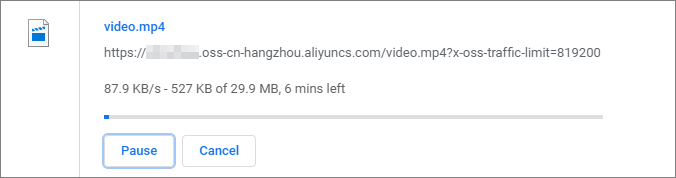
Limiter la bande passante à l'aide d'une URL signée
Lorsque vous générez une URL signée via un SDK pour accéder à un fichier privé, vous devez inclure le paramètre de limitation dans le calcul de la signature. Le code ci-dessous illustre l'ajout de ce paramètre à une URL signée à l'aide des SDK courants. Pour consulter des exemples utilisant d'autres SDK, reportez-vous à la rubrique Présentation des SDK.
import com.aliyun.oss.*;
import com.aliyun.oss.common.auth.*;
import com.aliyun.oss.common.comm.SignVersion;
import com.aliyun.oss.model.GeneratePresignedUrlRequest;
import com.aliyun.oss.model.GetObjectRequest;
import java.io.File;
import java.io.FileInputStream;
import java.io.InputStream;
import java.net.URL;
import java.util.Date;

public class Demo {
    public static void main(String[] args) throws Throwable {
        // In this example, the endpoint of the China (Hangzhou) region is used. Specify your actual endpoint.
        String endpoint = "https://oss-cn-hangzhou.aliyuncs.com";
        // Obtain access credentials from environment variables. Before you run the sample code, make sure that the OSS_ACCESS_KEY_ID and OSS_ACCESS_KEY_SECRET environment variables are configured.
        EnvironmentVariableCredentialsProvider credentialsProvider = CredentialsProviderFactory.newEnvironmentVariableCredentialsProvider();
        // Specify the name of the bucket. Example: examplebucket.
        String bucketName = "examplebucket";
        // Specify the full path of the object. Do not include the bucket name in the full path. Example: exampledir/exampleobject.txt.
        String objectName = "exampledir/exampleobject.txt";

        // Specify the full path of the local file that you want to upload. Example: D:\\localpath\\examplefile.txt.
        // If you do not specify the path of the local file, the local file is uploaded from the path of the project to which the sample program belongs.
        String localFileName = "D:\\localpath\\examplefile.txt";

        // Specify the full path to which you want to download the object. If a file that has the same name already exists, the downloaded object overwrites the file. Otherwise, the downloaded object is saved in the path.
        // If you do not specify a path for the downloaded object, the downloaded object is saved to the path of the project to which the sample program belongs.
        String downLoadFileName = "D:\\localpath\\exampleobject.txt";

        // Set the bandwidth limit to 100 KB/s.
        int limitSpeed = 100 * 1024 * 8;
        // Specify the region in which the bucket is located. For example, if the bucket is located in the China (Hangzhou) region, set the region to cn-hangzhou.
        String region = "cn-hangzhou";

        // Create an OSS Client instance.
        // Call the shutdown method to release associated resources when the OSS Client is no longer in use.
        ClientBuilderConfiguration clientBuilderConfiguration = new ClientBuilderConfiguration();
        clientBuilderConfiguration.setSignatureVersion(SignVersion.V4);
        OSS ossClient = OSSClientBuilder.create()
        .endpoint(endpoint)
        .credentialsProvider(credentialsProvider)
        .clientConfiguration(clientBuilderConfiguration)
        .region(region)
        .build();

        try {
            // Generate a signed URL that includes the bandwidth throttling parameter for object upload and set the validity period of the URL to 60 seconds.
            Date date = new Date();
            date.setTime(date.getTime() + 60 * 1000);
            GeneratePresignedUrlRequest request = new GeneratePresignedUrlRequest(bucketName, objectName, HttpMethod.PUT);
            request.setExpiration(date);
            request.setTrafficLimit(limitSpeed);
            URL signedUrl = ossClient.generatePresignedUrl(request);
            System.out.println("put object url" + signedUrl);

            // Configure bandwidth throttling for object upload.
            InputStream inputStream = new FileInputStream(localFileName);
            ossClient.putObject(signedUrl, inputStream, -1, null, true);

            // Generate a signed URL that includes the bandwidth throttling parameter for object download and set the validity period of the URL to 60 seconds.
            date = new Date();
            date.setTime(date.getTime() + 60 * 1000);
            request = new GeneratePresignedUrlRequest(bucketName, objectName, HttpMethod.GET);
            request.setExpiration(date);
            request.setTrafficLimit(limitSpeed);
            signedUrl = ossClient.generatePresignedUrl(request);
            System.out.println("get object url" + signedUrl);

            // Configure bandwidth throttling for object download.
            GetObjectRequest getObjectRequest =  new GetObjectRequest(signedUrl, null);
            ossClient.getObject(getObjectRequest, new File(downLoadFileName));
        } catch (OSSException oe) {
            System.out.println("Caught an OSSException, which means your request made it to OSS, "
                    + "but was rejected with an error response for some reason.");
            System.out.println("Error Message:" + oe.getErrorMessage());
            System.out.println("Error Code:" + oe.getErrorCode());
            System.out.println("Request ID:" + oe.getRequestId());
            System.out.println("Host ID:" + oe.getHostId());
        } catch (ClientException ce) {
            System.out.println("Caught an ClientException, which means the client encountered "
                    + "a serious internal problem while trying to communicate with OSS, "
                    + "such as not being able to access the network.");
            System.out.println("Error Message:" + ce.getMessage());
        } finally {
            if (ossClient != null) {
                ossClient.shutdown();
            }
        }
    }
}<?php
if (is_file(__DIR__ . '/../autoload.php')) {
require_once __DIR__ . '/../autoload.php';
}
if (is_file(__DIR__ . '/../vendor/autoload.php')) {
require_once __DIR__ . '/../vendor/autoload.php';
}
use OSS\Credentials\EnvironmentVariableCredentialsProvider;
use OSS\OssClient;
use OSS\Core\OssException;
// Obtain access credentials from environment variables. Before you run the sample code, make sure that the OSS_ACCESS_KEY_ID and OSS_ACCESS_KEY_SECRET environment variables are configured.
$provider = new EnvironmentVariableCredentialsProvider();
// Specify the endpoint of the region in which the bucket is located. For example, if the bucket is located in the China (Hangzhou) region, set the endpoint to https://oss-cn-hangzhou.aliyuncs.com.
$endpoint = "yourEndpoint";
// Specify the name of the bucket. Example: examplebucket.
$bucket= "examplebucket";
// Specify the full path of the object. Example: exampledir/exampleobject.txt. Do not include the bucket name in the full path.
$object = "exampledir/exampleobject.txt";
$config = array(
"provider" => $provider,
"endpoint" => $endpoint,
"signatureVersion" => OssClient::OSS_SIGNATURE_VERSION_V4,
"region"=> "cn-hangzhou"
);
$ossClient = new OssClient($config);
// Set the bandwidth limit to 100 KB/s, which is equal to 819,200 bit/s.
$options = array(
OssClient::OSS_TRAFFIC_LIMIT => 819200,
);
// Generate a signed URL for object upload with single-connection bandwidth throttling configured and set the validity period of the URL to 60 seconds.
$timeout = 60;
$signedUrl = $ossClient->signUrl($bucket, $object, $timeout, "PUT", $options);
print($signedUrl);
// Generate a signed URL for object download with single-connection bandwidth throttling configured and set the validity period of the URL to 120 seconds.
$timeout = 120;
$signedUrl = $ossClient->signUrl($bucket, $object, $timeout, "GET", $options);
print($signedUrl);# -*- coding: utf-8 -*-
import oss2
from oss2.credentials import EnvironmentVariableCredentialsProvider
from oss2.models import OSS_TRAFFIC_LIMIT
# Obtain access credentials from environment variables. Before you run the sample code, make sure that the OSS_ACCESS_KEY_ID and OSS_ACCESS_KEY_SECRET environment variables are configured.
auth = oss2.ProviderAuthV4(EnvironmentVariableCredentialsProvider())
# Specify the endpoint of the region in which the bucket is located. For example, if the bucket is located in the China (Hangzhou) region, set the endpoint to https://oss-cn-hangzhou.aliyuncs.com.
endpoint = "https://oss-cn-hangzhou.aliyuncs.com"
# Specify the ID of the region that maps to the endpoint. Example: cn-hangzhou. This parameter is required if you use the signature algorithm V4.
region = "cn-hangzhou"
# Specify the name of the bucket.
bucket = oss2.Bucket(auth, endpoint, "examplebucket", region=region)
# Specify the full path of the object. Do not include the bucket name in the full path. Example: exampledir/exampleobject.txt.
object_name = 'exampledir/exampleobject.txt'
# Specify the full path of the local file that you want to upload. Example: D:\\localpath\\examplefile.txt. By default, if you do not specify the path of the local file, the local file is uploaded from the path of the project to which the sample program belongs.
local_file_name = 'D:\\localpath\\examplefile.txt'
# Specify the local path to which you want to download the object. If a file that has the same name already exists, the downloaded object overwrites the file. If no file that has the same name exists, the downloaded object is saved in the path.
# If you do not specify a path for the downloaded object, the downloaded object is saved to the path of the project to which the sample program belongs.
down_file_name = 'D:\\localpath\\exampleobject.txt'
# Configure the params parameter to set the bandwidth limit to 100 KB/s, which is equal to 819,200 bit/s.
limit_speed = (100 * 1024 * 8)
params = dict()
params[OSS_TRAFFIC_LIMIT] = str(limit_speed)
# Generate a signed URL that includes the bandwidth throttling parameter for object upload and set the validity period of the URL to 60 seconds.
url = bucket.sign_url('PUT', object_name, 60, params=params)
print('put object url:', url)
# Configure bandwidth throttling for object upload.
result = bucket.put_object_with_url_from_file(url, local_file_name)
print('http response status:', result.status)
# Generate a signed URL that includes the bandwidth throttling parameter for object download and set the validity period of the URL to 60 seconds.
url = bucket.sign_url('GET', object_name, 60, params=params)
print('get object url:', url)
# Configure bandwidth throttling for object download.
result = bucket.get_object_with_url_to_file(url, down_file_name)
print('http response status:', result.status)using System.Text;
using Aliyun.OSS;
using Aliyun.OSS.Common;
// Specify the endpoint of the region in which the bucket is located. For example, if the bucket is located in the China (Hangzhou) region, set the endpoint to https://oss-cn-hangzhou.aliyuncs.com.
var endpoint = "https://oss-cn-hangzhou.aliyuncs.com";
// Obtain access credentials from environment variables. Before you run the sample code, make sure that the OSS_ACCESS_KEY_ID and OSS_ACCESS_KEY_SECRET environment variables are configured.
var accessKeyId = Environment.GetEnvironmentVariable("OSS_ACCESS_KEY_ID");
var accessKeySecret = Environment.GetEnvironmentVariable("OSS_ACCESS_KEY_SECRET");
// Specify the name of the bucket. Example: examplebucket.
var bucketName = "examplebucket";
// Specify the full path of the object. Do not include the bucket name in the full path. Example: exampledir/exampleobject.txt.
var objectName = "exampledir/exampleobject.txt";
var objectContent = "More than just cloud.";
var downloadFilename = "D:\\localpath\\examplefile.txt";
// Specify the region in which the bucket is located. For example, if the bucket is located in the China (Hangzhou) region, set the region to cn-hangzhou.
const string region = "cn-hangzhou";
// Create a ClientConfiguration instance and modify parameters as required.
var conf = new ClientConfiguration();
// Use the signature algorithm V4.
conf.SignatureVersion = SignatureVersion.V4;
// Create an OSSClient instance.
var client = new OssClient(endpoint, accessKeyId, accessKeySecret, conf);
client.SetRegion(region);
try
{
// Generate a signed URL to upload the object.
var generatePresignedUriRequest = new GeneratePresignedUriRequest(bucketName, objectName, SignHttpMethod.Put)
{
Expiration = DateTime.Now.AddHours(1),
};
// Set the bandwidth limit to 100 KB/s, which is equal to 819,200 bit/s.
generatePresignedUriRequest.AddQueryParam("x-oss-traffic-limit", "819200");
var signedUrl = client.GeneratePresignedUri(generatePresignedUriRequest);
// Use the signed URLs to upload the object.
var buffer = Encoding.UTF8.GetBytes(objectContent);
using (var ms = new MemoryStream(buffer))
{
client.PutObject(signedUrl, ms);
}
Console.WriteLine("Put object by signatrue succeeded. {0} ", signedUrl.ToString());
var metadata = client.GetObjectMetadata(bucketName, objectName);
var etag = metadata.ETag;
// Generate a signed URL to download the object.
// Set the bandwidth limit to 100 KB/s, which is equal to 819,200 bit/s.
var req = new GeneratePresignedUriRequest(bucketName, objectName, SignHttpMethod.Get);
req.AddQueryParam("x-oss-traffic-limit", "819200");
var uri = client.GeneratePresignedUri(req);
// Use the signed URL to download the object.
OssObject ossObject = client.GetObject(uri);
using (var file = File.Open(downloadFilename, FileMode.OpenOrCreate))
{
using (Stream stream = ossObject.Content)
{
int length = 4 * 1024;
var buf = new byte[length];
do
{
length = stream.Read(buf, 0, length);
file.Write(buf, 0, length);
} while (length != 0);
}
}
Console.WriteLine("Get object by signatrue succeeded. {0} ", uri.ToString());
}
catch (Exception ex)
{
Console.WriteLine("Put object failed, {0}", ex.Message);
}#include <alibabacloud/oss/OssClient.h>
#include <fstream>
using namespace AlibabaCloud::OSS;
int main(void)
{
/* Initialize OSS account information. */
/* Set yourEndpoint to the endpoint of the region where the bucket is located. For example, for the China (Hangzhou) region, set the endpoint to https://oss-cn-hangzhou.aliyuncs.com. */
std::string Endpoint = "yourEndpoint";
/* Set yourRegion to the region where the bucket is located. For example, for the China (Hangzhou) region, set the region to cn-hangzhou. */
std::string Region = "yourRegion";
/* Specify the bucket name, for example, examplebucket. */
std::string BucketName = "examplebucket";
/* Specify the full path of the object. The full path cannot contain the bucket name. For example, exampledir/exampleobject.txt. */
std::string ObjectName = "exampledir/exampleobject.txt";
/* Initialize network resources. */
InitializeSdk();
ClientConfiguration conf;
conf.signatureVersion = SignatureVersionType::V4;
/* Obtain access credentials from environment variables. Before you run this sample code, make sure that the OSS_ACCESS_KEY_ID and OSS_ACCESS_KEY_SECRET environment variables are set. */
auto credentialsProvider = std::make_shared<EnvironmentVariableCredentialsProvider>();
OssClient client(Endpoint, credentialsProvider, conf);
client.SetRegion(Region);
/* Set the validity period of the signature. The maximum validity period is 32,400 seconds. */
std::time_t expires = std::time(nullptr) + 1200;
/* Generate a URL for uploading the file. */
GeneratePresignedUrlRequest putrequest(BucketName, ObjectName, Http::Put);
putrequest.setExpires(expires);
/* Set the upload bandwidth limit to 100 KB/s. */
putrequest.setTrafficLimit(819200);
auto genOutcome = client.GeneratePresignedUrl(putrequest);
std::shared_ptr<std::iostream> content = std::make_shared<std::stringstream>();
*content << "test cpp sdk";
/* Print the result of the signed URL for the upload. */
std::cout << "Signed URL for upload: " << genOutcome.result() << std::endl;
/* Use the signed URL to upload the file. */
auto outcome = client.PutObjectByUrl(genOutcome.result(), content);
/* Generate a URL for downloading the file. */
GeneratePresignedUrlRequest getrequest(BucketName, ObjectName, Http::Get);
getrequest.setExpires(expires);
/* Set the download bandwidth limit to 100 KB/s. */
getrequest.setTrafficLimit(819200);
genOutcome = client.GeneratePresignedUrl(getrequest);
/* Print the result of the signed URL for the download. */
std::cout << "Signed URL for download: " << genOutcome.result() << std::endl;
/* Use the signed URL to download the file. */
auto goutcome = client.GetObjectByUrl(genOutcome.result());
/* Release network resources. */
ShutdownSdk();
return 0;
}