Les objets OSS sont privés par défaut et seul le propriétaire du fichier peut y accéder. Toutefois, les propriétaires de fichiers peuvent générer des liens partagés (URL pré-signées) afin d'autoriser des tiers à télécharger ou à prévisualiser des fichiers spécifiques en ligne pendant une période de validité définie.

Public cible : utilisateurs souhaitant partager rapidement un objet OSS (fichier) avec des tiers, ainsi que les destinataires de ces URL. Cette documentation s'adresse aussi bien aux débutants sur OSS qu'aux utilisateurs techniques tels que les développeurs et les ingénieurs O&M.
Objectif : aider les utilisateurs de tous niveaux à générer des URL pré-signées conformes à leurs besoins et accessibles comme prévu, et permettre aux tiers d'utiliser ces URL pour accéder aux ressources.
Fonctionnement
La génération d'URL pré-signées repose sur le chiffrement par clé secrète et la concaténation de paramètres. Le processus est le suivant :
Vérification des autorisations : lors de la génération d'une URL pré-signée, vous devez disposer de l'autorisation
oss:GetObjectafin que les tiers puissent télécharger ou prévisualiser les fichiers via cette URL.Chiffrement local : à partir de l'AK/SK, chiffrez et calculez le chemin d'accès au fichier, l'heure d'expiration et d'autres informations pour obtenir une signature (
x-oss-signature).Ajout de la signature : ajoutez les paramètres de signature (
x-oss-date,x-oss-expires,x-oss-credential, etc.) sous forme de chaînes de requête à l'URL du fichier.-
Formation du lien : composez l'URL pré-signée complète.
Format de l'URL pré-signée
https://BucketName.Endpoint/Object?signature parametersExemple complet
https://examplebucket.oss-cn-hangzhou.aliyuncs.com/exampleobject.txt?x-oss-process=image%2Fresize%2Cp_10&x-oss-date=20241115T095058Z&x-oss-expires=3600&x-oss-signature-version=OSS4-HMAC-SHA256&x-oss-credential=LTAI****************%2F20241115%2Fcn-hangzhou%2Foss%2Faliyun_v4_request&x-oss-signature=6e7a*********************************
Pour plus de détails sur le processus de génération, consultez la rubrique Version 4 de la signature (recommandée).
Obtention des liens de téléchargement de fichiers
Utilisez le endpoint par défaut OSS pour générer un lien de téléchargement de fichier avec une date d'expiration (URL pré-signée).
Utilisation de la console OSS
Connectez-vous à la console de gestion OSS, accédez à la liste Files du bucket cible, cliquez sur le fichier souhaité, puis sélectionnez Copy File URL dans le panneau de détails à droite pour obtenir un lien de téléchargement temporaire valide par défaut pendant 300 secondes (5 minutes).
Utilisation du SDK Alibaba Cloud
Voici des exemples de code pour générer des liens de téléchargement de fichiers (URL pré-signées) dans les langages courants.
Java
Pour plus d'informations, consultez la rubrique Téléchargement de fichiers à l'aide d'URL pré-signées en Java.
import com.aliyun.oss.*;
import com.aliyun.oss.common.auth.*;
import com.aliyun.oss.common.comm.SignVersion;

import java.net.URL;
import java.util.Date;

public class Demo {
    public static void main(String[] args) throws Throwable {
        // This example uses the public endpoint of the China (Hangzhou) region. Specify the actual endpoint.
        String endpoint = "https://oss-cn-hangzhou.aliyuncs.com";
        // Obtain access credentials from environment variables. Before you run this code, make sure that the OSS_ACCESS_KEY_ID and OSS_ACCESS_KEY_SECRET environment variables are set.
        EnvironmentVariableCredentialsProvider credentialsProvider = CredentialsProviderFactory.newEnvironmentVariableCredentialsProvider();
        // Enter the bucket name. For example, examplebucket.
        String bucketName = "examplebucket";
        // Enter the full path of the object. For example, exampleobject.txt. The full path cannot contain the bucket name.
        String objectName = "exampleobject.txt";
        // Enter the region where the bucket is located. For example, if the bucket is in the China (Hangzhou) region, set Region to cn-hangzhou.
        String region = "cn-hangzhou";

        // Create an OSSClient instance.
        // When the OSSClient instance is no longer used, call the shutdown method to release resources.
        ClientBuilderConfiguration clientBuilderConfiguration = new ClientBuilderConfiguration();
        clientBuilderConfiguration.setSignatureVersion(SignVersion.V4);
        OSS ossClient = OSSClientBuilder.create()
                .endpoint(endpoint)
                .credentialsProvider(credentialsProvider)
                .clientConfiguration(clientBuilderConfiguration)
                .region(region)
                .build();

        try {
            // Set the expiration time of the presigned URL in milliseconds. This example sets the expiration time to one hour.
            Date expiration = new Date(new Date().getTime() + 3600 * 1000L);
            // Generate a presigned URL for a GET request. This example does not include additional request headers. Other users can directly access the content through a browser.
            URL url = ossClient.generatePresignedUrl(bucketName, objectName, expiration);
            System.out.println(url);
        } catch (OSSException oe) {
            System.out.println("Caught an OSSException, which means your request made it to OSS, "
                    + "but was rejected with an error response for some reason.");
            System.out.println("Error Message:" + oe.getErrorMessage());
            System.out.println("Error Code:" + oe.getErrorCode());
            System.out.println("Request ID:" + oe.getRequestId());
            System.out.println("Host ID:" + oe.getHostId());
        } catch (ClientException ce) {
            System.out.println("Caught an ClientException, which means the client encountered "
                    + "a serious internal problem while trying to communicate with OSS, "
                    + "such as not being able to access the network.");
            System.out.println("Error Message:" + ce.getMessage());
        } finally {
            if (ossClient != null) {
                ossClient.shutdown();
            }
        }
    }
}
Python
Pour plus d'informations, consultez la rubrique Téléchargement de fichiers à l'aide d'URL pré-signées en Python.
import argparse
import alibabacloud_oss_v2 as oss

# Create a command-line parameter parser and describe the purpose of the script.
parser = argparse.ArgumentParser(description="presign get object sample")

# Specify the --region parameter to indicate the region in which the bucket is located. This parameter is required.
parser.add_argument('--region', help='The region in which the bucket is located.', required=True)
# Specify the --bucket parameter to indicate the name of the bucket in which the object is stored. This parameter is required.
parser.add_argument('--bucket', help='The name of the bucket.', required=True)
# Specify the --endpoint parameter to indicate the endpoint of the region in which the bucket is located. This parameter is optional.
parser.add_argument('--endpoint', help='The domain names that other services can use to access OSS')
# Specify the --key parameter to indicate the name of the object. This parameter is required.
parser.add_argument('--key', help='The name of the object.', required=True)

def main():
    # Parse the command-line parameters to obtain the specified values.
    args = parser.parse_args()

    # From the environment variables, load the authentication information required to access OSS.
    credentials_provider = oss.credentials.EnvironmentVariableCredentialsProvider()

    # Use the default configuration to create a cfg object and specify the credential provider.
    cfg = oss.config.load_default()
    cfg.credentials_provider = credentials_provider

    # Set the region attribute of the cfg object to the region provided in the command line.
    cfg.region = args.region

    # If a custom endpoint is provided, update the endpoint attribute of the cfg object with the provided endpoint.
    if args.endpoint is not None:
        cfg.endpoint = args.endpoint

    # Use the preceding settings to initialize the OSSClient instance.
    client = oss.Client(cfg)

    # Initiate a request to generate a presigned URL.
    pre_result = client.presign(
        oss.GetObjectRequest(
            bucket=args.bucket,  # Specify the bucket name.
            key=args.key,        # Specify the object key.
        )
    )

    # Display the HTTP method, expiration time, and presigned URL.
    print(f'method: {pre_result.method},'
          f' expiration: {pre_result.expiration.strftime("%Y-%m-%dT%H:%M:%S.000Z")},'
          f' url: {pre_result.url}'
    )

    # Display the signed headers.
    for key, value in pre_result.signed_headers.items():
        print(f'signed headers key: {key}, signed headers value: {value}')

# Call the main function to start the processing logic when the script is directly run.
if __name__ == "__main__":
    main()  # Specify the entry point of the script. The control flow starts here.
Go
Pour plus d'informations, consultez la rubrique Téléchargement de fichiers à l'aide d'URL pré-signées en Go.
package main
import (
"context"
"flag"
"log"
"time"
"github.com/aliyun/alibabacloud-oss-go-sdk-v2/oss"
"github.com/aliyun/alibabacloud-oss-go-sdk-v2/oss/credentials"
)
// Define global variables.
var (
region string // The region in which the bucket is located.
bucketName string // The name of the bucket.
objectName string // The name of the object.
)
// The init function is used to initialize command-line parameters.
func init() {
flag.StringVar(®ion, "region", "", "The region in which the bucket is located.")
flag.StringVar(&bucketName, "bucket", "", "The name of the bucket.")
flag.StringVar(&objectName, "object", "", "The name of the object.")
}
func main() {
// Parse command-line parameters.
flag.Parse()
// Check whether the bucket name is empty.
if len(bucketName) == 0 {
flag.PrintDefaults()
log.Fatalf("invalid parameters, bucket name required")
}
// Check whether the region is empty.
if len(region) == 0 {
flag.PrintDefaults()
log.Fatalf("invalid parameters, region required")
}
// Check whether the object name is empty.
if len(objectName) == 0 {
flag.PrintDefaults()
log.Fatalf("invalid parameters, object name required")
}
// Load the default configurations and specify the credential provider and region.
cfg := oss.LoadDefaultConfig().
WithCredentialsProvider(credentials.NewEnvironmentVariableCredentialsProvider()).
WithRegion(region)
// Create an OSS client.
client := oss.NewClient(cfg)
// Generate a presigned URL for the GetObject request.
result, err := client.Presign(context.TODO(), &oss.GetObjectRequest{
Bucket: oss.Ptr(bucketName),
Key: oss.Ptr(objectName),
},
oss.PresignExpires(10*time.Minute),
)
if err != nil {
log.Fatalf("failed to get object presign %v", err)
}
log.Printf("request method:%v\n", result.Method)
log.Printf("request expiration:%v\n", result.Expiration)
log.Printf("request url:%v\n", result.URL)
if len(result.SignedHeaders) > 0 {
// If the returned result contains signed headers, you must include the corresponding request headers when you send a GET request using the presigned URL. Otherwise, the request may fail or a signature error may occur.
log.Printf("signed headers:\n")
for k, v := range result.SignedHeaders {
log.Printf("%v: %v\n", k, v)
}
}
}
Node.js
Pour plus d'informations, consultez la rubrique Téléchargement de fichiers à l'aide d'URL pré-signées en Node.js.
const OSS = require("ali-oss");

// Define a function to generate a presigned URL.
async function generateSignatureUrl(fileName) {
  // Obtain the presigned URL.
  const client = await new OSS({
      // Obtain access credentials from environment variables. Before you run this code, make sure that the OSS_ACCESS_KEY_ID and OSS_ACCESS_KEY_SECRET environment variables are set.
      accessKeyId: process.env.OSS_ACCESS_KEY_ID,
      accessKeySecret: process.env.OSS_ACCESS_KEY_SECRET,
      bucket: 'examplebucket',
      // Replace yourregion with the region where the bucket is located. For example, if the bucket is in the China (Hangzhou) region, set Region to oss-cn-hangzhou.
      region: 'oss-cn-hangzhou',
      // Set secure to true to use HTTPS. This prevents the browser from blocking the generated download link.
      secure: true,
      authorizationV4: true
  });

  return await client.signatureUrlV4('GET', 3600, {
      headers: {} // Set the request headers based on the actual request headers.
  }, fileName);
}
// Call the function and pass the file name.
generateSignatureUrl('yourFileName').then(url => {
  console.log('Generated Signature URL:', url);
}).catch(err => {
  console.error('Error generating signature URL:', err);
});
PHP
Pour plus d'informations, consultez la rubrique Téléchargement de fichiers à l'aide d'URL pré-signées en PHP.
<?php

// Import the autoloader file to ensure that dependency libraries are loaded correctly.
require_once __DIR__ . '/../../vendor/autoload.php';

use AlibabaCloud\Oss\V2 as Oss;

// Define the description for command-line arguments.
$optsdesc = [
    "region" => ['help' => 'The region in which the bucket is located.', 'required' => True], // The region where the bucket is located. (Required)
    "endpoint" => ['help' => 'The domain names that other services can use to access OSS.', 'required' => False], // The endpoint to access OSS. (Optional)
    "bucket" => ['help' => 'The name of the bucket', 'required' => True], // The bucket name. (Required)
    "key" => ['help' => 'The name of the object', 'required' => True], // The object name. (Required)
    "expire" => ['help' => 'The expiration time in seconds (default: 900)', 'required' => False], // The expiration time in seconds. (Optional, default: 900)
];

// Convert the argument descriptions to the long options format required by getopt.
// A colon ":" after each argument indicates that it requires a value.
$longopts = \array_map(function ($key) {
    return "$key:";
}, array_keys($optsdesc));

// Parse the command-line arguments.
$options = getopt("", $longopts);

// Check if all required arguments are provided.
foreach ($optsdesc as $key => $value) {
    if ($value['required'] === True && empty($options[$key])) {
        $help = $value['help']; // Get the help information for the argument.
        echo "Error: the following arguments are required: --$key, $help" . PHP_EOL;
        exit(1); // If a required argument is missing, exit the program.
    }
}

// Extract values from the parsed arguments.
$region = $options["region"]; // The region where the bucket is located.
$bucket = $options["bucket"]; // The bucket name.
$key = $options["key"];       // The object name.
$expire = isset($options["expire"]) ? (int)$options["expire"] : 900; // The expiration time. Default: 900 seconds.

// Load the credentials from environment variables.
// Use EnvironmentVariableCredentialsProvider to read the Access Key ID and Access Key Secret from environment variables.
$credentialsProvider = new Oss\Credentials\EnvironmentVariableCredentialsProvider();

// Use the default configurations of the SDK.
$cfg = Oss\Config::loadDefault();
$cfg->setCredentialsProvider($credentialsProvider); // Set the credential provider.
$cfg->setRegion($region); // Set the region where the bucket is located.
if (isset($options["endpoint"])) {
    $cfg->setEndpoint($options["endpoint"]); // If an endpoint is provided, set it.
}

try {
    // Create an OSS client instance.
    $client = new Oss\Client($cfg);

    // Create a GetObjectRequest object to download the object.
    $request = new Oss\Models\GetObjectRequest(bucket:$bucket, key:$key);

    // Call the presign method to generate a signed URL and set the expiration time.
    $result = $client->presign($request, [
        'expires' => new \DateInterval("PT{$expire}S") // PT stands for Period Time, and S stands for seconds.
    ]);

    // Output the signed URL.
    echo "Signed URL: " . $result->url . PHP_EOL;
} catch (Exception $e) {
    echo "Error: " . $e->getMessage() . PHP_EOL;
    exit(1);
}
.NET
Pour plus d'informations, consultez la rubrique Téléchargement de fichiers à l'aide d'URL pré-signées en .NET.
using Aliyun.OSS;
using Aliyun.OSS.Common;
// Specify the endpoint of the region in which the bucket is located. For example, if the bucket is located in the China (Hangzhou) region, set the endpoint to https://oss-cn-hangzhou.aliyuncs.com.
var endpoint = "https://oss-cn-hangzhou.aliyuncs.com";
// Obtain a credential from the environment variables. Before you run the sample code, make sure that the OSS_ACCESS_KEY_ID and OSS_ACCESS_KEY_SECRET environment variables are configured.
var accessKeyId = Environment.GetEnvironmentVariable("OSS_ACCESS_KEY_ID");
var accessKeySecret = Environment.GetEnvironmentVariable("OSS_ACCESS_KEY_SECRET");
// Specify the name of the bucket. Example: examplebucket.
var bucketName = "examplebucket";
// Specify the full path of the object. The full path cannot contain the bucket name. Example: exampledir/exampleobject.txt.
var objectName = "exampledir/exampleobject.txt";
// Specify the region in which the bucket is located. For example, if the bucket is located in the China (Hangzhou) region, set the region to cn-hangzhou.
const string region = "cn-hangzhou";

// Create a ClientConfiguration instance and modify the default parameters based on your requirements.
var conf = new ClientConfiguration();

// Specify the V4 signature.
conf.SignatureVersion = SignatureVersion.V4;

// Create an OSSClient instance.
var client = new OssClient(endpoint, accessKeyId, accessKeySecret, conf);
client.SetRegion(region);
try
{
    var metadata = client.GetObjectMetadata(bucketName, objectName);
    var etag = metadata.ETag;
    // Generate a presigned URL.
    var req = new GeneratePresignedUriRequest(bucketName, objectName, SignHttpMethod.Get)
      {
        // Set the validity period of the presigned URL. Default value: 3600. Unit: seconds.
        Expiration = DateTime.UtcNow.AddHours(1),
    };
    var uri = client.GeneratePresignedUri(req);
    // Print the generated presigned URL
    Console.WriteLine("Generated Signed URL: " + uri);
}
catch (OssException ex)
{
    Console.WriteLine("Failed with error code: {0}; Error info: {1}. \nRequestID:{2}\tHostID:{3}",
        ex.ErrorCode, ex.Message, ex.RequestId, ex.HostId);
}
catch (Exception ex)
{
    Console.WriteLine("Failed with error info: {0}", ex.Message);
}
Android
Pour plus d'informations sur le SDK, consultez la rubrique Téléchargement de fichiers à l'aide d'URL pré-signées sur Android.
// Specify the bucket name, for example, examplebucket.
String bucketName = "examplebucket";
// Specify the full path of the source object, without the bucket name, for example, exampleobject.txt.
String objectKey = "exampleobject.txt";
String url = null;
try {
    // Generate a presigned URL for downloading the file.
    GeneratePresignedUrlRequest request = new GeneratePresignedUrlRequest(bucketName, objectKey);
    // Set the expiration time of the presigned URL to 30 minutes.
    request.setExpiration(30*60);
    request.setMethod(HttpMethod.GET);
    url = oss.presignConstrainedObjectURL(request);
    Log.d("url", url);
} catch (ClientException e) {
    e.printStackTrace();
}
iOS
Pour plus d'informations sur le SDK, consultez la rubrique Téléchargement de fichiers à l'aide d'URL pré-signées sur iOS.
// Specify the name of the bucket.
NSString *bucketName = @"examplebucket";
// Specify the name of the object.
NSString *objectKey = @"exampleobject.txt";
__block NSString *urlString;
// Generate a presigned URL with a validity period for downloading the object. In this example, the validity period of the URL is 30 minutes.
OSSTask *task = [client presignConstrainURLWithBucketName:bucketName
                                            withObjectKey:objectKey
                                               httpMethod:@"GET"
                                   withExpirationInterval:30 * 60
                                           withParameters:@{}];
[task continueWithBlock:^id _Nullable(OSSTask * _Nonnull task) {
    if (task.error) {
        NSLog(@"presign error: %@", task.error);
    } else {
        urlString = task.result;
        NSLog(@"url: %@", urlString);
    }
    return nil;
}];
C++
Pour plus d'informations sur le SDK, consultez la rubrique Téléchargement de fichiers à l'aide d'URL pré-signées en C++.
#include <alibabacloud/oss/OssClient.h>
using namespace AlibabaCloud::OSS;

int main(void)
{
    /* Initialize information about the account that is used to access OSS. */

    /* Specify the endpoint of the region in which the bucket is located. For example, if the bucket is located in the China (Hangzhou) region, set the endpoint to https://oss-cn-hangzhou.aliyuncs.com. */
    std::string Endpoint = "yourEndpoint";
    /* Specify the region in which the bucket is located. For example, if the bucket is located in the China (Hangzhou) region, set the region to cn-hangzhou.   * /
    std::string Region = "yourRegion";
    /* Specify the name of the bucket. Example: examplebucket. */
    std::string BucketName = "examplebucket";
    /* Specify the full path of the object. Do not include the bucket name in the full path. Example: exampledir/exampleobject.txt. */
    std::string GetobjectUrlName = "exampledir/exampleobject.txt";

    /* Initialize resources, such as network resources. */
    InitializeSdk();

    ClientConfiguration conf;
    conf.signatureVersion = SignatureVersionType::V4;
    /* Obtain access credentials from environment variables. Before you run the sample code, make sure that the OSS_ACCESS_KEY_ID and OSS_ACCESS_KEY_SECRET environment variables are configured. */
    auto credentialsProvider = std::make_shared<EnvironmentVariableCredentialsProvider>();
    OssClient client(Endpoint, credentialsProvider, conf);
    client.SetRegion(Region);

    /* Specify the validity period of the pre-signed URL. The maximum validity period is 32,400. Unit: seconds. */
    std::time_t t = std::time(nullptr) + 1200;
    /* Generate a pre-signed URL. */
    auto genOutcome = client.GeneratePresignedUrl(BucketName, GetobjectUrlName, t, Http::Get);
    if (genOutcome.isSuccess()) {
        std::cout << "GeneratePresignedUrl success, Gen url:" << genOutcome.result().c_str() << std::endl;
    }
    else {
        /* Handle exceptions. */
        std::cout << "GeneratePresignedUrl fail" <<
        ",code:" << genOutcome.error().Code() <<
        ",message:" << genOutcome.error().Message() <<
        ",requestId:" << genOutcome.error().RequestId() << std::endl;
        return -1;
    }

    /* Release resources, such as network resources. */
    ShutdownSdk();
    return 0;
}
Ruby
Pour plus d'informations sur le SDK, consultez la rubrique Téléchargement de fichiers à l'aide d'URL pré-signées en Ruby.
require 'aliyun/oss'

client = Aliyun::OSS::Client.new(
  # The China (Hangzhou) endpoint is used as an example. Specify the endpoint based on your actual region.
  endpoint: 'https://oss-cn-hangzhou.aliyuncs.com',
  # Obtain access credentials from environment variables. Before you run this sample code, make sure that the OSS_ACCESS_KEY_ID and OSS_ACCESS_KEY_SECRET environment variables are set.
  access_key_id: ENV['OSS_ACCESS_KEY_ID'],
  access_key_secret: ENV['OSS_ACCESS_KEY_SECRET']
)
# Specify the bucket name. For example, examplebucket.
bucket = client.get_bucket('examplebucket')

# Generate a presigned URL and set its validity period to 1 hour (3600 seconds).
puts bucket.object_url('my-object', true, 3600)
C
Pour plus d'informations sur le SDK, consultez la rubrique Téléchargement de fichiers à l'aide d'URL pré-signées en C.
#include "oss_api.h"
#include "aos_http_io.h"
/* Set yourEndpoint to the endpoint of the region where the bucket is located. For example, if the bucket is in the China (Hangzhou) region, set the endpoint to https://oss-cn-hangzhou.aliyuncs.com. */
const char *endpoint = "yourEndpoint";
/* Specify the bucket name. For example, examplebucket. */
const char *bucket_name = "examplebucket";
/* Specify the full path of the object. The full path cannot contain the bucket name. For example, exampledir/exampleobject.txt. */
const char *object_name = "exampledir/exampleobject.txt";
/* Specify the full path of the local file. */
const char *local_filename = "yourLocalFilename";

void init_options(oss_request_options_t *options)
{
    options->config = oss_config_create(options->pool);
    /* Initialize the aos_string_t type with a char* string. */
    aos_str_set(&options->config->endpoint, endpoint);
    /* Obtain access credentials from environment variables. Before you run this sample code, make sure that the OSS_ACCESS_KEY_ID and OSS_ACCESS_KEY_SECRET environment variables are set. */
    aos_str_set(&options->config->access_key_id, getenv("OSS_ACCESS_KEY_ID"));
    aos_str_set(&options->config->access_key_secret, getenv("OSS_ACCESS_KEY_SECRET"));
    /* Specify whether to use a CNAME to access OSS. A value of 0 indicates that a CNAME is not used. */
    options->config->is_cname = 0;
    /* Set network parameters, such as the timeout period. */
    options->ctl = aos_http_controller_create(options->pool, 0);
}
int main(int argc, char *argv[])
{
    /* Call the aos_http_io_initialize method at the program entry to initialize global resources, such as the network and memory. */
    if (aos_http_io_initialize(NULL, 0) != AOSE_OK) {
        exit(1);
    }
    /* The memory pool (pool) for memory management, which is equivalent to apr_pool_t. Its implementation code is in the APR library. */
    aos_pool_t *pool;
    /* Create a new memory pool. The second parameter is NULL, which indicates that the pool does not inherit from other memory pools. */
    aos_pool_create(&pool, NULL);
    /* Create and initialize options. This parameter includes global configuration information, such as endpoint, access_key_id, access_key_secret, is_cname, and curl. */
    oss_request_options_t *oss_client_options;
    /* Allocate memory for options in the memory pool. */
    oss_client_options = oss_request_options_create(pool);
    /* Initialize the client option oss_client_options. */
    init_options(oss_client_options);
    /* Initialize parameters. */
    aos_string_t bucket;
    aos_string_t object;
    aos_string_t file;
    aos_http_request_t *req;
    apr_time_t now;
    char *url_str;
    aos_string_t url;
    int64_t expire_time;
    int one_hour = 3600;
    aos_str_set(&bucket, bucket_name);
    aos_str_set(&object, object_name);
    aos_str_set(&file, local_filename);
    expire_time = now / 1000000 + one_hour;
    req = aos_http_request_create(pool);
    req->method = HTTP_GET;
    now = apr_time_now();
    /* Unit: microseconds. */
    expire_time = now / 1000000 + one_hour;
    /* Generate a presigned URL. */
    url_str = oss_gen_signed_url(oss_client_options, &bucket, &object, expire_time, req);
    aos_str_set(&url, url_str);
    printf("Temporary download URL: %s\n", url_str);
    /* Release the memory pool. This is equivalent to releasing the memory allocated for various resources during the request. */
    aos_pool_destroy(pool);
    /* Release the previously allocated global resources. */
    aos_http_io_deinitialize();
    return 0;
}
L'exemple d'URL présignée générée est le suivant :
https://examplebucket.oss-cn-hangzhou.aliyuncs.com/exampleobject.txt?x-oss-process=image%2Fresize%2Cp_10&x-oss-date=20241115T095058Z&x-oss-expires=3600&x-oss-signature-version=OSS4-HMAC-SHA256&x-oss-credential=LTAI****************%2F20241115%2Fcn-hangzhou%2Foss%2Faliyun_v4_request&x-oss-signature=6e7a*********************************************Utilisation de l'outil de ligne de commande ossutil
Pour l'objet example.txt dans le bucket examplebucket, générez un lien de téléchargement de fichier (URL présignée) avec une durée de validité par défaut de 15 minutes à l'aide de la commande suivante.
ossutil presign oss://examplebucket/example.txtPour plus d'exemples sur l'utilisation d'ossutil pour générer des URL présignées, reportez-vous à presign (Générer des URL présignées).
Utilisation de l'outil de gestion graphique ossbrowser
ossbrowser prend en charge les opérations au niveau des objets similaires à celles prises en charge par la console. Suivez l'interface d'ossbrowser pour terminer l'opération d'obtention d'une URL présignée. Pour savoir comment utiliser ossbrowser, reportez-vous à 常用操作.
Obtenir des liens de prévisualisation en ligne pour les fichiers
Pour générer des liens prenant en charge la prévisualisation en ligne (URL présignées), vous devez d'abord associer un nom de domaine personnalisé. Après avoir associé le nom de domaine personnalisé, utilisez-le pour générer des URL présignées.
Utiliser la console OSS
Connectez-vous à la console OSS.
Dans le volet de navigation de gauche, cliquez sur Buckets. Sur la page Buckets, cliquez sur le nom du bucket.
Dans l'arborescence de navigation de gauche, choisissez .
Sur la page Objects, cliquez sur le nom de l'objet.
-
Dans le panneau View Details, sélectionnez le nom de domaine personnalisé mappé au bucket dans le champ Custom Domain Name, conservez les paramètres par défaut pour les autres paramètres, puis cliquez sur Copy Object URL.
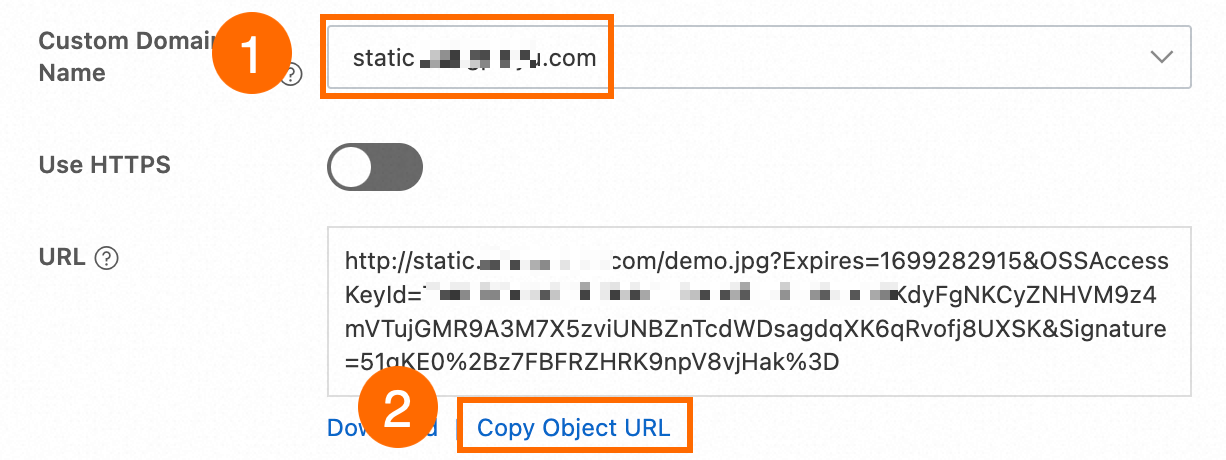
Utiliser ossbrowser
Vous pouvez utiliser ossbrowser pour effectuer les mêmes opérations au niveau des objets que celles disponibles dans la console OSS. Vous pouvez suivre les instructions à l'écran dans ossbrowser pour obtenir une URL présignée. Pour savoir comment télécharger ossbrowser, reportez-vous à ossbrowser 1,0.
-
Utilisez le nom de domaine personnalisé pour vous connecter à ossbrowser.
-
Obtenez l'URL de l'objet.
Utiliser les SDK OSS
Vous pouvez utiliser le nom de domaine personnalisé pour créer une instance OssClient et générer une URL présignée.
Java
import com.aliyun.oss.*;
import com.aliyun.oss.common.auth.*;
import com.aliyun.oss.common.comm.SignVersion;
import com.aliyun.oss.model.GeneratePresignedUrlRequest;

import java.net.URL;
import java.util.Date;

public class Demo {
    public static void main(String[] args) throws Throwable {
        // Set yourCustomEndpoint to your custom domain name. For example, http://static.example.com.
        String endpoint = "yourCustomEndpoint";
        // Enter the region information of your bucket, for example, cn-hangzhou.
        String region = "cn-hangzhou";
        // Enter the bucket name. For example, examplebucket.
        String bucketName = "examplebucket";
        // Enter the full path of the object. For example, exampleobject.txt. The full path cannot contain the bucket name.
        String objectName = "exampleobject.txt";

        // Obtain access credentials from environment variables. Before you run this code, configure the environment variables.
        EnvironmentVariableCredentialsProvider credentialsProvider = CredentialsProviderFactory.newEnvironmentVariableCredentialsProvider();

        // Create an OSSClient instance.
        // When the OSSClient instance is no longer used, call the shutdown method to release resources.
        ClientBuilderConfiguration clientBuilderConfiguration = new ClientBuilderConfiguration();
        // Note: Set this to true to enable the CNAME option.
        clientBuilderConfiguration.setSupportCname(true);
        // Explicitly declare the use of the V4 signature algorithm.
        clientBuilderConfiguration.setSignatureVersion(SignVersion.V4);
        OSS ossClient = OSSClientBuilder.create()
                .endpoint(endpoint)
                .credentialsProvider(credentialsProvider)
                .clientConfiguration(clientBuilderConfiguration)
                .region(region)
                .build();

        try {
            // Set the expiration time of the generated presigned URL in milliseconds. This example sets the expiration time to one hour.
            Date expiration = new Date(new Date().getTime() + 3600 * 1000L);

            // Generate a presigned URL.
            GeneratePresignedUrlRequest request = new GeneratePresignedUrlRequest(bucketName, objectName, HttpMethod.GET);

            // Set the expiration time.
            request.setExpiration(expiration);

            // Generate a presigned URL for an HTTP GET request.
            URL signedUrl = ossClient.generatePresignedUrl(request);
            // Print the presigned URL.
            System.out.println("signed url for getObject: " + signedUrl);
        } catch (OSSException oe) {
            System.out.println("Caught an OSSException, which means your request made it to OSS, "
                    + "but was rejected with an error response for some reason.");
            System.out.println("Error Message:" + oe.getErrorMessage());
            System.out.println("Error Code:" + oe.getErrorCode());
            System.out.println("Request ID:" + oe.getRequestId());
            System.out.println("Host ID:" + oe.getHostId());
        } catch (ClientException ce) {
            System.out.println("Caught an ClientException, which means the client encountered "
                    + "a serious internal problem while trying to communicate with OSS, "
                    + "such as not being able to access the network.");
            System.out.println("Error Message:" + ce.getMessage());
        } finally {
            if (ossClient != null) {
                ossClient.shutdown();
            }
        }
    }
}
PHP
<?php

// Import the autoloader file to ensure that dependency libraries are loaded correctly.
require_once __DIR__ . '/../vendor/autoload.php';

use AlibabaCloud\Oss\V2 as Oss;

// Define the description for command-line arguments.
$optsdesc = [
    "region" => ['help' => 'The region in which the bucket is located.', 'required' => True], // The region where the bucket is located. (Required)
    "endpoint" => ['help' => 'The domain names that other services can use to access OSS.', 'required' => False], // The endpoint to access OSS. (Optional)
    "bucket" => ['help' => 'The name of the bucket', 'required' => True], // The bucket name. (Required)
    "key" => ['help' => 'The name of the object', 'required' => True], // The object name. (Required)
];

// Convert the argument descriptions to the long options format required by getopt.
// A colon ":" after each argument indicates that it requires a value.
$longopts = \array_map(function ($key) {
    return "$key:";
}, array_keys($optsdesc));

// Parse the command-line arguments.
$options = getopt("", $longopts);

// Check if all required arguments are provided.
foreach ($optsdesc as $key => $value) {
    if ($value['required'] === True && empty($options[$key])) {
        $help = $value['help']; // Get the help information for the argument.
        echo "Error: the following arguments are required: --$key, $help" . PHP_EOL;
        exit(1); // If a required argument is missing, exit the program.
    }
}

// Extract values from the parsed arguments.
$region = $options["region"]; // The region where the bucket is located.
$bucket = $options["bucket"]; // The bucket name.
$key = $options["key"];       // The object name.

// Load the credentials from environment variables.
// Use EnvironmentVariableCredentialsProvider to read the Access Key ID and Access Key Secret from environment variables.
$credentialsProvider = new Oss\Credentials\EnvironmentVariableCredentialsProvider();

// Use the default configurations of the SDK.
$cfg = Oss\Config::loadDefault();
$cfg->setCredentialsProvider($credentialsProvider); // Set the credential provider.
$cfg->setRegion($region); // Set the region where the bucket is located.
$cfg->setEndpoint(endpoint: "http://static.example.com"); // Set this to your custom endpoint.
$cfg->setUseCname(true); // Set to use a CNAME.

// Create an OSS client instance.
$client = new Oss\Client($cfg);

// Create a GetObjectRequest object to download the object.
$request = new Oss\Models\GetObjectRequest(bucket:$bucket, key:$key);

// Call the presign method to generate a signed URL.
$result = $client->presign($request);

// Print the presign result.
// Output the signed URL, which users can use directly to download the object.
print(
    'get object presign result:' . var_export($result, true) . PHP_EOL . // Detailed information about the presign result.
    'get object url:' . $result->url . PHP_EOL                           // The signed URL for directly downloading the object.
);
Node.js
const OSS = require("ali-oss");

// Define a function to generate a presigned URL.
async function generateSignatureUrl(fileName) {
  // Obtain the presigned URL.
  const client = await new OSS({
      // Use a custom domain name as the endpoint.
      endpoint: 'http://static.example.com',
      // Obtain access credentials from environment variables. Before you run this code, make sure that the OSS_ACCESS_KEY_ID and OSS_ACCESS_KEY_SECRET environment variables are set.
      accessKeyId: process.env.OSS_ACCESS_KEY_ID,
      accessKeySecret: process.env.OSS_ACCESS_KEY_SECRET,
      bucket: 'examplebucket',
      // Replace yourregion with the region where the bucket is located. For example, if the bucket is in the China (Hangzhou) region, set Region to oss-cn-hangzhou.
      region: 'oss-cn-hangzhou',
      authorizationV4: true,
      cname: true
  });

  return await client.signatureUrlV4('GET', 3600, {
      headers: {} // Set the request headers based on the actual request headers.
  }, fileName);
}
// Call the function and pass the file name.
generateSignatureUrl('yourFileName').then(url => {
  console.log('Generated Signature URL:', url);
}).catch(err => {
  console.error('Error generating signature URL:', err);
});
Python
import argparse
import alibabacloud_oss_v2 as oss

# Create a command-line parameter parser and describe the purpose of the script.
parser = argparse.ArgumentParser(description="presign get object sample")

# Specify the --region parameter to indicate the region in which the bucket is located. This parameter is required.
parser.add_argument('--region', help='The region in which the bucket is located.', required=True)
# Specify the --bucket parameter to indicate the name of the bucket in which the object is stored. This parameter is required.
parser.add_argument('--bucket', help='The name of the bucket.', required=True)
# Specify the --endpoint parameter to indicate the endpoint of the region in which the bucket is located. This parameter is optional.
parser.add_argument('--endpoint', help='The domain names that other services can use to access OSS')
# Specify the --key parameter to indicate the name of the object. This parameter is required.
parser.add_argument('--key', help='The name of the object.', required=True)

def main():
    # Parse the command-line parameters to obtain the specified values.
    args = parser.parse_args()

    # From the environment variables, load the authentication information required to access OSS.
    credentials_provider = oss.credentials.EnvironmentVariableCredentialsProvider()

    # Use the default configuration to create a cfg object and specify the credential provider.
    cfg = oss.config.load_default()
    cfg.credentials_provider = credentials_provider

    # Specify the region attribute of the configuration object based on the command line parameters specified by the user.
    cfg.region = args.region

    # Specify the custom endpoint. Example: http://static.example.com
    cfg.endpoint = "http://static.example.com"

    # Enable CNAME record resolution.
    cfg.use_cname = True

    # Use the preceding settings to initialize the OSSClient instance.
    client = oss.Client(cfg)

    # Initiate a request to generate a presigned URL.
    pre_result = client.presign(
        oss.GetObjectRequest(
            bucket=args.bucket,  # Specify the bucket name.
            key=args.key,        # Specify the object key.
        )
    )

    # Display the HTTP method, expiration time, and presigned URL.
    print(f'method: {pre_result.method},'
          f' expiration: {pre_result.expiration.strftime("%Y-%m-%dT%H:%M:%S.000Z")},'
          f' url: {pre_result.url}'
    )

    # Display the signed headers.
    for key, value in pre_result.signed_headers.items():
        print(f'signed headers key: {key}, signed headers value: {value}')

# Call the main function to start the processing logic when the script is directly run.
if __name__ == "__main__":
    main()  # Specify the entry point of the script. The control flow starts here.
Go
package main
import (
"context"
"flag"
"log"
"time"
"github.com/aliyun/alibabacloud-oss-go-sdk-v2/oss"
"github.com/aliyun/alibabacloud-oss-go-sdk-v2/oss/credentials"
)
// Define global variables.
var (
region string // The region in which the bucket is located.
bucketName string // The name of the bucket.
objectName string // The name of the object.
)
// The init function is used to initialize command-line parameters.
func init() {
flag.StringVar(®ion, "region", "", "The region in which the bucket is located.")
flag.StringVar(&bucketName, "bucket", "", "The name of the bucket.")
flag.StringVar(&objectName, "object", "", "The name of the object.")
}
func main() {
// Parse command-line parameters.
flag.Parse()
// Check whether the bucket name is empty.
if len(bucketName) == 0 {
flag.PrintDefaults()
log.Fatalf("invalid parameters, bucket name required")
}
// Check whether the region is empty.
if len(region) == 0 {
flag.PrintDefaults()
log.Fatalf("invalid parameters, region required")
}
// Check whether the object name is empty.
if len(objectName) == 0 {
flag.PrintDefaults()
log.Fatalf("invalid parameters, object name required")
}
// Load the default configurations and specify the credential provider and region.
cfg := oss.LoadDefaultConfig().
WithCredentialsProvider(credentials.NewEnvironmentVariableCredentialsProvider()).
WithRegion(region).
WithEndpoint("http://static.example.com").
WithUseCName(true)
// Create an OSS client.
client := oss.NewClient(cfg)
// Generate a presigned URL for the GetObject request.
result, err := client.Presign(context.TODO(), &oss.GetObjectRequest{
Bucket: oss.Ptr(bucketName),
Key: oss.Ptr(objectName),
//RequestPayer: oss.Ptr("requester"), // Specify the identity of the requester.
},
oss.PresignExpires(10*time.Minute),
)
if err != nil {
log.Fatalf("failed to get object presign %v", err)
}
log.Printf("request method:%v\n", result.Method)
log.Printf("request expiration:%v\n", result.Expiration)
log.Printf("request url:%v\n", result.URL)
if len(result.SignedHeaders) > 0 {
// If you specify request headers when you generate a presigned URL that allows HTTP GET requests, make sure that the request headers are included in the GET request initiated using the presigned URL. This prevents request failures and signature errors.
log.Printf("signed headers:\n")
for k, v := range result.SignedHeaders {
log.Printf("%v: %v\n", k, v)
}
}
}Utiliser ossutil
Utilisez le nom de domaine personnalisé pour générer une URL présignée pour un objet en exécutant la commande presign (générer une URL signée).
ossutil presign oss://examplebucket/exampleobject.txt --endpoint "http://static.example.com” --addressing-style "cname"Pour permettre à la commande ossutil d'utiliser automatiquement un nom de domaine personnalisé, au lieu de le spécifier manuellement à chaque fois, ajoutez le nom de domaine personnalisé au fichier de configuration.
Si le lien ne peut toujours pas être prévisualisé, vérifiez les configurations suivantes.
-
Le paramètre
Content-Typeest-il défini de manière appropriée ?Si le
Content-Typedu fichier ne correspond pas à son type réel, le navigateur peut ne pas identifier et rendre correctement le contenu, ce qui entraîne le téléchargement du fichier en tant que pièce jointe. Vous pouvez consulter Comment définir Content-Type (MIME) ? pour confirmer si l'extension du fichier correspond auContent-Type. S'ils ne correspondent pas, reportez-vous à Gérer les métadonnées des objets pour connaître les méthodes permettant de modifier leContent-Typedu fichier. -
Le paramètre
Content-Dispositionest-il défini surinline?Si le Content-Disposition du fichier est défini sur
attachment, le navigateur forcera le téléchargement du fichier. Reportez-vous à Gérer les métadonnées des objets pour connaître les méthodes permettant de le modifier eninlineafin de prendre en charge la prévisualisation. -
Le cache CDN a-t-il été actualisé ?
Si vous n'utilisez pas l'accélération CDN, vous pouvez ignorer cet élément.
Si vous utilisez CDN pour accéder aux ressources OSS, vous devez actualiser le cache CDN après avoir modifié les métadonnées du fichier. Sinon, l'ancienne configuration peut encore être lue, ce qui empêche la prévisualisation de prendre effet.
Obtenir un lien de téléchargement forcé pour un fichier
Si le lien actuel (URL présignée) s'ouvre directement pour la prévisualisation dans un navigateur, mais que vous souhaitez qu'il soit téléchargé à la place, vous pouvez utiliser les méthodes suivantes. La méthode 1 a une priorité plus élevée que la méthode 2.
Méthode 1 : Téléchargement forcé unique
Cela s'applique uniquement au lien actuellement généré. Implémentez cela en définissant le paramètre response-content-disposition sur attachment lors de la génération de l'URL.
Java
Importez la classe GeneratePresignedUrlRequest.
import com.aliyun.oss.model.GeneratePresignedUrlRequest;Utilisez la méthode GeneratePresignedUrlRequest et définissez l'en-tête de réponse response-content-disposition sur attachment.
// Build a presigned URL for GET request
GeneratePresignedUrlRequest request = new GeneratePresignedUrlRequest(
    bucketName, objectName, HttpMethod.GET);

// Set forced download
request.getResponseHeaders().setContentDisposition("attachment");
Python
Ajoutez le paramètre response_content_disposition dans GetObjectRequest et définissez sa valeur sur attachment.
    # Generate a presigned GET request
    pre_result = client.presign(
        oss.GetObjectRequest(
            bucket=args.bucket,  # Specify the bucket name
            key=args.key,        # Specify the object key
            response_content_disposition="attachment",# Set to forced download
        )
    )
Go
Ajoutez le paramètre ResponseContentDisposition dans GetObjectRequest et définissez sa valeur sur attachment.
// Generate a presigned GET request with forced download behavior
result, err := client.Presign(context.TODO(), &oss.GetObjectRequest{
    Bucket:                     oss.Ptr(bucketName),
    Key:                        oss.Ptr(objectName),
    ResponseContentDisposition: oss.Ptr("attachment"), // Set to forced download
})Méthode 2 : Configuration universelle du téléchargement forcé (via les métadonnées)
Une fois cette configuration appliquée, tout accès au fichier déclenche un téléchargement forcé. Cette fonctionnalité repose sur la modification du champ Content-Disposition dans les métadonnées du fichier.
Utilisation de la console OSS
Dans la console de gestion OSS, localisez le fichier cible, cliquez sur Set File MetadataSet File Metadata dans le panneau des détails du fichier, définissez Content-Disposition sur attachment, puis cliquez sur OKOK pour enregistrer.
Outre les opérations via la console, vous pouvez également consulter la rubrique Gérer les métadonnées des fichiers pour configurer ce champ à l'aide du SDK ou de l'interface de ligne de commande ossutil.
Si vous souhaitez également personnaliser le nom de fichier affiché lors du téléchargement, consultez la section Personnaliser le nom de fichier lors du téléchargement.
Obtenir des liens vers des versions spécifiques de fichiers
Générez des liens (URL pré-signées) pour des versions spécifiques de fichiers. Cette fonctionnalité s'applique aux buckets pour lesquels la fonctionnalité versioning est activée.
Utilisation de la console OSS
-
Connectez-vous à la console de gestion OSS, accédez à l'onglet FilesFiles du bucket cible, puis basculez l'option Historical VersionHistorical Version sur ShowShow dans le coin supérieur droit de la page.

-
Localisez le fichier cible, cliquez sur le nom de fichier de la version historique requise, puis CopyCopy l'URL de cette version du fichier sur la page des détails.

Utilisation du SDK Alibaba Cloud
Java
Ajoutez le code clé suivant :
// 1. Define the version ID variable
String versionId = "CAEQARiBgID8rumR2hYiIGUyOTAyZGY2MzU5MjQ5ZjlhYzQzZjNlYTAyZDE3****";

// 2. Create a query parameter Map
Map<String, String> queryParam = new HashMap<String, String>();
queryParam.put("versionId", versionId);

// 3. Add the version ID parameter to the request
request.setQueryParameter(queryParam);
Python
Ajoutez le paramètre version_id à GetObjectRequest.
pre_result = client.presign(
    oss.GetObjectRequest(
        bucket=bucket_name,
        key=object_name,
        version_id='CAEQARiBgID8rumR2hYiIGUyOTAyZGY2MzU5MjQ5ZjlhYzQzZjNlYTAyZDE3****'  # Set the VersionId parameter
    )
)
Go
Ajoutez le champ VersionId à GetObjectRequest.
result, err := client.Presign(context.TODO(), &oss.GetObjectRequest{
    Bucket:    oss.Ptr(bucketName),
    Key:       oss.Ptr(objectName),
    VersionId: oss.Ptr("CAEQARiBgID8rumR2hYiIGUyOTAyZGY2MzU5MjQ5ZjlhYzQzZjNlYTAyZDE7****"), // Set VersionId
}, oss.PresignExpires(10*time.Minute))
Node.js
Ajoutez le paramètre queries à signatureUrlV4.
const signedUrl = await client.signatureUrlV4('GET', 3600, {
  queries: {
    "versionId": 'CAEQARiBgID8rumR2hYiIGUyOTAyZGY2MzU5MjQ5ZjlhYzQzZjNlYTAyZDE7****'  // Add versionId parameter
  }
}, objectName);
PHP
Dans GetObjectRequest, ajoutez le paramètre versionId.
// Add specific version parameter
$versionId = "yourVersionId"; // Replace with actual version number
$request = new Oss\Models\GetObjectRequest(bucket:$bucket, key:$key, versionId:$versionId);Utilisation d'ossutil
Générez une URL pré-signée pour l'objet example.txt avec l'ID de version 123 dans le bucket examplebucket.
ossutil presign oss://examplebucket/example.txt --version-id 123Générer des liens de fichiers par lot
Il est recommandé d'utiliser l'interface de ligne de commande ossutil, qui permet de générer des liens pour tous les fichiers d'un dossier entier.
Utiliser l'interface de ligne de commande ossutil
-
Générez des URL pré-signées avec une durée de validité par défaut de 15 minutes pour tous les fichiers du répertoire folder du bucket examplebucket.
ossutil presign oss://examplebucket/folder/ -r -
Générez des URL pré-signées avec une durée de validité par défaut de 15 minutes pour les fichiers portant l'extension .txt dans le répertoire folder du bucket examplebucket.
ossutil presign oss://examplebucket/folder/ -r --include "*.txt" -
Générez des URL pré-signées avec une durée de validité par défaut de 15 minutes pour tous les fichiers du bucket examplebucket.
ossutil presign oss://examplebucket/ -r
Pour plus d'informations sur la génération d'URL pré-signées à l'aide d'ossutil, consultez presign (Générer des URL pré-signées).
Utiliser la console OSS
Vous ne pouvez exporter des URL pré-signées que pour les fichiers du répertoire actuel. L'exportation d'URL pré-signées pour les fichiers situés dans des sous-répertoires n'est pas possible.
Sélectionnez le fichier objet, puis cliquez sur Export URL List ci-dessous.
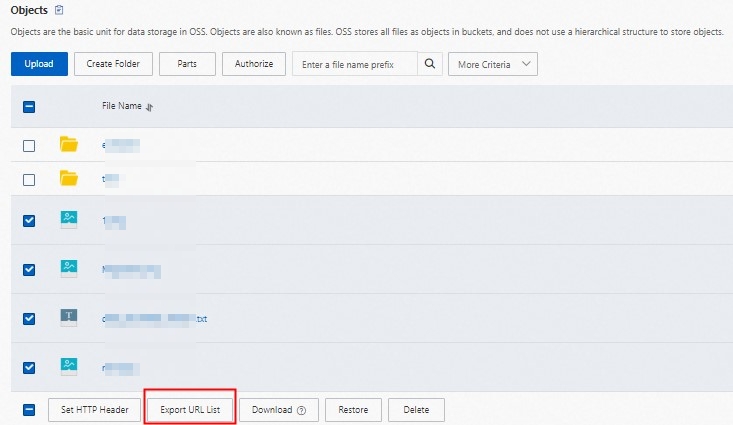
-
Dans le panneau de configuration qui s'affiche, les paramètres par défaut conviennent à la plupart des scénarios et peuvent être utilisés sans modification.
Cliquez sur OK pour télécharger et enregistrer le fichier contenant la liste des URL générées.
Utiliser le SDK Alibaba Cloud
Utilisez l'opération GetBucket (ListObjects) pour obtenir la liste de tous les noms d'objets, puis générez des URL pré-signées pour chaque objet.
Personnaliser le nom du fichier téléchargé
Sur la base des téléchargements forcés, vous pouvez spécifier le nom de fichier que les utilisateurs verront lors de l'enregistrement. La méthode 1 est prioritaire sur la méthode 2.
Méthode 1 : Définir le nom du fichier téléchargé pour une seule requête
Spécifiez un nom de fichier de téléchargement pour une seule URL pré-signée. Il suffit d'ajouter le paramètre response-content-disposition défini sur attachment et d'inclure le paramètre filename.
Java
Définissez le paramètre response-content-disposition.
// Set the file name displayed when the client downloads, using "test.txt" as an example
String filename = "test.txt";
request.getResponseHeaders().setContentDisposition("attachment;filename=" + URLEncoder.encode(filename,"UTF-8"));
Python
Utilisez le paramètre response_content_disposition pour personnaliser le nom du fichier téléchargé en test.txt.
    # Generate a presigned GET request
    pre_result = client.presign(
        oss.GetObjectRequest(
            bucket=args.bucket,  # Specify the bucket name
            key=args.key,        # Specify the object key
            response_content_disposition="attachment;filename=test.txt",# Set the file name displayed when the client downloads, in this case "test.txt"
        )
    )
Go
Utilisez le paramètre ResponseContentDisposition pour personnaliser le nom du fichier téléchargé en test.txt.
// Generate a presigned GET request with forced download behavior
result, err := client.Presign(context.TODO(), &oss.GetObjectRequest{
    Bucket:                     oss.Ptr(bucketName),
    Key:                        oss.Ptr(objectName),
    ResponseContentDisposition: oss.Ptr("attachment;filename=test.txt"),//Set the file name displayed when the client downloads, in this case "test.txt"
})
Méthode 2 : Paramétrage universel (via les métadonnées)
Modifiez les métadonnées pour définir un nom de téléchargement par défaut unique pour tous les accès. Cela se fait en modifiant le champ Content-Disposition dans les métadonnées du fichier vers attachment; filename="yourFileName", où yourFileName correspond à votre nom de fichier personnalisé, par exemple example.jpg.
Définir la durée de validité d'un lien
La durée de validité d'un lien (URL pré-signée) est définie lors de sa génération et ne peut pas être modifiée par la suite. Le lien reste accessible plusieurs fois pendant sa période de validité et devient invalide après expiration.
Les différentes méthodes de génération prennent en charge des durées de validité maximales différentes. Le dépassement de cette limite entraîne un échec de génération ou des erreurs d'accès.
Utilisation de la console OSS
Connectez-vous à la console de gestion OSS, accédez à la liste Files du bucket cible, cliquez sur le fichier souhaité et définissez la durée de validité du lien dans le champ Expiration Time du panneau de détails situé à droite.
Utilisation du SDK Alibaba Cloud
Vous devez disposer de l'autorisation oss:GetObject pour permettre aux tiers de télécharger correctement les fichiers via l'URL pré-signée. Pour les opérations d'autorisation spécifiques, consultez Accorder des autorisations personnalisées aux utilisateurs RAM. Une fois générée, vous pouvez envoyer le lien aux tiers qui doivent accéder au fichier.
Vous pouvez définir l'heure d'expiration de l'URL pré-signée en modifiant la valeur d'expiration dans le code.
Java
Pour plus d'informations sur le SDK, consultez Télécharger des objets à l'aide d'URL pré-signées en Java.
import com.aliyun.oss.*;
import com.aliyun.oss.common.auth.*;
import com.aliyun.oss.common.comm.SignVersion;

import java.net.URL;
import java.util.Date;

public class Demo {
    public static void main(String[] args) throws Throwable {
        // This example uses the public endpoint of the China (Hangzhou) region. Specify the actual endpoint.
        String endpoint = "https://oss-cn-hangzhou.aliyuncs.com";
        // Obtain access credentials from environment variables. Before you run this code, make sure that the OSS_ACCESS_KEY_ID and OSS_ACCESS_KEY_SECRET environment variables are set.
        EnvironmentVariableCredentialsProvider credentialsProvider = CredentialsProviderFactory.newEnvironmentVariableCredentialsProvider();
        // Enter the bucket name. For example, examplebucket.
        String bucketName = "examplebucket";
        // Enter the full path of the object. For example, exampleobject.txt. The full path cannot contain the bucket name.
        String objectName = "exampleobject.txt";
        // Enter the region where the bucket is located. For example, if the bucket is in the China (Hangzhou) region, set Region to cn-hangzhou.
        String region = "cn-hangzhou";

        // Create an OSSClient instance.
        // When the OSSClient instance is no longer used, call the shutdown method to release resources.
        ClientBuilderConfiguration clientBuilderConfiguration = new ClientBuilderConfiguration();
        clientBuilderConfiguration.setSignatureVersion(SignVersion.V4);
        OSS ossClient = OSSClientBuilder.create()
                .endpoint(endpoint)
                .credentialsProvider(credentialsProvider)
                .clientConfiguration(clientBuilderConfiguration)
                .region(region)
                .build();

        try {
            // Set the expiration time of the presigned URL in milliseconds. This example sets the expiration time to one hour.
            Date expiration = new Date(new Date().getTime() + 3600 * 1000L);
            // Generate a presigned URL for a GET request. This example does not include additional request headers. Other users can directly access the content through a browser.
            URL url = ossClient.generatePresignedUrl(bucketName, objectName, expiration);
            System.out.println(url);
        } catch (OSSException oe) {
            System.out.println("Caught an OSSException, which means your request made it to OSS, "
                    + "but was rejected with an error response for some reason.");
            System.out.println("Error Message:" + oe.getErrorMessage());
            System.out.println("Error Code:" + oe.getErrorCode());
            System.out.println("Request ID:" + oe.getRequestId());
            System.out.println("Host ID:" + oe.getHostId());
        } catch (ClientException ce) {
            System.out.println("Caught an ClientException, which means the client encountered "
                    + "a serious internal problem while trying to communicate with OSS, "
                    + "such as not being able to access the network.");
            System.out.println("Error Message:" + ce.getMessage());
        } finally {
            if (ossClient != null) {
                ossClient.shutdown();
            }
        }
    }
}
Python
Pour plus d'informations sur le SDK, consultez Télécharger des objets à l'aide d'URL pré-signées en Python.
import argparse
import alibabacloud_oss_v2 as oss

# Create a command-line parameter parser and describe the purpose of the script.
parser = argparse.ArgumentParser(description="presign get object sample")

# Specify the --region parameter to indicate the region in which the bucket is located. This parameter is required.
parser.add_argument('--region', help='The region in which the bucket is located.', required=True)
# Specify the --bucket parameter to indicate the name of the bucket in which the object is stored. This parameter is required.
parser.add_argument('--bucket', help='The name of the bucket.', required=True)
# Specify the --endpoint parameter to indicate the endpoint of the region in which the bucket is located. This parameter is optional.
parser.add_argument('--endpoint', help='The domain names that other services can use to access OSS')
# Specify the --key parameter to indicate the name of the object. This parameter is required.
parser.add_argument('--key', help='The name of the object.', required=True)

def main():
    # Parse the command-line parameters to obtain the specified values.
    args = parser.parse_args()

    # From the environment variables, load the authentication information required to access OSS.
    credentials_provider = oss.credentials.EnvironmentVariableCredentialsProvider()

    # Use the default configuration to create a cfg object and specify the credential provider.
    cfg = oss.config.load_default()
    cfg.credentials_provider = credentials_provider

    # Set the region attribute of the cfg object to the region provided in the command line.
    cfg.region = args.region

    # If a custom endpoint is provided, update the endpoint attribute of the cfg object with the provided endpoint.
    if args.endpoint is not None:
        cfg.endpoint = args.endpoint

    # Use the preceding settings to initialize the OSSClient instance.
    client = oss.Client(cfg)

    # Initiate a request to generate a presigned URL.
    pre_result = client.presign(
        oss.GetObjectRequest(
            bucket=args.bucket,  # Specify the bucket name.
            key=args.key,        # Specify the object key.
        )
    )

    # Display the HTTP method, expiration time, and presigned URL.
    print(f'method: {pre_result.method},'
          f' expiration: {pre_result.expiration.strftime("%Y-%m-%dT%H:%M:%S.000Z")},'
          f' url: {pre_result.url}'
    )

    # Display the signed headers.
    for key, value in pre_result.signed_headers.items():
        print(f'signed headers key: {key}, signed headers value: {value}')

# Call the main function to start the processing logic when the script is directly run.
if __name__ == "__main__":
    main()  # Specify the entry point of the script. The control flow starts here.
Go
Pour plus d'informations sur le SDK, consultez Télécharger des objets à l'aide d'URL pré-signées en Go.
package main
import (
"context"
"flag"
"log"
"time"
"github.com/aliyun/alibabacloud-oss-go-sdk-v2/oss"
"github.com/aliyun/alibabacloud-oss-go-sdk-v2/oss/credentials"
)
// Define global variables.
var (
region string // The region in which the bucket is located.
bucketName string // The name of the bucket.
objectName string // The name of the object.
)
// The init function is used to initialize command-line parameters.
func init() {
flag.StringVar(®ion, "region", "", "The region in which the bucket is located.")
flag.StringVar(&bucketName, "bucket", "", "The name of the bucket.")
flag.StringVar(&objectName, "object", "", "The name of the object.")
}
func main() {
// Parse command-line parameters.
flag.Parse()
// Check whether the bucket name is empty.
if len(bucketName) == 0 {
flag.PrintDefaults()
log.Fatalf("invalid parameters, bucket name required")
}
// Check whether the region is empty.
if len(region) == 0 {
flag.PrintDefaults()
log.Fatalf("invalid parameters, region required")
}
// Check whether the object name is empty.
if len(objectName) == 0 {
flag.PrintDefaults()
log.Fatalf("invalid parameters, object name required")
}
// Load the default configurations and specify the credential provider and region.
cfg := oss.LoadDefaultConfig().
WithCredentialsProvider(credentials.NewEnvironmentVariableCredentialsProvider()).
WithRegion(region)
// Create an OSS client.
client := oss.NewClient(cfg)
// Generate a presigned URL for the GetObject request.
result, err := client.Presign(context.TODO(), &oss.GetObjectRequest{
Bucket: oss.Ptr(bucketName),
Key: oss.Ptr(objectName),
},
oss.PresignExpires(10*time.Minute),
)
if err != nil {
log.Fatalf("failed to get object presign %v", err)
}
log.Printf("request method:%v\n", result.Method)
log.Printf("request expiration:%v\n", result.Expiration)
log.Printf("request url:%v\n", result.URL)
if len(result.SignedHeaders) > 0 {
// If the returned result contains signed headers, you must include the corresponding request headers when you send a GET request using the presigned URL. Otherwise, the request may fail or a signature error may occur.
log.Printf("signed headers:\n")
for k, v := range result.SignedHeaders {
log.Printf("%v: %v\n", k, v)
}
}
}
Node.js
Pour plus d'informations sur le SDK, consultez Télécharger des objets à l'aide d'URL pré-signées en Node.js.
const OSS = require("ali-oss");

// Define a function to generate a presigned URL.
async function generateSignatureUrl(fileName) {
  // Obtain the presigned URL.
  const client = await new OSS({
      // Obtain access credentials from environment variables. Before you run this code, make sure that the OSS_ACCESS_KEY_ID and OSS_ACCESS_KEY_SECRET environment variables are set.
      accessKeyId: process.env.OSS_ACCESS_KEY_ID,
      accessKeySecret: process.env.OSS_ACCESS_KEY_SECRET,
      bucket: 'examplebucket',
      // Replace yourregion with the region where the bucket is located. For example, if the bucket is in the China (Hangzhou) region, set Region to oss-cn-hangzhou.
      region: 'oss-cn-hangzhou',
      // Set secure to true to use HTTPS. This prevents the browser from blocking the generated download link.
      secure: true,
      authorizationV4: true
  });

  return await client.signatureUrlV4('GET', 3600, {
      headers: {} // Set the request headers based on the actual request headers.
  }, fileName);
}
// Call the function and pass the file name.
generateSignatureUrl('yourFileName').then(url => {
  console.log('Generated Signature URL:', url);
}).catch(err => {
  console.error('Error generating signature URL:', err);
});
PHP
Pour plus d'informations sur le SDK, consultez Télécharger des objets à l'aide d'URL pré-signées en PHP.
<?php

// Import the autoloader file to ensure that dependency libraries are loaded correctly.
require_once __DIR__ . '/../../vendor/autoload.php';

use AlibabaCloud\Oss\V2 as Oss;

// Define the description for command-line arguments.
$optsdesc = [
    "region" => ['help' => 'The region in which the bucket is located.', 'required' => True], // The region where the bucket is located. (Required)
    "endpoint" => ['help' => 'The domain names that other services can use to access OSS.', 'required' => False], // The endpoint to access OSS. (Optional)
    "bucket" => ['help' => 'The name of the bucket', 'required' => True], // The bucket name. (Required)
    "key" => ['help' => 'The name of the object', 'required' => True], // The object name. (Required)
    "expire" => ['help' => 'The expiration time in seconds (default: 900)', 'required' => False], // The expiration time in seconds. (Optional, default: 900)
];

// Convert the argument descriptions to the long options format required by getopt.
// A colon ":" after each argument indicates that it requires a value.
$longopts = \array_map(function ($key) {
    return "$key:";
}, array_keys($optsdesc));

// Parse the command-line arguments.
$options = getopt("", $longopts);

// Check if all required arguments are provided.
foreach ($optsdesc as $key => $value) {
    if ($value['required'] === True && empty($options[$key])) {
        $help = $value['help']; // Get the help information for the argument.
        echo "Error: the following arguments are required: --$key, $help" . PHP_EOL;
        exit(1); // If a required argument is missing, exit the program.
    }
}

// Extract values from the parsed arguments.
$region = $options["region"]; // The region where the bucket is located.
$bucket = $options["bucket"]; // The bucket name.
$key = $options["key"];       // The object name.
$expire = isset($options["expire"]) ? (int)$options["expire"] : 900; // The expiration time. Default: 900 seconds.

// Load the credentials from environment variables.
// Use EnvironmentVariableCredentialsProvider to read the Access Key ID and Access Key Secret from environment variables.
$credentialsProvider = new Oss\Credentials\EnvironmentVariableCredentialsProvider();

// Use the default configurations of the SDK.
$cfg = Oss\Config::loadDefault();
$cfg->setCredentialsProvider($credentialsProvider); // Set the credential provider.
$cfg->setRegion($region); // Set the region where the bucket is located.
if (isset($options["endpoint"])) {
    $cfg->setEndpoint($options["endpoint"]); // If an endpoint is provided, set it.
}

try {
    // Create an OSS client instance.
    $client = new Oss\Client($cfg);

    // Create a GetObjectRequest object to download the object.
    $request = new Oss\Models\GetObjectRequest(bucket:$bucket, key:$key);

    // Call the presign method to generate a signed URL and set the expiration time.
    $result = $client->presign($request, [
        'expires' => new \DateInterval("PT{$expire}S") // PT stands for Period Time, and S stands for seconds.
    ]);

    // Output the signed URL.
    echo "Signed URL: " . $result->url . PHP_EOL;
} catch (Exception $e) {
    echo "Error: " . $e->getMessage() . PHP_EOL;
    exit(1);
}
.NET
Pour plus d'informations sur le SDK, consultez Télécharger des objets à l'aide d'URL pré-signées en .NET.
Instructions
using Aliyun.OSS;
using Aliyun.OSS.Common;
// Specify the endpoint of the region in which the bucket is located. For example, if the bucket is located in the China (Hangzhou) region, set the endpoint to https://oss-cn-hangzhou.aliyuncs.com.
var endpoint = "https://oss-cn-hangzhou.aliyuncs.com";
// Obtain a credential from the environment variables. Before you run the sample code, make sure that the OSS_ACCESS_KEY_ID and OSS_ACCESS_KEY_SECRET environment variables are configured.
var accessKeyId = Environment.GetEnvironmentVariable("OSS_ACCESS_KEY_ID");
var accessKeySecret = Environment.GetEnvironmentVariable("OSS_ACCESS_KEY_SECRET");
// Specify the name of the bucket. Example: examplebucket.
var bucketName = "examplebucket";
// Specify the full path of the object. The full path cannot contain the bucket name. Example: exampledir/exampleobject.txt.
var objectName = "exampledir/exampleobject.txt";
// Specify the region in which the bucket is located. For example, if the bucket is located in the China (Hangzhou) region, set the region to cn-hangzhou.
const string region = "cn-hangzhou";

// Create a ClientConfiguration instance and modify the default parameters based on your requirements.
var conf = new ClientConfiguration();

// Specify the V4 signature.
conf.SignatureVersion = SignatureVersion.V4;

// Create an OSSClient instance.
var client = new OssClient(endpoint, accessKeyId, accessKeySecret, conf);
client.SetRegion(region);
try
{
    var metadata = client.GetObjectMetadata(bucketName, objectName);
    var etag = metadata.ETag;
    // Generate a presigned URL.
    var req = new GeneratePresignedUriRequest(bucketName, objectName, SignHttpMethod.Get)
      {
        // Set the validity period of the presigned URL. Default value: 3600. Unit: seconds.
        Expiration = DateTime.UtcNow.AddHours(1),
    };
    var uri = client.GeneratePresignedUri(req);
    // Print the generated presigned URL
    Console.WriteLine("Generated Signed URL: " + uri);
}
catch (OssException ex)
{
    Console.WriteLine("Failed with error code: {0}; Error info: {1}. \nRequestID:{2}\tHostID:{3}",
        ex.ErrorCode, ex.Message, ex.RequestId, ex.HostId);
}
catch (Exception ex)
{
    Console.WriteLine("Failed with error info: {0}", ex.Message);
}
Android
Pour plus d'informations sur le SDK, consultez Téléchargement d'objets à l'aide d'URL présignées dans Android.
// Specify the bucket name, for example, examplebucket.
String bucketName = "examplebucket";
// Specify the full path of the source object, without the bucket name, for example, exampleobject.txt.
String objectKey = "exampleobject.txt";
String url = null;
try {
    // Generate a presigned URL for downloading the file.
    GeneratePresignedUrlRequest request = new GeneratePresignedUrlRequest(bucketName, objectKey);
    // Set the expiration time of the presigned URL to 30 minutes.
    request.setExpiration(30*60);
    request.setMethod(HttpMethod.GET);
    url = oss.presignConstrainedObjectURL(request);
    Log.d("url", url);
} catch (ClientException e) {
    e.printStackTrace();
}
iOS
Pour plus d'informations sur le SDK, consultez Téléchargement d'objets à l'aide d'URL présignées dans iOS.
// Specify the name of the bucket.
NSString *bucketName = @"examplebucket";
// Specify the name of the object.
NSString *objectKey = @"exampleobject.txt";
__block NSString *urlString;
// Generate a presigned URL with a validity period for downloading the object. In this example, the validity period of the URL is 30 minutes.
OSSTask *task = [client presignConstrainURLWithBucketName:bucketName
                                            withObjectKey:objectKey
                                               httpMethod:@"GET"
                                   withExpirationInterval:30 * 60
                                           withParameters:@{}];
[task continueWithBlock:^id _Nullable(OSSTask * _Nonnull task) {
    if (task.error) {
        NSLog(@"presign error: %@", task.error);
    } else {
        urlString = task.result;
        NSLog(@"url: %@", urlString);
    }
    return nil;
}];
C++
Pour plus d'informations sur le SDK, consultez Téléchargement d'objets à l'aide d'URL présignées en C++.
#include <alibabacloud/oss/OssClient.h>
using namespace AlibabaCloud::OSS;

int main(void)
{
    /* Initialize information about the account that is used to access OSS. */

    /* Specify the endpoint of the region in which the bucket is located. For example, if the bucket is located in the China (Hangzhou) region, set the endpoint to https://oss-cn-hangzhou.aliyuncs.com. */
    std::string Endpoint = "yourEndpoint";
    /* Specify the region in which the bucket is located. For example, if the bucket is located in the China (Hangzhou) region, set the region to cn-hangzhou.   * /
    std::string Region = "yourRegion";
    /* Specify the name of the bucket. Example: examplebucket. */
    std::string BucketName = "examplebucket";
    /* Specify the full path of the object. Do not include the bucket name in the full path. Example: exampledir/exampleobject.txt. */
    std::string GetobjectUrlName = "exampledir/exampleobject.txt";

    /* Initialize resources, such as network resources. */
    InitializeSdk();

    ClientConfiguration conf;
    conf.signatureVersion = SignatureVersionType::V4;
    /* Obtain access credentials from environment variables. Before you run the sample code, make sure that the OSS_ACCESS_KEY_ID and OSS_ACCESS_KEY_SECRET environment variables are configured. */
    auto credentialsProvider = std::make_shared<EnvironmentVariableCredentialsProvider>();
    OssClient client(Endpoint, credentialsProvider, conf);
    client.SetRegion(Region);

    /* Specify the validity period of the pre-signed URL. The maximum validity period is 32,400. Unit: seconds. */
    std::time_t t = std::time(nullptr) + 1200;
    /* Generate a pre-signed URL. */
    auto genOutcome = client.GeneratePresignedUrl(BucketName, GetobjectUrlName, t, Http::Get);
    if (genOutcome.isSuccess()) {
        std::cout << "GeneratePresignedUrl success, Gen url:" << genOutcome.result().c_str() << std::endl;
    }
    else {
        /* Handle exceptions. */
        std::cout << "GeneratePresignedUrl fail" <<
        ",code:" << genOutcome.error().Code() <<
        ",message:" << genOutcome.error().Message() <<
        ",requestId:" << genOutcome.error().RequestId() << std::endl;
        return -1;
    }

    /* Release resources, such as network resources. */
    ShutdownSdk();
    return 0;
}
Ruby
Pour plus d'informations sur le SDK, consultez Téléchargement d'objets à l'aide d'URL présignées en Ruby.
require 'aliyun/oss'

client = Aliyun::OSS::Client.new(
  # The China (Hangzhou) endpoint is used as an example. Specify the endpoint based on your actual region.
  endpoint: 'https://oss-cn-hangzhou.aliyuncs.com',
  # Obtain access credentials from environment variables. Before you run this sample code, make sure that the OSS_ACCESS_KEY_ID and OSS_ACCESS_KEY_SECRET environment variables are set.
  access_key_id: ENV['OSS_ACCESS_KEY_ID'],
  access_key_secret: ENV['OSS_ACCESS_KEY_SECRET']
)
# Specify the bucket name. For example, examplebucket.
bucket = client.get_bucket('examplebucket')

# Generate a presigned URL and set its validity period to 1 hour (3600 seconds).
puts bucket.object_url('my-object', true, 3600)
C
Pour plus d'informations sur le SDK, consultez Téléchargement d'objets à l'aide d'URL présignées en C.
#include "oss_api.h"
#include "aos_http_io.h"
/* Set yourEndpoint to the endpoint of the region where the bucket is located. For example, if the bucket is in the China (Hangzhou) region, set the endpoint to https://oss-cn-hangzhou.aliyuncs.com. */
const char *endpoint = "yourEndpoint";
/* Specify the bucket name. For example, examplebucket. */
const char *bucket_name = "examplebucket";
/* Specify the full path of the object. The full path cannot contain the bucket name. For example, exampledir/exampleobject.txt. */
const char *object_name = "exampledir/exampleobject.txt";
/* Specify the full path of the local file. */
const char *local_filename = "yourLocalFilename";

void init_options(oss_request_options_t *options)
{
    options->config = oss_config_create(options->pool);
    /* Initialize the aos_string_t type with a char* string. */
    aos_str_set(&options->config->endpoint, endpoint);
    /* Obtain access credentials from environment variables. Before you run this sample code, make sure that the OSS_ACCESS_KEY_ID and OSS_ACCESS_KEY_SECRET environment variables are set. */
    aos_str_set(&options->config->access_key_id, getenv("OSS_ACCESS_KEY_ID"));
    aos_str_set(&options->config->access_key_secret, getenv("OSS_ACCESS_KEY_SECRET"));
    /* Specify whether to use a CNAME to access OSS. A value of 0 indicates that a CNAME is not used. */
    options->config->is_cname = 0;
    /* Set network parameters, such as the timeout period. */
    options->ctl = aos_http_controller_create(options->pool, 0);
}
int main(int argc, char *argv[])
{
    /* Call the aos_http_io_initialize method at the program entry to initialize global resources, such as the network and memory. */
    if (aos_http_io_initialize(NULL, 0) != AOSE_OK) {
        exit(1);
    }
    /* The memory pool (pool) for memory management, which is equivalent to apr_pool_t. Its implementation code is in the APR library. */
    aos_pool_t *pool;
    /* Create a new memory pool. The second parameter is NULL, which indicates that the pool does not inherit from other memory pools. */
    aos_pool_create(&pool, NULL);
    /* Create and initialize options. This parameter includes global configuration information, such as endpoint, access_key_id, access_key_secret, is_cname, and curl. */
    oss_request_options_t *oss_client_options;
    /* Allocate memory for options in the memory pool. */
    oss_client_options = oss_request_options_create(pool);
    /* Initialize the client option oss_client_options. */
    init_options(oss_client_options);
    /* Initialize parameters. */
    aos_string_t bucket;
    aos_string_t object;
    aos_string_t file;
    aos_http_request_t *req;
    apr_time_t now;
    char *url_str;
    aos_string_t url;
    int64_t expire_time;
    int one_hour = 3600;
    aos_str_set(&bucket, bucket_name);
    aos_str_set(&object, object_name);
    aos_str_set(&file, local_filename);
    expire_time = now / 1000000 + one_hour;
    req = aos_http_request_create(pool);
    req->method = HTTP_GET;
    now = apr_time_now();
    /* Unit: microseconds. */
    expire_time = now / 1000000 + one_hour;
    /* Generate a presigned URL. */
    url_str = oss_gen_signed_url(oss_client_options, &bucket, &object, expire_time, req);
    aos_str_set(&url, url_str);
    printf("Temporary download URL: %s\n", url_str);
    /* Release the memory pool. This is equivalent to releasing the memory allocated for various resources during the request. */
    aos_pool_destroy(pool);
    /* Release the previously allocated global resources. */
    aos_http_io_deinitialize();
    return 0;
}
Utilisation de l'outil de ligne de commande ossutil
Générez une URL présignée avec une durée de validité d'une heure pour l'objet example.txt dans le compartiment examplebucket.
ossutil presign oss://examplebucket/example.txt --expires-duration 1hPour plus d'exemples de génération d'URL présignées à l'aide d'ossutil, consultez presign (Générer une URL présignée).
Utilisation de l'outil de gestion graphique ossbrowser
ossbrowser prend en charge les opérations au niveau des objets similaires à celles prises en charge par la console. Suivez le guide de l'interface ossbrowser pour obtenir une URL présignée. Pour plus d'informations sur l'utilisation d'ossbrowser, consultez Opérations courantes.
Obtenir des liens valides à long terme
Vous pouvez obtenir des URL de fichier (liens) sans signature ni limite de temps d'expiration via les deux méthodes suivantes.
-
Méthode 1 : Définir le fichier en lecture publique (non recommandé)
Définissez la liste de contrôle d'accès (ACL) du fichier sur « public-read » pour obtenir une URL de fichier valide en permanence. Cette configuration est simple et ne nécessite aucun outil supplémentaire. Toutefois, l'adresse du fichier est entièrement publique, accessible par n'importe qui et vulnérable aux robots malveillants ou à l'abus de trafic. Nous vous recommandons d'utiliser cette méthode avec la protection contre le hotlinking OSS (liste blanche Referer), mais il existe toujours un risque d'exposition de la source.
-
Méthode 2 : Fournir un accès en lecture publique via CDN (recommandé)
Gardez le fichier privé et implémentez l'accès public via CDN. Après avoir activé la fonctionnalité back-to-origin pour compartiment OSS privé pour CDN, vous pouvez accéder à toutes les ressources du compartiment privé via le nom de domaine accéléré par CDN. La méthode d'authentification privée de l'URL d'origine deviendra invalide. Par rapport à la méthode 1, OSS n'est pas directement exposé, ce qui offre une sécurité plus élevée et prend en charge les fonctionnalités d'accélération et de contrôle d'accès. Nous vous recommandons d'activer la protection contre le hotlinking par Referer et la signature d'URL de CDN pour prévenir l'abus de liens.
Comment construire des URL de fichier valides à long terme
Vous pouvez construire des adresses d'accès aux fichiers en fonction du type de nom de domaine.
|
Type de nom de domaine |
Format d'URL |
Exemple |
|
Nom de domaine par défaut OSS |
|
Par exemple, dans un compartiment nommé examplebucket dans la région Chine (Hangzhou), il existe un dossier nommé example contenant un fichier nommé example.jpg.
|
|
Nom de domaine personnalisé |
|
Par exemple, si vous avez attaché un nom de domaine personnalisé |
|
Nom de domaine accéléré par CDN |
|
Par exemple, lorsque le nom de domaine accéléré par CDN est |
<BucketName>: Le nom du compartiment.<ObjectName>: Le chemin complet du fichier (par exemplefolder/example.jpg).<Endpoint>: L'endpoint de la région.<YourDomainName>: Votre nom de domaine personnalisé. Pour plus d'informations, consultez Attacher des noms de domaine personnalisés aux noms de domaine par défaut des compartiments.<CDN accelerated domain name>: Votre nom de domaine accéléré par CDN.
Configurer le protocole HTTPS
Le protocole de liaison est déterminé par l'endpoint. L'endpoint par défaut ne nécessite aucune configuration et prend directement en charge HTTPS. Lors de l'utilisation d'un nom de domaine personnalisé, vous devez d'abord effectuer l'hébergement de certificat avant de pouvoir activer le protocole HTTPS.
Console OSS : Lors de la génération d'un lien, vous pouvez sélectionner le protocole dans le panneau des détails. HTTPS est le protocole par défaut.
ossutil/SDK : Cela dépend de l'endpoint que vous définissez. S'il commence par
https://, HTTPS est utilisé.
Texte chinois illisible lors de la prévisualisation des fichiers .txt
Lors de la prévisualisation de fichiers .txt dans un navigateur ou la console OSS, si les caractères chinois apparaissent sous forme de texte illisible, c'est généralement parce que le fichier ne déclare pas le format d'encodage correct. Vous pouvez définir le champ Content-Type dans les métadonnées du fichier sur text/plain;charset=utf-8, ce qui force le navigateur à afficher le contenu en utilisant l'encodage UTF-8 correct.
Connectez-vous à la console de gestion OSS.
Cliquez sur Bucket List, puis cliquez sur le nom du compartiment cible.
Dans le volet de navigation de gauche, choisissez .
À droite de l'objet cible, choisissez .
Dans la zone HTTP Standard Properties, définissez Content-Type sur text/plain;charset=utf-8.
Cliquez sur OK pour enregistrer les paramètres.
Restreindre les sources d'accès
En configurant la protection contre le hotlinking par Referer, vous pouvez autoriser uniquement les sites Web spécifiés à accéder aux ressources OSS et rejeter les requêtes provenant d'autres sources.
Par exemple, vous pouvez autoriser uniquement les requêtes d'accès depuis votre site Web officiel https://example.com, et les requêtes provenant d'autres sources seront refusées.
Autoriser des tiers à effectuer davantage d'opérations
Outre les URL présignées, Alibaba Cloud propose une méthode d'autorisation temporaire plus flexible : les identifiants d'accès temporaires STS. Si vous souhaitez que des tiers effectuent des opérations sur OSS au-delà du téléchargement, telles que la liste et la copie, nous vous recommandons de vous renseigner sur les identifiants d'accès temporaires STS et de les utiliser. Pour plus d'informations, consultez Accéder à OSS avec des identifiants d'accès temporaires STS.
Traiter des images
Vous pouvez générer une URL présignée avec des paramètres de traitement d'image pour traiter des images, telles que le redimensionnement d'images et l'ajout de filigranes.