La détection de visages, proposée par Intelligent Media Management (IMM), identifie les visages dans les images et extrait des attributs tels que l'âge, le genre et les expressions faciales. Elle prend en charge la détection de plusieurs visages par image.
Présentation
La détection de visages utilise l'intelligence artificielle appliquée aux images pour identifier les visages présents et renvoyer les attributs correspondants pour chaque visage détecté.
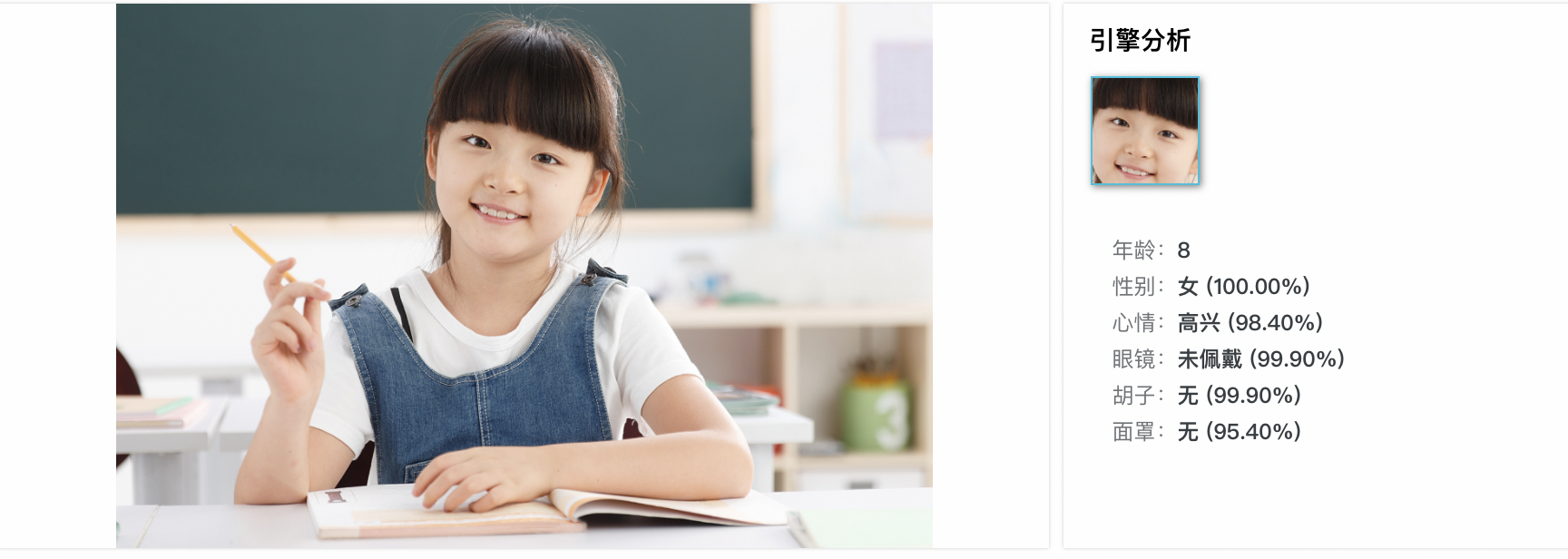
Les informations relatives au visage incluent l'ID du visage, l'âge, le genre, l'humeur, l'attractivité, la qualité du visage ainsi que divers attributs (position, orientation de la tête, port de lunettes, barbe et masque).
Cas d'utilisation
Reconnaissance faciale : détectez et comparez les visages à une base de données pour l'authentification et le contrôle d'accès.
Authentification faciale : vérifiez l'identité de l'utilisateur dans des scénarios tels que le déverrouillage de téléphone ou la validation de paiements.
-
Analyse des expressions faciales : analysez les expressions pour l'analyse des sentiments, l'interaction homme-machine et les personnages virtuels.
RemarqueArrière-plan encombré : des arrière-plans complexes peuvent interférer avec la détection des traits du visage.
Occlusion du visage : la superposition de visages dans une image peut réduire la précision de la détection.
Utilisation
Prérequis
Créer un bucket dans OSS et télécharger les fichiers que vous souhaitez traiter vers ce bucket.
Créez et liez un projet IMM. Vous pouvez effectuer cette liaison depuis la console OSS ou en appelant une opération API. Le projet IMM doit se trouver dans la même région que le bucket.
Détection de visages
Les exemples suivants illustrent la détection de visages à l'aide des SDK OSS. Pour les autres langages, adaptez les paramètres en conséquence.
Java
Le SDK OSS pour Java version 3.17.4 ou ultérieure est requis.
import com.aliyun.oss.ClientBuilderConfiguration;
import com.aliyun.oss.OSS;
import com.aliyun.oss.OSSClientBuilder;
import com.aliyun.oss.common.auth.CredentialsProviderFactory;
import com.aliyun.oss.common.auth.EnvironmentVariableCredentialsProvider;
import com.aliyun.oss.common.comm.SignVersion;
import com.aliyun.oss.model.OSSObject;
import com.aliyun.oss.model.GetObjectRequest;
import com.aliyuncs.exceptions.ClientException;

import java.io.ByteArrayOutputStream;
import java.io.IOException;

public class Demo1 {
    public static void main(String[] args) throws ClientException, ClientException {
        // Specify the endpoint of the region in which the bucket is located.
        String endpoint = "https://oss-cn-hangzhou.aliyuncs.com";
        // Specify the ID of the Alibaba Cloud region in which the bucket is located. Example: cn-hangzhou.
        String region = "cn-hangzhou";
        // Obtain access credentials from environment variables. Before you run the sample code, make sure that the OSS_ACCESS_KEY_ID and OSS_ACCESS_KEY_SECRET environment variables are configured.
        EnvironmentVariableCredentialsProvider credentialsProvider = CredentialsProviderFactory.newEnvironmentVariableCredentialsProvider();
        // Specify the name of the bucket.
        String bucketName = "examplebucket";
        // If the image is stored in the root directory of the bucket, enter the image name. If the image is not stored in the root directory of the bucket, you must specify the full path of the image. Example: exampledir/example.jpg.
        String key = "example.jpg";

        // Create an OSSClient instance.
        // Call the shutdown method to release resources when the OSSClient is no longer in use.
        ClientBuilderConfiguration clientBuilderConfiguration = new ClientBuilderConfiguration();
        clientBuilderConfiguration.setSignatureVersion(SignVersion.V4);
        OSS ossClient = OSSClientBuilder.create()
                .endpoint(endpoint)
                .credentialsProvider(credentialsProvider)
                .clientConfiguration(clientBuilderConfiguration)
                .region(region)
                .build();

        try {
            // Create a processing instruction to use face detection.
            GetObjectRequest getObjectRequest = new GetObjectRequest(bucketName, key);
            getObjectRequest.setProcess("image/faces");

            // Use the getObject method and pass the processing instruction by using the process parameter.
            OSSObject ossObject = ossClient.getObject(getObjectRequest);

            // Read and display the query results.
            ByteArrayOutputStream baos = new ByteArrayOutputStream();
            byte[] buffer = new byte[1024];
            int bytesRead;
            while ((bytesRead = ossObject.getObjectContent().read(buffer)) != -1) {
                baos.write(buffer, 0, bytesRead);
            }
            String imageFaces = baos.toString("UTF-8");
            System.out.println("Image Faces:");
            System.out.println(imageFaces);
        } catch (IOException e) {
            System.out.println("Error: " + e.getMessage());
        } finally {
            // Shut down the OSSClient instance.
            ossClient.shutdown();
        }
    }
}
Python
Le SDK OSS pour Python version 2.18.4 ou ultérieure est requis.
# -*- coding: utf-8 -*-
import oss2
from oss2.credentials import EnvironmentVariableCredentialsProvider

# Obtain access credentials from environment variables. Before you run the sample code, make sure that the OSS_ACCESS_KEY_ID and OSS_ACCESS_KEY_SECRET environment variables are configured.
auth = oss2.ProviderAuthV4(EnvironmentVariableCredentialsProvider())

# Specify the endpoint of the region where the bucket is located.
endpoint = 'https://oss-cn-hangzhou.aliyuncs.com'
# Specify the ID of the Alibaba Cloud region in which the bucket is located.
region = 'cn-hangzhou'
bucket = oss2.Bucket(auth, endpoint, 'examplebucket', region=region)

# If the image is stored in the root directory, enter the image name. Otherwise, specify the full path.
key = 'example.jpg'

# Create a processing instruction to use face detection.
process = 'image/faces'

try:
    # Use the get_object method and pass the processing instruction by using the process parameter.
    result = bucket.get_object(key, process=process)

    # Read and display the query results.
    image_faces = result.read().decode('utf-8')
    print("Image Faces:")
    print(image_faces)
except oss2.exceptions.OssError as e:
    print("Error:", e)
Go
Le SDK OSS pour Go version 3.0.2 ou ultérieure est requis.
package main

import (
	"fmt"
	"io"
	"os"

	"github.com/aliyun/aliyun-oss-go-sdk/oss"
)

func main() {
	// Obtain the temporary access credentials from the environment variables. Before you run the sample code, make sure that the OSS_ACCESS_KEY_ID and OSS_ACCESS_KEY_SECRET environment variables are configured.
	provider, err := oss.NewEnvironmentVariableCredentialsProvider()
	if err != nil {
		fmt.Println("Error:", err)
		os.Exit(-1)
	}
	// Create an OSSClient instance.
	// Specify the endpoint of the region in which the bucket is located. For example, if the bucket is located in the China (Hangzhou) region, set the endpoint to https://oss-cn-hangzhou.aliyuncs.com. Specify your actual endpoint.
	// Specify the ID of the Alibaba Cloud region in which the bucket is located. Example: cn-hangzhou.
	client, err := oss.New("https://oss-cn-hangzhou.aliyuncs.com", "", "", oss.SetCredentialsProvider(&provider), oss.AuthVersion(oss.AuthV4), oss.Region("cn-hangzhou"))
	if err != nil {
		fmt.Println("Error:", err)
		os.Exit(-1)
	}
	// Specify the name of the bucket. Example: examplebucket.
	bucketName := "examplebucket"

	bucket, err := client.Bucket(bucketName)
	if err != nil {
		fmt.Println("Error:", err)
		os.Exit(-1)
	}
	// If the image is stored in the root directory of the bucket, enter the image name. If the image is not stored in the root directory of the bucket, you must specify the full path of the image. Example: exampledir/example.jpg.
	// Use the oss.Process method to create a processing instruction to use face detection.
	body, err := bucket.GetObject("example.jpg", oss.Process("image/faces"))
	if err != nil {
		fmt.Println("Error:", err)
		os.Exit(-1)
	}

	defer body.Close()

	data, err := io.ReadAll(body)
	if err != nil {
		fmt.Println("Error:", err)
		os.Exit(-1)
	}
	fmt.Println("data:", string(data))
}
PHP
Le SDK OSS pour PHP version 2.7.0 ou ultérieure est requis.
<?php
if (is_file(__DIR__ . '/../autoload.php')) {
    require_once __DIR__ . '/../autoload.php';
}
if (is_file(__DIR__ . '/../vendor/autoload.php')) {
    require_once __DIR__ . '/../vendor/autoload.php';
}
use OSS\Credentials\EnvironmentVariableCredentialsProvider;
use OSS\OssClient;

try {
    // Obtain access credentials from environment variables. Before you run the sample code, make sure that the OSS_ACCESS_KEY_ID and OSS_ACCESS_KEY_SECRET environment variables are configured.
    $provider = new EnvironmentVariableCredentialsProvider();
    // Specify the endpoint of the region in which the bucket is located. For example, if the bucket is located in the China (Hangzhou) region, set the endpoint to https://oss-cn-hangzhou.aliyuncs.com.
    $endpoint = 'https://oss-cn-hangzhou.aliyuncs.com';
    // Specify the name of the bucket. Example: examplebucket.
    $bucket = 'examplebucket';
    // If the image is stored in the root directory of the bucket, enter the image name. If the image is not stored in the root directory of the bucket, you must specify the full path of the image. Example: exampledir/example.jpg.
    $key = 'example.jpg';

    $config = array(
        "provider" => $provider,
        "endpoint" => $endpoint,
        "signatureVersion" => OssClient::OSS_SIGNATURE_VERSION_V4,
        // Specify the ID of the Alibaba Cloud region in which the bucket is located.
        "region" => "cn-hangzhou"
    );
    $ossClient = new OssClient($config);
  // Create a processing instruction to use face detection.
  $options[$ossClient::OSS_PROCESS] = "image/faces";
  $result = $ossClient->getObject($bucket,$key,$options);
  var_dump($result);
} catch (OssException $e) {
  printf($e->getMessage() . "\n");
  return;
}
Paramètres
Action : image/faces
Pour plus de détails sur les champs de réponse, consultez la référence de l'API DetectImageFaces.
Opérations API associées
Pour appeler directement l'API RESTful, intégrez le calcul de signature dans votre code. Utilisez la méthode (Recommandé) Inclure une signature V4 pour l'en-tête Authorization.
Traitez les images en ajoutant le paramètre x-oss-process à l'opération GetObject. GetObject.
Exemple de requête
GET /example.jpg?x-oss-process=image/faces HTTP/1.1
Host: image-demo.oss-cn-hangzhou.aliyuncs.com
Date: Fri, 21 Jul 2023 08:57:30 GMT
Authorization: SignatureValue
Exemple de réponse réussie
HTTP/1.1 200 OK
Server: AliyunOSS
Date: Fri, 21 Jul 2023 08:57:30 GMT
Content-Type: application/json;charset=utf-8
Content-Length: 161
Connection: keep-alive
x-oss-request-id: 628E2481184E20F26C000009
x-oss-transfer-acc-type: acc-none
x-oss-data-location: oss-cn-hangzhou-a
ETag: "D0F162350DA037F4DC2A142B2E116BD0"
Last-Modified: Wed, 25 May 2022 12:20:34 GMT
x-oss-object-type: Normal
x-oss-hash-crc64ecma: 2040549661341440100
x-oss-storage-class: Standard
x-oss-server-time: 12437

{
    "RequestId": "5F2389FE-A5E3-076F-B071-43A33DB0D716",
    "Figures": [{
        "Beard": "none",
        "MaskConfidence": 0.7509999871253967,
        "Gender": "male",
        "Boundary": {
            "Left": 280,
            "Top": 36,
            "Height": 87,
            "Width": 70
        },
        "BeardConfidence": 0.9980000257492065,
        "FigureId": "d39651db-9dc4-469f-8834-d2fcf30e179e",
        "Mouth": "open",
        "Emotion": "none",
        "Age": 12,
        "MouthConfidence": 0.5669999718666077,
        "FigureType": "face",
        "GenderConfidence": 0.9509999752044678,
        "HeadPose": {
            "Pitch": -12.309000015258789,
            "Roll": -11.362000465393066,
            "Yaw": 3.443000078201294
        },
        "Mask": "none",
        "EmotionConfidence": 0.9950000047683716,
        "HatConfidence": 0.9879999756813049,
        "GlassesConfidence": 1,
        "Sharpness": 0.8870000243186951,
        "FigureClusterId": "figure-cluster-id-unavailable",
        "FaceQuality": 0.8289999961853027,
        "Attractive": 0.12099999934434891,
        "AgeSD": 5,
        "Glasses": "none",
        "FigureConfidence": 0.9990000128746033,
        "Hat": "hat"
    }
    ]
}
Facturation
La détection de visages entraîne des frais facturés à la fois par OSS et par IMM :
-
OSS : Tarification OSS
API
Élément facturable
Description
GetObject
Requêtes GET
Des frais de requête sont appliqués en fonction du nombre de requêtes abouties.
Trafic sortant via Internet
Si vous appelez l'opération GetObject via un point de terminaison public (par exemple oss-cn-hangzhou.aliyuncs.com) ou un point de terminaison d'accélération (par exemple oss-accelerate.aliyuncs.com), des frais de trafic sortant via Internet sont appliqués en fonction du volume de données transférées.
Récupération d'objets IA
Lorsque des objets IA sont récupérés, des frais de récupération de données IA sont appliqués en fonction de la taille des données récupérées.
Accélération du transfert
Si vous activez l'accélération du transfert et utilisez un point de terminaison d'accélération pour accéder à votre bucket, des frais d'accélération du transfert sont appliqués en fonction du volume de données transférées.
HeadObject
Requêtes GET
Des frais de requête sont appliqués en fonction du nombre de requêtes abouties.
-
IMM : Éléments facturables IMM
ImportantÀ partir du 28 juillet 2025 à 11 h 00 (UTC+8), le tarif du service de détection de visages IMM reste inchangé, mais le nom de l'élément facturable passe de ImageFace à ImageDetect. Pour plus d'informations, consultez l'avis d'ajustement de la facturation IMM.
API
Élément facturable
Description
DetectImageFaces
ImageDetect
Des frais de requête sont appliqués en fonction du nombre de requêtes abouties.
Limites
Seul le traitement synchrone (x-oss-process) est pris en charge.
L'accès anonyme est refusé.