Découvrez comment prendre en main OSS SDK for Go V1. Installez le SDK, configurez les identifiants d'accès et effectuez des opérations de base telles que la création de buckets, ainsi que l'upload, le téléchargement, la liste et la suppression d'objets.
Prérequis
Avant de commencer, assurez-vous de disposer des éléments suivants :
Un compte Alibaba Cloud avec le service OSS activé
Un utilisateur Resource Access Management (RAM) disposant d'une paire AccessKey. Pour plus de détails, reportez-vous à CreateAccessKey
Go installé
Vérifiez votre installation de Go :
go versionConfigurer les variables d'environnement
-
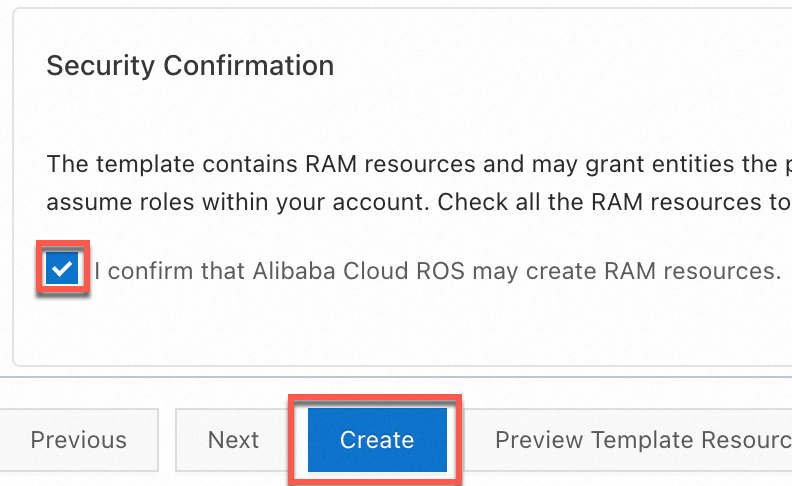
Vous pouvez créer rapidement une paire AccessKey pour un utilisateur RAM disposant des autorisations d'accès complètes à OSS en utilisant un script Resource Orchestration Service (ROS). Pour ce faire, accédez à l'de création de pile basée sur un modèle, sélectionnez I confirm that Alibaba Cloud ROS may create RAM resources dans la section Security Confirmation, puis cliquez sur Create.
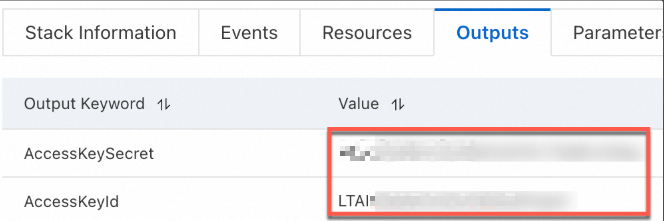
Une fois la paire AccessKey créée, copiez-la depuis l'onglet Outputs.
-
Configurez les variables d'environnement pour la paire AccessKey.
Linux
-
Exécutez les commandes suivantes dans l'interface CLI pour ajouter la configuration des variables d'environnement au fichier
~/.bashrc:echo "export OSS_ACCESS_KEY_ID='YOUR_ACCESS_KEY_ID'" >> ~/.bashrc echo "export OSS_ACCESS_KEY_SECRET='YOUR_ACCESS_KEY_SECRET'" >> ~/.bashrc-
Appliquez les modifications.
source ~/.bashrc -
Vérifiez si les variables d'environnement sont prises en compte :
echo $OSS_ACCESS_KEY_ID
echo $OSS_ACCESS_KEY_SECRET
-
macOS
-
Exécutez la commande suivante dans le terminal pour afficher le type de shell par défaut :
echo $SHELL-
Configurez les variables d'environnement en fonction du type de shell par défaut.
Zsh
-
Exécutez les commandes suivantes pour ajouter la configuration des variables d'environnement au fichier
~/.zshrc:echo "export OSS_ACCESS_KEY_ID='YOUR_ACCESS_KEY_ID'" >> ~/.zshrc echo "export OSS_ACCESS_KEY_SECRET='YOUR_ACCESS_KEY_SECRET'" >> ~/.zshrc -
Appliquez les modifications.
source ~/.zshrc -
Vérifiez si les variables d'environnement sont prises en compte :
echo $OSS_ACCESS_KEY_ID
echo $OSS_ACCESS_KEY_SECRET
Bash
-
Exécutez les commandes suivantes pour ajouter la configuration des variables d'environnement au fichier
~/.bash_profile:echo "export OSS_ACCESS_KEY_ID='YOUR_ACCESS_KEY_ID'" >> ~/.bash_profile echo "export OSS_ACCESS_KEY_SECRET='YOUR_ACCESS_KEY_SECRET'" >> ~/.bash_profile -
Appliquez les modifications.
source ~/.bash_profile -
Vérifiez si les variables d'environnement sont prises en compte :
echo $OSS_ACCESS_KEY_ID
echo $OSS_ACCESS_KEY_SECRET
-
-
Windows
CMD
-
Exécutez les commandes suivantes dans CMD :
setx OSS_ACCESS_KEY_ID "YOUR_ACCESS_KEY_ID" setx OSS_ACCESS_KEY_SECRET "YOUR_ACCESS_KEY_SECRET"-
Vérifiez si les variables d'environnement sont prises en compte :
echo %OSS_ACCESS_KEY_ID%
echo %OSS_ACCESS_KEY_SECRET%
-
PowerShell
-
Exécutez les commandes suivantes dans PowerShell :
[Environment]::SetEnvironmentVariable("OSS_ACCESS_KEY_ID", "YOUR_ACCESS_KEY_ID", [EnvironmentVariableTarget]::User) [Environment]::SetEnvironmentVariable("OSS_ACCESS_KEY_SECRET", "YOUR_ACCESS_KEY_SECRET", [EnvironmentVariableTarget]::User)-
Vérifiez si la variable d'environnement est prise en compte :
[Environment]::GetEnvironmentVariable("OSS_ACCESS_KEY_ID", [EnvironmentVariableTarget]::User)
[Environment]::GetEnvironmentVariable("OSS_ACCESS_KEY_SECRET", [EnvironmentVariableTarget]::User)
-
-
Après avoir défini les variables d'environnement, redémarrez toutes les sessions de terminal ou les IDE ouverts pour que les modifications soient prises en compte.
Installer OSS SDK for Go
-
Vérifiez que Go 1.13 ou une version ultérieure est installé.
Consultez votre version de Go :
go versionSi Go n'est pas installé, suivez le guide d'installation de Golang.
-
Créez un répertoire de projet et initialisez un module Go.
mkdir oss-go-example && cd oss-go-example && go mod init oss-go-example -
Installez le SDK :
go get github.com/aliyun/aliyun-oss-go-sdk/oss
Démarrage rapide
Ces exemples montrent comment créer un bucket, uploader, télécharger, lister et supprimer des objets.
Créer un bucket
package main

import (
	"fmt"
	"os"

	"github.com/aliyun/aliyun-oss-go-sdk/oss"
)

func main() {
	/// Obtain a credential from the environment variables. Before you execute the sample code, make sure that the OSS_ACCESS_KEY_ID and OSS_ACCESS_KEY_SECRET environment variables are configured.
	provider, err := oss.NewEnvironmentVariableCredentialsProvider()
	if err != nil {
		fmt.Println("Error:", err)
		os.Exit(-1)
	}

	// Create an OSSClient instance.
	// Set yourEndpoint to the endpoint of the region in which the bucket is located. For example, if the bucket is located in the China (Hangzhou) region, set the endpoint to https://oss-cn-hangzhou.aliyuncs.com. Specify the actual endpoint.
	// Specify the region in which the bucket is located. For example, if your bucket is located in the China (Hangzhou) region, set the region to cn-hangzhou. Specify the actual endpoint.
	clientOptions := []oss.ClientOption{oss.SetCredentialsProvider(&provider)}
	clientOptions = append(clientOptions, oss.Region("yourRegion"))
	// Specify the signature version
	clientOptions = append(clientOptions, oss.AuthVersion(oss.AuthV4))
	client, err := oss.New("yourEndpoint", "", "", clientOptions...)
	if err != nil {
		fmt.Println("Error:", err)
		os.Exit(-1)
	}

	// Create a bucket named examplebucket. Set the storage class to IA (oss.StorageIA), the ACL to public-read (oss.ACLPublicRead), and the redundancy type to ZRS (oss.RedundancyZRS).
	err = client.CreateBucket("examplebucket", oss.StorageClass(oss.StorageIA), oss.ACL(oss.ACLPublicRead), oss.RedundancyType(oss.RedundancyZRS))
	if err != nil {
		fmt.Println("Error:", err)
		os.Exit(-1)
	}
}
Uploader un objet
package main

import (
	"log"
	"strings"

	"github.com/aliyun/aliyun-oss-go-sdk/oss"
)

func main() {
	// Obtain a credential from the environment variables. Before you execute the sample code, make sure that the OSS_ACCESS_KEY_ID and OSS_ACCESS_KEY_SECRET environment variables are configured.
	provider, err := oss.NewEnvironmentVariableCredentialsProvider()
	if err != nil {
		log.Fatalf("Failed to create credentials provider: %v", err)
	}

	// Create an OSSClient instance.
	// Set yourEndpoint to the endpoint of the region in which the bucket is located. For example, if the bucket is located in the China (Hangzhou) region, set the endpoint to https://oss-cn-hangzhou.aliyuncs.com. Specify the actual endpoint.
	// Specify the region in which the bucket is located. For example, if your bucket is located in the China (Hangzhou) region, set the region to cn-hangzhou. Specify the actual endpoint.
	clientOptions := []oss.ClientOption{oss.SetCredentialsProvider(&provider)}
	clientOptions = append(clientOptions, oss.Region("yourRegion"))
	// Specify the signature version
	clientOptions = append(clientOptions, oss.AuthVersion(oss.AuthV4))
	client, err := oss.New("yourEndpoint", "", "", clientOptions...)
	if err != nil {
		log.Fatalf("Failed to create OSS client: %v", err)
	}

	// Specify the name of the bucket. Example: examplebucket.
	bucketName := "examplebucket" // Replace examplebucket with the actual bucket name.
	bucket, err := client.Bucket(bucketName)
	if err != nil {
		log.Fatalf("Failed to get bucket: %v", err)
	}

	objectKey := "exampledir/exampleobject.txt" // Replace exampledir/exampleobject.txt with the actual object key.
	content := "Hello OSS"
	err = bucket.PutObject(objectKey, strings.NewReader(content))
	if err != nil {
		log.Fatalf("Failed to put object: %v", err)
	}

	log.Println("File uploaded successfully.")
}
Télécharger un objet
package main

import (
	"io"
	"log"

	"github.com/aliyun/aliyun-oss-go-sdk/oss"
)

func main() {
	// Obtain a credential from the environment variables. Before you execute the sample code, make sure that the OSS_ACCESS_KEY_ID and OSS_ACCESS_KEY_SECRET environment variables are configured.
	provider, err := oss.NewEnvironmentVariableCredentialsProvider()
	if err != nil {
		log.Fatalf("Failed to create credentials provider: %v", err)
	}

	// Create an OSSClient instance.
	// Set yourEndpoint to the endpoint of the region in which the bucket is located. For example, if the bucket is located in the China (Hangzhou) region, set the endpoint to https://oss-cn-hangzhou.aliyuncs.com. Specify the actual endpoint.
	// Specify the region in which the bucket is located. For example, if your bucket is located in the China (Hangzhou) region, set the region to cn-hangzhou. Specify the actual endpoint.
	clientOptions := []oss.ClientOption{oss.SetCredentialsProvider(&provider)}
	clientOptions = append(clientOptions, oss.Region("yourRegion"))
	// Specify the signature version
	clientOptions = append(clientOptions, oss.AuthVersion(oss.AuthV4))
	client, err := oss.New("yourEndpoint", "", "", clientOptions...)
	if err != nil {
		log.Fatalf("Failed to create OSS client: %v", err)
	}

	// Specify the name of the bucket.
	bucket, err := client.Bucket("yourBucketName")
	if err != nil {
		log.Fatalf("Failed to get bucket: %v", err)
	}

	// Download the object to a stream.
	body, err := bucket.GetObject("yourObjectName")
	if err != nil {
		log.Fatalf("Failed to get object: %v", err)
	}
	// You must close the stream after the data is read. Otherwise, connection leaks may occur. Consequently, no connections are available and your application cannot work.
	defer body.Close()

	data, err := io.ReadAll(body)
	if err != nil {
		log.Fatalf("Failed to read all data from object: %v", err)
	}
	log.Println("Data:", string(data))
}
Lister des objets
package main

import (
	"log"
	"time"

	"github.com/aliyun/aliyun-oss-go-sdk/oss"
)

func main() {
	// Obtain a credential from the environment variables. Before you execute the sample code, make sure that the OSS_ACCESS_KEY_ID and OSS_ACCESS_KEY_SECRET environment variables are configured.
	provider, err := oss.NewEnvironmentVariableCredentialsProvider()
	if err != nil {
		log.Fatalf("Failed to create credentials provider: %v", err)
	}

	// Create an OSSClient instance.
	// Set yourEndpoint to the endpoint of the region in which the bucket is located. For example, if the bucket is located in the China (Hangzhou) region, set the endpoint to https://oss-cn-hangzhou.aliyuncs.com. Specify the actual endpoint.
	// Specify the region in which the bucket is located. For example, if your bucket is located in the China (Hangzhou) region, set the region to cn-hangzhou. Specify the actual endpoint.
	client, err := oss.New("yourEndpoint", "", "", oss.SetCredentialsProvider(&provider), oss.Region("yourRegion"), oss.AuthVersion(oss.AuthV4))
	if err != nil {
		log.Fatalf("Failed to create OSS client: %v", err)
	}

	// Specify the name of the bucket.
	bucketName := "yourBucketName" // Replace yourBucketName with the actual bucket name.
	bucket, err := client.Bucket(bucketName)
	if err != nil {
		log.Fatalf("Failed to get bucket: %v", err)
	}

	// Specify the position from which the list starts.
	continueToken := ""

	for {
		// List all objects by page.
		lsRes, err := bucket.ListObjectsV2(oss.ContinuationToken(continueToken))
		if err != nil {
			log.Fatalf("Failed to list objects: %v", err)
		}

		// Display the listed objects. By default, up to 100 objects are returned at a time.
		for _, object := range lsRes.Objects {
			log.Printf("Object Key: %s, Type: %s, Size: %d, ETag: %s, LastModified: %s, StorageClass: %s\n",
				object.Key, object.Type, object.Size, object.ETag, object.LastModified.Format(time.RFC3339), object.StorageClass)
		}

		// If you want to list more objects, update the value of the continueToken parameter.
		if lsRes.IsTruncated {
			continueToken = lsRes.NextContinuationToken
		} else {
			break
		}
	}

	log.Println("All objects have been listed.")
}
Supprimer un objet
package main

import (
	"log"

	"github.com/aliyun/aliyun-oss-go-sdk/oss"
)

func main() {
	// Obtain a credential from the environment variables. Before you execute the sample code, make sure that the OSS_ACCESS_KEY_ID and OSS_ACCESS_KEY_SECRET environment variables are configured.
	provider, err := oss.NewEnvironmentVariableCredentialsProvider()
	if err != nil {
		log.Fatalf("Failed to create credentials provider: %v", err)
	}

	// Create an OSSClient instance.
	// Set yourEndpoint to the endpoint of the region in which the bucket is located. For example, if the bucket is located in the China (Hangzhou) region, set the endpoint to https://oss-cn-hangzhou.aliyuncs.com. Specify the actual endpoint.
	// Specify the region in which the bucket is located. For example, if your bucket is located in the China (Hangzhou) region, set the region to cn-hangzhou. Specify the actual endpoint.
	clientOptions := []oss.ClientOption{oss.SetCredentialsProvider(&provider)}
	clientOptions = append(clientOptions, oss.Region("yourRegion"))
	// Specify the signature version
	clientOptions = append(clientOptions, oss.AuthVersion(oss.AuthV4))
	client, err := oss.New("yourEndpoint", "", "", clientOptions...)
	if err != nil {
		log.Fatalf("Failed to create OSS client: %v", err)
	}

	// Specify the bucket name. Example: examplebucket.
	bucketName := "examplebucket"
	// Set objectName to the full path of the object that you want to delete. The full path must contain the extension of the object name and cannot contain the bucket name. Example: exampledir/exampleobject.txt.
	// If you want to delete a directory, set objectName to the directory name. If the directory is not empty, you must delete all objects in the directory before you can delete the directory.
	objectName := "exampledir/exampleobject.txt"

	// Get a bucket instance.
	bucket, err := client.Bucket(bucketName)
	if err != nil {
		log.Fatalf("Failed to get bucket '%s': %v", bucketName, err)
	}

	// Delete a single object.
	err = bucket.DeleteObject(objectName)
	if err != nil {
		log.Fatalf("Failed to delete object '%s': %v", objectName, err)
	}

	log.Printf("Successfully deleted object: %s\n", objectName)
}
Exécuter les exemples
Pour uploader un objet, créez un fichier main.go dans le répertoire de votre projet et collez-y le code d'upload.
Mettez à jour yourRegion, yourEndpoint, bucketName et objectName dans main.go.
-
Exécutez la commande suivante :
go run main.go
FAQ
Que faire si l'erreur AccessDenied est signalée lors de l'utilisation des SDK OSS ?
Références
Exemples de code sur GitHub