Après avoir instrumenté une application à l'aide de SkyWalking et rapporté ses données de trace vers Managed Service for OpenTelemetry, Managed Service for OpenTelemetry commence à surveiller l'application. Vous pouvez consulter diverses données de surveillance, telles que la topologie des applications, les traces d'appels, les transactions en erreur, les transactions lentes et l'analyse SQL. Cette rubrique explique comment utiliser le SDK SkyWalking .NET Core pour instrumenter une application et rapporter ses données.
Prérequis
New console
Connectez-vous à la console Managed Service for OpenTelemetry. Dans le volet de navigation de gauche, cliquez sur Integration Center.
Sur la page Integration Center, cliquez sur la carte SkyWalking dans la section Open Source Frameworks.
-
Dans le panneau SkyWalking, cliquez sur l'onglet Start Integration, puis sélectionnez la région dans laquelle vous souhaitez rapporter les données.
RemarqueLorsque vous accédez à une région pour la première fois, les ressources y sont automatiquement initialisées.
-
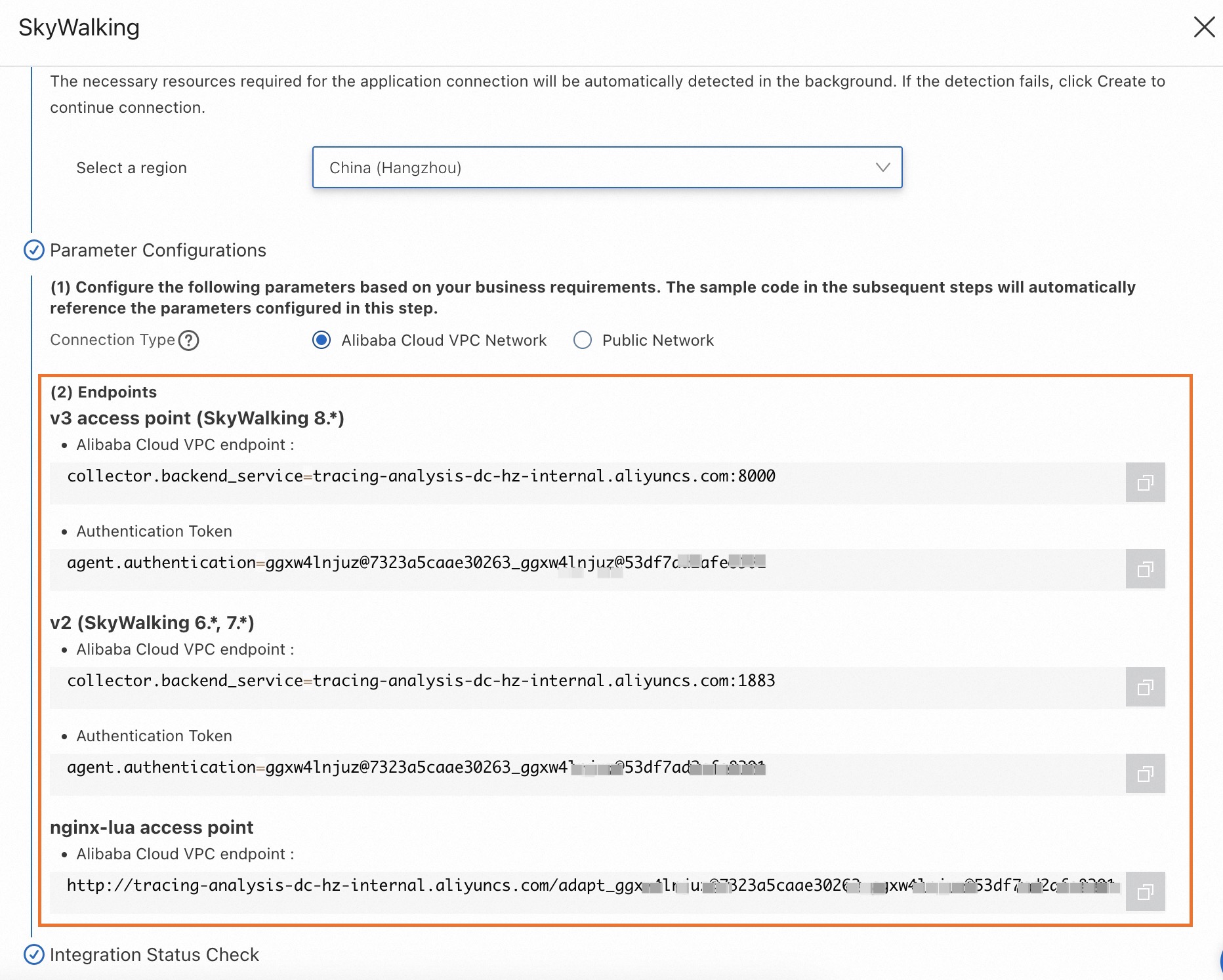
Configurez le paramètre Connection Type et copiez un endpoint.
Si votre service est déployé sur Alibaba Cloud et se trouve dans la région que vous avez sélectionnée, nous vous recommandons de définir ce paramètre sur Alibaba Cloud VPC Network. Sinon, définissez ce paramètre sur Public Network.
Old console
Connectez-vous à la console Managed Service for OpenTelemetry.
Dans le volet de navigation de gauche, cliquez sur Cluster Configurations. Sur la page qui s'affiche, cliquez sur l'onglet Access point information.
Dans la barre de navigation supérieure, sélectionnez la région dans laquelle vous souhaitez rapporter les données. Dans la section Cluster Information, activez l'option Show Token.
-
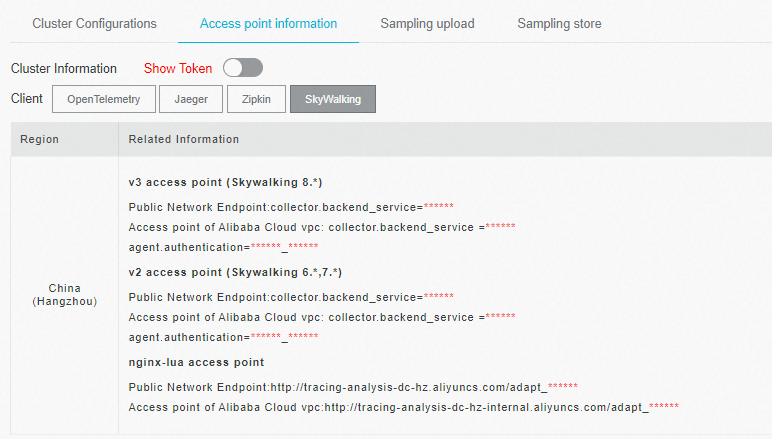
Définissez le paramètre Client sur SkyWalking.
Dans la colonne Related Information du tableau, copiez un endpoint.
 Remarque
Si votre application est déployée dans un environnement de production Alibaba Cloud, utilisez un endpoint VPC. Sinon, utilisez un endpoint public.
Informations générales
SkyWalking est un outil open source de surveillance des performances des applications (APM) destiné aux microservices, aux architectures cloud-native et aux architectures basées sur des conteneurs comme Docker, Kubernetes et Mesos. Au cœur de SkyWalking se trouve un système de traçage distribué.
Démo d'exemple
Pour un exemple complet et fonctionnel, consultez le dépôt SkyWalking Demo.
Instrumenter une application .NET avec SkyWalking
-
Installez l'agent .NET.
Accédez au répertoire racine de votre projet et exécutez les commandes suivantes.
# Install the .NET Agent dotnet add package SkyAPM.Agent.AspNetCore # Add environment variables export ASPNETCORE_HOSTINGSTARTUPASSEMBLIES=SkyAPM.Agent.AspNetCore export SKYWALKING__SERVICENAME=<service-name> -
Configurez les propriétés de l'agent .NET.
Créez un fichier
skyapm.jsonen utilisant l'une des méthodes suivantes.Méthode 1 : Utilisez l'outil SkyAPM.DotNet.CLI pour générer le fichier de configuration des propriétés.
Méthode 2 : Créez un fichier
skyapm.jsondans le répertoire racine de votre projet et copiez-y le contenu suivant.
dotnet tool install -g SkyAPM.DotNet.CLI # Set the environment variable. Replace /path/to with the path to your .dotnet/tools directory. export PATH="$PATH:/path/to/.dotnet/tools/" dotnet skyapm config <service-name> <endpoint>{ "SkyWalking": { "ServiceName": <service-name>, "Namespace": "", "HeaderVersions": [ "sw8" ], "Sampling": { "SamplePer3Secs": -1, "Percentage": -1.0, "LogSqlParameterValue": false }, "Logging": { "Level": "Information", "FilePath": "logs/skyapm-{Date}.log" }, "Transport": { "Interval": 3000, "ProtocolVersion": "v8", "QueueSize": 30000, "BatchSize": 3000, "gRPC": { "Servers": <endpoint>, "Authentication": <token>, "Timeout": 100000, "ConnectTimeout": 100000, "ReportTimeout": 600000 } } } }Paramètres
-
Paramètres obligatoires
<service-name>: Le nom du service.<endpoint>: L'endpoint obtenu dans la section « Prérequis ».<token>: Le jeton d'authentification pour l'endpoint. Obtenez ce jeton comme décrit dans la section « Prérequis ».
-
Paramètres facultatifs
SamplePer3Secs: Le nombre d'échantillons à collecter toutes les trois secondes.Percentage: Le pourcentage d'échantillonnage. Par exemple, pour échantillonner 10 % des traces, définissez cette valeur sur 10.Logging: Configure la journalisation et le débogage.Levelspécifie le niveau de journal, etFilePathspécifie l'emplacement et le nom du fichier journal.
-
Redémarrez votre projet .NET.
dotnet run
-
Vérifiez les journaux locaux de l'agent. Lorsque vous exécutez le projet, un fichier
skyapm-<date>.logest généré dans le dossierlogs. Si le rapport des données échoue, vous pouvez utiliser ce fichier journal pour déboguer le problème.2023-07-27 10:04:08.396 +08:00 [skywalking-net-demo] [Information] SkyApm.InstrumentStartup : Initializing ... 2023-07-27 10:04:08.477 +08:00 [skywalking-net-demo] [Information] SkyApm.Service.RegisterService : Loaded instrument service [Skyxxx] 2023-07-27 10:04:08.477 +08:00 [skywalking-net-demo] [Information] SkyApm.Service.LogReportService : Loaded instrument service [Skxxx] 2023-07-27 10:04:08.477 +08:00 [skywalking-net-demo] [Information] SkyApm.Service.PingService : Loaded instrument service [SkyApm.xxx] 2023-07-27 10:04:08.477 +08:00 [skywalking-net-demo] [Information] SkyApm.Service.SegmentReportService : Loaded instrument servicexxx 2023-07-27 10:04:08.477 +08:00 [skywalking-net-demo] [Information] SkyApm.Service.CLRStatsService : Loaded instrument service [Skyxxx] 2023-07-27 10:04:08.477 +08:00 [skywalking-net-demo] [Information] SkyApm.Sampling.SimpleCountSamplingInterceptor : Loaded instruxxx 2023-07-27 10:04:08.477 +08:00 [skywalking-net-demo] [Information] SkyApm.Transport.Grpc.ConnectService : Loaded instrument servicxxx 2023-07-27 10:04:08.486 +08:00 [skywalking-net-demo] [Information] SkyApm.Transport.Grpc.ConnectionManager : Connected server[tracixxx] 2023-07-27 10:04:08.486 +08:00 [skywalking-net-demo] [Information] SkyApm.Diagnostics.TracingDiagnosticProcessorObserver : Loaded dxxx 2023-07-27 10:04:08.486 +08:00 [skywalking-net-demo] [Information] SkyApm.InstrumentStartup : Started SkyAPM .NET Core Agent. 2023-07-27 10:04:13.512 +08:00 [skywalking-net-demo] [Information] SkyApm.Diagnostics.TracingDiagnosticProcessorObserver : Loaded dxxx 2023-07-27 10:04:13.552 +08:00 [skywalking-net-demo] [Information] SkyApm.Diagnostics.TracingDiagnosticProcessorObserver : Loaded dxxx 2023-07-27 10:04:13.605 +08:00 [skywalking-net-demo] [Information] SkyApm.Service.RegisterService : Reported Service Instance Propexxx 2023-07-27 10:04:20.525 +08:00 [skywalking-net-demo] [Information] SkyApm.Transport.Grpc.V8.SegmentReporter : Report 14 trace segmexxx 2023-07-27 10:04:20.534 +08:00 [skywalking-net-demo] [Error] SkyApm.Transport.Grpc.SegmentReporter : Report trace segment fail. Grpc.Core.RpcException: Status(StatusCode="Unimplemented", Detail="Method not found: skywalking.v3.LogReportService/collect") at SkyApm.Transport.Grpc.LoggerReporter.ReportAsync(IReadOnlyCollection`1 loggerRequests, CancellationToken cancellationToken)
Références
Pour générer l'agent à partir du code source, exécutez les commandes suivantes.
# Download the source code
git clone https://github.com/SkyAPM/SkyAPM-dotnet.git
# Enter the root directory
cd SkyAPM-dotnet/
# Switch to the target tag
git checkout [tagname]
git submodule init
git submodule update
dotnet restore
dotnet build src/SkyApm.Transport.Grpc.Protocol
dotnet build skyapm-dotnet.sln
FAQ
Une erreur peut survenir lors de l'exécution de la commande dotnet skyapm config si la version requise du framework .NET n'est pas installée.
dotnet skyapm config net-app 192.168.0.1:11800
You must install or update .NET to run this application.
App: /Users/whlongxi/.dotnet/tools/dotnet-skyapm
Architecture: arm64
Framework: 'Microsoft.NETCore.App', version '6.0.0' (arm64)
.NET location: /usr/local/share/dotnet
The following frameworks were found:
  7.0.9 at [/usr/local/share/dotnet/shared/Microsoft.NETCore.App]
Learn about framework resolution:
https://aka.ms/dotnet/app-launch-failed
To install missing framework, download:
https://aka.ms/dotnet-core-applaunch?framework=Microsoft.NETCore.App&framework_version=6.0.0&arch=arm64&rid=osx.13-arm64
Solution 1 (recommandée) : L'outil
dotnet-skyapmgénère uniquement le fichier de configurationskyapm.json. Vous pouvez créer et configurer ce fichier manuellement comme décrit ci-dessus.Solution 2 : Utilisez .NET 6.0.