Une fois votre application instrumentée avec l'agent Rust SkyWalking et les données de trace rapportées à Managed Service for OpenTelemetry, Managed Service for OpenTelemetry commence à surveiller votre application. Vous pouvez consulter les métriques clés, telles que la topologie des applications, les traces, les transactions en échec ou lentes, ainsi que l'analyse SQL.
Prérequis
-
Protobuf est installé.
macOS
brew install protobufDebian
sudo apt install protobuf-compiler -
New console
Connectez-vous à la console Managed Service for OpenTelemetry. Dans le volet de navigation de gauche, cliquez sur Integration Center.
Sur la page Integration Center, cliquez sur la carte SkyWalking dans la section Open Source Frameworks.
-
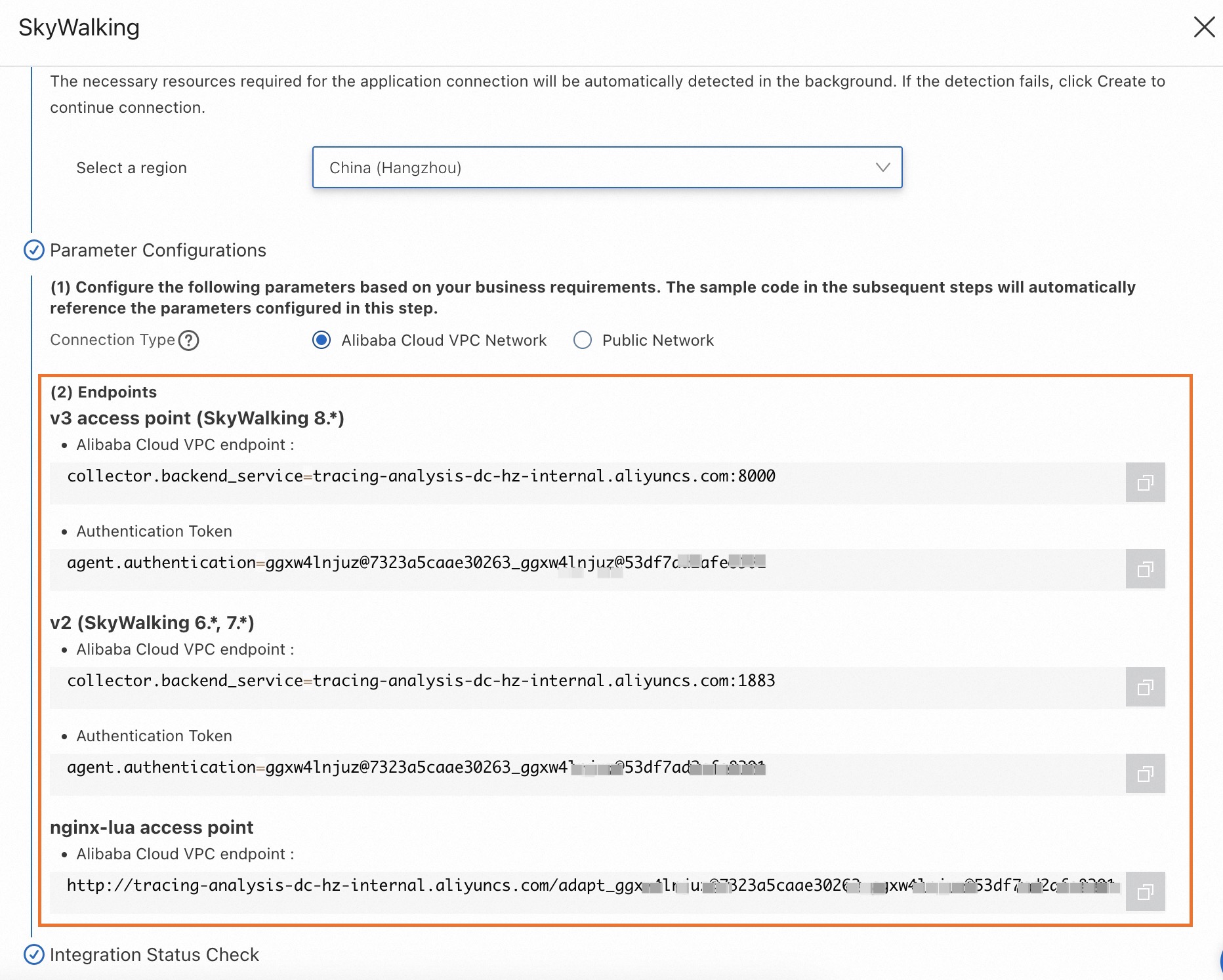
Dans le panneau SkyWalking, cliquez sur l'onglet Start Integration, puis sélectionnez la région dans laquelle vous souhaitez rapporter les données.
RemarqueLorsque vous accédez à une région pour la première fois, les ressources y sont automatiquement initialisées.
-
Configurez le paramètre Connection Type et copiez un endpoint.
Si votre service est déployé sur Alibaba Cloud et se trouve dans la région sélectionnée, nous vous recommandons de définir ce paramètre sur Alibaba Cloud VPC Network. Sinon, définissez-le sur Public Network.
Old console
Connectez-vous à la console Managed Service for OpenTelemetry.
Dans le volet de navigation de gauche, cliquez sur Cluster Configurations. Sur la page qui s'affiche, cliquez sur l'onglet Access point information.
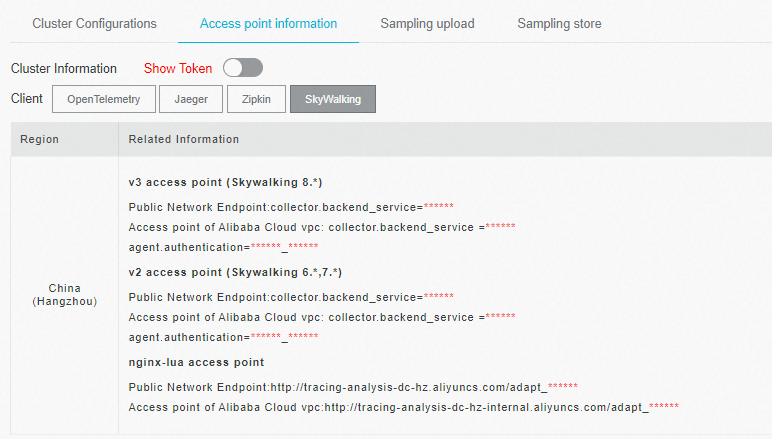
Dans la barre de navigation supérieure, sélectionnez la région dans laquelle vous souhaitez rapporter les données. Dans la section Cluster Information, activez l'option Show Token.
-
Définissez le paramètre Client sur SkyWalking.
Dans la colonne Related Information du tableau, copiez un endpoint.
 Remarque
Si votre application est déployée dans un environnement de production Alibaba Cloud, utilisez un endpoint VPC. Sinon, utilisez un endpoint public.
Contexte
SkyWalking est un outil open source populaire de surveillance des performances des applications (APM) destiné aux microservices, aux architectures cloud-native et aux applications conteneurisées (telles que Docker, Kubernetes et Mesos). Au cœur de SkyWalking se trouve un système de traçage distribué.
La crate skywalking-rust est la bibliothèque officielle de l'agent Rust SkyWalking. Vous pouvez l'intégrer pour surveiller les applications Rust. Actuellement, skywalking-rust offre une instrumentation automatique limitée et nécessite une instrumentation manuelle.
Démo
Référentiel de démonstration : SkyWalking Demo
Cette démo fournit un serveur HTTP simple basé sur le framework hyper pour Rust. Elle utilise une instrumentation manuelle avec skywalking-rust pour rapporter les données à la console Managed Service for OpenTelemetry.
Instrumenter manuellement une application Rust
-
Ajoutez la dépendance SkyWalking à votre projet Rust.
RemarqueCette rubrique utilise SkyWalking 0.8.0 à titre d'exemple.
cargo.toml
# Add the following line under [dependencies]
skywalking = { version = "0.8.0", features = ["vendored"] }
cargo add
cargo add skywalking --features vendored -
Importez les modules SkyWalking dans votre code source.
# Import modules in the source code that requires instrumentation. use skywalking::{reporter::grpc::GrpcReporter, trace::tracer::Tracer}; -
Effectuez une instrumentation manuelle.
// Use entry span, local span, and exit span to manually instrument a trace. // These three span types enable complete end-to-end tracing. // // entry span: Used on the server side to extract the tracing context from an incoming HTTP request. // local span: Used for instrumenting operations within the same process. // exit span: Used on the client side to inject the tracing context into an outgoing HTTP request. // // For cross-process traces, refer to the following example: // // client.rs: let mut ctx = tracer.create_trace_context(); { // do something... let span = ctx.create_exit_span("operation1", "remote_peer"); } // server.rs: let mut ctx = tracer.create_trace_context(); { let span = ctx.create_entry_span("operation1"); // do something... } -
Configurez l'endpoint et le token.
Récupérez l'adresse de l'endpoint et le token d'authentification depuis la section Prérequis.
// Replace  with the endpoint address,  with the authentication token,
// and  with your application name.
let endpoint = "<endpoint>";
let token = "<token>";
let service_name = "<service_name>";
let instance_name = "<instance_name>";

let reporter = GrpcReporter::connect(endpoint).await?;
let reporter = reporter.with_authentication(token);
let tracer = Tracer::new(service_name, instance_name, reporter.clone());
Redémarrez votre application.
FAQ
La compilation de votre projet Rust échoue avec l'erreur suivante :
   Compiling tokio-io v0.1.13
   Compiling hyper v0.14.27
error: failed to run custom build command for `skywalking v0.8.0`
Caused by:
  process didn't exit successfully: `/Users/whlongxi/work/test/skywalking-test-demo/skywalking-rust-demo/target/debug/build/skywalking-12f2124cc5c4c6c4/build-script-build` (exit status:
101)
  --- stdout
  cargo:rerun-if-changed=./skywalking-data-collect-protocol/language-agent/Meter.proto
  cargo:rerun-if-changed=./skywalking-data-collect-protocol/language-agent/Tracing.proto
  cargo:rerun-if-changed=./skywalking-data-collect-protocol/logging/Logging.proto
  cargo:rerun-if-changed=./skywalking-data-collect-protocol/management/Management.proto
  cargo:rerun-if-changed=./skywalking-data-collect-protocol
  --- stderr
  thread 'main' panicked at 'Could not find `protoc` installation and this build crate cannot proceed without
      this knowledge. If `protoc` is installed and this crate had trouble finding
      it, you can set the `PROTOC` environment variable with the specific path to your
      installed `protoc` binary.You could try running `brew install protobuf` or downloading it from https://github.com/protocolbuffers/protobuf/releases
Cette erreur indique que le compilateur protoc est manquant. Pour résoudre ce problème, installez protobuf comme décrit dans la section Prérequis.