Connectez-vous au service de synthèse vocale en temps réel Qwen-TTS via WebSocket. Cette rubrique présente l'endpoint du service, les en-têtes de requête et le flux d'interaction.
Pour une présentation des modèles et des conseils de sélection, consultez Synthèse vocale en temps réel.
L'API Realtime de Qwen-TTS repose sur le protocole WebSocket. Les applications Java et Python peuvent utiliser le SDK DashScope pour s'affranchir de la gestion directe du WebSocket. Pour les autres langages, connectez-vous directement à l'aide d'une bibliothèque WebSocket.
Endpoint du service
Utilisez l'URL suivante. Définissez le modèle à l'aide du paramètre de requête model :
Singapore
URL WebSocket : wss://dashscope-intl.aliyuncs.com/api-ws/v1/realtime?model=qwen3-tts-flash-realtime
China (Beijing)
URL WebSocket : wss://dashscope-intl.aliyuncs.com/api-ws/v1/realtime?model=qwen3-tts-flash-realtime
ImportantL'URL doit impérativement utiliser le protocole wss://. Configurez l'en-tête Authorization (voir En-têtes de requête) et spécifiez le modèle via le paramètre de requête model.
En-têtes de requête
Définissez les en-têtes de requête suivants :
Paramètre | Type | Obligatoire | Description |
|---|---|---|---|
Authorization | string | Oui | Format : |
user-agent | string | Non | Identifiant client permettant le suivi source côté serveur. |
X-DashScope-WorkSpace | string | Non | L'ID d'espace de travail Alibaba Cloud Model Studio. |
ImportantL'autorisation est vérifiée lors de la négociation WebSocket. Une clé API invalide ou manquante entraîne l'échec de la négociation avec un code HTTP 401 ou 403.
Flux d'interaction
Pour une description détaillée des événements client et serveur, reportez-vous aux rubriques Événements client et Événements serveur.
L'API prend en charge deux modes :
- Mode ServerCommit : le serveur gère automatiquement la segmentation du texte et le déclenchement de la synthèse.
- Mode Commit : le client maîtrise le moment de soumission de chaque segment de texte. Appelez explicitement
input_text_buffer.commitpour lancer la synthèse.
Détails des modes
- En mode ServerCommit, utilisez
input_text_buffer.appendpour mettre le texte en mémoire tampon. Le système détermine alors automatiquement le moment opportun pour la synthèse. - Si vous appelez
input_text_buffer.commiten mode ServerCommit, la synthèse du tampon actuel s'effectue immédiatement, puis la session reprend son fonctionnement normal en mode ServerCommit. - En mode Commit, l'appel seul à
input_text_buffer.appendne déclenche pas la synthèse. Appelezinput_text_buffer.commitpour démarrer le traitement.
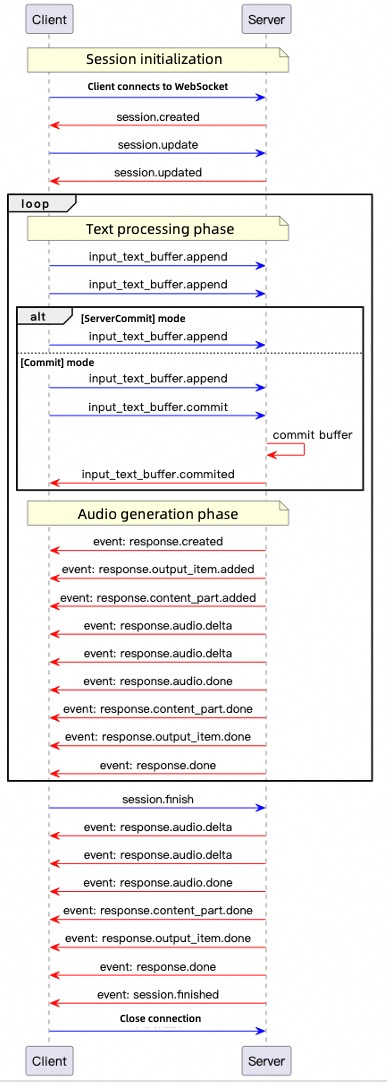
-
Connexion : ouvrez une connexion WebSocket depuis le client. Le serveur renvoie
session.createdlorsqu'il est prêt. -
Configuration de la session : envoyez
session.updatepour configurer la voix, le format audio et le mode de fonctionnement. -
Saisie du texte : transmettez
input_text_buffer.appendafin d'ajouter du texte au tampon. -
Déclenchement de la synthèse :
- En mode ServerCommit, la synthèse démarre automatiquement. Le client peut toutefois appeler
input_text_buffer.commitpour forcer une synthèse immédiate. - En mode Commit, seul l'appel à
input_text_buffer.commitinitie la synthèse.
- En mode ServerCommit, la synthèse démarre automatiquement. Le client peut toutefois appeler
-
Génération audio : le serveur émet
response.created, puis diffuse l'audio encodé en base64 sous forme d'événementsresponse.audio.deltajusqu'à la réception deresponse.audio.done. -
Clôture de la session : envoyez
session.finishpour libérer les ressources. Le serveur répond parsession.finishedet ferme la connexion.
Une fois la connexion établie, le serveur retourne l'événement session.created suivant :
{
    "event_id": "event_xxx",
    "type": "session.created",
    "session": {
        "object": "realtime.session",
        "mode": "server_commit",
        "model": "qwen3-tts-flash-realtime",
        "voice": "Cherry",
        "response_format": "pcm",
        "sample_rate": 24000,
        "id": "sess_xxx"
    }
}
Exemples de code
Ces exemples fournissent des clients Python et Java et les deux modes de validation. Définissez DASHSCOPE_API_KEY pour la région de l’adresse utilisée. Python nécessite websockets et pyaudio ; Java nécessite Java-WebSocket et Gson, et utilise Java Sound pour la lecture. Chaque événement client utilise un UUID unique.
<dependencies>
    <dependency>
        <groupId>org.java-websocket</groupId>
        <artifactId>Java-WebSocket</artifactId>
        <version>1.5.3</version>
    </dependency>
    <dependency>
        <groupId>com.google.code.gson</groupId>
        <artifactId>gson</artifactId>
        <version>2.10.1</version>
    </dependency>
</dependencies>
pip install websockets pyaudio
-
Créer le client
Java
Créez un fichier Java nommé
TTSRealtimeClient.javaet copiez-y le code suivant :import com.google.gson.Gson; import com.google.gson.JsonObject; import org.java_websocket.client.WebSocketClient; import org.java_websocket.handshake.ServerHandshake; import java.net.URI; import java.util.Base64; import java.util.HashMap; import java.util.Map; import java.util.concurrent.CountDownLatch; import java.util.function.Consumer; /** * A client for interacting with the TTS Realtime API. * * This class provides methods for connecting to the TTS Realtime API, sending text data, retrieving audio output, and managing WebSocket connections. */ public class TTSRealtimeClient { public enum SessionMode { SERVER_COMMIT("server_commit"), COMMIT("commit"); private final String value; SessionMode(String value) { this.value = value; } public String getValue() { return value; } } /** * Audio callback interface */ public interface AudioCallback { void onAudio(byte[] audioData); } private final String baseUrl; private final String apiKey; private final String voice; private final SessionMode mode; private final String languageType; private final AudioCallback audioCallback; private final Gson gson = new Gson(); private WebSocketClient ws; private CountDownLatch responseDoneLatch; private CountDownLatch sessionFinishedLatch; public TTSRealtimeClient(String baseUrl, String apiKey, String voice, SessionMode mode, AudioCallback audioCallback, String languageType) { this.baseUrl = baseUrl; this.apiKey = apiKey; this.voice = voice; this.mode = mode; this.audioCallback = audioCallback; this.languageType = languageType; } public TTSRealtimeClient(String baseUrl, String apiKey, String voice, SessionMode mode, AudioCallback audioCallback) { this(baseUrl, apiKey, voice, mode, audioCallback, "Auto"); } /** * Establish a WebSocket connection to the TTS Realtime API. */ public void connect() throws Exception { Map<String, String> headers = new HashMap<>(); headers.put("Authorization", "Bearer " + apiKey); responseDoneLatch = new CountDownLatch(0); sessionFinishedLatch = new CountDownLatch(1); ws = new WebSocketClient(new URI(baseUrl), headers) { @Override public void onOpen(ServerHandshake handshake) { System.out.println("WebSocket connection established"); // Send default session configuration JsonObject session = new JsonObject(); session.addProperty("mode", mode.getValue()); session.addProperty("voice", TTSRealtimeClient.this.voice); session.addProperty("language_type", languageType); session.addProperty("response_format", "pcm"); session.addProperty("sample_rate", 24000); updateSession(session); } @Override public void onMessage(String message) { JsonObject event = gson.fromJson(message, JsonObject.class); String eventType = event.has("type") ? event.get("type").getAsString() : ""; if (!"response.audio.delta".equals(eventType)) { System.out.println("Received event: " + eventType); } switch (eventType) { case "error": System.err.println("Error: " + event.get("error")); break; case "session.created": System.out.println("Session created, ID: " + event.getAsJsonObject("session").get("id").getAsString()); break; case "session.updated": System.out.println("Session updated, ID: " + event.getAsJsonObject("session").get("id").getAsString()); break; case "input_text_buffer.committed": System.out.println("Text buffer committed, item ID: " + event.get("item_id")); break; case "input_text_buffer.cleared": System.out.println("Text buffer cleared"); break; case "response.created": System.out.println("Response created, ID: " + event.getAsJsonObject("response").get("id").getAsString()); responseDoneLatch = new CountDownLatch(1); break; case "response.output_item.added": System.out.println("Output item added, ID: " + event.getAsJsonObject("item").get("id").getAsString()); break; case "response.audio.delta": if (audioCallback != null) { byte[] audioBytes = Base64.getDecoder().decode( event.get("delta").getAsString()); audioCallback.onAudio(audioBytes); } break; case "response.audio.done": System.out.println("Audio generation completed"); break; case "response.done": System.out.println("Response completed"); responseDoneLatch.countDown(); break; case "session.finished": System.out.println("Session finished"); sessionFinishedLatch.countDown(); break; } } @Override public void onClose(int code, String reason, boolean remote) { System.out.println("Connection closed: " + reason); } @Override public void onError(Exception ex) { System.err.println("WebSocket error: " + ex.getMessage()); } }; ws.connectBlocking(); } /** * Send an event to the server. */ public void sendEvent(JsonObject event) { String eventId = "event_" + java.util.UUID.randomUUID().toString(); event.addProperty("event_id", eventId); System.out.println("Sending event: type=" + event.get("type").getAsString() + ", event_id=" + eventId); ws.send(gson.toJson(event)); } /** * Update the session configuration. */ public void updateSession(JsonObject config) { JsonObject event = new JsonObject(); event.addProperty("type", "session.update"); event.add("session", config); System.out.println("Updating session configuration: " + event); sendEvent(event); } /** * Send text data to the API. */ public void appendText(String text) { JsonObject event = new JsonObject(); event.addProperty("type", "input_text_buffer.append"); event.addProperty("text", text); sendEvent(event); } /** * Commit the text buffer to trigger processing. */ public void commitTextBuffer() { JsonObject event = new JsonObject(); event.addProperty("type", "input_text_buffer.commit"); sendEvent(event); } /** * Clear the text buffer. */ public void clearTextBuffer() { JsonObject event = new JsonObject(); event.addProperty("type", "input_text_buffer.clear"); sendEvent(event); } /** * End the session. */ public void finishSession() { JsonObject event = new JsonObject(); event.addProperty("type", "session.finish"); sendEvent(event); } /** * Wait for the response.done event. */ public void waitForResponseDone() throws InterruptedException { responseDoneLatch.await(); } /** * Wait for the session.finished event. */ public void waitForSessionFinished() throws InterruptedException { sessionFinishedLatch.await(); } /** * Close the WebSocket connection. */ public void close() { if (ws != null) { ws.close(); } } }Python
Créez un fichier Python nommé
tts_realtime_client.pyet copiez-y le code suivant :# -- coding: utf-8 -- import asyncio import websockets import json import base64 import time import uuid from typing import Optional, Callable, Dict, Any from enum import Enum class SessionMode(Enum): SERVER_COMMIT = "server_commit" COMMIT = "commit" class TTSRealtimeClient: """ Client for interacting with the TTS Realtime API. This class provides methods for connecting to the TTS Realtime API, sending text data, receiving audio output, and managing WebSocket connections. Attributes: base_url (str): Base URL of the Realtime API. api_key (str): API Key for authentication. voice (str): Voice used for server-side speech synthesis. mode (SessionMode): Session mode, either server_commit or commit. audio_callback (Callable[[bytes], None]): Callback function for receiving audio data. language_type(str) Language for synthesized speech. Options: Chinese, English, German, Italian, Portuguese, Spanish, Japanese, Korean, French, Russian, Auto """ def __init__( self, base_url: str, api_key: str, voice: str = "Cherry", mode: SessionMode = SessionMode.SERVER_COMMIT, audio_callback: Optional[Callable[[bytes], None]] = None, language_type: str = "Auto"): self.base_url = base_url self.api_key = api_key self.voice = voice self.mode = mode self.ws = None self.audio_callback = audio_callback self.language_type = language_type # Current response state self._current_response_id = None self._current_item_id = None self._is_responding = False self._response_done_future = None async def connect(self) -> None: """Establish WebSocket connection with the TTS Realtime API.""" headers = { "Authorization": f"Bearer {self.api_key}" } self.ws = await websockets.connect(self.base_url, additional_headers=headers) # Set default session configuration await self.update_session({ "mode": self.mode.value, "voice": self.voice, "language_type": self.language_type, "response_format": "pcm", "sample_rate": 24000 }) async def send_event(self, event) -> None: """Send an event to the server.""" event['event_id'] = "event_" + uuid.uuid4().hex print(f"Sending event: type={event['type']}, event_id={event['event_id']}") await self.ws.send(json.dumps(event)) async def update_session(self, config: Dict[str, Any]) -> None: """Update session configuration.""" event = { "type": "session.update", "session": config } print("Updating session configuration: ", event) await self.send_event(event) async def append_text(self, text: str) -> None: """Send text data to the API.""" event = { "type": "input_text_buffer.append", "text": text } await self.send_event(event) async def commit_text_buffer(self) -> None: """Commit text buffer to trigger processing.""" event = { "type": "input_text_buffer.commit" } await self.send_event(event) async def clear_text_buffer(self) -> None: """Clear the text buffer.""" event = { "type": "input_text_buffer.clear" } await self.send_event(event) async def finish_session(self) -> None: """End the session.""" event = { "type": "session.finish" } await self.send_event(event) async def wait_for_response_done(self): """Wait for the response.done event""" if self._response_done_future: await self._response_done_future async def handle_messages(self) -> None: """Handle messages from the server.""" try: async for message in self.ws: event = json.loads(message) event_type = event.get("type") if event_type != "response.audio.delta": print(f"Received event: {event_type}") if event_type == "error": print("Error: ", event.get('error', {})) continue elif event_type == "session.created": print("Session created, ID: ", event.get('session', {}).get('id')) elif event_type == "session.updated": print("Session updated, ID: ", event.get('session', {}).get('id')) elif event_type == "input_text_buffer.committed": print("Text buffer committed, item ID: ", event.get('item_id')) elif event_type == "input_text_buffer.cleared": print("Text buffer cleared") elif event_type == "response.created": self._current_response_id = event.get("response", {}).get("id") self._is_responding = True # Create a new future to wait for response.done self._response_done_future = asyncio.Future() print("Response created, ID: ", self._current_response_id) elif event_type == "response.output_item.added": self._current_item_id = event.get("item", {}).get("id") print("Output item added, ID: ", self._current_item_id) # Handle audio delta elif event_type == "response.audio.delta" and self.audio_callback: audio_bytes = base64.b64decode(event.get("delta", "")) self.audio_callback(audio_bytes) elif event_type == "response.audio.done": print("Audio generation completed") elif event_type == "response.done": self._is_responding = False self._current_response_id = None self._current_item_id = None # Mark future as done if self._response_done_future and not self._response_done_future.done(): self._response_done_future.set_result(True) print("Response completed") elif event_type == "session.finished": print("Session finished") except websockets.exceptions.ConnectionClosed: print("Connection closed") except Exception as e: print("Error handling messages: ", str(e)) async def close(self) -> None: """Close the WebSocket connection.""" if self.ws: await self.ws.close() -
Choisir un mode de synthèse vocale
L'API Realtime prend en charge deux modes :
-
Mode server_commit
Le serveur gère automatiquement la segmentation du texte et le timing de la synthèse. Le client se contente d'envoyer le texte. Ce mode convient aux scénarios à faible latence (comme la navigation GPS).
-
Mode commit
Le client ajoute le texte dans un tampon et déclenche explicitement la synthèse. Cette approche est recommandée lorsque vous devez contrôler précisément la segmentation des phrases (par exemple pour un journal télévisé).
Mode server_commit
Java
Dans le même répertoire que
TTSRealtimeClient.java, créez un autre fichier Java nomméServerCommit.javaet copiez-y le code suivant :import javax.sound.sampled.*; import java.io.*; import java.util.ArrayList; import java.util.List; import java.util.concurrent.ConcurrentLinkedQueue; import java.util.concurrent.atomic.AtomicBoolean; public class ServerCommit { // The following is the configuration for the Singapore region. private static final String URL = "wss://dashscope-intl.aliyuncs.com/api-ws/v1/realtime?model=qwen3-tts-flash-realtime"; // The API Key differs between the Singapore and Beijing regions. Get your API Key: https://www.alibabacloud.com/help/model-studio/get-api-key // If you have not configured the environment variable, replace the next line with your Model Studio API Key: private static final String API_KEY = "sk-xxx"; private static final String API_KEY = System.getenv("DASHSCOPE_API_KEY"); private static final int SAMPLE_RATE = 24000; // Audio data cache private static final List<byte[]> audioChunks = new ArrayList<>(); // Real-time playback queue private static final ConcurrentLinkedQueue<byte[]> playbackQueue = new ConcurrentLinkedQueue<>(); private static final AtomicBoolean playing = new AtomicBoolean(true); public static void main(String[] args) throws Exception { if (API_KEY == null || API_KEY.isEmpty()) { throw new IllegalStateException("Please set the DASHSCOPE_API_KEY environment variable"); } // Initialize audio playback AudioFormat format = new AudioFormat(SAMPLE_RATE, 16, 1, true, false); DataLine.Info info = new DataLine.Info(SourceDataLine.class, format); SourceDataLine audioLine = (SourceDataLine) AudioSystem.getLine(info); audioLine.open(format); audioLine.start(); // Start the playback thread Thread playerThread = new Thread(() -> { while (playing.get() || !playbackQueue.isEmpty()) { byte[] chunk = playbackQueue.poll(); if (chunk != null) { audioLine.write(chunk, 0, chunk.length); } else { try { Thread.sleep(10); } catch (InterruptedException ignored) {} } } }); playerThread.start(); // Create the TTS client TTSRealtimeClient client = new TTSRealtimeClient( URL, API_KEY, "Cherry", TTSRealtimeClient.SessionMode.SERVER_COMMIT, audioData -> { playbackQueue.add(audioData); audioChunks.add(audioData); System.out.println("Received audio data: " + audioData.length + " bytes"); } ); client.connect(); // Send text fragments String[] textFragments = { "Alibaba Cloud's large language model platform, Model Studio, is an all-in-one platform for developing and building large language model applications.", "Both developers and business users can deeply participate in the design and development of large language model applications.", "You can develop a large language model application in five minutes using a simple interface,", "or train a dedicated model in a few hours, allowing you to focus more energy on application innovation." }; System.out.println("Starting to send text..."); for (String text : textFragments) { System.out.println("Sending fragment: " + text); client.appendText(text); Thread.sleep(100); } Thread.sleep(1000); client.finishSession(); // Wait for the response to complete client.waitForResponseDone(); client.waitForSessionFinished(); client.close(); // Wait for playback to complete playing.set(false); playerThread.join(); audioLine.drain(); audioLine.close(); // Save the audio file saveWav("output.wav"); System.out.println("Done"); } private static void saveWav(String filename) throws IOException { if (audioChunks.isEmpty()) { System.out.println("No audio data to save"); return; } ByteArrayOutputStream bos = new ByteArrayOutputStream(); for (byte[] chunk : audioChunks) { bos.write(chunk); } byte[] allAudio = bos.toByteArray(); AudioFormat format = new AudioFormat(SAMPLE_RATE, 16, 1, true, false); AudioInputStream ais = new AudioInputStream( new ByteArrayInputStream(allAudio), format, allAudio.length / 2); new File("outputs").mkdirs(); AudioSystem.write(ais, AudioFileFormat.Type.WAVE, new File("outputs/" + filename)); System.out.println("Audio saved to: outputs/" + filename); } }Compilez et exécutez
ServerCommit.javapour écouter en temps réel l'audio généré par l'API Realtime.Python
Dans le même répertoire que
tts_realtime_client.py, créez un autre fichier Python nomméserver_commit.pyet copiez-y le code suivant :import os import asyncio import logging import wave from tts_realtime_client import TTSRealtimeClient, SessionMode import pyaudio # QwenTTS service configuration # The following is the configuration for the Singapore region. URL = "wss://dashscope-intl.aliyuncs.com/api-ws/v1/realtime?model=qwen3-tts-flash-realtime" # The API Key differs between the Singapore and Beijing regions. Get your API Key: https://www.alibabacloud.com/help/model-studio/get-api-key # If you have not configured the environment variable, replace the next line with your Model Studio API Key: API_KEY="sk-xxx" API_KEY = os.getenv("DASHSCOPE_API_KEY") if not API_KEY: raise ValueError("Please set DASHSCOPE_API_KEY environment variable") # Collect audio data _audio_chunks = [] # Real-time playback related _AUDIO_SAMPLE_RATE = 24000 _audio_pyaudio = pyaudio.PyAudio() _audio_stream = None # Will be opened at runtime def _audio_callback(audio_bytes: bytes): """TTSRealtimeClient audio callback: real-time playback and caching""" global _audio_stream if _audio_stream is not None: try: _audio_stream.write(audio_bytes) except Exception as exc: logging.error(f"PyAudio playback error: {exc}") _audio_chunks.append(audio_bytes) logging.info(f"Received audio chunk: {len(audio_bytes)} bytes") def _save_audio_to_file(filename: str = "output.wav", sample_rate: int = 24000) -> bool: """Save collected audio data as a WAV file""" if not _audio_chunks: logging.warning("No audio data to save") return False try: audio_data = b"".join(_audio_chunks) with wave.open(filename, 'wb') as wav_file: wav_file.setnchannels(1) # Mono wav_file.setsampwidth(2) # 16-bit wav_file.setframerate(sample_rate) wav_file.writeframes(audio_data) logging.info(f"Audio saved to: {filename}") return True except Exception as exc: logging.error(f"Failed to save audio: {exc}") return False async def _produce_text(client: TTSRealtimeClient): """Send text fragments to the server""" text_fragments = [ "Alibaba Cloud's large language model platform, Model Studio, is an all-in-one platform for developing and building large language model applications.", "Both developers and business users can deeply participate in the design and development of large language model applications.", "You can develop a large language model application in five minutes using a simple interface,", "or train a dedicated model in a few hours, allowing you to focus more energy on application innovation.", ] logging.info("Sending text fragments…") for text in text_fragments: logging.info(f"Sending fragment: {text}") await client.append_text(text) await asyncio.sleep(0.1) # Brief delay between fragments # Wait for the server to finish internal processing before ending the session await asyncio.sleep(1.0) await client.finish_session() async def _run_demo(): """Run the complete demo""" global _audio_stream # Open PyAudio output stream _audio_stream = _audio_pyaudio.open( format=pyaudio.paInt16, channels=1, rate=_AUDIO_SAMPLE_RATE, output=True, frames_per_buffer=1024 ) client = TTSRealtimeClient( base_url=URL, api_key=API_KEY, voice="Cherry", mode=SessionMode.SERVER_COMMIT, audio_callback=_audio_callback ) # Establish connection await client.connect() # Run message handling and text sending in parallel consumer_task = asyncio.create_task(client.handle_messages()) producer_task = asyncio.create_task(_produce_text(client)) await producer_task # Wait for text sending to complete # Wait for response.done await client.wait_for_response_done() # Close connection and cancel consumer task await client.close() consumer_task.cancel() # Close audio stream if _audio_stream is not None: _audio_stream.stop_stream() _audio_stream.close() _audio_pyaudio.terminate() # Save audio data os.makedirs("outputs", exist_ok=True) _save_audio_to_file(os.path.join("outputs", "qwen_tts_output.wav")) def main(): """Synchronous entry point""" logging.basicConfig( level=logging.INFO, format='%(asctime)s [%(levelname)s] %(message)s', datefmt='%Y-%m-%d %H:%M:%S' ) logging.info("Starting QwenTTS Realtime Client demo…") asyncio.run(_run_demo()) if __name__ == "__main__": main()Exécutez
server_commit.pypour écouter en temps réel l'audio généré par l'API Realtime.Mode commit
Java
Dans le même répertoire que
TTSRealtimeClient.java, créez un autre fichier Java nomméCommit.javaet copiez-y le code suivant :import javax.sound.sampled.*; import java.io.*; import java.util.ArrayList; import java.util.List; import java.util.Scanner; import java.util.concurrent.ConcurrentLinkedQueue; import java.util.concurrent.atomic.AtomicBoolean; public class Commit { // The following is the configuration for the Singapore region. private static final String URL = "wss://dashscope-intl.aliyuncs.com/api-ws/v1/realtime?model=qwen3-tts-flash-realtime"; // The API Key differs between the Singapore and Beijing regions. Get your API Key: https://www.alibabacloud.com/help/model-studio/get-api-key // If you have not configured the environment variable, replace the next line with your Model Studio API Key: private static final String API_KEY = "sk-xxx"; private static final String API_KEY = System.getenv("DASHSCOPE_API_KEY"); private static final int SAMPLE_RATE = 24000; private static final List<byte[]> audioChunks = new ArrayList<>(); private static final ConcurrentLinkedQueue<byte[]> playbackQueue = new ConcurrentLinkedQueue<>(); private static final AtomicBoolean playing = new AtomicBoolean(true); public static void main(String[] args) throws Exception { if (API_KEY == null || API_KEY.isEmpty()) { throw new IllegalStateException("Please set the DASHSCOPE_API_KEY environment variable"); } // Initialize audio playback AudioFormat format = new AudioFormat(SAMPLE_RATE, 16, 1, true, false); DataLine.Info info = new DataLine.Info(SourceDataLine.class, format); SourceDataLine audioLine = (SourceDataLine) AudioSystem.getLine(info); audioLine.open(format); audioLine.start(); // Start the playback thread Thread playerThread = new Thread(() -> { while (playing.get() || !playbackQueue.isEmpty()) { byte[] chunk = playbackQueue.poll(); if (chunk != null) { audioLine.write(chunk, 0, chunk.length); } else { try { Thread.sleep(10); } catch (InterruptedException ignored) {} } } }); playerThread.start(); // Create a TTS client (commit mode) TTSRealtimeClient client = new TTSRealtimeClient( URL, API_KEY, "Cherry", TTSRealtimeClient.SessionMode.COMMIT, audioData -> { playbackQueue.add(audioData); audioChunks.add(audioData); System.out.println("Received audio data: " + audioData.length + " bytes"); } ); client.connect(); // Interactive input System.out.println("Enter text (press Enter directly to send a commit event and end the session, press Ctrl+D to exit the program):"); Scanner scanner = new Scanner(System.in); while (true) { System.out.print("> "); if (!scanner.hasNextLine()) { client.finishSession(); break; } String userText = scanner.nextLine(); if (userText.isEmpty()) { // Empty input: commit the buffer and end the session System.out.println("Empty input, sending commit event and ending the session"); client.commitTextBuffer(); Thread.sleep(300); client.finishSession(); break; } else { System.out.println("Sending text: " + userText); client.appendText(userText); } } scanner.close(); // Wait for the response to complete client.waitForResponseDone(); client.waitForSessionFinished(); client.close(); // Wait for playback to complete playing.set(false); playerThread.join(); audioLine.drain(); audioLine.close(); // Save the audio file saveWav("output.wav"); System.out.println("Done"); } private static void saveWav(String filename) throws IOException { if (audioChunks.isEmpty()) { System.out.println("No audio data to save"); return; } ByteArrayOutputStream bos = new ByteArrayOutputStream(); for (byte[] chunk : audioChunks) { bos.write(chunk); } byte[] allAudio = bos.toByteArray(); AudioFormat format = new AudioFormat(SAMPLE_RATE, 16, 1, true, false); AudioInputStream ais = new AudioInputStream( new ByteArrayInputStream(allAudio), format, allAudio.length / 2); new File("outputs").mkdirs(); AudioSystem.write(ais, AudioFileFormat.Type.WAVE, new File("outputs/" + filename)); System.out.println("Audio saved to: outputs/" + filename); } }Compilez et exécutez
Commit.java. Il est possible de saisir du texte à synthétiser plusieurs fois de suite. Appuyez simplement sur Entrée sans texte pour diffuser l'audio généré par l'API Realtime sur votre haut-parleur.Python
Dans le même répertoire que
tts_realtime_client.py, créez un autre fichier Python nommécommit.pyet copiez-y le code suivant :import os import asyncio import logging import wave from tts_realtime_client import TTSRealtimeClient, SessionMode import pyaudio # QwenTTS service configuration # The following is the configuration for the Singapore region. URL = "wss://dashscope-intl.aliyuncs.com/api-ws/v1/realtime?model=qwen3-tts-flash-realtime" # The API Key differs between the Singapore and Beijing regions. Get your API Key: https://www.alibabacloud.com/help/model-studio/get-api-key # If you have not configured the environment variable, replace the next line with your Model Studio API Key: API_KEY="sk-xxx" API_KEY = os.getenv("DASHSCOPE_API_KEY") if not API_KEY: raise ValueError("Please set DASHSCOPE_API_KEY environment variable") # Collect audio data _audio_chunks = [] _AUDIO_SAMPLE_RATE = 24000 _audio_pyaudio = pyaudio.PyAudio() _audio_stream = None def _audio_callback(audio_bytes: bytes): """TTSRealtimeClient audio callback: real-time playback and caching""" global _audio_stream if _audio_stream is not None: try: _audio_stream.write(audio_bytes) except Exception as exc: logging.error(f"PyAudio playback error: {exc}") _audio_chunks.append(audio_bytes) logging.info(f"Received audio chunk: {len(audio_bytes)} bytes") def _save_audio_to_file(filename: str = "output.wav", sample_rate: int = 24000) -> bool: """Save collected audio data as a WAV file""" if not _audio_chunks: logging.warning("No audio data to save") return False try: audio_data = b"".join(_audio_chunks) with wave.open(filename, 'wb') as wav_file: wav_file.setnchannels(1) # Mono wav_file.setsampwidth(2) # 16-bit wav_file.setframerate(sample_rate) wav_file.writeframes(audio_data) logging.info(f"Audio saved to: {filename}") return True except Exception as exc: logging.error(f"Failed to save audio: {exc}") return False async def _user_input_loop(client: TTSRealtimeClient): """Continuously get user input and send text. When user enters empty text, send a commit event and end the current session""" print("Enter text (press Enter directly to send a commit event and end the current session, press Ctrl+C or Ctrl+D to exit the program):") while True: try: user_text = input("> ") if not user_text: # User input is empty # Empty input is treated as end of a conversation: commit buffer -> end session -> break loop logging.info("Empty input, sending commit event and ending current session") await client.commit_text_buffer() # Wait briefly for the server to process the commit, preventing premature session end that could lose audio await asyncio.sleep(0.3) await client.finish_session() break # Exit user input loop directly, no need to press Enter again else: logging.info(f"Sending text: {user_text}") await client.append_text(user_text) except EOFError: # User pressed Ctrl+D break except KeyboardInterrupt: # User pressed Ctrl+C break # End session logging.info("Ending session...") async def _run_demo(): """Run the complete demo""" global _audio_stream # Open PyAudio output stream _audio_stream = _audio_pyaudio.open( format=pyaudio.paInt16, channels=1, rate=_AUDIO_SAMPLE_RATE, output=True, frames_per_buffer=1024 ) client = TTSRealtimeClient( base_url=URL, api_key=API_KEY, voice="Cherry", mode=SessionMode.COMMIT, # Changed to COMMIT mode audio_callback=_audio_callback ) # Establish connection await client.connect() # Run message handling and user input in parallel consumer_task = asyncio.create_task(client.handle_messages()) producer_task = asyncio.create_task(_user_input_loop(client)) await producer_task # Wait for user input to complete # Wait for response.done await client.wait_for_response_done() # Close connection and cancel consumer task await client.close() consumer_task.cancel() # Close audio stream if _audio_stream is not None: _audio_stream.stop_stream() _audio_stream.close() _audio_pyaudio.terminate() # Save audio data os.makedirs("outputs", exist_ok=True) _save_audio_to_file(os.path.join("outputs", "qwen_tts_output.wav")) def main(): logging.basicConfig( level=logging.INFO, format='%(asctime)s [%(levelname)s] %(message)s', datefmt='%Y-%m-%d %H:%M:%S' ) logging.info("Starting QwenTTS Realtime Client demo…") asyncio.run(_run_demo()) if __name__ == "__main__": main()Exécutez
commit.py. Vous avez la possibilité de saisir du texte à synthétiser à plusieurs reprises. Appuyez sur Entrée sans saisir de texte pour écouter via le haut-parleur l'audio renvoyé par l'API Realtime. -
Mode server_commit