Pour des raisons de sécurité, vous ne pouvez pas ouvrir directement une URL pour prévisualiser un document en ligne ou le modifier en mode collaboratif. Vous devez inclure un jeton d'accès dans la page HTML. Ce jeton n'est valide que 30 minutes après sa génération. Pour maintenir l'accès au-delà de cette durée, actualisez le jeton avant son expiration.
Traitement des documents
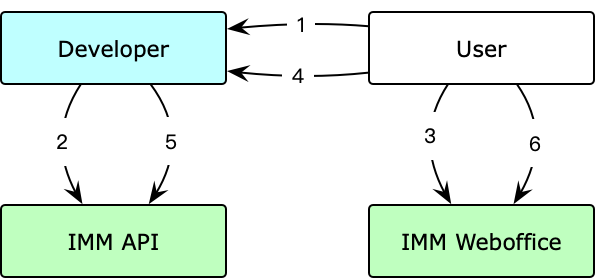
L'utilisateur ouvre la page web de prévisualisation ou d'édition collaborative du document.
Le système appelle l'opération GenerateWebofficeToken d'Intelligent Media Management (IMM) pour générer un jeton d'accès. Il invoque ensuite la méthode
configdu SDK WebOffice IMM pour JavaScript afin d'initialiser le service.L'utilisateur prévisualise ou modifie le document sur la page web.
Lorsque le jeton d'accès est sur le point d'expirer, la page web demande automatiquement son actualisation.
La page web exécute le rappel
refreshToken, qui appelle l'opération API IMM RefreshWebofficeToken pour actualiser le jeton d'accès.L'utilisateur conserve l'accès au document.
Références backend
GenerateWebofficeToken : opération API qui génère un jeton d'accès.
RefreshWebofficeToken : opération API qui actualise un jeton d'accès.
Références frontend
<!DOCTYPE html>
<html>
<head>
  <meta charset="utf-8">
  <title>Demo</title>
  <meta name="viewport" content="width=device-width,initial-scale=1.0">
  <style>
    html,body{
      margin:0;
      height:100%;
    }
    #weboffice-zone{
      height: 100%;
      width: 100%;
    }
    iframe {
      width: 100%;
      height: 100%;
    }
  </style>
</head>

<body>
  <script src="https://g.alicdn.com/IMM/office-js/1.1.15/aliyun-web-office-sdk.min.js"></script>
  <script src="https://g.alicdn.com/code/lib/axios/0.27.2/axios.min.js"></script>
  <div id="weboffice-zone"></div>
  <script>
    window.onload = init;
    var tokenInfo;
    function init() {
      // Call the backend operation to create an access token and URL for document preview or collaborative editing.
      axios.get("https://example.developer.backend.com/GenerateWebofficeToken")
      .then(r => r.data)
      .then(function (data){
        tokenInfo = data;
        weboffice(tokenInfo);
      });
    }
    function weboffice(tokenInfo) {
      var mount = document.getElementById('weboffice-zone');
      var demo = aliyun.config({
        mount: mount,
        url: tokenInfo.WebofficeURL,
        refreshToken: refreshTokenPromise // Refresh the access token when it is about to expire.
      });
      demo.setToken({
        token: tokenInfo.AccessToken,
        timeout: 25*60*1000 // The validity period of the access token. Unit: milliseconds. The access token is refreshed after 25 minutes.
      });
    }

    // The refreshToken method does not support async and await. It can return a promise object or a common object {token,timeout}.
    function refreshTokenPromise() {
      return new Promise(function(resolve){
        axios.get("https://example.developer.backend.com/RefreshWebofficeURLToken", tokenInfo) // Call the backend operation to refresh the token.
        .then(r => r.data)
        .then(function(data) {
          // Save the data for the next refresh.
          tokenInfo = data
          resolve({
            token: tokenInfo.AccessToken,
            timeout: 10*60*1000
          })
        })
      })
    }
  </script>
</body>
</html>