Cette rubrique explique comment interroger des données à partir de tables internes ou via des tables externes dans Hologres. Elle vous permet de découvrir les performances supérieures des requêtes de données dans Hologres.
Prérequis
Vous avez acheté une instance Hologres. Pour plus d'informations, consultez la page Achat d'une instance Hologres.
Les autorisations requises ont été accordées à l'utilisateur RAM que vous souhaitez utiliser pour effectuer les opérations. Pour plus d'informations, consultez la page Octroi d'autorisations à un utilisateur RAM.
Contexte
Hologres répond rapidement aux demandes de requêtes de données. Cette rubrique décrit la création d'une base de données, de tables externes et de tables internes, ainsi que l'importation de données dans les tables internes de Hologres. Elle explique également comment interroger des données à partir de tables internes ou via des tables externes dans Hologres. Vous pourrez ainsi constater par vous-même les excellentes performances des requêtes de données dans Hologres.
Procédure
-
Cette étape montre comment créer une base de données dans Hologres. Vous pouvez utiliser cette base de données pour stocker les données de votre instance Hologres en vue de futures requêtes.
-
Dans la base de données créée, créez une table pour stocker des exemples de données. Les tables sont classées en deux catégories : les tables externes et les tables internes :
Les tables externes mappent les champs des sources de données externes et ne stockent pas les données dans Hologres.
Les tables internes servent à stocker les données dans Hologres.
-
Importer des exemples de données
Cette étape montre comment importer des données dans les tables internes de Hologres en vue de futures requêtes. Dans cet exemple, nous utilisons les jeux de données TPC Benchmark H (TPC-H).
-
Interroger des données dans les tables
Cette étape montre comment interroger des données dans les tables. Dans cet exemple, nous utilisons les 22 instructions SQL TPC-H. Cela vous permet de constater la réactivité et la stabilité des requêtes de données dans Hologres.
Étape 1 : Créer une base de données
Connectez-vous à la console Hologres. Dans le volet de navigation de gauche, cliquez sur Instances.
Sur la page Instances, cliquez sur le nom de l'instance cible.
Dans le volet de navigation de gauche de la page Instance Details, cliquez sur Database Management.
-
Sur la page DB Authorization, cliquez sur Create Database dans le coin supérieur droit.

-
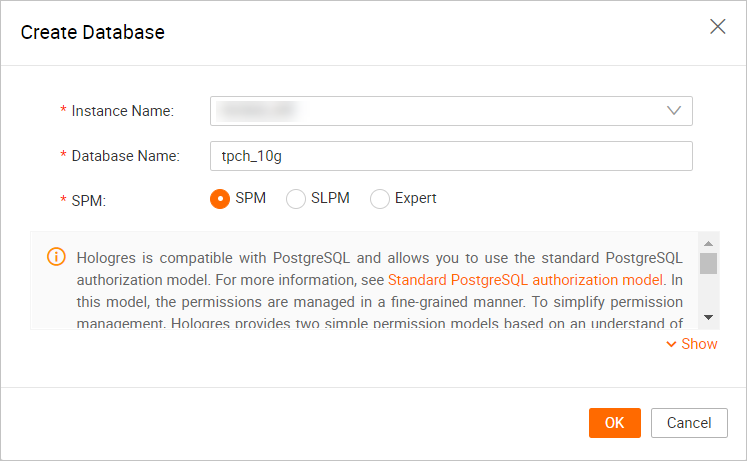
Dans la boîte de dialogue Create Database, configurez les paramètres suivants.
Paramètre
Description
Instance Name
Le nom de l'instance Hologres dans laquelle vous souhaitez créer la base de données. Par défaut, le nom de l'instance connectée s'affiche. Vous pouvez également sélectionner une autre instance Hologres dans la liste déroulante.
Database Name
Le nom de la base de données. Dans cet exemple, nous utilisons tpch_10g.
RemarqueLe nom de la base de données doit être unique.
Permission Model
Vous pouvez sélectionner une politique d'accès pour la base de données que vous avez créée. Pour plus d'informations sur les politiques d'accès, consultez les pages suivantes :
-
SPM : modèle d'autorisation simple (SPM). Si vous sélectionnez SPM, les autorisations sont accordées au niveau de la base de données. Les rôles suivants sont proposés : admin, developer, writer et viewer. Vous pouvez gérer les autorisations sur les objets d'une base de données de manière pratique et sécurisée à l'aide de quelques fonctions de gestion des autorisations.
-
SLPM : modèle d'autorisation au niveau du schéma (SLPM). Si vous sélectionnez SLPM, les autorisations sont accordées au niveau du schéma. Les rôles suivants sont proposés : <db>.admin, <db>.<schema>.developer, <db>.<schema>.writer et <db>.<schema>.viewer. Par rapport au SPM, le SLPM vous permet de gérer les autorisations avec une granularité plus fine.
-
modèle d'autorisation PostgreSQL standard : Hologres est compatible avec PostgreSQL et utilise le système d'autorisations PostgreSQL.
-
Étape 2 : Créer des tables
Une fois la base de données créée, vous pouvez y créer des tables. Vous pouvez créer des tables externes ou internes en fonction de l'emplacement de stockage de vos données.
-
Créer une table externe
-
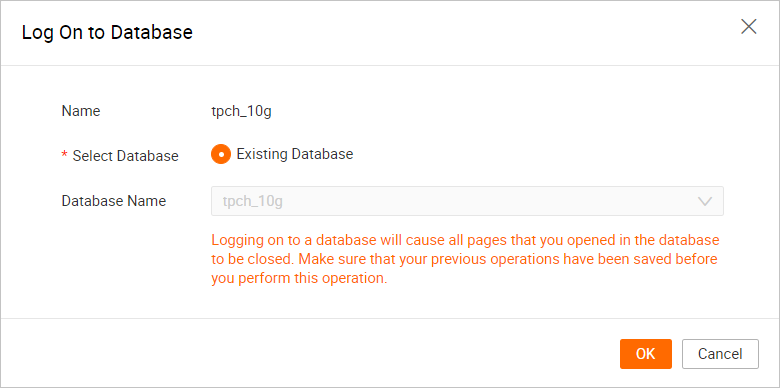
Connectez-vous à la base de données.
Sur la page de développement HoloWeb, cliquez sur Metadata Management.
Sur la page Metadata Management, double-cliquez sur le nom de la base de données que vous avez créée dans l'arborescence de gauche, puis cliquez sur OK.
-
Créez des tables externes.
Sur la page SQL Editor, cliquez sur l'icône
 dans le coin supérieur gauche.
-
Sur la nouvelle page Ad-hoc Query, sélectionnez votre Instance Name et votre Database. Ensuite, saisissez les instructions suivantes dans l'éditeur SQL et cliquez sur Run.
Les instructions SQL suivantes permettent de créer des tables externes en vue de futures requêtes. Les tables externes mappent les champs des tables source, telles que les tables odps_customer_10g et odps_lineitem_10g du projet MaxCompute MAXCOMPUTE_PUBLIC_DATA.
DROP FOREIGN TABLE IF EXISTS odps_customer_10g;
DROP FOREIGN TABLE IF EXISTS odps_lineitem_10g;
DROP FOREIGN TABLE IF EXISTS odps_nation_10g;
DROP FOREIGN TABLE IF EXISTS odps_orders_10g;
DROP FOREIGN TABLE IF EXISTS odps_part_10g;
DROP FOREIGN TABLE IF EXISTS odps_partsupp_10g;
DROP FOREIGN TABLE IF EXISTS odps_region_10g;
DROP FOREIGN TABLE IF EXISTS odps_supplier_10g;

IMPORT FOREIGN SCHEMA "MAXCOMPUTE_PUBLIC_DATA#default" LIMIT to
(
    odps_customer_10g,
    odps_lineitem_10g,
    odps_nation_10g,
    odps_orders_10g,
    odps_part_10g,
    odps_partsupp_10g,
    odps_region_10g,
    odps_supplier_10g
)
FROM SERVER odps_server INTO public OPTIONS(if_table_exist'error',if_unsupported_type'error');
-
-
Créer des tables internes
-
Connectez-vous à la base de données.
Sur la page de développement HoloWeb, cliquez sur Metadata Management.
Sur la page Metadata Management, double-cliquez sur le nom de la base de données que vous avez créée dans l'arborescence de gauche, puis cliquez sur OK.
-
Créez des tables internes.
Sur la page SQL Editor, cliquez sur New SQL Window dans le coin supérieur gauche.
-
Sur la nouvelle page Ad-hoc Query, sélectionnez l'Instance Name et la Database que vous avez créées. Ensuite, saisissez les instructions suivantes dans l'éditeur SQL et cliquez sur Run.
Les instructions SQL suivantes permettent de créer des tables internes nommées LINEITEM, ORDERS, PARTSUPP, PART, CUSTOMER, SUPPLIER, NATION et REGION. Ces tables internes servent à stocker les données en vue de futures requêtes.
DROP TABLE IF EXISTS LINEITEM;

BEGIN;
CREATE TABLE LINEITEM (
    L_ORDERKEY bigint NOT NULL,
    L_PARTKEY int NOT NULL,
    L_SUPPKEY int NOT NULL,
    L_LINENUMBER int NOT NULL,
    L_QUANTITY DECIMAL(15, 2) NOT NULL,
    L_EXTENDEDPRICE DECIMAL(15, 2) NOT NULL,
    L_DISCOUNT DECIMAL(15, 2) NOT NULL,
    L_TAX DECIMAL(15, 2) NOT NULL,
    L_RETURNFLAG text NOT NULL,
    L_LINESTATUS text NOT NULL,
    L_SHIPDATE date NOT NULL,
    L_COMMITDATE date NOT NULL,
    L_RECEIPTDATE date NOT NULL,
    L_SHIPINSTRUCT text NOT NULL,
    L_SHIPMODE text NOT NULL,
    L_COMMENT text NOT NULL,
    PRIMARY KEY (L_ORDERKEY, L_LINENUMBER)
);
CALL set_table_property ('LINEITEM', 'clustering_key', 'L_SHIPDATE,L_ORDERKEY');
CALL set_table_property ('LINEITEM', 'segment_key', 'L_SHIPDATE');
CALL set_table_property ('LINEITEM', 'distribution_key', 'L_ORDERKEY');
CALL set_table_property ('LINEITEM', 'bitmap_columns', 'L_RETURNFLAG,L_LINESTATUS,L_SHIPINSTRUCT,L_SHIPMODE');
CALL set_table_property ('LINEITEM', 'dictionary_encoding_columns', 'l_comment:off,l_returnflag,l_linestatus,l_shipinstruct,l_shipmode');
COMMIT;

DROP TABLE IF EXISTS ORDERS;

BEGIN;
CREATE TABLE ORDERS (
    O_ORDERKEY bigint NOT NULL PRIMARY KEY,
    O_CUSTKEY int NOT NULL,
    O_ORDERSTATUS text NOT NULL,
    O_TOTALPRICE DECIMAL(15, 2) NOT NULL,
    O_ORDERDATE date NOT NULL,
    O_ORDERPRIORITY text NOT NULL,
    O_CLERK text NOT NULL,
    O_SHIPPRIORITY int NOT NULL,
    O_COMMENT text NOT NULL
);
CALL set_table_property ('ORDERS', 'segment_key', 'O_ORDERDATE');
CALL set_table_property ('ORDERS', 'colocate_with', 'lineitem');
CALL set_table_property ('ORDERS', 'distribution_key', 'O_ORDERKEY');
CALL set_table_property ('ORDERS', 'bitmap_columns', 'O_ORDERSTATUS,O_ORDERPRIORITY,O_CLERK,O_SHIPPRIORITY');
CALL set_table_property ('ORDERS', 'dictionary_encoding_columns', 'o_comment:off,o_orderstatus,o_orderpriority,o_clerk');
COMMIT;

DROP TABLE IF EXISTS PARTSUPP;

BEGIN;
CREATE TABLE PARTSUPP (
    PS_PARTKEY int NOT NULL,
    PS_SUPPKEY int NOT NULL,
    PS_AVAILQTY int NOT NULL,
    PS_SUPPLYCOST DECIMAL(15, 2) NOT NULL,
    PS_COMMENT text NOT NULL,
    PRIMARY KEY (PS_PARTKEY, PS_SUPPKEY)
);
CALL set_table_property ('PARTSUPP', 'distribution_key', 'PS_PARTKEY');
CALL set_table_property ('PARTSUPP', 'colocate_with', 'lineitem');
CALL set_table_property ('PARTSUPP', 'bitmap_columns', 'ps_availqty');
CALL set_table_property ('PARTSUPP', 'dictionary_encoding_columns', '');
COMMIT;

DROP TABLE IF EXISTS PART;

BEGIN;
CREATE TABLE PART (
    P_PARTKEY int NOT NULL PRIMARY KEY,
    P_NAME text NOT NULL,
    P_MFGR text NOT NULL,
    P_BRAND text NOT NULL,
    P_TYPE text NOT NULL,
    P_SIZE int NOT NULL,
    P_CONTAINER text NOT NULL,
    P_RETAILPRICE DECIMAL(15, 2) NOT NULL,
    P_COMMENT text NOT NULL
);
CALL set_table_property ('PART', 'distribution_key', 'P_PARTKEY');
CALL set_table_property ('PART', 'colocate_with', 'lineitem');
CALL set_table_property ('PART', 'bitmap_columns', 'P_SIZE,P_MFGR,P_BRAND,P_TYPE,P_CONTAINER');
CALL set_table_property ('PART', 'dictionary_encoding_columns', 'p_name:off,p_comment:off,p_mfgr,p_brand,p_type,p_container');
COMMIT;

DROP TABLE IF EXISTS CUSTOMER;

BEGIN;
CREATE TABLE CUSTOMER (
    C_CUSTKEY int NOT NULL PRIMARY KEY,
    C_NAME text NOT NULL,
    C_ADDRESS text NOT NULL,
    C_NATIONKEY int NOT NULL,
    C_PHONE text NOT NULL,
    C_ACCTBAL DECIMAL(15, 2) NOT NULL,
    C_MKTSEGMENT text NOT NULL,
    C_COMMENT text NOT NULL
);
CALL set_table_property ('CUSTOMER', 'distribution_key', 'C_CUSTKEY');
CALL set_table_property ('CUSTOMER', 'colocate_with', 'lineitem');
CALL set_table_property ('CUSTOMER', 'bitmap_columns', 'C_NATIONKEY,C_MKTSEGMENT');
CALL set_table_property ('CUSTOMER', 'dictionary_encoding_columns', 'c_name:off,c_address:off,c_phone:off,c_comment:off,c_mktsegment');
COMMIT;

DROP TABLE IF EXISTS SUPPLIER;

BEGIN;
CREATE TABLE SUPPLIER (
    S_SUPPKEY int NOT NULL PRIMARY KEY,
    S_NAME text NOT NULL,
    S_ADDRESS text NOT NULL,
    S_NATIONKEY int NOT NULL,
    S_PHONE text NOT NULL,
    S_ACCTBAL DECIMAL(15, 2) NOT NULL,
    S_COMMENT text NOT NULL
);
CALL set_table_property ('SUPPLIER', 'distribution_key', 'S_SUPPKEY');
CALL set_table_property ('SUPPLIER', 'colocate_with', 'lineitem');
CALL set_table_property ('SUPPLIER', 'bitmap_columns', 'S_NATIONKEY');
CALL set_table_property ('SUPPLIER', 'dictionary_encoding_columns', '');
COMMIT;

DROP TABLE IF EXISTS NATION;

BEGIN;
CREATE TABLE NATION (
    N_NATIONKEY int NOT NULL PRIMARY KEY,
    N_NAME text NOT NULL,
    N_REGIONKEY int NOT NULL,
    N_COMMENT text NOT NULL
);
CALL set_table_property ('NATION', 'distribution_key', 'N_NATIONKEY');
CALL set_table_property ('NATION', 'colocate_with', 'lineitem');
CALL set_table_property ('NATION', 'bitmap_columns', '');
CALL set_table_property ('NATION', 'dictionary_encoding_columns', '');
COMMIT;

DROP TABLE IF EXISTS REGION;

BEGIN;
CREATE TABLE REGION (
    R_REGIONKEY int NOT NULL PRIMARY KEY,
    R_NAME text NOT NULL,
    R_COMMENT text
);
CALL set_table_property ('REGION', 'distribution_key', 'R_REGIONKEY');
CALL set_table_property ('REGION', 'colocate_with', 'lineitem');
CALL set_table_property ('REGION', 'bitmap_columns', '');
CALL set_table_property ('REGION', 'dictionary_encoding_columns', '');
COMMIT;
-
Étape 3 : Importer des exemples de données
Une fois les tables internes créées, suivez les étapes ci-dessous pour importer des données dans les tables internes de Hologres.
Les tables externes mappent les champs des sources de données externes et ne stockent pas les données dans Hologres. Vous pouvez utiliser des tables externes dans Hologres pour interroger les données stockées dans le projet MaxCompute MAXCOMPUTE_PUBLIC_DATA.
Sur la page SQL Editor, cliquez sur New SQL Window dans le coin supérieur gauche.
-
Sur la page Ad-hoc Query, sélectionnez l'Instance Name et la Database que vous avez créées, saisissez les instructions suivantes dans l'éditeur SQL, puis cliquez sur Run.
Les instructions SQL suivantes importent les données depuis des tables telles que
public.odps_customer_10getpublic.odps_lineitem_10gdans le projet public MaxComputeMAXCOMPUTE_PUBLIC_DATA, et chargent ces données dans des tables internes portant les mêmes noms en vue de requêtes ultérieures.INSERT INTO public.customer SELECT * FROM public.odps_customer_10g ; INSERT INTO public.lineitem SELECT * FROM public.odps_lineitem_10g ; INSERT INTO public.nation SELECT * FROM public.odps_nation_10g ; INSERT INTO public.orders SELECT * FROM public.odps_orders_10g ; INSERT INTO public.part SELECT * FROM public.odps_part_10g ; INSERT INTO public.partsupp SELECT * FROM public.odps_partsupp_10g ; INSERT INTO public.region SELECT * FROM public.odps_region_10g ; INSERT INTO public.supplier SELECT * FROM public.odps_supplier_10g ; vacuum nation; vacuum region; vacuum supplier; vacuum customer; vacuum part; vacuum partsupp; vacuum orders; vacuum lineitem; analyze nation; analyze region; analyze lineitem; analyze orders; analyze customer; analyze part; analyze partsupp; analyze supplier; analyze lineitem (l_orderkey,l_partkey,l_suppkey); analyze orders (o_custkey); analyze partsupp(ps_partkey,ps_suppkey);
Étape 4 : Interroger des données dans les tables
Sur la page SQL Editor, cliquez sur New SQL Window dans le coin supérieur gauche.
-
Sur la nouvelle page Ad-hoc Query, sélectionnez l'Instance Name et la Database que vous avez créées, saisissez les instructions suivantes dans l'éditeur SQL, puis cliquez sur Run.
RemarqueLes instructions SQL suivantes servent à interroger des données à partir de tables internes. Pour interroger des données via une table externe, remplacez le nom de la table dans l'instruction par le nom de la table externe.
Le tableau suivant fournit les liens vers les 22 instructions SQL TPC-H. Pour afficher une instruction SQL spécifique, cliquez sur le lien correspondant dans le tableau.
Nom
Instruction de requête
22 instructions de requête TPC-H
-
-
-
Q1
select l_returnflag, l_linestatus, sum(l_quantity) as sum_qty, sum(l_extendedprice) as sum_base_price, sum(l_extendedprice * (1 - l_discount)) as sum_disc_price, sum(l_extendedprice * (1 - l_discount) * (1 + l_tax)) as sum_charge, avg(l_quantity) as avg_qty, avg(l_extendedprice) as avg_price, avg(l_discount) as avg_disc, count(*) as count_order from lineitem where l_shipdate <= date '1998-12-01' - interval '120' day group by l_returnflag, l_linestatus order by l_returnflag, l_linestatus; -
Q2
select s_acctbal, s_name, n_name, p_partkey, p_mfgr, s_address, s_phone, s_comment from part, supplier, partsupp, nation, region where p_partkey = ps_partkey and s_suppkey = ps_suppkey and p_size = 48 and p_type like '%STEEL' and s_nationkey = n_nationkey and n_regionkey = r_regionkey and r_name = 'EUROPE' and ps_supplycost = ( select min(ps_supplycost) from partsupp, supplier, nation, region where p_partkey = ps_partkey and s_suppkey = ps_suppkey and s_nationkey = n_nationkey and n_regionkey = r_regionkey and r_name = 'EUROPE' ) order by s_acctbal desc, n_name, s_name, p_partkey limit 100; -
Q3
select l_orderkey, sum(l_extendedprice * (1 - l_discount)) as revenue, o_orderdate, o_shippriority from customer, orders, lineitem where c_mktsegment = 'MACHINERY' and c_custkey = o_custkey and l_orderkey = o_orderkey and o_orderdate < date '1995-03-23' and l_shipdate > date '1995-03-23' group by l_orderkey, o_orderdate, o_shippriority order by revenue desc, o_orderdate limit 10; -
Q4
select o_orderpriority, count(*) as order_count from orders where o_orderdate >= date '1996-07-01' and o_orderdate < date '1996-07-01' + interval '3' month and exists ( select * from lineitem where l_orderkey = o_orderkey and l_commitdate < l_receiptdate ) group by o_orderpriority order by o_orderpriority; -
Q5
select n_name, sum(l_extendedprice * (1 - l_discount)) as revenue from customer, orders, lineitem, supplier, nation, region where c_custkey = o_custkey and l_orderkey = o_orderkey and l_suppkey = s_suppkey and c_nationkey = s_nationkey and s_nationkey = n_nationkey and n_regionkey = r_regionkey and r_name = 'EUROPE' and o_orderdate >= date '1996-01-01' and o_orderdate < date '1996-01-01' + interval '1' year group by n_name order by revenue desc; -
Q6
select sum(l_extendedprice * l_discount) as revenue from lineitem where l_shipdate >= date '1996-01-01' and l_shipdate < date '1996-01-01' + interval '1' year and l_discount between 0.02 - 0.01 and 0.02 + 0.01 and l_quantity < 24; -
Q7
set hg_experimental_enable_double_equivalent=on; select supp_nation, cust_nation, l_year, sum(volume) as revenue from ( select n1.n_name as supp_nation, n2.n_name as cust_nation, extract(year from l_shipdate) as l_year, l_extendedprice * (1 - l_discount) as volume from supplier, lineitem, orders, customer, nation n1, nation n2 where s_suppkey = l_suppkey and o_orderkey = l_orderkey and c_custkey = o_custkey and s_nationkey = n1.n_nationkey and c_nationkey = n2.n_nationkey and ( (n1.n_name = 'CANADA' and n2.n_name = 'BRAZIL') or (n1.n_name = 'BRAZIL' and n2.n_name = 'CANADA') ) and l_shipdate between date '1995-01-01' and date '1996-12-31' ) as shipping group by supp_nation, cust_nation, l_year order by supp_nation, cust_nation, l_year; -
Q8
set hg_experimental_enable_double_equivalent=on; select o_year, sum(case when nation = 'BRAZIL' then volume else 0 end) / sum(volume) as mkt_share from ( select extract(year from o_orderdate) as o_year, l_extendedprice * (1 - l_discount) as volume, n2.n_name as nation from part, supplier, lineitem, orders, customer, nation n1, nation n2, region where p_partkey = l_partkey and s_suppkey = l_suppkey and l_orderkey = o_orderkey and o_custkey = c_custkey and c_nationkey = n1.n_nationkey and n1.n_regionkey = r_regionkey and r_name = 'AMERICA' and s_nationkey = n2.n_nationkey and o_orderdate between date '1995-01-01' and date '1996-12-31' and p_type = 'LARGE ANODIZED COPPER' ) as all_nations group by o_year order by o_year; -
Q9
set hg_experimental_enable_double_equivalent=on; select nation, o_year, sum(amount) as sum_profit from ( select n_name as nation, extract(year from o_orderdate) as o_year, l_extendedprice * (1 - l_discount) - ps_supplycost * l_quantity as amount from part, supplier, lineitem, partsupp, orders, nation where s_suppkey = l_suppkey and ps_suppkey = l_suppkey and ps_partkey = l_partkey and p_partkey = l_partkey and o_orderkey = l_orderkey and s_nationkey = n_nationkey and p_name like '%maroon%' ) as profit group by nation, o_year order by nation, o_year desc; -
Q10
select c_custkey, c_name, sum(l_extendedprice * (1 - l_discount)) as revenue, c_acctbal, n_name, c_address, c_phone, c_comment from customer, orders, lineitem, nation where c_custkey = o_custkey and l_orderkey = o_orderkey and o_orderdate >= date '1993-02-01' and o_orderdate < date '1993-02-01' + interval '3' month and l_returnflag = 'R' and c_nationkey = n_nationkey group by c_custkey, c_name, c_acctbal, c_phone, n_name, c_address, c_comment order by revenue desc limit 20; -
Q11
select ps_partkey, sum(ps_supplycost * ps_availqty) as value from partsupp, supplier, nation where ps_suppkey = s_suppkey and s_nationkey = n_nationkey and n_name = 'EGYPT' group by ps_partkey having sum(ps_supplycost * ps_availqty) > ( select sum(ps_supplycost * ps_availqty) * 0.0001000000 from partsupp, supplier, nation where ps_suppkey = s_suppkey and s_nationkey = n_nationkey and n_name = 'EGYPT' ) order by value desc; -
Q12
select l_shipmode, sum(case when o_orderpriority = '1-URGENT' or o_orderpriority = '2-HIGH' then 1 else 0 end) as high_line_count, sum(case when o_orderpriority <> '1-URGENT' and o_orderpriority <> '2-HIGH' then 1 else 0 end) as low_line_count from orders, lineitem where o_orderkey = l_orderkey and l_shipmode in ('FOB', 'AIR') and l_commitdate < l_receiptdate and l_shipdate < l_commitdate and l_receiptdate >= date '1997-01-01' and l_receiptdate < date '1997-01-01' + interval '1' year group by l_shipmode order by l_shipmode; -
Q13
select c_count, count(*) as custdist from ( select c_custkey, count(o_orderkey) as c_count from customer left outer join orders on c_custkey = o_custkey and o_comment not like '%special%deposits%' group by c_custkey ) c_orders group by c_count order by custdist desc, c_count desc; -
Q14
select 100.00 * sum(case when p_type like 'PROMO%' then l_extendedprice * (1 - l_discount) else 0 end) / sum(l_extendedprice * (1 - l_discount)) as promo_revenue from lineitem, part where l_partkey = p_partkey and l_shipdate >= date '1997-06-01' and l_shipdate < date '1997-06-01' + interval '1' month; -
Q15
with revenue0(SUPPLIER_NO, TOTAL_REVENUE) as ( select l_suppkey, sum(l_extendedprice * (1 - l_discount)) from lineitem where l_shipdate >= date '1995-02-01' and l_shipdate < date '1995-02-01' + interval '3' month group by l_suppkey ) select s_suppkey, s_name, s_address, s_phone, total_revenue from supplier, revenue0 where s_suppkey = supplier_no and total_revenue = ( select max(total_revenue) from revenue0 ) order by s_suppkey; -
Q16
select p_brand, p_type, p_size, count(distinct ps_suppkey) as supplier_cnt from partsupp, part where p_partkey = ps_partkey and p_brand <> 'Brand#45' and p_type not like 'SMALL ANODIZED%' and p_size in (47, 15, 37, 30, 46, 16, 18, 6) and ps_suppkey not in ( select s_suppkey from supplier where s_comment like '%Customer%Complaints%' ) group by p_brand, p_type, p_size order by supplier_cnt desc, p_brand, p_type, p_size; -
Q17
select sum(l_extendedprice) / 7.0 as avg_yearly from lineitem, part where p_partkey = l_partkey and p_brand = 'Brand#51' and p_container = 'WRAP PACK' and l_quantity < ( select 0.2 * avg(l_quantity) from lineitem where l_partkey = p_partkey ); -
Q18
select c_name, c_custkey, o_orderkey, o_orderdate, o_totalprice, sum(l_quantity) from customer, orders, lineitem where o_orderkey in ( select l_orderkey from lineitem group by l_orderkey having sum(l_quantity) > 312 ) and c_custkey = o_custkey and o_orderkey = l_orderkey group by c_name, c_custkey, o_orderkey, o_orderdate, o_totalprice order by o_totalprice desc, o_orderdate limit 100; -
Q19
select sum(l_extendedprice* (1 - l_discount)) as revenue from lineitem, part where ( p_partkey = l_partkey and p_brand = 'Brand#52' and p_container in ('SM CASE', 'SM BOX', 'SM PACK', 'SM PKG') and l_quantity >= 3 and l_quantity <= 3 + 10 and p_size between 1 and 5 and l_shipmode in ('AIR', 'AIR REG') and l_shipinstruct = 'DELIVER IN PERSON' ) or ( p_partkey = l_partkey and p_brand = 'Brand#43' and p_container in ('MED BAG', 'MED BOX', 'MED PKG', 'MED PACK') and l_quantity >= 12 and l_quantity <= 12 + 10 and p_size between 1 and 10 and l_shipmode in ('AIR', 'AIR REG') and l_shipinstruct = 'DELIVER IN PERSON' ) or ( p_partkey = l_partkey and p_brand = 'Brand#52' and p_container in ('LG CASE', 'LG BOX', 'LG PACK', 'LG PKG') and l_quantity >= 21 and l_quantity <= 21 + 10 and p_size between 1 and 15 and l_shipmode in ('AIR', 'AIR REG') and l_shipinstruct = 'DELIVER IN PERSON' ); -
Q20
select s_name, s_address from supplier, nation where s_suppkey in ( select ps_suppkey from partsupp where ps_partkey in ( select p_partkey from part where p_name like 'drab%' ) and ps_availqty > ( select 0.5 * sum(l_quantity) from lineitem where l_partkey = ps_partkey and l_suppkey = ps_suppkey and l_shipdate >= date '1996-01-01' and l_shipdate < date '1996-01-01' + interval '1' year ) ) and s_nationkey = n_nationkey and n_name = 'KENYA' order by s_name; -
Q21
select s_name, count(*) as numwait from supplier, lineitem l1, orders, nation where s_suppkey = l1.l_suppkey and o_orderkey = l1.l_orderkey and o_orderstatus = 'F' and l1.l_receiptdate > l1.l_commitdate and exists ( select * from lineitem l2 where l2.l_orderkey = l1.l_orderkey and l2.l_suppkey <> l1.l_suppkey ) and not exists ( select * from lineitem l3 where l3.l_orderkey = l1.l_orderkey and l3.l_suppkey <> l1.l_suppkey and l3.l_receiptdate > l3.l_commitdate ) and s_nationkey = n_nationkey and n_name = 'PERU' group by s_name order by numwait desc, s_name limit 100; -
Q22
select
        cntrycode,
        count(*) as numcust,
        sum(c_acctbal) as totacctbal
from
        (
                select
                        substring(c_phone from 1 for 2) as cntrycode,
                        c_acctbal
                from
                        customer
                where
                        substring(c_phone from 1 for 2) in
                                ('24', '32', '17', '18', '12', '14', '22')
                        and c_acctbal > (
                                select
                                        avg(c_acctbal)
                                from
                                        customer
                                where
                                        c_acctbal > 0.00
                                        and substring(c_phone from 1 for 2) in
                                                ('24', '32', '17', '18', '12', '14', '22')
                        )
                        and not exists (
                                select
                                        *
                                from
                                        orders
                                where
                                        o_custkey = c_custkey
                        )
        ) as custsale
group by
        cntrycode
order by
        cntrycode;
-