Scénario problématique
Lorsque vous utilisez le kit de développement logiciel (SDK) C# pour envoyer une grande quantité de contenu, une erreur « Invalid URI: The Uri string is too long » se produit.
Solutions
Connectez-vous à Alibaba Cloud OpenAPI Explorer pour générer du code destiné au débogage.
Activez l'option Generate code en mode commun et spécifiez les paramètres.
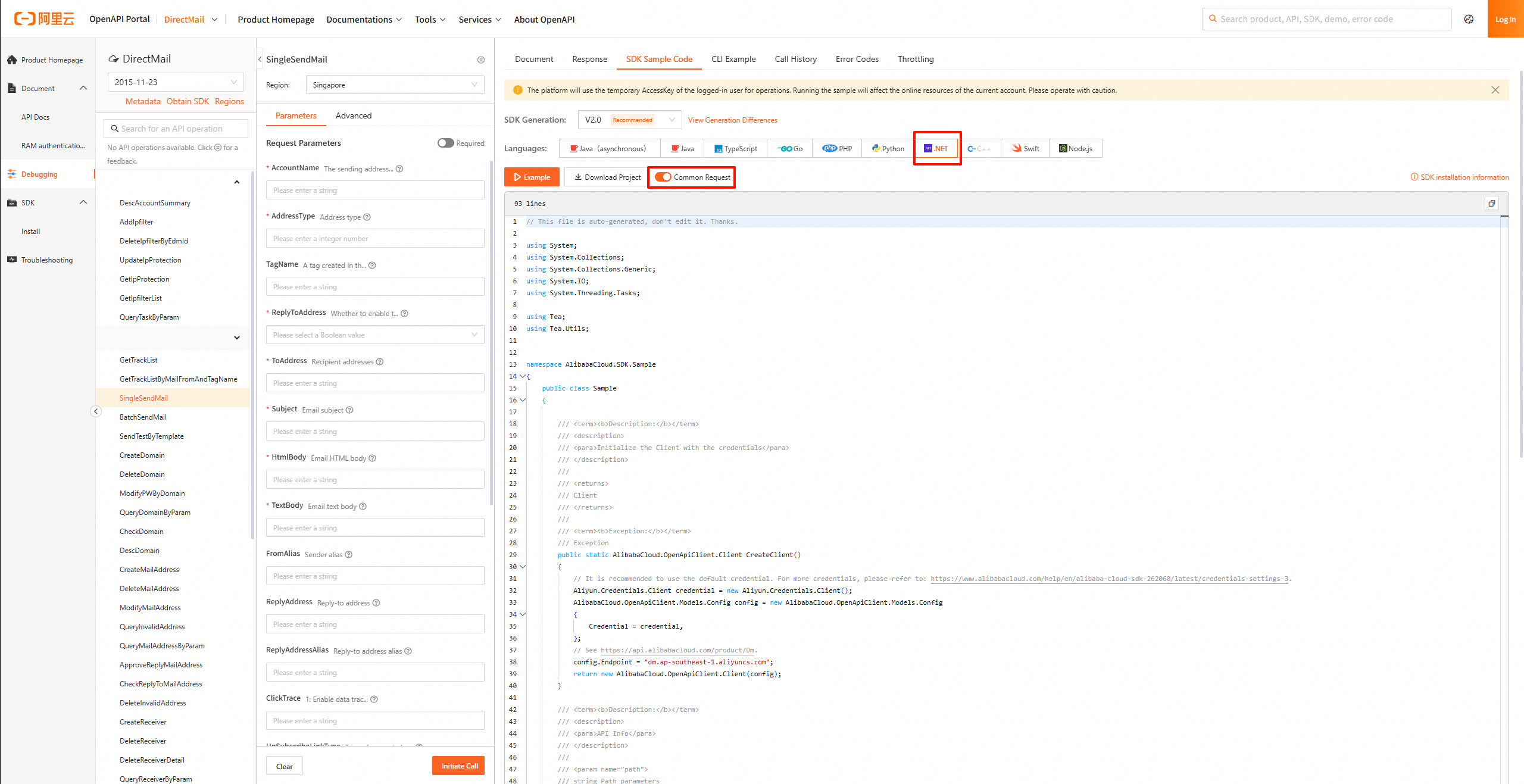
Une fois le code obtenu, modifiez la méthode de transmission des paramètres de URL vers Body.
La figure suivante illustre les deux modifications clés :
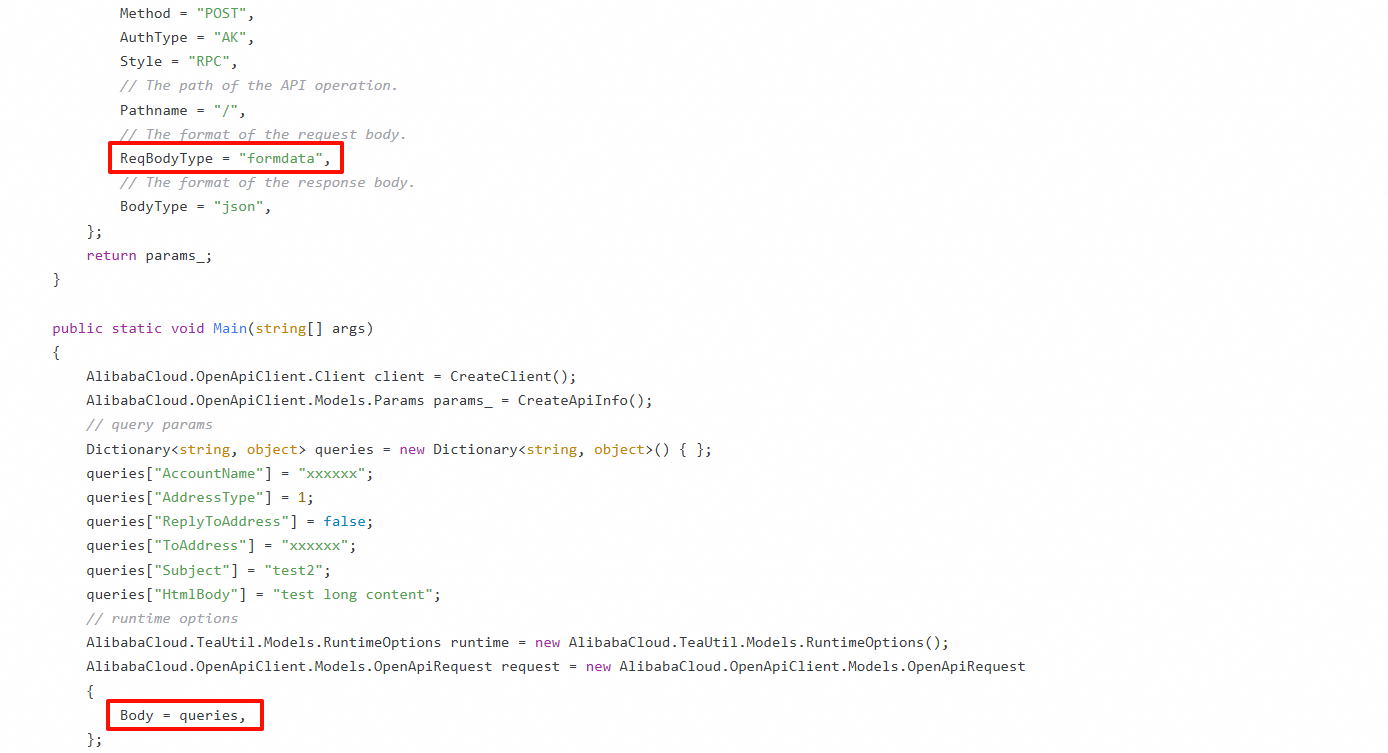
Code modifié :
using System;
using System.Collections;
using System.Collections.Generic;
using System.IO;
using System.Threading.Tasks;

using Tea;
using Tea.Utils;

namespace AlibabaCloud.SDK.Sample
{
    public class Sample
    {

        /**
         * Use an AccessKey pair to initialize the client.
         * @return Client
         * @throws Exception
         */
        public static AlibabaCloud.OpenApiClient.Client CreateClient()
        {
            // Leaking the code may expose your AccessKey pair and compromise the security of all your resources. The following sample code is for reference only.
            // Use the more secure Security Token Service (STS) method. For more information, see the related documents below.
            AlibabaCloud.OpenApiClient.Models.Config config = new AlibabaCloud.OpenApiClient.Models.Config
            {
                // Required. Make sure that the ALIBABA_CLOUD_ACCESS_KEY_ID environment variable is set.
                AccessKeyId = "xxxxxx",
                // Required. Make sure that the ALIBABA_CLOUD_ACCESS_KEY_SECRET environment variable is set.
                AccessKeySecret = "xxxxxx",
            };
            // For more information about endpoints, see the related documents.
            config.Endpoint = "dm.aliyuncs.com";
            return new AlibabaCloud.OpenApiClient.Client(config);
        }

        /**
         * API-related information
         * @param path params
         * @return OpenApi.Params
         */
        public static AlibabaCloud.OpenApiClient.Models.Params CreateApiInfo()
        {
            AlibabaCloud.OpenApiClient.Models.Params params_ = new AlibabaCloud.OpenApiClient.Models.Params
            {
                // The name of the API operation.
                Action = "SingleSendMail",
                // The version of the API operation.
                Version = "2015-11-23",
                // The protocol.
                Protocol = "HTTPS",
                // The HTTP method.
                Method = "POST",
                AuthType = "AK",
                Style = "RPC",
                // The path of the API operation.
                Pathname = "/",
                // The format of the request body.
                ReqBodyType = "formdata",
                // The format of the response body.
                BodyType = "json",
            };
            return params_;
        }

        public static void Main(string[] args)
        {
            AlibabaCloud.OpenApiClient.Client client = CreateClient();
            AlibabaCloud.OpenApiClient.Models.Params params_ = CreateApiInfo();
            // query params
            Dictionary<string, object> queries = new Dictionary<string, object>() { };
            queries["AccountName"] = "xxxxxx";
            queries["AddressType"] = 1;
            queries["ReplyToAddress"] = false;
            queries["ToAddress"] = "xxxxxx";
            queries["Subject"] = "test2";
            queries["HtmlBody"] = "test long content";
            // runtime options
            AlibabaCloud.TeaUtil.Models.RuntimeOptions runtime = new AlibabaCloud.TeaUtil.Models.RuntimeOptions();
            AlibabaCloud.OpenApiClient.Models.OpenApiRequest request = new AlibabaCloud.OpenApiClient.Models.OpenApiRequest
            {
                Body = queries,
            };
            // When you copy the code to run, print the return value of the API operation.
            // The return value is of the Map type. You can obtain three types of data from the Map: the response body, response headers, and the HTTP status code.
            client.CallApi(params_, request, runtime);
        }

    }
}
Références :