La taille totale d'un e-mail comportant des pièces jointes ne doit pas dépasser 15 Mo. Un e-mail peut contenir au maximum 100 pièces jointes.
Cette limite de 15 Mo s'applique à la taille totale de l'e-mail envoyé, incluant l'en-tête, le corps du message et les pièces jointes. L'encodage Base64 augmentant la taille des fichiers, l'e-mail final peut peser plus de 1,5 fois la taille des pièces jointes d'origine. Par conséquent, veillez à ce que la taille totale de vos fichiers joints initiaux ne dépasse pas 8 Mo. Pour envoyer des fichiers plus volumineux, insérez des liens hypertexte vers ceux-ci dans le corps de l'e-mail.
# -*- coding: utf-8 -*-
import sys
from typing import List
from typing import BinaryIO
from alibabacloud_dm20151123.client import Client as Dm20151123Client
from alibabacloud_tea_openapi import models as open_api_models
from alibabacloud_dm20151123 import models as dm_20151123_models
from alibabacloud_tea_util import models as util_models
from alibabacloud_dm20151123 import models as main_models

attachments = []

class Sample:
    def __init__(self) -> None:
        pass

    @staticmethod
    def create_client() -> Dm20151123Client:
        """
        Initializes the account client using credentials.
        @return: Client
        @throws Exception
        """
        # For production code, we recommend using a more secure method that does not require an AccessKey pair. For more information about how to configure credentials, see https://www.alibabacloud.com/help/en/sdk/developer-reference/v2-manage-python-access-credentials.
        config = open_api_models.Config(
            access_key_id='xxxxxx',
            access_key_secret='xxxxxx'
        )
        # For more information about endpoints, see https://api.alibabacloud.com/product/Dm
        config.endpoint = f'dm.ap-southeast-1.aliyuncs.com'
        config.region_id = f'ap-southeast-1'
        return Dm20151123Client(config)

    @staticmethod
    def main(
            args: List[str],
    ) -> None:
        client = Sample.create_client()
        single_sendmail_request = dm_20151123_models.SingleSendMailAdvanceRequest(
            account_name='sender@example.com',
            address_type='1',
            reply_to_address='true',
            to_address='recipient@example.com',
            subject='Subject',
            html_body='Email Body',
            attachments=getAttachments()
        )
        try:
            # When you copy the code to run, print the API return value.
            response = client.single_send_mail_advance(single_sendmail_request, util_models.RuntimeOptions())
            print(response)
        except Exception as error:
            # This is for demonstration purposes only. Handle exceptions with care. Do not ignore exceptions in your project.
            # Error message
            print(error.data)
            # # Diagnosis address
            # print(error.data.get("Recommend"))
            # UtilClient.assert_as_string(error.message)

def getAttachments() -> List[main_models.SingleSendMailAdvanceRequestAttachments]:
    attach = main_models.SingleSendMailAdvanceRequestAttachments("test1.txt", getFile(r"C:\Users\Downloads\111.txt"))
    attach1 = main_models.SingleSendMailAdvanceRequestAttachments("test2.txt", getFile(r"C:\Users\Downloads\222.txt"))
    attachments.append(attach)
    attachments.append(attach1)
    return attachments

def getFile(v_file) -> BinaryIO:
    f = open(v_file, 'rb')
    return f

if __name__ == '__main__':
Sample.main(sys.argv[1:])package org.example;
import com.aliyun.dm20151123.models.SingleSendMailAdvanceRequest;
import com.aliyun.dm20151123.models.SingleSendMailResponse;
import com.aliyun.tea.TeaException;
import com.google.gson.Gson;
import java.io.File;
import java.io.FileInputStream;
import java.util.ArrayList;
import java.util.List;
public class Sample {
/**
* description<?php
// This file is auto-generated, don't edit it. Thanks.
namespace AlibabaCloud\SDK\Sample;
use AlibabaCloud\SDK\Dm\V20151123\Dm;
// use AlibabaCloud\Credentials\Credential;
use \Exception;
use AlibabaCloud\Tea\Exception\TeaError;
use AlibabaCloud\Tea\Utils\Utils;
use Darabonba\OpenApi\Models\Config;
use AlibabaCloud\SDK\Dm\V20151123\Models\SingleSendMailAdvanceRequest;
use AlibabaCloud\SDK\Dm\V20151123\Models\SingleSendMailAdvanceRequest\attachments;
use GuzzleHttp\Psr7\Stream;
use AlibabaCloud\Tea\Utils\Utils\RuntimeOptions;
require_once __DIR__ . '\\..\\..\\vendor\\autoload.php';
class Sample {
/**
* Initializes the account client using credentials.
* @return Dm Client
*/
public static function createClient(){
// For production code, we recommend using a more secure method that does not require an AccessKey pair. For more information about how to configure credentials, see https://www.alibabacloud.com/help/en/sdk/developer-reference/v2-manage-php-access-credentials.
$config = new Config([
"accessKeyId" => "xxxxxx",
"accessKeySecret" => "xxxxxxx"
]);
// For more information about endpoints, see https://api.alibabacloud.com/product/Dm
$config->endpoint = "dm.ap-southeast-1.aliyuncs.com";
$config->regionId = "ap-southeast-1";
return new Dm($config);
}
// public static function createClient(){
// // For production code, we recommend using a more secure method that does not require an AccessKey pair. For more information about how to configure credentials, see https://www.alibabacloud.com/help/document_detail/311677.html.
// $credential = new Credential();
// $config = new Config([
// "credential" => $credential
// ]);
// // For more information about endpoints, see https://api.aliyun.com/product/Dm
// $config->endpoint = "dm.aliyuncs.com";
// $config->regionId = "cn-hangzhou";
// return new Dm($config);
// }
/**
* Gets the file stream.
* @param string $filePath The file path.
* @return Stream
*/
public static function getFile($filePath) {
$fileResource = fopen($filePath, 'rb');
$fileSize = filesize($filePath); // Get the file size.
var_dump("File size:");
var_dump($fileSize);
return new Stream($fileResource);
}
/**
* Gets the attachment list.
* @return array
*/
public static function getAttachments() {
$attachments = [];
// Create the first attachment.
$attachment1 = new attachments();
$attachment1->attachmentName = "test1.txt";
$attachment1->attachmentUrlObject = self::getFile("C:\\Users\\Downloads\\111.txt");
$attachments[] = $attachment1;
// Create the second attachment.
$attachment2 = new attachments();
$attachment2->attachmentName = "test2.txt";
$attachment2->attachmentUrlObject = self::getFile("C:\\Users\\Downloads\\222.txt");
$attachments[] = $attachment2;
// Print $attachments;
var_dump($attachments);
return $attachments;
}
/**
* @param string[] $args
* @return void
*/
public static function main($args){
$client = self::createClient();
// Create the email request.
$singleSendMailRequest = new SingleSendMailAdvanceRequest([
"accountName" => "sender@example.com",
"addressType" => 1,
"replyToAddress" => true,
"subject" => "Subject",
"toAddress" => "recipient@example.com",
"attachments" => self::getAttachments(),
"htmlBody" => "<h1>Body</h1>",
"textBody" => "Body"
]);
// // Create runtime options.
// $runtime = new RuntimeOptions([
// "ca" => "C:\\Users\\cacert.pem" // Specify the local CA certification path.
// ]);
$runtime = new RuntimeOptions();
try {
// Send the email.
$client->singleSendMailAdvance($singleSendMailRequest, $runtime);
var_dump("Sent successfully");
}
catch (Exception $error) {
if (!($error instanceof TeaError)) {
$error = new TeaError([], $error->getMessage(), $error->getCode(), $error);
}
// This is for demonstration purposes only. Handle exceptions with care. Do not ignore exceptions in your project.
// Error message
var_dump($error->message);
// Diagnosis address
var_dump($error->data["Recommend"]);
Utils::assertAsString($error->message);
}
}
}
$path = __DIR__ . \DIRECTORY_SEPARATOR . '..' . \DIRECTORY_SEPARATOR . 'vendor' . \DIRECTORY_SEPARATOR . 'autoload.php';
if (file_exists($path)) {
require_once $path;
}
Sample::main(array_slice($argv, 1));package main
import (
"fmt"
"os"
openapiutil "github.com/alibabacloud-go/darabonba-openapi/v2/utils"
dm "github.com/alibabacloud-go/dm-20151123/v2/client"
"github.com/alibabacloud-go/tea/dara"
"github.com/aliyun/credentials-go/credentials"
)
// Description:
//
// Initializes the account client using credentials.
//
// @return Client
//
// @throws Exception
func CreateClient() (_result *dm.Client, _err error) {
config := new(credentials.Config).
SetType("access_key").
SetAccessKeyId("xxxxxx").
SetAccessKeySecret("xxxxxx")
akCredential, err := credentials.NewCredential(config)
if err != nil {
return _result, err
}
openapiConfig := &openapiutil.Config{
Credential: akCredential,
}
// For more information about endpoints, see https://api.alibabacloud.com/product/Dm
openapiConfig.Endpoint = dara.String("dm.ap-southeast-1.aliyuncs.com")
_result, _err = dm.NewClient(openapiConfig)
return _result, _err
}
func main() {
err := _main(dara.StringSlice(os.Args[1:]))
if err != nil {
panic(err)
}
}
func _main(args []*string) (_err error) {
client, _err := CreateClient()
if _err != nil {
return _err
}
// Create attachments.
attachments, _err := getAttachments()
if _err != nil {
return _err
}
// Use SingleSendMailAdvanceRequest instead of SingleSendMailRequest.
singleSendMailRequest := &dm.SingleSendMailAdvanceRequest{
AccountName: dara.String("sender@example.com"),
AddressType: dara.Int32(1),
ReplyToAddress: dara.Bool(true),
ToAddress: dara.String("recipient@example.com"),
Subject: dara.String("Subject"),
HtmlBody: dara.String("Email Body"),
Attachments: attachments,
}
runtime := &dara.RuntimeOptions{}
// Use the SingleSendMailAdvance method instead of SingleSendMailWithOptions.
resp, _err := client.SingleSendMailAdvance(singleSendMailRequest, runtime)
if _err != nil {
fmt.Printf("[ERROR] %s\n", _err.Error())
return _err
}
fmt.Printf("[LOG] %s\n", dara.Stringify(resp))
return _err
}
// getAttachments gets the attachment list.
func getAttachments() ([]*dm.SingleSendMailAdvanceRequestAttachments, error) {
// Note: You must change the file path to your actual file path.
attach1, err := createAttachmentFromFile("test1.txt", `C:\Users\Downloads\111.txt`)
if err != nil {
return nil, fmt.Errorf("Failed to create attachment test1.txt: %v", err)
}
attach2, err := createAttachmentFromFile("test2.txt", `C:\Users\Downloads\222.txt`)
if err != nil {
return nil, fmt.Errorf("Failed to create attachment test2.txt: %v", err)
}
return []*dm.SingleSendMailAdvanceRequestAttachments{attach1, attach2}, nil
}
// createAttachmentFromFile creates an attachment from a file.
func createAttachmentFromFile(name, filePath string) (*dm.SingleSendMailAdvanceRequestAttachments, error) {
// Open the file.
file, err := os.Open(filePath)
if err != nil {
return nil, fmt.Errorf("Cannot open file %s: %v", filePath, err)
}
// Get file information.
fileInfo, err := file.Stat()
if err != nil {
file.Close()
return nil, fmt.Errorf("Cannot get file information %s: %v", filePath, err)
}
// Check the file size.
// if fileInfo.Size() > 15*1024*1024 {
// file.Close()
// return nil, fmt.Errorf("File %s exceeds the size limit", filePath)
// }
// Create an attachment object and use the file as an io.Reader.
attachment := &dm.SingleSendMailAdvanceRequestAttachments{
AttachmentName: dara.String(name),
AttachmentUrlObject: file, // Use the file directly as an io.Reader.
}
fmt.Printf("Attachment %s created. Size: %d bytes\n", name, fileInfo.Size())
// Note: In a real application, you may need to keep the file open until the sending is complete
// or read the file content into memory to avoid file handle issues.
return attachment, nil
}
Accédez à OpenAPI Explorer pour télécharger le dernier kit de développement logiciel (SDK) contenant les méthodes de gestion des pièces jointes.
Si vous utilisez une instance ECS dans un VPC et avez besoin d'une connexion via le réseau interne, définissez le paramètre config.setEndpointType("internal");.
Description de l'appel API
L'exemple suivant utilise Python :
Le principe consiste à lire le flux binaire des fichiers, à regrouper plusieurs pièces jointes dans une liste, puis à transmettre cette liste au champ dédié aux pièces jointes. Ensuite, appelez l'opération single_send_mail_advance pour envoyer l'e-mail. Notez que cette méthode diffère de l'opération singleSendMailWithOptions.
SingleSendMailAdvanceRequestAttachments
Cette classe définit une pièce jointe d'e-mail, incluant son nom de fichier et son contenu (flux binaire).
SingleSendMailAdvanceRequest
Cette classe encapsule tous les paramètres nécessaires à l'envoi d'un e-mail, tels que l'expéditeur, le destinataire, l'objet, le corps du message et les pièces jointes.
single_send_mail_advanceenvoie un e-mail unique.
Appelez cette méthode depuis une instance Dm20151123Client pour envoyer un e-mail avec des pièces jointes.
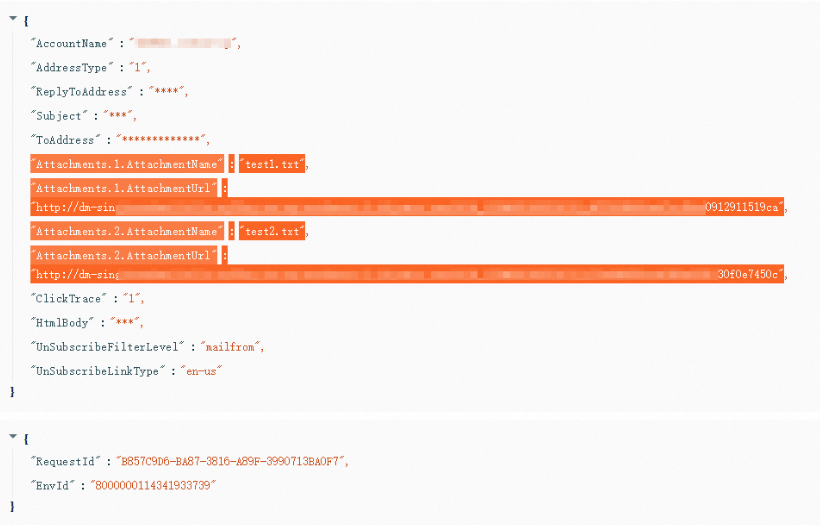
Résultat
Utilisez le Centre de dépannage pour interroger l'ID de la requête et vérifier que les paramètres ont été transmis correctement.