Zipkin est un système de traçage distribué open source développé par Twitter pour suivre les données en temps réel. Il agrège les données de surveillance collectées à partir de plusieurs systèmes hétérogènes. Ce guide vous explique comment instrumenter votre application Java avec la bibliothèque Brave et reporter les données de trace vers ARMS Tracing Analysis via un endpoint compatible avec Zipkin.
Choisir une méthode d'instrumentation
Sélectionnez la méthode adaptée à votre framework. Spring Sleuth nécessite le moins de configuration et est recommandé pour les projets Spring Boot.
| Méthode | Idéal pour | Complexité |
|---|---|---|
| Spring Sleuth | Microservices Spring Cloud (recommandé) | Faible |
| Spring 4.0 MVC ou Spring Boot | Projets modernes basés sur les annotations Spring | Moyenne |
| Spring 2.5 ou 3,0 MVC | Anciens projets Spring basés sur XML | Moyenne |
| Dubbo | Applications RPC Dubbo | Moyenne |
| Instrumentation manuelle | Contrôle total des spans et des tags | Élevée |
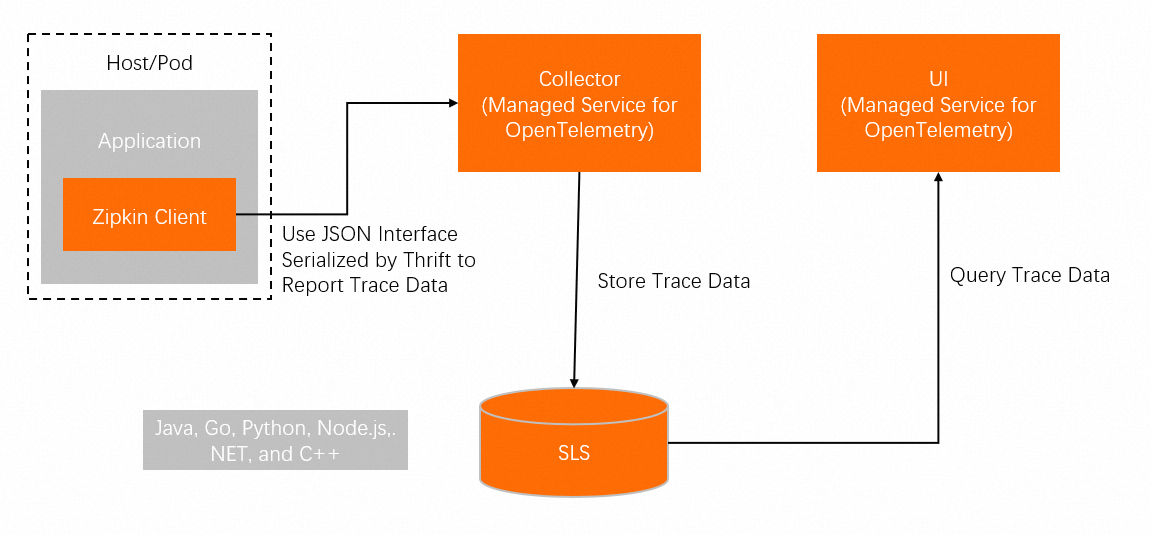
Flux de données
Votre application utilise la bibliothèque Brave pour créer des spans et les reporter vers ARMS via un endpoint compatible avec Zipkin.
Prérequis
Obtenir un endpoint Zipkin
Pour reporter les données de trace, vous avez besoin d'un endpoint compatible avec Zipkin depuis la console Tracing Analysis.
Connectez-vous à la console Tracing Analysis.
Dans le volet de navigation de gauche, cliquez sur Cluster Configurations. Ensuite, cliquez sur l'onglet Access point information.
Dans la barre de navigation supérieure, sélectionnez une région. Dans la section Cluster Information, activez l'option Show Token.
Dans la section Client, cliquez sur Zipkin.
Copiez l'endpoint depuis la colonne Related Information.
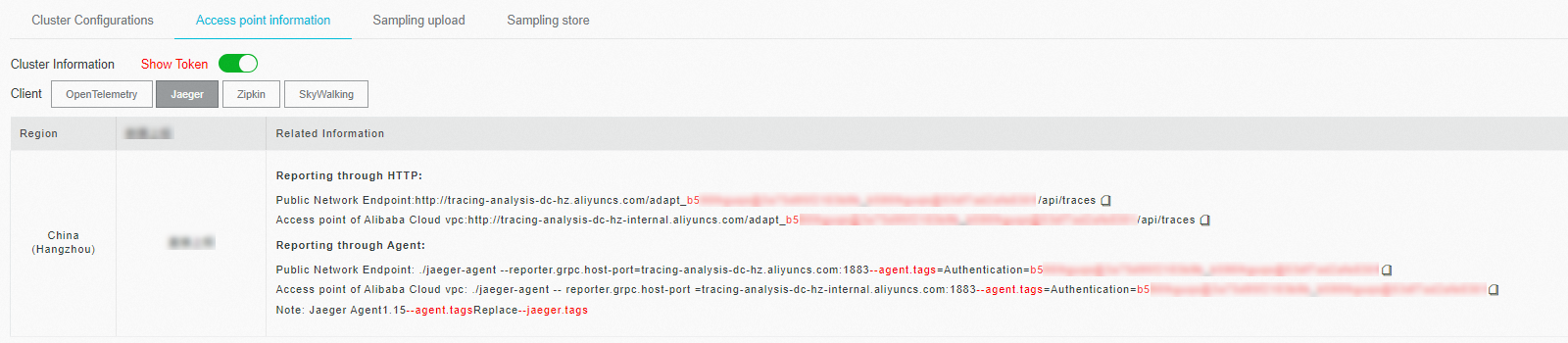
Si votre application s'exécute dans un environnement de production Alibaba Cloud, utilisez un point d'accès VPC Alibaba Cloud. Sinon, utilisez un endpoint public.
Utilisez l'endpoint v2, sauf si vous avez une raison spécifique d'utiliser la version v1.
Frameworks pris en charge
Brave fournit l'instrumentation pour les frameworks Java suivants. Pour la liste complète, consultez brave-instrumentation.
Apache HttpClient, Dubbo, gRPC, JAX-RS 2.X, Jersey Server, JMS, Kafka, MySQL, Netty, OkHttp, Servlet, Spark, Spring Boot, Spring MVC
Projet de démonstration
Une démonstration fonctionnelle est disponible pour chaque méthode d'instrumentation. Téléchargez le projet de démonstration et suivez le fichier README dans le répertoire correspondant.
| Méthode | Répertoire de démonstration | |
|---|---|---|
| Instrumentation manuelle | manualDemo |
|
| Spring 2.5 ou 3,0 MVC | |
webmvc25` |
| Spring 4.0 MVC ou Spring Boot | |
webmv4` |
| Dubbo | dubboDemo |
|
| Spring Sleuth | sleuthDemo |
Instrumenter avec Spring Sleuth
Spring Cloud Sleuth offre un traçage distribué automatique pour les applications Spring Boot avec une configuration minimale. Il s'intègre nativement à Zipkin pour le reporting des traces.
Étape 1 : Ajouter les dépendances
Ajoutez les dépendances suivantes à votre fichier pom.xml :
<dependency>
    <groupId>io.zipkin.brave</groupId>
    <artifactId>brave</artifactId>
    <version>5.4.2</version>
</dependency>

<dependency>
    <groupId>io.zipkin.reporter2</groupId>
    <artifactId>zipkin-sender-okhttp3</artifactId>
    <version>2.7.9</version>
</dependency>
<dependency>
    <groupId>org.springframework.boot</groupId>
    <artifactId>spring-boot-starter-web</artifactId>
    <version>2.0.1.RELEASE</version>
</dependency>
<dependency>
    <groupId>org.springframework.cloud</groupId>
    <artifactId>spring-cloud-sleuth-core</artifactId>
    <version>2.0.1.RELEASE</version>
</dependency>
<dependency>
    <groupId>org.springframework.cloud</groupId>
    <artifactId>spring-cloud-sleuth-zipkin</artifactId>
    <version>2.0.1.RELEASE</version>
</dependency>
Étape 2 : Configurer application.yml
Définissez l'URL de base Zipkin et le taux d'échantillonnage. Remplacez <endpoint_short> par l'endpoint public se terminant par api/v2/spans, obtenu depuis l'onglet Access point information de la console Tracing Analysis.
spring:
   application:
     # This ends up as the service name in zipkin
     name: sleuthDemo
   zipkin:
     # Uncomment to send to zipkin, replacing 192.168.99.100 with your zipkin IP address
     baseUrl: <endpoint_short>

   sleuth:
     sampler:
       probability: 1.0

   sample:
   zipkin:
     # When enabled=false, traces log to the console. Comment to send to zipkin
     enabled: true
Étape 3 : Vérifier la configuration
Envoyez une requête HTTP pour déclencher le reporting des traces :
http://localhost:3380/tracedAprès avoir envoyé la requête, vérifiez la console Tracing Analysis pour voir les données de trace entrantes. Pour obtenir d'autres chemins de requête, consultez les méthodes sous com.alibaba.apm.SampleController dans le projet de démonstration.
Instrumenter avec Spring 4.0 MVC ou Spring Boot
Configurez le traçage via des annotations Java pour les applications Spring 4.0 MVC ou Spring Boot.
Pour un exemple fonctionnel, consultez le répertoire springMvcDemo\webmvc4-boot|webmv4 du projet de démonstration .
Étape 1 : Configurer les beans de traçage et de filtre
Ajoutez la classe de configuration suivante. Remplacez <endpoint> par l'endpoint que vous avez obtenu dans la section Prérequis.
/** Configuration for how to send spans to Zipkin */
@Bean Sender sender() {
  return OkHttpSender.create("<endpoint>");
}

/** Configuration for how to buffer spans into messages for Zipkin */
@Bean AsyncReporter<Span> spanReporter() {
  return AsyncReporter.create(sender());
}

/** Controls aspects of tracing such as the name that shows up in the UI */
@Bean Tracing tracing(@Value("${spring.application.name}") String serviceName) {
  return Tracing.newBuilder()
      .localServiceName(serviceName)
      .propagationFactory(ExtraFieldPropagation.newFactory(B3Propagation.FACTORY, "user-name"))
      .currentTraceContext(ThreadLocalCurrentTraceContext.newBuilder()
          .addScopeDecorator(MDCScopeDecorator.create()) // puts trace IDs into logs
          .build()
      )
      .spanReporter(spanReporter()).build();
}

/** decides how to name and tag spans. By default they are named the same as the http method. */
@Bean HttpTracing httpTracing(Tracing tracing) {
  return HttpTracing.create(tracing);
}

/** Creates client spans for http requests */
// We are using a BPP as the Frontend supplies a RestTemplate bean prior to this configuration
@Bean BeanPostProcessor connectionFactoryDecorator(final BeanFactory beanFactory) {
  return new BeanPostProcessor() {
    @Override public Object postProcessBeforeInitialization(Object bean, String beanName) {
      return bean;
    }

    @Override public Object postProcessAfterInitialization(Object bean, String beanName) {
      if (!(bean instanceof RestTemplate)) return bean;

      RestTemplate restTemplate = (RestTemplate) bean;
      List<ClientHttpRequestInterceptor> interceptors =
          new ArrayList<>(restTemplate.getInterceptors());
      interceptors.add(0, getTracingInterceptor());
      restTemplate.setInterceptors(interceptors);
      return bean;
    }

    // Lazy lookup so that the BPP doesn't end up needing to proxy anything.
    ClientHttpRequestInterceptor getTracingInterceptor() {
      return TracingClientHttpRequestInterceptor.create(beanFactory.getBean(HttpTracing.class));
    }
  };
}

/** Creates server spans for http requests */
@Bean Filter tracingFilter(HttpTracing httpTracing) {
  return TracingFilter.create(httpTracing);
}

@Autowired SpanCustomizingAsyncHandlerInterceptor webMvcTracingCustomizer;

/** Decorates server spans with application-defined web tags */
@Override public void addInterceptors(InterceptorRegistry registry) {
  registry.addInterceptor(webMvcTracingCustomizer);
}
Étape 2 : Activer l'auto-configuration
Ajoutez la ligne suivante au fichier src/main/resources/META-INF/spring.factories :
org.springframework.boot.autoconfigure.EnableAutoConfiguration=\
brave.webmvc.TracingConfiguration
Instrumenter avec Spring 2.5 ou 3,0 MVC
Configurez le traçage via des définitions de beans XML pour les applications Spring 2.5 ou 3,0 MVC.
Pour un exemple fonctionnel, consultez le répertoire springMvcDemo\webmvc3|webmvc25 du projet de démonstration .
Étape 1 : Configurer l'objet de traçage
Ajoutez les définitions de beans suivantes à votre fichier applicationContext.xml. Remplacez <endpoint> par l'endpoint que vous avez obtenu dans la section Prérequis.
<bean class="zipkin2.reporter.beans.OkHttpSenderFactoryBean">
  <property name="endpoint" value="<endpoint>"/>
</bean>

<!-- allows us to read the service name from spring config -->
<context:property-placeholder/>

<bean class="brave.spring.beans.TracingFactoryBean">
  <property name="localServiceName" value="brave-webmvc3-example"/>
  <property name="spanReporter">
    <bean class="zipkin2.reporter.beans.AsyncReporterFactoryBean">
      <property name="encoder" value="JSON_V2"/>
      <property name="sender" ref="sender"/>
      <!-- wait up to half a second for any in-flight spans on close -->
      <property name="closeTimeout" value="500"/>
    </bean>
  </property>
  <property name="propagationFactory">
    <bean class="brave.propagation.ExtraFieldPropagation" factory-method="newFactory">
      <constructor-arg index="0">
        <util:constant static-field="brave.propagation.B3Propagation.FACTORY"/>
      </constructor-arg>
      <constructor-arg index="1">
        <list>
          <value>user-name</value>
        </list>
      </constructor-arg>
    </bean>
  </property>
  <property name="currentTraceContext">
    <bean class="brave.spring.beans.CurrentTraceContextFactoryBean">
      <property name="scopeDecorators">
        <bean class="brave.context.log4j12.MDCScopeDecorator" factory-method="create"/>
      </property>
    </bean>
  </property>
</bean>

<bean class="brave.spring.beans.HttpTracingFactoryBean">
  <property name="tracing" ref="tracing"/>
</bean>
Étape 2 : Ajouter des intercepteurs
Enregistrez le générateur de client HTTP de traçage et l'intercepteur de gestionnaire :
<bean class="brave.httpclient.TracingHttpClientBuilder"
      factory-method="create">
    <constructor-arg type="brave.http.HttpTracing" ref="httpTracing"/>
  </bean>

  <bean factory-bean="httpClientBuilder" factory-method="build"/>

  <bean class="org.springframework.web.servlet.mvc.annotation.DefaultAnnotationHandlerMapping">
    <property name="interceptors">
      <list>
        <bean class="brave.spring.webmvc.SpanCustomizingHandlerInterceptor"/>
      </list>
    </property>
  </bean>

  <!-- Loads the controller -->
  <context:component-scan base-package="brave.webmvc"/>
Étape 3 : Ajouter un filtre servlet
Ajoutez le filtre de traçage à votre fichier web.xml pour intercepter toutes les requêtes entrantes :
<!-- Add the delegate to the standard tracing filter and map it to all paths -->
<filter>
  <filter-name>tracingFilter</filter-name>
  <filter-class>brave.spring.webmvc.DelegatingTracingFilter</filter-class>
</filter>
<filter-mapping>
  <filter-name>tracingFilter</filter-name>
  <url-pattern>/*</url-pattern>
</filter-mapping>
Instrumenter avec Dubbo
La bibliothèque d'instrumentation Brave Dubbo ajoute le traçage distribué aux applications RPC Dubbo.
Pour un exemple fonctionnel, consultez le répertoire dubboDemo du projet de démonstration .
Étape 1 : Ajouter les dépendances
Ajoutez les dépendances suivantes à votre fichier pom.xml :
<dependency>
    <groupId>io.zipkin.brave</groupId>
    <artifactId>brave</artifactId>
    <version>5.4.2</version>
</dependency>

<dependency>
    <groupId>io.zipkin.brave</groupId>
    <artifactId>brave-instrumentation-dubbo-rpc</artifactId>
    <version>5.4.2</version>
</dependency>

<dependency>
    <groupId>io.zipkin.brave</groupId>
    <artifactId>brave-spring-beans</artifactId>
    <version>5.4.2</version>
</dependency>

<dependency>
    <groupId>io.zipkin.brave</groupId>
    <artifactId>brave-context-slf4j</artifactId>
    <version>5.4.2</version>
</dependency>

<dependency>
    <groupId>io.zipkin.reporter2</groupId>
    <artifactId>zipkin-sender-okhttp3</artifactId>
    <version>2.7.9</version>
</dependency>
Étape 2 : Configurer l'objet de traçage
Ajoutez les définitions de beans suivantes à votre configuration XML Spring. Remplacez <endpoint> par l'endpoint que vous avez obtenu dans la section Prérequis.
<bean class="zipkin2.reporter.beans.OkHttpSenderFactoryBean">
    <property name="endpoint" value="<endpoint>"/>
</bean>

<bean class="brave.spring.beans.TracingFactoryBean">
    <property name="localServiceName" value="double-provider"/>
    <property name="spanReporter">
        <bean class="zipkin2.reporter.beans.AsyncReporterFactoryBean">
            <property name="sender" ref="sender"/>
            <!-- wait up to half a second for any in-flight spans on close -->
            <property name="closeTimeout" value="500"/>
        </bean>
    </property>
    <property name="currentTraceContext">
        <bean class="brave.spring.beans.CurrentTraceContextFactoryBean">
            <property name="scopeDecorators">
                <bean class="brave.context.slf4j.MDCScopeDecorator" factory-method="create"/>
            </property>
        </bean>
    </property>
</bean>
Étape 3 : Ajouter des filtres de traçage
Appliquez le filtre de traçage aux configurations du fournisseur et du consommateur :
// Server configuration
<dubbo:provider filter="tracing" />
// Client configuration
<dubbo:consumer filter="tracing" />
Instrumenter manuellement une application Java
L'instrumentation manuelle vous offre un contrôle précis sur les opérations tracées et les métadonnées associées à chaque span. Utilisez cette méthode lorsque l'instrumentation automatique ne couvre pas votre framework ou lorsque vous avez besoin d'une granularité personnalisée des spans.
Pour un exemple fonctionnel, consultez le répertoire manualDemo du projet de démonstration .
Étape 1 : Ajouter les dépendances
Ajoutez les dépendances suivantes à votre fichier pom.xml :
<dependency>
    <groupId>io.zipkin.brave</groupId>
    <artifactId>brave</artifactId>
    <version>5.4.2</version>
</dependency>
<dependency>
    <groupId>io.zipkin.reporter2</groupId>
    <artifactId>zipkin-sender-okhttp3</artifactId>
    <version>2.7.9</version>
</dependency>
Étape 2 : Créer un traceur
Initialisez le traceur avec votre endpoint Zipkin. Remplacez <endpoint> par l'endpoint que vous avez obtenu dans la section Prérequis.
private static final String zipkinEndPoint = "<endpoint>";
...
// Create a sender to transmit span data
OkHttpSender sender = OkHttpSender.newBuilder().endpoint(zipkinEndPoint).build();

// Create an asynchronous reporter
Reporter<Span> reporter = AsyncReporter.builder(sender).build();

tracing = Tracing.newBuilder().localServiceName(localServiceName).spanReporter(reporter).build();
Étape 3 : Créer des spans
Créez une span racine et imbriquez des spans enfants pour représenter les sous-opérations :
private void firstBiz() {
    // Create a root span
    tracing.tracer().startScopedSpan("parentSpan");
    Span span =  tracing.tracer().currentSpan();
    span.tag("key", "firstBiz");
    secondBiz();
    span.finish();
}

private void secondBiz() {
    tracing.tracer().startScopedSpanWithParent("childSpan", tracing.tracer().currentSpan().context());
    Span childSpan =  tracing.tracer().currentSpan();
    childSpan.tag("key", "secondBiz");
    childSpan.finish();
    System.out.println("end tracing,id:" + childSpan.context().traceIdString());
}
Étape 4 : Ajouter des tags personnalisés (facultatif)
Attachez des métadonnées aux spans pour faciliter le dépannage. Par exemple, enregistrez un code d'état HTTP :
tracer.activeSpan().setTag("http.status_code", "500");Étape 5 : Propager le contexte de trace entre les services
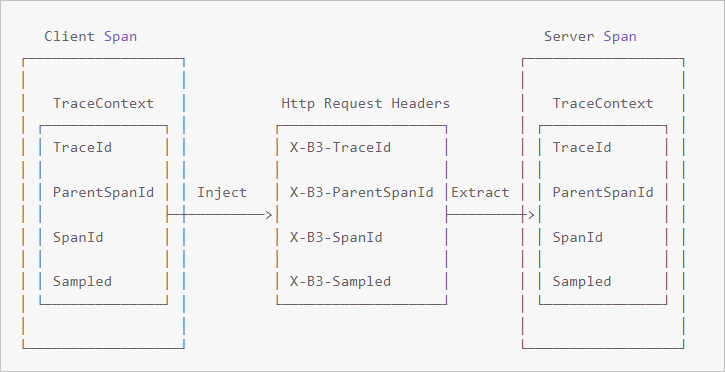
Dans les systèmes distribués, le contexte de trace (TraceId, ParentSpanId, SpanId, Sampled) doit accompagner chaque requête RPC. Appelez Inject côté client pour intégrer le contexte dans les en-têtes de requête, et appelez Extract côté serveur pour le lire.
Côté client -- injecter le contexte
// Start a new span representing a client request
oneWaySend = tracer.nextSpan().name(service + "/" + method).kind(CLIENT);
--snip--

// Add the trace context to the request, so it can be propagated in-band
tracing.propagation().injector(Request::addHeader)
                 .inject(oneWaySend.context(), request);

// Fire off the request asynchronously, totally dropping any response
request.execute();

// Start the client side and flush instead of finish
oneWaySend.start().flush();
Côté serveur -- extraire le contexte
// Pull the context out of the incoming request
extractor = tracing.propagation().extractor(Request::getHeader);

// Convert that context to a span which you can name and add tags to
oneWayReceive = nextSpan(tracer, extractor.extract(request))
    .name("process-request")
    .kind(SERVER)
    ... add tags etc.

// Start the server side and flush instead of finish
oneWayReceive.start().flush();

// You should not modify this span anymore as it is complete. However,
// you can create children to represent follow-up work.
next = tracer.newSpan(oneWayReceive.context()).name("step2").start();
FAQ
Q : Aucune donnée de trace n'apparaît après l'exécution de la démonstration.
R : Cela indique généralement une configuration incorrecte de l'endpoint. Pour diagnostiquer le problème :
Vérifiez que l'endpoint correspond à celui affiché dans l'onglet Access point information de la console Tracing Analysis.
Assurez-vous d'avoir sélectionné le bon type de client (Zipkin, et non Jaeger) lors de la copie de l'endpoint.
Si vous utilisez un point d'accès VPC, confirmez que votre application s'exécute dans le même VPC.
Pour un débogage plus approfondi, définissez un point d'arrêt dans la méthode
parseResponsedezipkin2.reporter.okhttp3.HttpCallet inspectez la réponse HTTP. Une erreur403indique que la configuration du nom d'utilisateur n'est pas valide. Vérifiez la configuration de votre endpoint.