ACK s'appuie sur le framework de planification pour sélectionner les combinaisons optimales de GPU au sein d'un même nœud pour l'entraînement distribué TensorFlow. Cette approche réduit la surcharge de synchronisation entre les nœuds et améliore le débit.
Prérequis
Vérifiez que vous disposez des éléments suivants :
Un cluster ACK Pro avec un type d'instance Elastic GPU Service. Pour plus d'informations, consultez la rubrique Créer un cluster ACK managé
Arena installé
Le module complémentaire de planification GPU sensible à la topologie installé
Les versions requises des composants :
| Composant | Version requise | Commande de vérification |
|---|---|---|
| Kubernetes | 1.18.8 ou version ultérieure | kubectl version --short |
| Pilote NVIDIA | 418.87.01 ou version ultérieure | nvidia-smi --query-gpu=driver_version --format=csv,noheader |
| NCCL (NVIDIA Collective Communications Library) | 2.7 ou version ultérieure | python3 -c "import torch; print(torch.cuda.nccl.version())" |
| Système d'exploitation | CentOS 7.6, CentOS 7.7, Ubuntu 16.04, Ubuntu 18.04, Alibaba Cloud Linux 2, Alibaba Cloud Linux 3 | cat /etc/os-release |
| GPU | V100 | nvidia-smi --query-gpu=name --format=csv,noheader |
Respectez l'ordre suivant pour les prérequis : créez le cluster ACK Pro, installez Arena, puis installez le module complémentaire de planification GPU sensible à la topologie. Toute installation hors ordre risque d'échouer.
Limitations
La planification GPU sensible à la topologie s'applique uniquement aux jobs MPI (Message Passing Interface) utilisant un framework distribué.
La planification GPU classique attribue les GPU selon leur seule disponibilité, sans tenir compte de la topologie d'interconnexion. Les workers peuvent ainsi être déployés sur des GPU situés sur différents nœuds reliés par des réseaux plus lents, ce qui fait de la communication inter-GPU le goulot d'étranglement. La planification sensible à la topologie regroupe les workers sur des GPU du même nœud connectés par NVLink, réduisant ainsi la latence de synchronisation des gradients.
Les pods ne sont créés que lorsque toutes les ressources demandées sont disponibles (planification gang). Si les ressources sont insuffisantes, le job reste en attente jusqu'à la libération d'un nombre suffisant de GPU.
Configurer les nœuds
Appliquez un libellé aux nœuds pour activer la planification GPU sensible à la topologie :
kubectl label node <your-node-name> ack.node.gpu.schedule=topologyL'activation de la planification sensible à la topologie sur un nœud désactive la planification GPU classique pour ce nœud. Pour rétablir la planification classique, exécutez la commande suivante :
kubectl label node <your-node-name> ack.node.gpu.schedule=default --overwriteSoumettre un job
Soumettez un job MPI avec les options --gputopology=true et --gang :
arena submit mpi --gputopology=true --gang <other-parameters>Ces deux indicateurs sont obligatoires : --gputopology=true active la sélection de GPU sensible à la topologie ; --gang impose la planification gang afin que tous les workers démarrent simultanément.
Exemple 1 : Entraîner VGG16
Cet exemple utilise un cluster composé de deux nœuds, chacun disposant de huit GPU V100.
Planification GPU sensible à la topologie
-
Soumettez le job d'entraînement :
arena submit mpi \ --name=tensorflow-topo-4-vgg16 \ --gpus=1 \ --workers=4 \ --gang \ --gputopology=true \ --image=registry.cn-hangzhou.aliyuncs.com/kubernetes-image-hub/tensorflow-benchmark:tf2.3.0-py3.7-cuda10.1 \ "mpirun --allow-run-as-root -np 4 -bind-to none -map-by slot -x NCCL_DEBUG=INFO -x NCCL_SOCKET_IFNAME=eth0 -x LD_LIBRARY_PATH -x PATH --mca pml ob1 --mca btl_tcp_if_include eth0 --mca oob_tcp_if_include eth0 --mca orte_keep_fqdn_hostnames t --mca btl ^openib python /tensorflow/benchmarks/scripts/tf_cnn_benchmarks/tf_cnn_benchmarks.py --model=vgg16 --batch_size=64 --variable_update=horovod" -
Vérifiez l'état du job :
arena get tensorflow-topo-4-vgg16 --type mpijobRésultat attendu :
Name:      tensorflow-topo-4-vgg16
Status:    RUNNING
Namespace: default
Priority:  N/A
Trainer:   MPIJOB
Duration:  2m

Instances:
  NAME                                    STATUS   AGE  IS_CHIEF  GPU(Requested)  NODE
  ----                                    ------   ---  --------  --------------  ----
  tensorflow-topo-4-vgg16-launcher-lmhjl  Running  2m   true      0               cn-shanghai.192.168.16.172
  tensorflow-topo-4-vgg16-worker-0        Running  2m   false     1               cn-shanghai.192.168.16.173
  tensorflow-topo-4-vgg16-worker-1        Running  2m   false     1               cn-shanghai.192.168.16.173
  tensorflow-topo-4-vgg16-worker-2        Running  2m   false     1               cn-shanghai.192.168.16.173
  tensorflow-topo-4-vgg16-worker-3        Running  2m   false     1               cn-shanghai.192.168.16.173
Les quatre workers s'exécutent sur un seul nœud, partageant la bande passante NVLink.
-
Consultez le journal d'entraînement :
arena logs -f tensorflow-topo-4-vgg16Résultat attendu :
total images/sec: 991.92
Planification GPU classique
-
Soumettez le job sans les indicateurs de topologie :
arena submit mpi \ --name=tensorflow-4-vgg16 \ --gpus=1 \ --workers=4 \ --image=registry.cn-hangzhou.aliyuncs.com/kubernetes-image-hub/tensorflow-benchmark:tf2.3.0-py3.7-cuda10.1 \ "mpirun --allow-run-as-root -np 4 -bind-to none -map-by slot -x NCCL_DEBUG=INFO -x NCCL_SOCKET_IFNAME=eth0 -x LD_LIBRARY_PATH -x PATH --mca pml ob1 --mca btl_tcp_if_include eth0 --mca oob_tcp_if_include eth0 --mca orte_keep_fqdn_hostnames t --mca btl ^openib python /tensorflow/benchmarks/scripts/tf_cnn_benchmarks/tf_cnn_benchmarks.py --model=vgg16 --batch_size=64 --variable_update=horovod" -
Vérifiez l'état du job :
arena get tensorflow-4-vgg16 --type mpijobRésultat attendu :
Name:      tensorflow-4-vgg16
Status:    RUNNING
Namespace: default
Priority:  N/A
Trainer:   MPIJOB
Duration:  9s

Instances:
  NAME                               STATUS   AGE  IS_CHIEF  GPU(Requested)  NODE
  ----                               ------   ---  --------  --------------  ----
  tensorflow-4-vgg16-launcher-xc28k  Running  9s   true      0               cn-shanghai.192.168.16.172
  tensorflow-4-vgg16-worker-0        Running  9s   false     1               cn-shanghai.192.168.16.172
  tensorflow-4-vgg16-worker-1        Running  9s   false     1               cn-shanghai.192.168.16.173
  tensorflow-4-vgg16-worker-2        Running  9s   false     1               cn-shanghai.192.168.16.172
  tensorflow-4-vgg16-worker-3        Running  9s   false     1               cn-shanghai.192.168.16.173
Les workers sont répartis sur deux nœuds, ce qui implique une communication inter-nœuds à chaque étape de synchronisation des gradients.
-
Consultez le journal d'entraînement :
arena logs -f tensorflow-4-vgg16Résultat attendu :
total images/sec: 200.47
Exemple 2 : Entraîner ResNet50
Planification GPU sensible à la topologie
-
Soumettez le job d'entraînement :
arena submit mpi \ --name=tensorflow-topo-4-resnet50 \ --gpus=1 \ --workers=4 \ --gang \ --gputopology=true \ --image=registry.cn-hangzhou.aliyuncs.com/kubernetes-image-hub/tensorflow-benchmark:tf2.3.0-py3.7-cuda10.1 \ "mpirun --allow-run-as-root -np 4 -bind-to none -map-by slot -x NCCL_DEBUG=INFO -x NCCL_SOCKET_IFNAME=eth0 -x LD_LIBRARY_PATH -x PATH --mca pml ob1 --mca btl_tcp_if_include eth0 --mca oob_tcp_if_include eth0 --mca orte_keep_fqdn_hostnames t --mca btl ^openib python /tensorflow/benchmarks/scripts/tf_cnn_benchmarks/tf_cnn_benchmarks.py --model=resnet50 --batch_size=64 --variable_update=horovod" -
Vérifiez l'état du job :
arena get tensorflow-topo-4-resnet50 --type mpijobRésultat attendu :
Name: tensorflow-topo-4-resnet50 Status: RUNNING Namespace: default Priority: N/A Trainer: MPIJOB Duration: 8s Instances: NAME STATUS AGE IS_CHIEF GPU(Requested) NODE ---- ------ --- -------- -------------- ---- tensorflow-topo-4-resnet50-launcher-7ln8j Running 8s true 0 cn-shanghai.192.168.16.172 tensorflow-topo-4-resnet50-worker-0 Running 8s false 1 cn-shanghai.192.168.16.173 tensorflow-topo-4-resnet50-worker-1 Running 8s false 1 cn-shanghai.192.168.16.173 tensorflow-topo-4-resnet50-worker-2 Running 8s false 1 cn-shanghai.192.168.16.173 tensorflow-topo-4-resnet50-worker-3 Running 8s false 1 cn-shanghai.192.168.16.173 -
Consultez le journal d'entraînement :
arena logs -f tensorflow-topo-4-resnet50Résultat attendu :
total images/sec: 1471.55
Planification GPU classique
-
Soumettez le job sans les indicateurs de topologie :
arena submit mpi \ --name=tensorflow-4-resnet50 \ --gpus=1 \ --workers=4 \ --image=registry.cn-hangzhou.aliyuncs.com/kubernetes-image-hub/tensorflow-benchmark:tf2.3.0-py3.7-cuda10.1 \ "mpirun --allow-run-as-root -np 4 -bind-to none -map-by slot -x NCCL_DEBUG=INFO -x NCCL_SOCKET_IFNAME=eth0 -x LD_LIBRARY_PATH -x PATH --mca pml ob1 --mca btl_tcp_if_include eth0 --mca oob_tcp_if_include eth0 --mca orte_keep_fqdn_hostnames t --mca btl ^openib python /tensorflow/benchmarks/scripts/tf_cnn_benchmarks/tf_cnn_benchmarks.py --model=resnet50 --batch_size=64 --variable_update=horovod" -
Vérifiez l'état du job :
arena get tensorflow-4-resnet50 --type mpijobRésultat attendu :
Name: tensorflow-4-resnet50 Status: RUNNING Namespace: default Priority: N/A Trainer: MPIJOB Duration: 9s Instances: NAME STATUS AGE IS_CHIEF GPU(Requested) NODE ---- ------ --- -------- -------------- ---- tensorflow-4-resnet50-launcher-q24hv Running 9s true 0 cn-shanghai.192.168.16.172 tensorflow-4-resnet50-worker-0 Running 9s false 1 cn-shanghai.192.168.16.172 tensorflow-4-resnet50-worker-1 Running 9s false 1 cn-shanghai.192.168.16.173 tensorflow-4-resnet50-worker-2 Running 9s false 1 cn-shanghai.192.168.16.172 tensorflow-4-resnet50-worker-3 Running 9s false 1 cn-shanghai.192.168.16.173 -
Consultez le journal d'entraînement :
arena logs -f tensorflow-4-resnet50Résultat attendu :
total images/sec: 745.38
Comparaison des performances
Débit pour l'entraînement de VGG16 et ResNet50 avec la planification GPU sensible à la topologie et la planification classique :
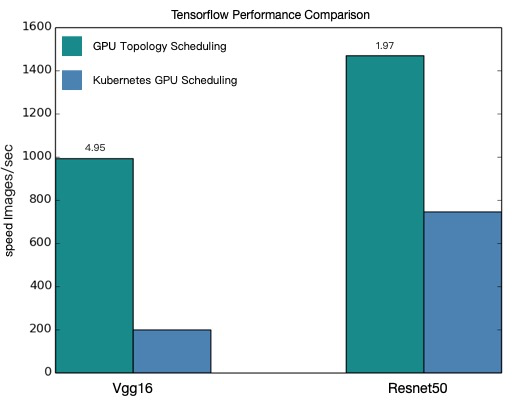
| Modèle | Sensible à la topologie (images/sec) | Classique (images/sec) | Amélioration |
|---|---|---|---|
| VGG16 | 991.92 | 200.47 | ~4,9x |
| ResNet50 | 1471.55 | 745.38 | ~2,0x |
Les valeurs de performance sont théoriques. Les résultats réels varient selon le modèle, la configuration du cluster et les conditions réseau. Exécutez les exemples dans votre cluster pour mesurer les gains.