La planification GPU consciente de la topologie sélectionne la combinaison optimale de GPU à partir des nœuds accélérés par GPU afin de minimiser les frais de communication entre les workers. ACK implémente cette fonctionnalité en s'appuyant sur le framework de planification Kubernetes, ce qui la rend efficace pour les jobs d'entraînement distribué qui dépendent d'interconnexions GPU à haut débit.
Cette rubrique explique comment activer la planification GPU consciente de la topologie sur ACK et exécuter des jobs d'entraînement distribué PyTorch à l'aide d'Arena.
Prérequis
Avant de commencer, assurez-vous de disposer des éléments suivants :
Un cluster ACK Pro. Voir Créer un cluster ACK Pro
Arena installé. Consultez le référentiel GitHub Arena
ack-ai-installer installé. Voir Installer ack-ai-installer
-
Des nœuds répondant aux exigences de version suivantes :
Composant Version requise Kubernetes V1.18.8 et versions ultérieures Helm 3.0 et versions ultérieures Nvidia 418.87.01 et versions ultérieures NVIDIA Collective Communications Library (NCCL) 2,7+ Docker 19.03.5 OS CentOS 7.6, CentOS 7.7, Ubuntu 16.04 et 18,04, ainsi que Alibaba Cloud Linux 2 GPU V100
Limitations
La planification GPU consciente de la topologie s'applique uniquement aux jobs MPI (Message Passing Interface) entraînés avec un framework distribué.
Tous les pods d'un job doivent être planifiables simultanément avant le démarrage du job. Si les ressources sont insuffisantes, le job reste en attente jusqu'à ce que toutes les ressources demandées soient disponibles.
Étape 1 : Ajouter des labels aux nœuds pour la planification consciente de la topologie
Ajoutez le label ack.node.gpu.schedule=topology à chaque nœud pour lequel vous souhaitez activer la planification consciente de la topologie :
kubectl label node <your-node-name> ack.node.gpu.schedule=topologyLes nœuds étiquetés pour la planification consciente de la topologie ne peuvent pas utiliser simultanément la planification GPU classique. Pour revenir à la planification GPU classique sur un nœud, exécutez la commande suivante :
kubectl label node <your-node-name> ack.node.gpu.schedule=default --overwriteÉtape 2 : Soumettre un job d'entraînement distribué
Soumettez un job MPI en utilisant à la fois les indicateurs --gputopology=true et --gang. L'indicateur --gang active la planification gang, qui garantit que tous les workers sont alloués simultanément, évitant ainsi les interblocages lorsque les nœuds disposent d'un nombre limité de GPU.
arena submit mpi --gputopology=true --gang <other-flags>(Facultatif) Exemples de benchmark et comparaison des performances
Les exemples suivants comparent le débit entre la planification GPU consciente de la topologie et la planification GPU classique en utilisant les modèles VGG16 et ResNet50. L'environnement de test utilise deux serveurs, chacun doté de huit GPU V100. Exécutez ces benchmarks dans votre propre environnement pour évaluer l'amélioration apportée à vos charges de travail.
Entraîner VGG16 avec la planification consciente de la topologie
-
Soumettez le job :
arena submit mpi \ --name=pytorch-topo-4-vgg16 \ --gpus=1 \ --workers=4 \ --gang \ --gputopology=true \ --image=registry.cn-hangzhou.aliyuncs.com/kubernetes-image-hub/pytorch-benchmark:torch1.6.0-py3.7-cuda10.1 \ "mpirun --allow-run-as-root -np "4" -bind-to none -map-by slot -x NCCL_DEBUG=INFO -x NCCL_SOCKET_IFNAME=eth0 -x LD_LIBRARY_PATH -x PATH --mca pml ob1 --mca btl_tcp_if_include eth0 --mca oob_tcp_if_include eth0 --mca orte_keep_fqdn_hostnames t --mca btl ^openib python /examples/pytorch_synthetic_benchmark.py --model=vgg16 --batch-size=64" -
Vérifiez l'état du job :
arena get pytorch-topo-4-vgg16 --type mpijobRésultat attendu :
Name: pytorch-topo-4-vgg16 Status: RUNNING Namespace: default Priority: N/A Trainer: MPIJOB Duration: 11s Instances: NAME STATUS AGE IS_CHIEF GPU(Requested) NODE ---- ------ --- -------- -------------- ---- pytorch-topo-4-vgg16-launcher-mnjzr Running 11s true 0 cn-shanghai.192.168.16.173 pytorch-topo-4-vgg16-worker-0 Running 11s false 1 cn-shanghai.192.168.16.173 pytorch-topo-4-vgg16-worker-1 Running 11s false 1 cn-shanghai.192.168.16.173 pytorch-topo-4-vgg16-worker-2 Running 11s false 1 cn-shanghai.192.168.16.173 pytorch-topo-4-vgg16-worker-3 Running 11s false 1 cn-shanghai.192.168.16.173 -
Consultez les journaux du job :
arena logs -f pytorch-topo-4-vgg16Résultat attendu :
Model: vgg16
Batch size: 64
Number of GPUs: 4
Running warmup...
Running benchmark...
Iter #0: 205.5 img/sec per GPU
Iter #1: 205.2 img/sec per GPU
Iter #2: 205.1 img/sec per GPU
Iter #3: 205.5 img/sec per GPU
Iter #4: 205.1 img/sec per GPU
Iter #5: 205.1 img/sec per GPU
Iter #6: 205.3 img/sec per GPU
Iter #7: 204.3 img/sec per GPU
Iter #8: 205.0 img/sec per GPU
Iter #9: 204.9 img/sec per GPU
Img/sec per GPU: 205.1 +-0.6
Total img/sec on 4 GPU(s): 820.5 +-2.5
Entraîner VGG16 avec la planification GPU classique
-
Soumettez le job :
arena submit mpi \ --name=pytorch-4-vgg16 \ --gpus=1 \ --workers=4 \ --image=registry.cn-hangzhou.aliyuncs.com/kubernetes-image-hub/pytorch-benchmark:torch1.6.0-py3.7-cuda10.1 \ "mpirun --allow-run-as-root -np "4" -bind-to none -map-by slot -x NCCL_DEBUG=INFO -x NCCL_SOCKET_IFNAME=eth0 -x LD_LIBRARY_PATH -x PATH --mca pml ob1 --mca btl_tcp_if_include eth0 --mca oob_tcp_if_include eth0 --mca orte_keep_fqdn_hostnames t --mca btl ^openib python /examples/pytorch_synthetic_benchmark.py --model=vgg16 --batch-size=64" -
Vérifiez l'état du job :
arena get pytorch-4-vgg16 --type mpijobRésultat attendu :
Name: pytorch-4-vgg16 Status: RUNNING Namespace: default Priority: N/A Trainer: MPIJOB Duration: 10s Instances: NAME STATUS AGE IS_CHIEF GPU(Requested) NODE ---- ------ --- -------- -------------- ---- pytorch-4-vgg16-launcher-qhnxl Running 10s true 0 cn-shanghai.192.168.16.173 pytorch-4-vgg16-worker-0 Running 10s false 1 cn-shanghai.192.168.16.173 pytorch-4-vgg16-worker-1 Running 10s false 1 cn-shanghai.192.168.16.173 pytorch-4-vgg16-worker-2 Running 10s false 1 cn-shanghai.192.168.16.173 pytorch-4-vgg16-worker-3 Running 10s false 1 cn-shanghai.192.168.16.173 -
Consultez les journaux du job :
arena logs -f pytorch-4-vgg16Résultat attendu :
Model: vgg16
Batch size: 64
Number of GPUs: 4
Running warmup...
Running benchmark...
Iter #0: 113.1 img/sec per GPU
Iter #1: 109.5 img/sec per GPU
Iter #2: 106.5 img/sec per GPU
Iter #3: 108.5 img/sec per GPU
Iter #4: 108.1 img/sec per GPU
Iter #5: 111.2 img/sec per GPU
Iter #6: 110.7 img/sec per GPU
Iter #7: 109.8 img/sec per GPU
Iter #8: 102.8 img/sec per GPU
Iter #9: 107.9 img/sec per GPU
Img/sec per GPU: 108.8 +-5.3
Total img/sec on 4 GPU(s): 435.2 +-21.1
Entraîner ResNet50 avec la planification consciente de la topologie
-
Soumettez le job :
arena submit mpi \ --name=pytorch-topo-4-resnet50 \ --gpus=1 \ --workers=4 \ --gang \ --gputopology=true \ --image=registry.cn-hangzhou.aliyuncs.com/kubernetes-image-hub/pytorch-benchmark:torch1.6.0-py3.7-cuda10.1 \ "mpirun --allow-run-as-root -np "4" -bind-to none -map-by slot -x NCCL_DEBUG=INFO -x NCCL_SOCKET_IFNAME=eth0 -x LD_LIBRARY_PATH -x PATH --mca pml ob1 --mca btl_tcp_if_include eth0 --mca oob_tcp_if_include eth0 --mca orte_keep_fqdn_hostnames t --mca btl ^openib python /examples/pytorch_synthetic_benchmark.py --model=resnet50 --batch-size=64" -
Vérifiez l'état du job :
arena get pytorch-topo-4-resnet50 --type mpijobRésultat attendu :
Name: pytorch-topo-4-resnet50 Status: RUNNING Namespace: default Priority: N/A Trainer: MPIJOB Duration: 8s Instances: NAME STATUS AGE IS_CHIEF GPU(Requested) NODE ---- ------ --- -------- -------------- ---- pytorch-topo-4-resnet50-launcher-x7r2n Running 8s true 0 cn-shanghai.192.168.16.173 pytorch-topo-4-resnet50-worker-0 Running 8s false 1 cn-shanghai.192.168.16.173 pytorch-topo-4-resnet50-worker-1 Running 8s false 1 cn-shanghai.192.168.16.173 pytorch-topo-4-resnet50-worker-2 Running 8s false 1 cn-shanghai.192.168.16.173 pytorch-topo-4-resnet50-worker-3 Running 8s false 1 cn-shanghai.192.168.16.173 -
Consultez les journaux du job :
arena logs -f pytorch-topo-4-resnet50Résultat attendu :
Model: resnet50
Batch size: 64
Number of GPUs: 4
Running warmup...
Running benchmark...
Iter #0: 331.0 img/sec per GPU
Iter #1: 330.6 img/sec per GPU
Iter #2: 330.9 img/sec per GPU
Iter #3: 330.4 img/sec per GPU
Iter #4: 330.7 img/sec per GPU
Iter #5: 330.8 img/sec per GPU
Iter #6: 329.9 img/sec per GPU
Iter #7: 330.5 img/sec per GPU
Iter #8: 330.4 img/sec per GPU
Iter #9: 329.7 img/sec per GPU
Img/sec per GPU: 330.5 +-0.8
Total img/sec on 4 GPU(s): 1321.9 +-3.2
Entraîner ResNet50 avec la planification GPU classique
-
Soumettez le job :
arena submit mpi \ --name=pytorch-4-resnet50 \ --gpus=1 \ --workers=4 \ --image=registry.cn-hangzhou.aliyuncs.com/kubernetes-image-hub/pytorch-benchmark:torch1.6.0-py3.7-cuda10.1 \ "mpirun --allow-run-as-root -np "4" -bind-to none -map-by slot -x NCCL_DEBUG=INFO -x NCCL_SOCKET_IFNAME=eth0 -x LD_LIBRARY_PATH -x PATH --mca pml ob1 --mca btl_tcp_if_include eth0 --mca oob_tcp_if_include eth0 --mca orte_keep_fqdn_hostnames t --mca btl ^openib python /examples/pytorch_synthetic_benchmark.py --model=resnet50 --batch-size=64" -
Vérifiez l'état du job :
arena get pytorch-4-resnet50 --type mpijobRésultat attendu :
Name: pytorch-4-resnet50 Status: RUNNING Namespace: default Priority: N/A Trainer: MPIJOB Duration: 10s Instances: NAME STATUS AGE IS_CHIEF GPU(Requested) NODE ---- ------ --- -------- -------------- ---- pytorch-4-resnet50-launcher-qw5k6 Running 10s true 0 cn-shanghai.192.168.16.173 pytorch-4-resnet50-worker-0 Running 10s false 1 cn-shanghai.192.168.16.173 pytorch-4-resnet50-worker-1 Running 10s false 1 cn-shanghai.192.168.16.173 pytorch-4-resnet50-worker-2 Running 10s false 1 cn-shanghai.192.168.16.173 pytorch-4-resnet50-worker-3 Running 10s false 1 cn-shanghai.192.168.16.173 -
Consultez les journaux du job :
arena logs -f pytorch-4-resnet50Résultat attendu :
Model: resnet50
Batch size: 64
Number of GPUs: 4
Running warmup...
Running benchmark...
Iter #0: 313.1 img/sec per GPU
Iter #1: 312.8 img/sec per GPU
Iter #2: 313.0 img/sec per GPU
Iter #3: 312.2 img/sec per GPU
Iter #4: 313.7 img/sec per GPU
Iter #5: 313.2 img/sec per GPU
Iter #6: 313.6 img/sec per GPU
Iter #7: 313.0 img/sec per GPU
Iter #8: 311.3 img/sec per GPU
Iter #9: 313.6 img/sec per GPU
Img/sec per GPU: 313.0 +-1.3
Total img/sec on 4 GPU(s): 1251.8 +-5.3
Comparaison des performances
La figure suivante compare le débit entre la planification GPU consciente de la topologie et la planification GPU classique pour les deux modèles.
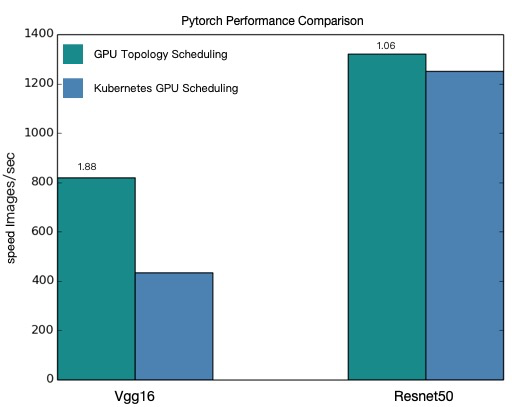
La planification GPU consciente de la topologie offre un débit plus élevé pour les jobs d'entraînement distribué VGG16 et ResNet50.
Les valeurs de performance présentées dans cette rubrique sont théoriques. Les performances de la planification GPU consciente de la topologie varient en fonction de l'architecture de votre modèle et de la configuration de votre cluster. Seules les statistiques de performance réelles font foi.