La detección de rostros, impulsada por Intelligent Media Management (IMM), identifica rostros en imágenes y extrae atributos como edad, género y expresiones faciales. Esta función admite varios rostros por imagen.
Descripción general
La detección de rostros utiliza IA de imágenes para identificar rostros en una imagen y devolver los atributos de cada rostro detectado.
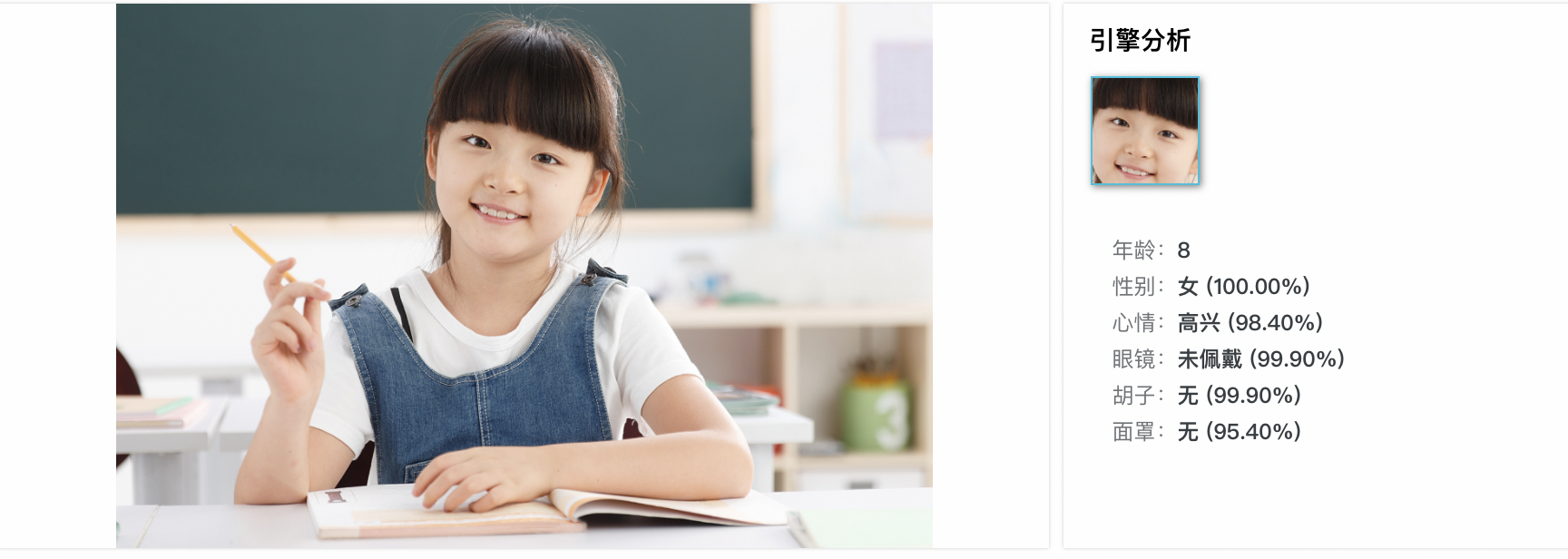
La información del rostro incluye ID de rostro, edad, género, estado de ánimo, atractivo, calidad del rostro y atributos faciales (posición, orientación de la cabeza, gafas, barba y mascarilla).
Casos de uso
Reconocimiento facial: detecte y compare rostros con una base de datos para tareas de autenticación y control de acceso.
Autenticación facial: verifique la identidad del usuario en escenarios como el desbloqueo de celulares y la validación de pagos.
-
Análisis de expresiones faciales: analice las expresiones del rostro para estudios de sentimiento, interacción humano-computadora y personajes virtuales.
NotaFondo desordenado: los fondos complejos pueden interferir con la detección de rasgos faciales.
Oclusión facial: los rostros superpuestos en una imagen pueden reducir la precisión de la detección.
Cómo utilizarlo
Requisitos previos
Create a bucket en OSS y upload the files que desea procesar al bucket.
Cree y vincule un proyecto de IMM. Puede vincular el proyecto desde OSS console o mediante una llamada a API operation. El proyecto de IMM debe estar en la misma región que el bucket.
Detección de rostros
A continuación se muestran ejemplos de cómo detectar rostros mediante los SDK de OSS. Para otros lenguajes, adapte los parámetros según corresponda.
Java
Se requiere OSS SDK for Java 3.17.4 o posterior.
import com.aliyun.oss.ClientBuilderConfiguration;
import com.aliyun.oss.OSS;
import com.aliyun.oss.OSSClientBuilder;
import com.aliyun.oss.common.auth.CredentialsProviderFactory;
import com.aliyun.oss.common.auth.EnvironmentVariableCredentialsProvider;
import com.aliyun.oss.common.comm.SignVersion;
import com.aliyun.oss.model.OSSObject;
import com.aliyun.oss.model.GetObjectRequest;
import com.aliyuncs.exceptions.ClientException;

import java.io.ByteArrayOutputStream;
import java.io.IOException;

public class Demo1 {
    public static void main(String[] args) throws ClientException, ClientException {
        // Specify the endpoint of the region in which the bucket is located.
        String endpoint = "https://oss-cn-hangzhou.aliyuncs.com";
        // Specify the ID of the Alibaba Cloud region in which the bucket is located. Example: cn-hangzhou.
        String region = "cn-hangzhou";
        // Obtain access credentials from environment variables. Before you run the sample code, make sure that the OSS_ACCESS_KEY_ID and OSS_ACCESS_KEY_SECRET environment variables are configured.
        EnvironmentVariableCredentialsProvider credentialsProvider = CredentialsProviderFactory.newEnvironmentVariableCredentialsProvider();
        // Specify the name of the bucket.
        String bucketName = "examplebucket";
        // If the image is stored in the root directory of the bucket, enter the image name. If the image is not stored in the root directory of the bucket, you must specify the full path of the image. Example: exampledir/example.jpg.
        String key = "example.jpg";

        // Create an OSSClient instance.
        // Call the shutdown method to release resources when the OSSClient is no longer in use.
        ClientBuilderConfiguration clientBuilderConfiguration = new ClientBuilderConfiguration();
        clientBuilderConfiguration.setSignatureVersion(SignVersion.V4);
        OSS ossClient = OSSClientBuilder.create()
                .endpoint(endpoint)
                .credentialsProvider(credentialsProvider)
                .clientConfiguration(clientBuilderConfiguration)
                .region(region)
                .build();

        try {
            // Create a processing instruction to use face detection.
            GetObjectRequest getObjectRequest = new GetObjectRequest(bucketName, key);
            getObjectRequest.setProcess("image/faces");

            // Use the getObject method and pass the processing instruction by using the process parameter.
            OSSObject ossObject = ossClient.getObject(getObjectRequest);

            // Read and display the query results.
            ByteArrayOutputStream baos = new ByteArrayOutputStream();
            byte[] buffer = new byte[1024];
            int bytesRead;
            while ((bytesRead = ossObject.getObjectContent().read(buffer)) != -1) {
                baos.write(buffer, 0, bytesRead);
            }
            String imageFaces = baos.toString("UTF-8");
            System.out.println("Image Faces:");
            System.out.println(imageFaces);
        } catch (IOException e) {
            System.out.println("Error: " + e.getMessage());
        } finally {
            // Shut down the OSSClient instance.
            ossClient.shutdown();
        }
    }
}
Python
Se requiere OSS SDK for Python 2.18.4 o posterior.
# -*- coding: utf-8 -*-
import oss2
from oss2.credentials import EnvironmentVariableCredentialsProvider

# Obtain access credentials from environment variables. Before you run the sample code, make sure that the OSS_ACCESS_KEY_ID and OSS_ACCESS_KEY_SECRET environment variables are configured.
auth = oss2.ProviderAuthV4(EnvironmentVariableCredentialsProvider())

# Specify the endpoint of the region where the bucket is located.
endpoint = 'https://oss-cn-hangzhou.aliyuncs.com'
# Specify the ID of the Alibaba Cloud region in which the bucket is located.
region = 'cn-hangzhou'
bucket = oss2.Bucket(auth, endpoint, 'examplebucket', region=region)

# If the image is stored in the root directory, enter the image name. Otherwise, specify the full path.
key = 'example.jpg'

# Create a processing instruction to use face detection.
process = 'image/faces'

try:
    # Use the get_object method and pass the processing instruction by using the process parameter.
    result = bucket.get_object(key, process=process)

    # Read and display the query results.
    image_faces = result.read().decode('utf-8')
    print("Image Faces:")
    print(image_faces)
except oss2.exceptions.OssError as e:
    print("Error:", e)
Go
Se requiere OSS SDK for Go 3.0.2 o posterior.
package main

import (
	"fmt"
	"io"
	"os"

	"github.com/aliyun/aliyun-oss-go-sdk/oss"
)

func main() {
	// Obtain the temporary access credentials from the environment variables. Before you run the sample code, make sure that the OSS_ACCESS_KEY_ID and OSS_ACCESS_KEY_SECRET environment variables are configured.
	provider, err := oss.NewEnvironmentVariableCredentialsProvider()
	if err != nil {
		fmt.Println("Error:", err)
		os.Exit(-1)
	}
	// Create an OSSClient instance.
	// Specify the endpoint of the region in which the bucket is located. For example, if the bucket is located in the China (Hangzhou) region, set the endpoint to https://oss-cn-hangzhou.aliyuncs.com. Specify your actual endpoint.
	// Specify the ID of the Alibaba Cloud region in which the bucket is located. Example: cn-hangzhou.
	client, err := oss.New("https://oss-cn-hangzhou.aliyuncs.com", "", "", oss.SetCredentialsProvider(&provider), oss.AuthVersion(oss.AuthV4), oss.Region("cn-hangzhou"))
	if err != nil {
		fmt.Println("Error:", err)
		os.Exit(-1)
	}
	// Specify the name of the bucket. Example: examplebucket.
	bucketName := "examplebucket"

	bucket, err := client.Bucket(bucketName)
	if err != nil {
		fmt.Println("Error:", err)
		os.Exit(-1)
	}
	// If the image is stored in the root directory of the bucket, enter the image name. If the image is not stored in the root directory of the bucket, you must specify the full path of the image. Example: exampledir/example.jpg.
	// Use the oss.Process method to create a processing instruction to use face detection.
	body, err := bucket.GetObject("example.jpg", oss.Process("image/faces"))
	if err != nil {
		fmt.Println("Error:", err)
		os.Exit(-1)
	}

	defer body.Close()

	data, err := io.ReadAll(body)
	if err != nil {
		fmt.Println("Error:", err)
		os.Exit(-1)
	}
	fmt.Println("data:", string(data))
}
PHP
Se requiere OSS SDK for PHP 2.7.0 o posterior.
<?php
if (is_file(__DIR__ . '/../autoload.php')) {
    require_once __DIR__ . '/../autoload.php';
}
if (is_file(__DIR__ . '/../vendor/autoload.php')) {
    require_once __DIR__ . '/../vendor/autoload.php';
}
use OSS\Credentials\EnvironmentVariableCredentialsProvider;
use OSS\OssClient;

try {
    // Obtain access credentials from environment variables. Before you run the sample code, make sure that the OSS_ACCESS_KEY_ID and OSS_ACCESS_KEY_SECRET environment variables are configured.
    $provider = new EnvironmentVariableCredentialsProvider();
    // Specify the endpoint of the region in which the bucket is located. For example, if the bucket is located in the China (Hangzhou) region, set the endpoint to https://oss-cn-hangzhou.aliyuncs.com.
    $endpoint = 'https://oss-cn-hangzhou.aliyuncs.com';
    // Specify the name of the bucket. Example: examplebucket.
    $bucket = 'examplebucket';
    // If the image is stored in the root directory of the bucket, enter the image name. If the image is not stored in the root directory of the bucket, you must specify the full path of the image. Example: exampledir/example.jpg.
    $key = 'example.jpg';

    $config = array(
        "provider" => $provider,
        "endpoint" => $endpoint,
        "signatureVersion" => OssClient::OSS_SIGNATURE_VERSION_V4,
        // Specify the ID of the Alibaba Cloud region in which the bucket is located.
        "region" => "cn-hangzhou"
    );
    $ossClient = new OssClient($config);
  // Create a processing instruction to use face detection.
  $options[$ossClient::OSS_PROCESS] = "image/faces";
  $result = $ossClient->getObject($bucket,$key,$options);
  var_dump($result);
} catch (OssException $e) {
  printf($e->getMessage() . "\n");
  return;
}
Parámetros
Acción: image/faces
Para obtener detalles sobre los campos de respuesta, consulte la referencia de la API DetectImageFaces.
Operaciones de API relacionadas
Para llamar directamente a la API RESTful, incluya el cálculo de la firma en su código. Utilice el método (Recommended) Include a V4 signature para el encabezado Authorization.
Procese imágenes agregando el parámetro x-oss-process a la operación GetObject. GetObject.
Solicitud de ejemplo
GET /example.jpg?x-oss-process=image/faces HTTP/1.1
Host: image-demo.oss-cn-hangzhou.aliyuncs.com
Date: Fri, 21 Jul 2023 08:57:30 GMT
Authorization: SignatureValue
Respuesta exitosa de ejemplo
HTTP/1.1 200 OK
Server: AliyunOSS
Date: Fri, 21 Jul 2023 08:57:30 GMT
Content-Type: application/json;charset=utf-8
Content-Length: 161
Connection: keep-alive
x-oss-request-id: 628E2481184E20F26C000009
x-oss-transfer-acc-type: acc-none
x-oss-data-location: oss-cn-hangzhou-a
ETag: "D0F162350DA037F4DC2A142B2E116BD0"
Last-Modified: Wed, 25 May 2022 12:20:34 GMT
x-oss-object-type: Normal
x-oss-hash-crc64ecma: 2040549661341440100
x-oss-storage-class: Standard
x-oss-server-time: 12437

{
    "RequestId": "5F2389FE-A5E3-076F-B071-43A33DB0D716",
    "Figures": [{
        "Beard": "none",
        "MaskConfidence": 0.7509999871253967,
        "Gender": "male",
        "Boundary": {
            "Left": 280,
            "Top": 36,
            "Height": 87,
            "Width": 70
        },
        "BeardConfidence": 0.9980000257492065,
        "FigureId": "d39651db-9dc4-469f-8834-d2fcf30e179e",
        "Mouth": "open",
        "Emotion": "none",
        "Age": 12,
        "MouthConfidence": 0.5669999718666077,
        "FigureType": "face",
        "GenderConfidence": 0.9509999752044678,
        "HeadPose": {
            "Pitch": -12.309000015258789,
            "Roll": -11.362000465393066,
            "Yaw": 3.443000078201294
        },
        "Mask": "none",
        "EmotionConfidence": 0.9950000047683716,
        "HatConfidence": 0.9879999756813049,
        "GlassesConfidence": 1,
        "Sharpness": 0.8870000243186951,
        "FigureClusterId": "figure-cluster-id-unavailable",
        "FaceQuality": 0.8289999961853027,
        "Attractive": 0.12099999934434891,
        "AgeSD": 5,
        "Glasses": "none",
        "FigureConfidence": 0.9990000128746033,
        "Hat": "hat"
    }
    ]
}
Facturación
La detección de rostros genera cargos tanto de OSS como de IMM:
-
OSS: Precios de OSS
API
Concepto facturable
Descripción
GetObject
Solicitudes GET
Se le cobran tarifas de solicitud según el número de solicitudes exitosas.
Tráfico saliente por Internet
Si llama a la operación GetObject mediante un endpoint público, como oss-cn-hangzhou.aliyuncs.com, o un endpoint de aceleración, como oss-accelerate.aliyuncs.com, se le cobran tarifas por tráfico saliente a través de Internet según el tamaño de los datos.
Recuperación de objetos IA
Si se recuperan objetos IA, se le cobran tarifas de recuperación de datos IA según el tamaño de los datos IA recuperados.
Aceleración de transferencia
Si habilita la aceleración de transferencia y utiliza un endpoint de aceleración para acceder a su bucket, se le cobran tarifas de aceleración de transferencia según el tamaño de los datos.
HeadObject
Solicitudes GET
Se le cobran tarifas de solicitud según el número de solicitudes exitosas.
-
IMM: IMM billable items
ImportanteA partir de las 11:00 del 28 de julio de 2025 (UTC+8), el precio del servicio de detección de rostros de IMM se mantiene sin cambios, pero el nombre del concepto facturable cambia de ImageFace a ImageDetect. Para más información, consulte el Aviso de ajuste de facturación de IMM.
API
Concepto facturable
Descripción
DetectImageFaces
ImageDetect
Se le cobran tarifas de solicitud según el número de solicitudes exitosas.
Límites
Solo se admite el procesamiento síncrono (x-oss-process).
Se denegará el acceso anónimo.