Comience a utilizar OSS SDK for Go V1. Instale el SDK, configure las credenciales de acceso y realice operaciones básicas como crear buckets, así como cargar, descargar, listar y eliminar objetos.
Requisitos previos
Antes de empezar, asegúrese de contar con lo siguiente:
Una cuenta de Alibaba Cloud con OSS activado
Un usuario de Resource Access Management (RAM) con un par de AccessKey. Para más detalles, consulte CreateAccessKey
Go instalado
Compruebe su instalación de Go:
go versionConfigurar variables de entorno
-
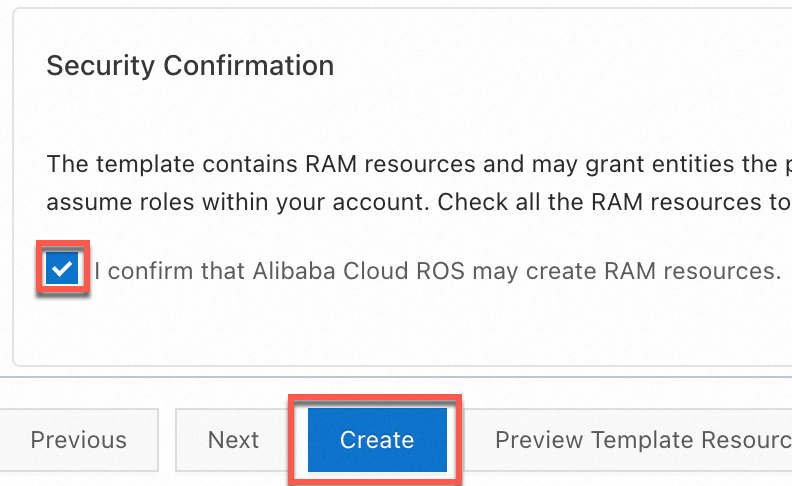
Puede crear rápidamente un par de AccessKey para un usuario de RAM que tenga permisos de acceso completo a OSS mediante un script de Resource Orchestration Service (ROS). Para ello, vaya al asistente para la creación de pilas basada en plantillas, seleccione I confirm that Alibaba Cloud ROS may create RAM resources en la sección Security Confirmation y haga clic en Create.
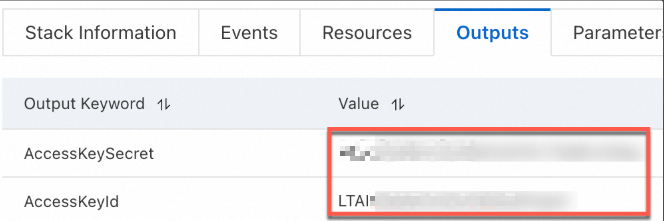
Una vez creado el par de AccessKey, cópielo desde la pestaña Outputs.
-
Configure las variables de entorno para el par de AccessKey.
Linux
-
Ejecute los siguientes comandos en la CLI para agregar las configuraciones de las variables de entorno al archivo
~/.bashrc:echo "export OSS_ACCESS_KEY_ID='YOUR_ACCESS_KEY_ID'" >> ~/.bashrc echo "export OSS_ACCESS_KEY_SECRET='YOUR_ACCESS_KEY_SECRET'" >> ~/.bashrc-
Aplique los cambios.
source ~/.bashrc -
Compruebe si las variables de entorno han surtido efecto:
echo $OSS_ACCESS_KEY_ID
echo $OSS_ACCESS_KEY_SECRET
-
macOS
-
Ejecute el siguiente comando en la terminal para ver el tipo de shell predeterminado:
echo $SHELL-
Configure las variables de entorno según el tipo de shell predeterminado.
Zsh
-
Ejecute los siguientes comandos para agregar las configuraciones de las variables de entorno al archivo
~/.zshrc:echo "export OSS_ACCESS_KEY_ID='YOUR_ACCESS_KEY_ID'" >> ~/.zshrc echo "export OSS_ACCESS_KEY_SECRET='YOUR_ACCESS_KEY_SECRET'" >> ~/.zshrc -
Aplique los cambios.
source ~/.zshrc -
Compruebe si las variables de entorno han surtido efecto:
echo $OSS_ACCESS_KEY_ID
echo $OSS_ACCESS_KEY_SECRET
Bash
-
Ejecute los siguientes comandos para agregar las configuraciones de las variables de entorno al archivo
~/.bash_profile:echo "export OSS_ACCESS_KEY_ID='YOUR_ACCESS_KEY_ID'" >> ~/.bash_profile echo "export OSS_ACCESS_KEY_SECRET='YOUR_ACCESS_KEY_SECRET'" >> ~/.bash_profile -
Aplique los cambios.
source ~/.bash_profile -
Compruebe si las variables de entorno han surtido efecto:
echo $OSS_ACCESS_KEY_ID
echo $OSS_ACCESS_KEY_SECRET
-
-
Windows
CMD
-
Ejecute los siguientes comandos en CMD:
setx OSS_ACCESS_KEY_ID "YOUR_ACCESS_KEY_ID" setx OSS_ACCESS_KEY_SECRET "YOUR_ACCESS_KEY_SECRET"-
Compruebe si las variables de entorno surten efecto:
echo %OSS_ACCESS_KEY_ID%
echo %OSS_ACCESS_KEY_SECRET%
-
PowerShell
-
Ejecute los siguientes comandos en PowerShell:
[Environment]::SetEnvironmentVariable("OSS_ACCESS_KEY_ID", "YOUR_ACCESS_KEY_ID", [EnvironmentVariableTarget]::User) [Environment]::SetEnvironmentVariable("OSS_ACCESS_KEY_SECRET", "YOUR_ACCESS_KEY_SECRET", [EnvironmentVariableTarget]::User)-
Compruebe si la variable de entorno surte efecto:
[Environment]::GetEnvironmentVariable("OSS_ACCESS_KEY_ID", [EnvironmentVariableTarget]::User)
[Environment]::GetEnvironmentVariable("OSS_ACCESS_KEY_SECRET", [EnvironmentVariableTarget]::User)
-
-
Después de establecer las variables de entorno, debe reiniciar cualquier sesión de terminal o IDE abierta para que los cambios surtan efecto.
Instalar OSS SDK for Go
-
Verifique que tenga instalada la versión 1.13 o posterior de Go.
Consulte su versión de Go:
go versionSi Go no está instalado, siga la guía de instalación de Golang.
-
Cree un directorio de proyecto e inicialice un módulo de Go.
mkdir oss-go-example && cd oss-go-example && go mod init oss-go-example -
Instale el SDK:
go get github.com/aliyun/aliyun-oss-go-sdk/oss
Inicio rápido
Estos ejemplos muestran cómo crear un bucket, cargar, descargar, listar y eliminar objetos.
Crear un bucket
package main

import (
	"fmt"
	"os"

	"github.com/aliyun/aliyun-oss-go-sdk/oss"
)

func main() {
	/// Obtain a credential from the environment variables. Before you execute the sample code, make sure that the OSS_ACCESS_KEY_ID and OSS_ACCESS_KEY_SECRET environment variables are configured.
	provider, err := oss.NewEnvironmentVariableCredentialsProvider()
	if err != nil {
		fmt.Println("Error:", err)
		os.Exit(-1)
	}

	// Create an OSSClient instance.
	// Set yourEndpoint to the endpoint of the region in which the bucket is located. For example, if the bucket is located in the China (Hangzhou) region, set the endpoint to https://oss-cn-hangzhou.aliyuncs.com. Specify the actual endpoint.
	// Specify the region in which the bucket is located. For example, if your bucket is located in the China (Hangzhou) region, set the region to cn-hangzhou. Specify the actual endpoint.
	clientOptions := []oss.ClientOption{oss.SetCredentialsProvider(&provider)}
	clientOptions = append(clientOptions, oss.Region("yourRegion"))
	// Specify the signature version
	clientOptions = append(clientOptions, oss.AuthVersion(oss.AuthV4))
	client, err := oss.New("yourEndpoint", "", "", clientOptions...)
	if err != nil {
		fmt.Println("Error:", err)
		os.Exit(-1)
	}

	// Create a bucket named examplebucket. Set the storage class to IA (oss.StorageIA), the ACL to public-read (oss.ACLPublicRead), and the redundancy type to ZRS (oss.RedundancyZRS).
	err = client.CreateBucket("examplebucket", oss.StorageClass(oss.StorageIA), oss.ACL(oss.ACLPublicRead), oss.RedundancyType(oss.RedundancyZRS))
	if err != nil {
		fmt.Println("Error:", err)
		os.Exit(-1)
	}
}
Cargar un objeto
package main

import (
	"log"
	"strings"

	"github.com/aliyun/aliyun-oss-go-sdk/oss"
)

func main() {
	// Obtain a credential from the environment variables. Before you execute the sample code, make sure that the OSS_ACCESS_KEY_ID and OSS_ACCESS_KEY_SECRET environment variables are configured.
	provider, err := oss.NewEnvironmentVariableCredentialsProvider()
	if err != nil {
		log.Fatalf("Failed to create credentials provider: %v", err)
	}

	// Create an OSSClient instance.
	// Set yourEndpoint to the endpoint of the region in which the bucket is located. For example, if the bucket is located in the China (Hangzhou) region, set the endpoint to https://oss-cn-hangzhou.aliyuncs.com. Specify the actual endpoint.
	// Specify the region in which the bucket is located. For example, if your bucket is located in the China (Hangzhou) region, set the region to cn-hangzhou. Specify the actual endpoint.
	clientOptions := []oss.ClientOption{oss.SetCredentialsProvider(&provider)}
	clientOptions = append(clientOptions, oss.Region("yourRegion"))
	// Specify the signature version
	clientOptions = append(clientOptions, oss.AuthVersion(oss.AuthV4))
	client, err := oss.New("yourEndpoint", "", "", clientOptions...)
	if err != nil {
		log.Fatalf("Failed to create OSS client: %v", err)
	}

	// Specify the name of the bucket. Example: examplebucket.
	bucketName := "examplebucket" // Replace examplebucket with the actual bucket name.
	bucket, err := client.Bucket(bucketName)
	if err != nil {
		log.Fatalf("Failed to get bucket: %v", err)
	}

	objectKey := "exampledir/exampleobject.txt" // Replace exampledir/exampleobject.txt with the actual object key.
	content := "Hello OSS"
	err = bucket.PutObject(objectKey, strings.NewReader(content))
	if err != nil {
		log.Fatalf("Failed to put object: %v", err)
	}

	log.Println("File uploaded successfully.")
}
Descargar un objeto
package main

import (
	"io"
	"log"

	"github.com/aliyun/aliyun-oss-go-sdk/oss"
)

func main() {
	// Obtain a credential from the environment variables. Before you execute the sample code, make sure that the OSS_ACCESS_KEY_ID and OSS_ACCESS_KEY_SECRET environment variables are configured.
	provider, err := oss.NewEnvironmentVariableCredentialsProvider()
	if err != nil {
		log.Fatalf("Failed to create credentials provider: %v", err)
	}

	// Create an OSSClient instance.
	// Set yourEndpoint to the endpoint of the region in which the bucket is located. For example, if the bucket is located in the China (Hangzhou) region, set the endpoint to https://oss-cn-hangzhou.aliyuncs.com. Specify the actual endpoint.
	// Specify the region in which the bucket is located. For example, if your bucket is located in the China (Hangzhou) region, set the region to cn-hangzhou. Specify the actual endpoint.
	clientOptions := []oss.ClientOption{oss.SetCredentialsProvider(&provider)}
	clientOptions = append(clientOptions, oss.Region("yourRegion"))
	// Specify the signature version
	clientOptions = append(clientOptions, oss.AuthVersion(oss.AuthV4))
	client, err := oss.New("yourEndpoint", "", "", clientOptions...)
	if err != nil {
		log.Fatalf("Failed to create OSS client: %v", err)
	}

	// Specify the name of the bucket.
	bucket, err := client.Bucket("yourBucketName")
	if err != nil {
		log.Fatalf("Failed to get bucket: %v", err)
	}

	// Download the object to a stream.
	body, err := bucket.GetObject("yourObjectName")
	if err != nil {
		log.Fatalf("Failed to get object: %v", err)
	}
	// You must close the stream after the data is read. Otherwise, connection leaks may occur. Consequently, no connections are available and your application cannot work.
	defer body.Close()

	data, err := io.ReadAll(body)
	if err != nil {
		log.Fatalf("Failed to read all data from object: %v", err)
	}
	log.Println("Data:", string(data))
}
Listar objetos
package main

import (
	"log"
	"time"

	"github.com/aliyun/aliyun-oss-go-sdk/oss"
)

func main() {
	// Obtain a credential from the environment variables. Before you execute the sample code, make sure that the OSS_ACCESS_KEY_ID and OSS_ACCESS_KEY_SECRET environment variables are configured.
	provider, err := oss.NewEnvironmentVariableCredentialsProvider()
	if err != nil {
		log.Fatalf("Failed to create credentials provider: %v", err)
	}

	// Create an OSSClient instance.
	// Set yourEndpoint to the endpoint of the region in which the bucket is located. For example, if the bucket is located in the China (Hangzhou) region, set the endpoint to https://oss-cn-hangzhou.aliyuncs.com. Specify the actual endpoint.
	// Specify the region in which the bucket is located. For example, if your bucket is located in the China (Hangzhou) region, set the region to cn-hangzhou. Specify the actual endpoint.
	client, err := oss.New("yourEndpoint", "", "", oss.SetCredentialsProvider(&provider), oss.Region("yourRegion"), oss.AuthVersion(oss.AuthV4))
	if err != nil {
		log.Fatalf("Failed to create OSS client: %v", err)
	}

	// Specify the name of the bucket.
	bucketName := "yourBucketName" // Replace yourBucketName with the actual bucket name.
	bucket, err := client.Bucket(bucketName)
	if err != nil {
		log.Fatalf("Failed to get bucket: %v", err)
	}

	// Specify the position from which the list starts.
	continueToken := ""

	for {
		// List all objects by page.
		lsRes, err := bucket.ListObjectsV2(oss.ContinuationToken(continueToken))
		if err != nil {
			log.Fatalf("Failed to list objects: %v", err)
		}

		// Display the listed objects. By default, up to 100 objects are returned at a time.
		for _, object := range lsRes.Objects {
			log.Printf("Object Key: %s, Type: %s, Size: %d, ETag: %s, LastModified: %s, StorageClass: %s\n",
				object.Key, object.Type, object.Size, object.ETag, object.LastModified.Format(time.RFC3339), object.StorageClass)
		}

		// If you want to list more objects, update the value of the continueToken parameter.
		if lsRes.IsTruncated {
			continueToken = lsRes.NextContinuationToken
		} else {
			break
		}
	}

	log.Println("All objects have been listed.")
}
Eliminar un objeto
package main

import (
	"log"

	"github.com/aliyun/aliyun-oss-go-sdk/oss"
)

func main() {
	// Obtain a credential from the environment variables. Before you execute the sample code, make sure that the OSS_ACCESS_KEY_ID and OSS_ACCESS_KEY_SECRET environment variables are configured.
	provider, err := oss.NewEnvironmentVariableCredentialsProvider()
	if err != nil {
		log.Fatalf("Failed to create credentials provider: %v", err)
	}

	// Create an OSSClient instance.
	// Set yourEndpoint to the endpoint of the region in which the bucket is located. For example, if the bucket is located in the China (Hangzhou) region, set the endpoint to https://oss-cn-hangzhou.aliyuncs.com. Specify the actual endpoint.
	// Specify the region in which the bucket is located. For example, if your bucket is located in the China (Hangzhou) region, set the region to cn-hangzhou. Specify the actual endpoint.
	clientOptions := []oss.ClientOption{oss.SetCredentialsProvider(&provider)}
	clientOptions = append(clientOptions, oss.Region("yourRegion"))
	// Specify the signature version
	clientOptions = append(clientOptions, oss.AuthVersion(oss.AuthV4))
	client, err := oss.New("yourEndpoint", "", "", clientOptions...)
	if err != nil {
		log.Fatalf("Failed to create OSS client: %v", err)
	}

	// Specify the bucket name. Example: examplebucket.
	bucketName := "examplebucket"
	// Set objectName to the full path of the object that you want to delete. The full path must contain the extension of the object name and cannot contain the bucket name. Example: exampledir/exampleobject.txt.
	// If you want to delete a directory, set objectName to the directory name. If the directory is not empty, you must delete all objects in the directory before you can delete the directory.
	objectName := "exampledir/exampleobject.txt"

	// Get a bucket instance.
	bucket, err := client.Bucket(bucketName)
	if err != nil {
		log.Fatalf("Failed to get bucket '%s': %v", bucketName, err)
	}

	// Delete a single object.
	err = bucket.DeleteObject(objectName)
	if err != nil {
		log.Fatalf("Failed to delete object '%s': %v", objectName, err)
	}

	log.Printf("Successfully deleted object: %s\n", objectName)
}
Ejecutar los ejemplos
Para cargar un objeto, cree un archivo main.go en el directorio de su proyecto y pegue el código de carga.
Actualice yourRegion, yourEndpoint, bucketName y objectName en main.go.
-
Ejecute el siguiente comando:
go run main.go
Preguntas frecuentes
¿Qué debo hacer si se reporta el error AccessDenied al usar los SDK de OSS?
Referencias
Ejemplos de código en GitHub