La edición de Qwen-Image admite entrada y salida de múltiples imágenes. Edite texto dentro de imágenes, agregue, elimine o mueva objetos, cambie poses de sujetos, transfiera estilos y mejore detalles, todo a través de prompts en lenguaje natural.
Resumen de modelos
Imagen de entrada 1 | Imagen de entrada 2 | Imagen de entrada 3 | Imágenes de salida (múltiples) | |
|---|---|---|---|---|
|
|
|
|
|

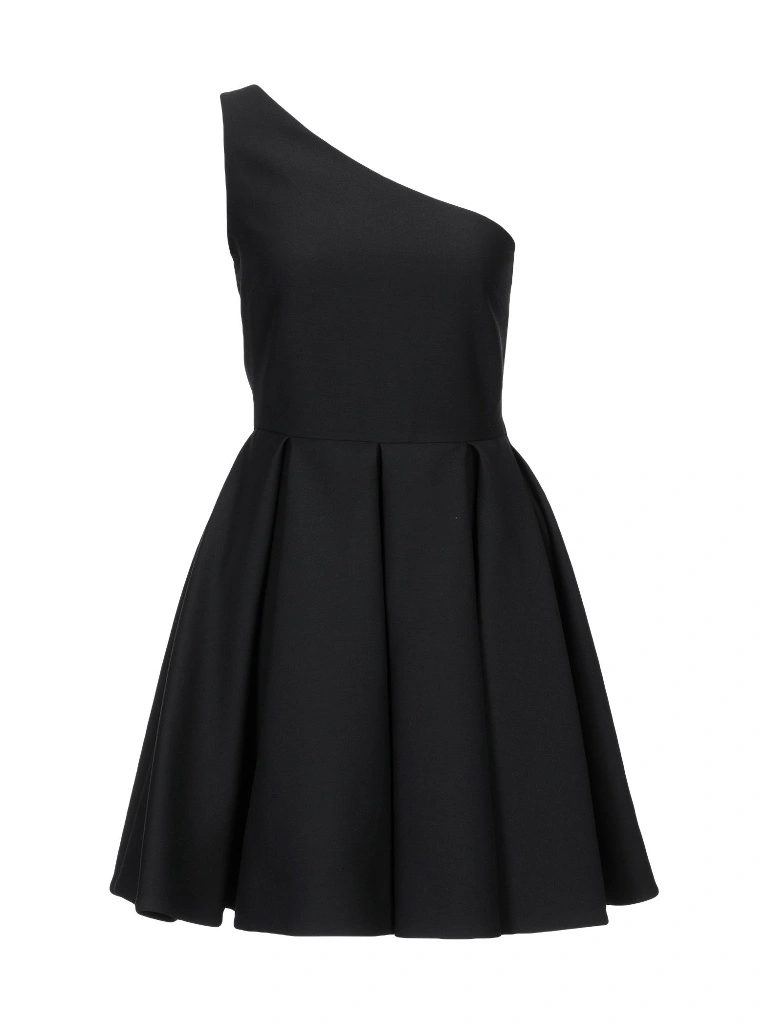
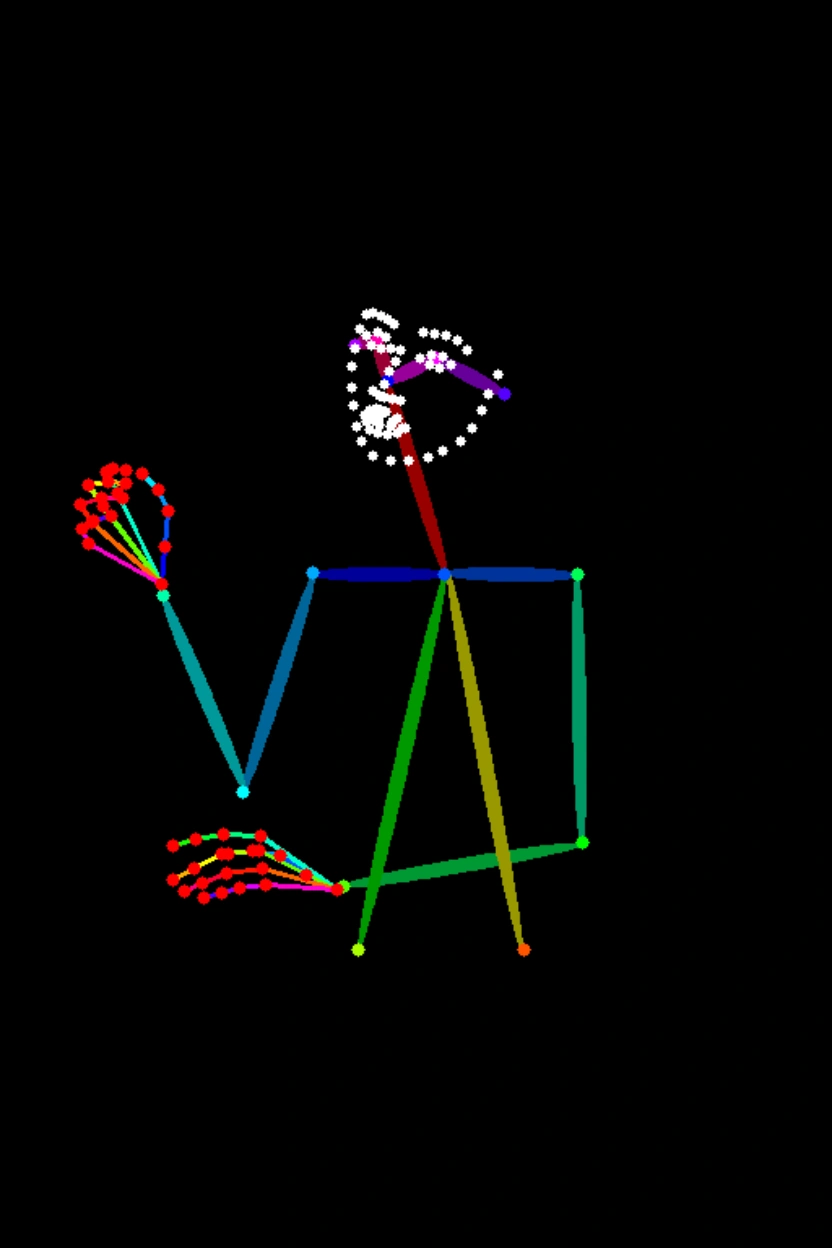


Prompt: La chica de la Imagen 1 lleva el vestido negro de la Imagen 2 y está sentada en la postura de la Imagen 3.
Nombre del modelo | Descripción del modelo | Especificaciones de la imagen de salida |
|---|---|---|
qwen-image-2.0-pro Actualmente tiene las mismas capacidades que qwen-image-2.0-pro-2026-04-22 | La serie Pro de modelos de generación y edición de imágenes Qwen ofrece capacidades mejoradas en renderizado de texto, texturas realistas y adherencia semántica. Para la generación de imágenes, consulte Qwen-Text a imagen. | Resolución de imagen:
Formato de imagen: png Número de imágenes: 1–6 |
qwen-image-2.0-pro-2026-06-22 | ||
qwen-image-2.0-pro-2026-04-22 | ||
qwen-image-2.0-pro-2026-03-03 | ||
qwen-image-2.0 Actualmente tiene las mismas capacidades que qwen-image-2.0-2026-03-03 | Esta es la versión acelerada del modelo de generación y edición de imágenes Qwen, que equilibra el rendimiento y la velocidad de respuesta. Para la generación de imágenes, consulte Qwen-Text a imagen. | |
qwen-image-2.0-2026-03-03 |
NotaAntes de llamar a la API, consulte la Lista de modelos para ver qué modelos son compatibles en cada región.
Requisitos previos
Antes de realizar una llamada, obtenga una clave de API y exporte la clave de API como variable de entorno.
Para llamar a la API mediante el SDK, instale el SDK de DashScope. El SDK está disponible para Python y Java.
ImportanteLas regiones de China (Pekín) y Singapur tienen claves de API y endpoints de solicitud separados. No pueden utilizarse indistintamente. Las llamadas entre regiones provocan fallos de autenticación o errores de servicio.
Llamada HTTP
Región de Singapur:POST https://{WorkspaceId}.ap-southeast-1.maas.aliyuncs.com/api/v1/services/aigc/multimodal-generation/generation
Región de Pekín:POST https://{WorkspaceId}.cn-beijing.maas.aliyuncs.com/api/v1/services/aigc/multimodal-generation/generation
Al realizar la llamada, reemplace {WorkspaceId} con su ID de espacio de trabajo real.
Parámetros de solicitud | Edición de imagen únicaEste ejemplo utiliza el modelo Fusión de múltiples imágenesEste ejemplo utiliza el modelo |
Encabezados de solicitud | |
Content-Type El tipo de contenido de la solicitud. Debe ser | |
Authorization Autentica la solicitud con una clave API de Model Studio. Ejemplo: Bearer sk-xxxx. | |
Cuerpo de la solicitud | |
model El nombre del modelo. Ejemplo: qwen-image-2.0-pro. | |
input El objeto de entrada, que contiene el siguiente campo: | |
parameters Parámetros adicionales para controlar la generación de imágenes. |
Parámetros de respuesta | Tarea exitosaLos datos de la tarea (estado de la tarea y URL de imágenes) se conservan solo durante 24 horas y luego se eliminan automáticamente. Guarde las imágenes generadas con prontitud. Error de tareaSi la tarea falla por cualquier motivo, se devuelve información relevante. Puede identificar la causa del error utilizando los campos code y message. Para obtener más información, consulte Códigos de error. |
output Los resultados de generación del modelo. | |
usage Uso de recursos para esta llamada. Se devuelve solo en caso de éxito. | |
request_id Identificador único de solicitud para rastreo y solución de problemas. | |
code Código de error. Se devuelve solo para solicitudes fallidas. Consulte Códigos de error. | |
message Mensaje de error detallado. Se devuelve solo para solicitudes fallidas. Consulte Códigos de error. |
Llamada al SDK de DashScope
Los nombres de los parámetros del SDK son mayoritariamente consistentes con la API HTTP. La estructura de parámetros se encapsula según las características del lenguaje. Para obtener una lista completa de parámetros, consulte la referencia de la API de Qwen.
Llamada con el SDK de Python
Nota
- Recomendamos instalar la última versión del SDK de Python de DashScope para evitar posibles errores en tiempo de ejecución. Para obtener más información, consulte Instalar o actualizar el SDK.
- No se admiten interfaces asíncronas.
Ejemplos de solicitud
import json
import os
import dashscope
from dashscope import MultiModalConversation

# The following is the URL for the Singapore region. Replace {WorkspaceId} with your Bailian workspace ID. URLs vary by region.
dashscope.base_http_api_url = 'https://{WorkspaceId}.ap-southeast-1.maas.aliyuncs.com/api/v1'

# The model supports one to three input images.
messages = [
    {
        "role": "user",
        "content": [
            {"image": "https://help-static-aliyun-doc.aliyuncs.com/file-manage-files/zh-CN/20250925/thtclx/input1.png"},
            {"image": "https://help-static-aliyun-doc.aliyuncs.com/file-manage-files/zh-CN/20250925/iclsnx/input2.png"},
            {"image": "https://help-static-aliyun-doc.aliyuncs.com/file-manage-files/zh-CN/20250925/gborgw/input3.png"},
            {"text": "The girl from Image 1 is wearing the black dress from Image 2 and sitting in the pose from Image 3."}
        ]
    }
]

# The API keys for the Singapore and Beijing regions are different. To get an API key, see https://www.alibabacloud.com/help/model-studio/get-api-key.
# If you have not configured the environment variable, replace the next line with: api_key="sk-xxx"
api_key = os.getenv("DASHSCOPE_API_KEY")

# The qwen-image-2.0 series supports one to six output images. This example generates two.
response = MultiModalConversation.call(
    api_key=api_key,
    model="qwen-image-2.0-pro",
    messages=messages,
    stream=False,
    n=2,
    watermark=False,
    negative_prompt=" ",
    prompt_extend=True,
    size="1024*1536",
)

if response.status_code == 200:
    # To view the full response, uncomment the next line.
    # print(json.dumps(response, ensure_ascii=False))
    for i, content in enumerate(response.output.choices[0].message.content):
        print(f"URL of output image {i+1}: {content['image']}")
else:
    print(f"HTTP status code: {response.status_code}")
    print(f"Error code: {response.code}")
    print(f"Error message: {response.message}")
    print("For more information, see https://www.alibabacloud.com/help/model-studio/error-code")
import json
import os
import dashscope
from dashscope import MultiModalConversation
import base64
import mimetypes

# The following is the URL for the Singapore region. Replace {WorkspaceId} with your Bailian workspace ID. URLs vary by region.
dashscope.base_http_api_url = 'https://{WorkspaceId}.ap-southeast-1.maas.aliyuncs.com/api/v1'

# --- For Base64 encoding ---
# Format: data:{mime_type};base64,{base64_data}
def encode_file(file_path):
    mime_type, _ = mimetypes.guess_type(file_path)
    if not mime_type or not mime_type.startswith("image/"):
        raise ValueError("Unsupported or unrecognized image format")

    try:
        with open(file_path, "rb") as image_file:
            encoded_string = base64.b64encode(
                image_file.read()).decode('utf-8')
        return f"data:{mime_type};base64,{encoded_string}"
    except IOError as e:
        raise IOError(f"Error reading file: {file_path}, Error: {str(e)}")

# Get the Base64 encoding of the image.
# Call the encoding function. Replace "/path/to/your/image.png" with the path to your local image file. Otherwise, the code will not run.
image = encode_file("/path/to/your/image.png")

messages = [
    {
        "role": "user",
        "content": [
            {"image": image},
            {"text": "Generate an image that matches the depth map, following this description: A red, dilapidated bicycle is parked on a muddy path, with a dense primeval forest in the background."}
        ]
    }
]

# The API keys for the Singapore and Beijing regions are different. To get an API key, see https://www.alibabacloud.com/help/model-studio/get-api-key.
# If you have not configured the environment variable, replace the next line with: api_key="sk-xxx"
api_key = os.getenv("DASHSCOPE_API_KEY")

# The qwen-image-2.0 series supports one to six output images. This example generates two.
response = MultiModalConversation.call(
    api_key=api_key,
    model="qwen-image-2.0-pro",
    messages=messages,
    stream=False,
    n=2,
    watermark=False,
    negative_prompt=" ",
    prompt_extend=True,
    size="1536*1024",
)

if response.status_code == 200:
    # To view the full response, uncomment the next line.
    # print(json.dumps(response, ensure_ascii=False))
    for i, content in enumerate(response.output.choices[0].message.content):
        print(f"URL of output image {i+1}: {content['image']}")
else:
    print(f"HTTP status code: {response.status_code}")
    print(f"Error code: {response.code}")
    print(f"Error message: {response.message}")
    print("For more information, see https://www.alibabacloud.com/help/model-studio/error-code")
# You need to install requests to download the image: pip install requests
import requests

def download_image(image_url, save_path='output.png'):
    try:
        response = requests.get(image_url, stream=True, timeout=300)  # Set a timeout.
        response.raise_for_status()  # Raise an exception if the HTTP status code is not 200.
        with open(save_path, 'wb') as f:
            for chunk in response.iter_content(chunk_size=8192):
                f.write(chunk)
        print(f"Image successfully downloaded to: {save_path}")

    except requests.exceptions.RequestException as e:
        print(f"Image download failed: {e}")

image_url = "https://dashscope-result-sz.oss-cn-shenzhen.aliyuncs.com/xxx.png?Expires=xxx"
download_image(image_url, save_path='output.png')
Ejemplo de respuesta
La URL de la imagen es válida durante 24 horas. Descargue la imagen rápidamente.
Los campos
input_tokens,output_tokensycharactersson compatibles. Sus valores están actualmente fijados en 0.
{
    "status_code": 200,
    "request_id": "fa41f9f9-3cb6-434d-a95d-4ae6b9xxxxxx",
    "code": "",
    "message": "",
    "output": {
        "text": null,
        "finish_reason": null,
        "choices": [
            {
                "finish_reason": "stop",
                "message": {
                    "role": "assistant",
                    "content": [
                        {
                            "image": "https://dashscope-result-hz.oss-cn-hangzhou.aliyuncs.com/xxx.png?Expires=xxx"
                        },
                        {
                            "image": "https://dashscope-result-hz.oss-cn-hangzhou.aliyuncs.com/xxx.png?Expires=xxx"
                        }
                    ]
                }
            }
        ],
        "audio": null
    },
    "usage": {
        "input_tokens": 0,
        "output_tokens": 0,
        "characters": 0,
        "height": 1536,
        "image_count": 2,
        "width": 1024
    }
}
Llamada con el SDK de Java
NotaInstale la última versión del SDK de Java de DashScope para evitar errores en tiempo de ejecución. Consulte Instalar o actualizar el SDK.
Ejemplos de solicitud
import com.alibaba.dashscope.aigc.multimodalconversation.MultiModalConversation;
import com.alibaba.dashscope.aigc.multimodalconversation.MultiModalConversationParam;
import com.alibaba.dashscope.aigc.multimodalconversation.MultiModalConversationResult;
import com.alibaba.dashscope.common.MultiModalMessage;
import com.alibaba.dashscope.common.Role;
import com.alibaba.dashscope.exception.ApiException;
import com.alibaba.dashscope.exception.NoApiKeyException;
import com.alibaba.dashscope.exception.UploadFileException;
import com.alibaba.dashscope.utils.JsonUtils;
import com.alibaba.dashscope.utils.Constants;

import java.io.IOException;
import java.util.Arrays;
import java.util.Collections;
import java.util.HashMap;
import java.util.Map;
import java.util.List;

public class QwenImageEdit {

    static {
        // The following is the URL for the Singapore region. Replace {WorkspaceId} with your Bailian workspace ID. URLs vary by region.
        Constants.baseHttpApiUrl = "https://{WorkspaceId}.ap-southeast-1.maas.aliyuncs.com/api/v1";
    }

    // The API keys for the Singapore and Beijing regions are different. To obtain an API key, see https://www.alibabacloud.com/help/model-studio/get-api-key.
    // If you have not configured the environment variable, replace the following line with your DashScope API key: apiKey="sk-xxx".
    static String apiKey = System.getenv("DASHSCOPE_API_KEY");

    public static void call() throws ApiException, NoApiKeyException, UploadFileException, IOException {

        MultiModalConversation conv = new MultiModalConversation();

        // The model supports one to three input images.
        MultiModalMessage userMessage = MultiModalMessage.builder().role(Role.USER.getValue())
                .content(Arrays.asList(
                        Collections.singletonMap("image", "https://help-static-aliyun-doc.aliyuncs.com/file-manage-files/zh-CN/20250925/thtclx/input1.png"),
                        Collections.singletonMap("image", "https://help-static-aliyun-doc.aliyuncs.com/file-manage-files/zh-CN/20250925/iclsnx/input2.png"),
                        Collections.singletonMap("image", "https://help-static-aliyun-doc.aliyuncs.com/file-manage-files/zh-CN/20250925/gborgw/input3.png"),
                        Collections.singletonMap("text", "The girl from Image 1 is wearing the black dress from Image 2 and sitting in the pose from Image 3.")
                )).build();
        // The qwen-image-2.0 series models support one to six output images. This example generates two images.
        Map<String, Object> parameters = new HashMap<>();
        parameters.put("watermark", false);
        parameters.put("negative_prompt", " ");
        parameters.put("n", 2);
        parameters.put("prompt_extend", true);
        parameters.put("size", "1024*1536");

        MultiModalConversationParam param = MultiModalConversationParam.builder()
                .apiKey(apiKey)
                .model("qwen-image-2.0-pro")
                .messages(Collections.singletonList(userMessage))
                .parameters(parameters)
                .build();

        MultiModalConversationResult result = conv.call(param);
        // To view the complete response, uncomment the following line.
        // System.out.println(JsonUtils.toJson(result));
        List<Map<String, Object>> contentList = result.getOutput().getChoices().get(0).getMessage().getContent();
        int imageIndex = 1;
        for (Map<String, Object> content : contentList) {
            if (content.containsKey("image")) {
                System.out.println("URL of output image " + imageIndex + ": " + content.get("image"));
                imageIndex++;
            }
        }
    }

    public static void main(String[] args) {
        try {
            call();
        } catch (ApiException | NoApiKeyException | UploadFileException | IOException e) {
            System.out.println(e.getMessage());
        }
    }
}
import com.alibaba.dashscope.aigc.multimodalconversation.MultiModalConversation;
import com.alibaba.dashscope.aigc.multimodalconversation.MultiModalConversationParam;
import com.alibaba.dashscope.aigc.multimodalconversation.MultiModalConversationResult;
import com.alibaba.dashscope.common.MultiModalMessage;
import com.alibaba.dashscope.common.Role;
import com.alibaba.dashscope.exception.ApiException;
import com.alibaba.dashscope.exception.NoApiKeyException;
import com.alibaba.dashscope.exception.UploadFileException;
import com.alibaba.dashscope.utils.JsonUtils;
import com.alibaba.dashscope.utils.Constants;

import java.io.IOException;
import java.nio.file.Files;
import java.nio.file.Path;
import java.nio.file.Paths;
import java.util.Arrays;
import java.util.Base64;
import java.util.Collections;
import java.util.HashMap;
import java.util.Map;
import java.util.List;

public class QwenImageEdit {

    static {
        // The following is the URL for the Singapore region. Replace {WorkspaceId} with your Bailian workspace ID. URLs vary by region.
        Constants.baseHttpApiUrl = "https://{WorkspaceId}.ap-southeast-1.maas.aliyuncs.com/api/v1";
    }

    // The API keys for the Singapore and Beijing regions are different. To obtain an API key, see https://www.alibabacloud.com/help/model-studio/get-api-key.
    // If you have not configured the environment variable, replace the following line with your DashScope API key: apiKey="sk-xxx".
    static String apiKey = System.getenv("DASHSCOPE_API_KEY");

    public static void call() throws ApiException, NoApiKeyException, UploadFileException, IOException {

        // Replace "/path/to/your/image.png" with the path to your local image file. Otherwise, the code cannot run.
        String image = encodeFile("/path/to/your/image.png");

        MultiModalConversation conv = new MultiModalConversation();

        MultiModalMessage userMessage = MultiModalMessage.builder().role(Role.USER.getValue())
                .content(Arrays.asList(
                        Collections.singletonMap("image", image),
                        Collections.singletonMap("text", "Generate an image that matches the depth map, following this description: A dilapidated red bicycle is parked on a muddy path, with a dense primeval forest in the background.")
                )).build();
        // The qwen-image-2.0 series models support one to six output images. This example generates two images.
        Map<String, Object> parameters = new HashMap<>();
        parameters.put("watermark", false);
        parameters.put("negative_prompt", " ");
        parameters.put("n", 2);
        parameters.put("prompt_extend", true);
        parameters.put("size", "1536*1024");

        MultiModalConversationParam param = MultiModalConversationParam.builder()
                .apiKey(apiKey)
                .model("qwen-image-2.0-pro")
                .messages(Collections.singletonList(userMessage))
                .parameters(parameters)
                .build();

        MultiModalConversationResult result = conv.call(param);
        // To view the complete response, uncomment the following line.
        // System.out.println(JsonUtils.toJson(result));
        List<Map<String, Object>> contentList = result.getOutput().getChoices().get(0).getMessage().getContent();
        int imageIndex = 1;
        for (Map<String, Object> content : contentList) {
            if (content.containsKey("image")) {
                System.out.println("URL of output image " + imageIndex + ": " + content.get("image"));
                imageIndex++;
            }
        }
    }

    /**
     * Encodes a file into a Base64 string.
     * @param filePath The path to the file.
     * @return A Base64 string in the format: data:{mime_type};base64,{base64_data}.
     */
    public static String encodeFile(String filePath) {
        Path path = Paths.get(filePath);
        if (!Files.exists(path)) {
            throw new IllegalArgumentException("File does not exist: " + filePath);
        }
        // Detect the MIME type.
        String mimeType = null;
        try {
            mimeType = Files.probeContentType(path);
        } catch (IOException e) {
            throw new IllegalArgumentException("Cannot detect file type: " + filePath);
        }
        if (mimeType == null || !mimeType.startsWith("image/")) {
            throw new IllegalArgumentException("Unsupported or unrecognized image format.");
        }
        // Read the file content and encode it.
        byte[] fileBytes = null;
        try{
            fileBytes = Files.readAllBytes(path);
        } catch (IOException e) {
            throw new IllegalArgumentException("Cannot read file content: " + filePath);
        }

        String encodedString = Base64.getEncoder().encodeToString(fileBytes);
        return "data:" + mimeType + ";base64," + encodedString;
    }

    public static void main(String[] args) {
        try {
            call();
        } catch (ApiException | NoApiKeyException | UploadFileException | IOException e) {
            System.out.println(e.getMessage());
        }
    }
}
import java.io.FileOutputStream;
import java.io.InputStream;
import java.net.HttpURLConnection;
import java.net.URL;

public class ImageDownloader {
    public static void downloadImage(String imageUrl, String savePath) {
        try {
            URL url = new URL(imageUrl);
            HttpURLConnection connection = (HttpURLConnection) url.openConnection();
            connection.setConnectTimeout(5000);
            connection.setReadTimeout(300000);
            connection.setRequestMethod("GET");
            InputStream inputStream = connection.getInputStream();
            FileOutputStream outputStream = new FileOutputStream(savePath);
            byte[] buffer = new byte[8192];
            int bytesRead;
            while ((bytesRead = inputStream.read(buffer)) != -1) {
                outputStream.write(buffer, 0, bytesRead);
            }
            inputStream.close();
            outputStream.close();

            System.out.println("Image downloaded successfully to: " + savePath);
        } catch (Exception e) {
            System.err.println("Image download failed: " + e.getMessage());
        }
    }

    public static void main(String[] args) {
        String imageUrl = "http://dashscope-result-bj.oss-cn-beijing.aliyuncs.com/xxx?Expires=xxx";
        String savePath = "output.png";
        downloadImage(imageUrl, savePath);
    }
}
Ejemplos de respuesta
La URL de la imagen es válida durante 24 horas. Descargue la imagen rápidamente.
{
    "requestId": "46281da9-9e02-941c-ac78-be88b8xxxxxx",
    "usage": {
        "image_count": 2,
        "width": 1024,
        "height": 1536
    },
    "output": {
        "choices": [
            {
                "finish_reason": "stop",
                "message": {
                    "role": "assistant",
                    "content": [
                        {
                            "image": "https://dashscope-result-sz.oss-cn-shenzhen.aliyuncs.com/xxx.png?Expires=xxx"
                        },
                        {
                            "image": "https://dashscope-result-sz.oss-cn-shenzhen.aliyuncs.com/xxx.png?Expires=xxx"
                        }
                    ]
                }
            }
        ]
    }
}
Códigos de error
Si la llamada al modelo falla y devuelve un mensaje de error, consulte Códigos de error para su resolución.
Facturación y limitación de tasa
- Para conocer las cuotas gratuitas de los modelos y las tarifas de facturación, consulte la Lista de modelos.
- Consulte Qwen-Image para obtener detalles sobre los límites de tasa del modelo.
- Facturación: Se le factura por cada imagen generada correctamente. Las llamadas fallidas no generan cargos ni consumen su cuota gratuita para nuevos usuarios.
FAQ
P: ¿Qué idiomas admite el modelo de edición de imágenes Qwen?
R: El modelo actualmente admite chino simplificado e inglés. Puede probar otros idiomas, pero no se garantiza el rendimiento.
P: ¿Cómo puedo ver las métricas de invocación del modelo?
R: Una hora después de que finalice la invocación de un modelo, vaya a la página de Monitoreo (Singapore) o Monitoreo (China (Pekín)) para ver métricas como el recuento de invocaciones y la tasa de éxito. Para obtener más información, consulte Facturación y gestión de costos.
P: ¿Cómo obtengo la lista blanca de nombres de dominio para el almacenamiento de imágenes?
R: Las imágenes generadas por los modelos se almacenan en OSS. La API devuelve una URL pública temporal. Para configurar una lista blanca de firewall para esta URL de descarga, tenga en cuenta lo siguiente: El almacenamiento subyacente puede cambiar dinámicamente. Este tema no proporciona una lista blanca fija de dominios de OSS para evitar problemas de acceso causados por información obsoleta. Si tiene requisitos de control de seguridad, póngase en contacto con su gestor de cuenta para obtener la lista más reciente de nombres de dominio de OSS.