Conéctese al servicio de síntesis de voz en tiempo real Qwen-TTS-Realtime a través de WebSocket. Cubre el endpoint del servicio, los encabezados de solicitud y el flujo de interacción.
Para obtener una descripción general del modelo y orientación sobre la selección, consulte Síntesis de voz en tiempo real
La API Realtime de Qwen-TTS utiliza el protocolo WebSocket. Las aplicaciones Java y Python pueden usar el SDK de DashScope para evitar la gestión de WebSocket. Otros lenguajes pueden conectarse directamente con una biblioteca de WebSocket.
Endpoint de servicio
Utilice la siguiente URL. Configure el modelo con el parámetro de consulta model:
Singapore
URL de WebSocket: wss://dashscope-intl.aliyuncs.com/api-ws/v1/realtime?model=qwen3-tts-flash-realtime
China (Beijing)
URL de WebSocket: wss://dashscope-intl.aliyuncs.com/api-ws/v1/realtime?model=qwen3-tts-flash-realtime
ImportanteLa URL debe utilizar el protocolo wss://. Configure el encabezado Authorization (consulte Encabezados de solicitud) y especifique el modelo mediante el parámetro de consulta model.
Encabezados de solicitud
Configure los siguientes encabezados de solicitud:
Parámetro | Tipo | Obligatorio | Descripción |
|---|---|---|---|
Authorization | string | Sí | Formato: |
user-agent | string | No | Identificador del cliente para el rastreo de origen en el servidor. |
X-DashScope-WorkSpace | string | No | El ID de espacio de trabajo de Alibaba Cloud Model Studio. |
ImportanteLa autorización se verifica durante el protocolo de enlace de WebSocket. Una clave de API no válida o faltante provoca que el protocolo de enlace falle con HTTP 401/403.
Flujo de interacción
Para obtener descripciones detalladas de los eventos del cliente y del servidor, consulte Eventos del cliente y Eventos del servidor.
La API admite dos modos:
- Modo ServerCommit: El servidor determina la segmentación del texto y el momento de la síntesis automáticamente.
- Modo Commit: El cliente controla cuándo enviar cada segmento de texto. Llame a
input_text_buffer.commitexplícitamente para activar la síntesis.
Detalles del modo
- En el modo ServerCommit, llame a
input_text_buffer.appendpara almacenar texto en el búfer. El sistema determina el momento de la síntesis automáticamente. - Llamar a
input_text_buffer.commiten el modo ServerCommit sintetiza el búfer actual inmediatamente. Luego, la sesión reanuda el modo ServerCommit. - En el modo Commit,
input_text_buffer.appendpor sí solo no activa la síntesis. Llame ainput_text_buffer.commitpara iniciar la síntesis.
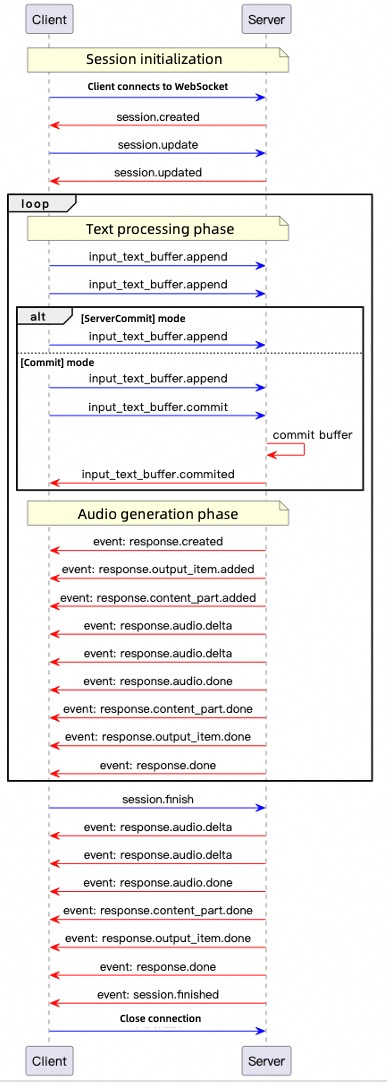
-
Conexión: El cliente abre una conexión WebSocket. El servidor devuelve
session.createdcuando está listo. -
Configuración de sesión: El cliente envía
session.updatepara configurar la voz, el formato y el modo. -
Entrada de texto: El cliente envía
input_text_buffer.appendpara agregar texto al búfer. -
Activador de síntesis:
- En el modo ServerCommit, la síntesis comienza automáticamente. El cliente puede llamar a
input_text_buffer.commitpara forzar la síntesis inmediata. - En el modo Commit, solo
input_text_buffer.commitactiva la síntesis.
- En el modo ServerCommit, la síntesis comienza automáticamente. El cliente puede llamar a
-
Generación de audio: El servidor envía
response.createdy luego transmite audio codificado en base64 como eventosresponse.audio.deltahastaresponse.audio.done. -
Finalización de sesión: El cliente envía
session.finishpara liberar recursos. El servidor devuelvesession.finishedy cierra la conexión.
Después de la conexión, el servidor devuelve este evento session.created:
{
    "event_id": "event_xxx",
    "type": "session.created",
    "session": {
        "object": "realtime.session",
        "mode": "server_commit",
        "model": "qwen3-tts-flash-realtime",
        "voice": "Cherry",
        "response_format": "pcm",
        "sample_rate": 24000,
        "id": "sess_xxx"
    }
}
Ejemplos de código
Los ejemplos proporcionan clientes Python y Java y ambos modos de commit. Configure DASHSCOPE_API_KEY para la región del endpoint. Python requiere websockets y pyaudio; Java requiere Java-WebSocket y Gson, y usa Java Sound para reproducir audio. Cada evento del cliente usa un UUID único.
<dependencies>
    <dependency>
        <groupId>org.java-websocket</groupId>
        <artifactId>Java-WebSocket</artifactId>
        <version>1.5.3</version>
    </dependency>
    <dependency>
        <groupId>com.google.code.gson</groupId>
        <artifactId>gson</artifactId>
        <version>2.10.1</version>
    </dependency>
</dependencies>
pip install websockets pyaudio
-
Crear el cliente
Java
Cree un archivo Java llamado
TTSRealtimeClient.javay copie el siguiente código en el archivo:import com.google.gson.Gson; import com.google.gson.JsonObject; import org.java_websocket.client.WebSocketClient; import org.java_websocket.handshake.ServerHandshake; import java.net.URI; import java.util.Base64; import java.util.HashMap; import java.util.Map; import java.util.concurrent.CountDownLatch; import java.util.function.Consumer; /** * A client for interacting with the TTS Realtime API. * * This class provides methods for connecting to the TTS Realtime API, sending text data, retrieving audio output, and managing WebSocket connections. */ public class TTSRealtimeClient { public enum SessionMode { SERVER_COMMIT("server_commit"), COMMIT("commit"); private final String value; SessionMode(String value) { this.value = value; } public String getValue() { return value; } } /** * Audio callback interface */ public interface AudioCallback { void onAudio(byte[] audioData); } private final String baseUrl; private final String apiKey; private final String voice; private final SessionMode mode; private final String languageType; private final AudioCallback audioCallback; private final Gson gson = new Gson(); private WebSocketClient ws; private CountDownLatch responseDoneLatch; private CountDownLatch sessionFinishedLatch; public TTSRealtimeClient(String baseUrl, String apiKey, String voice, SessionMode mode, AudioCallback audioCallback, String languageType) { this.baseUrl = baseUrl; this.apiKey = apiKey; this.voice = voice; this.mode = mode; this.audioCallback = audioCallback; this.languageType = languageType; } public TTSRealtimeClient(String baseUrl, String apiKey, String voice, SessionMode mode, AudioCallback audioCallback) { this(baseUrl, apiKey, voice, mode, audioCallback, "Auto"); } /** * Establish a WebSocket connection to the TTS Realtime API. */ public void connect() throws Exception { Map<String, String> headers = new HashMap<>(); headers.put("Authorization", "Bearer " + apiKey); responseDoneLatch = new CountDownLatch(0); sessionFinishedLatch = new CountDownLatch(1); ws = new WebSocketClient(new URI(baseUrl), headers) { @Override public void onOpen(ServerHandshake handshake) { System.out.println("WebSocket connection established"); // Send default session configuration JsonObject session = new JsonObject(); session.addProperty("mode", mode.getValue()); session.addProperty("voice", TTSRealtimeClient.this.voice); session.addProperty("language_type", languageType); session.addProperty("response_format", "pcm"); session.addProperty("sample_rate", 24000); updateSession(session); } @Override public void onMessage(String message) { JsonObject event = gson.fromJson(message, JsonObject.class); String eventType = event.has("type") ? event.get("type").getAsString() : ""; if (!"response.audio.delta".equals(eventType)) { System.out.println("Received event: " + eventType); } switch (eventType) { case "error": System.err.println("Error: " + event.get("error")); break; case "session.created": System.out.println("Session created, ID: " + event.getAsJsonObject("session").get("id").getAsString()); break; case "session.updated": System.out.println("Session updated, ID: " + event.getAsJsonObject("session").get("id").getAsString()); break; case "input_text_buffer.committed": System.out.println("Text buffer committed, item ID: " + event.get("item_id")); break; case "input_text_buffer.cleared": System.out.println("Text buffer cleared"); break; case "response.created": System.out.println("Response created, ID: " + event.getAsJsonObject("response").get("id").getAsString()); responseDoneLatch = new CountDownLatch(1); break; case "response.output_item.added": System.out.println("Output item added, ID: " + event.getAsJsonObject("item").get("id").getAsString()); break; case "response.audio.delta": if (audioCallback != null) { byte[] audioBytes = Base64.getDecoder().decode( event.get("delta").getAsString()); audioCallback.onAudio(audioBytes); } break; case "response.audio.done": System.out.println("Audio generation completed"); break; case "response.done": System.out.println("Response completed"); responseDoneLatch.countDown(); break; case "session.finished": System.out.println("Session finished"); sessionFinishedLatch.countDown(); break; } } @Override public void onClose(int code, String reason, boolean remote) { System.out.println("Connection closed: " + reason); } @Override public void onError(Exception ex) { System.err.println("WebSocket error: " + ex.getMessage()); } }; ws.connectBlocking(); } /** * Send an event to the server. */ public void sendEvent(JsonObject event) { String eventId = "event_" + java.util.UUID.randomUUID().toString(); event.addProperty("event_id", eventId); System.out.println("Sending event: type=" + event.get("type").getAsString() + ", event_id=" + eventId); ws.send(gson.toJson(event)); } /** * Update the session configuration. */ public void updateSession(JsonObject config) { JsonObject event = new JsonObject(); event.addProperty("type", "session.update"); event.add("session", config); System.out.println("Updating session configuration: " + event); sendEvent(event); } /** * Send text data to the API. */ public void appendText(String text) { JsonObject event = new JsonObject(); event.addProperty("type", "input_text_buffer.append"); event.addProperty("text", text); sendEvent(event); } /** * Commit the text buffer to trigger processing. */ public void commitTextBuffer() { JsonObject event = new JsonObject(); event.addProperty("type", "input_text_buffer.commit"); sendEvent(event); } /** * Clear the text buffer. */ public void clearTextBuffer() { JsonObject event = new JsonObject(); event.addProperty("type", "input_text_buffer.clear"); sendEvent(event); } /** * End the session. */ public void finishSession() { JsonObject event = new JsonObject(); event.addProperty("type", "session.finish"); sendEvent(event); } /** * Wait for the response.done event. */ public void waitForResponseDone() throws InterruptedException { responseDoneLatch.await(); } /** * Wait for the session.finished event. */ public void waitForSessionFinished() throws InterruptedException { sessionFinishedLatch.await(); } /** * Close the WebSocket connection. */ public void close() { if (ws != null) { ws.close(); } } }Python
Cree un archivo Python llamado
tts_realtime_client.pyy copie el siguiente código en el archivo:# -- coding: utf-8 -- import asyncio import websockets import json import base64 import time import uuid from typing import Optional, Callable, Dict, Any from enum import Enum class SessionMode(Enum): SERVER_COMMIT = "server_commit" COMMIT = "commit" class TTSRealtimeClient: """ Client for interacting with the TTS Realtime API. This class provides methods for connecting to the TTS Realtime API, sending text data, receiving audio output, and managing WebSocket connections. Attributes: base_url (str): Base URL of the Realtime API. api_key (str): API Key for authentication. voice (str): Voice used for server-side speech synthesis. mode (SessionMode): Session mode, either server_commit or commit. audio_callback (Callable[[bytes], None]): Callback function for receiving audio data. language_type(str) Language for synthesized speech. Options: Chinese, English, German, Italian, Portuguese, Spanish, Japanese, Korean, French, Russian, Auto """ def __init__( self, base_url: str, api_key: str, voice: str = "Cherry", mode: SessionMode = SessionMode.SERVER_COMMIT, audio_callback: Optional[Callable[[bytes], None]] = None, language_type: str = "Auto"): self.base_url = base_url self.api_key = api_key self.voice = voice self.mode = mode self.ws = None self.audio_callback = audio_callback self.language_type = language_type # Current response state self._current_response_id = None self._current_item_id = None self._is_responding = False self._response_done_future = None async def connect(self) -> None: """Establish WebSocket connection with the TTS Realtime API.""" headers = { "Authorization": f"Bearer {self.api_key}" } self.ws = await websockets.connect(self.base_url, additional_headers=headers) # Set default session configuration await self.update_session({ "mode": self.mode.value, "voice": self.voice, "language_type": self.language_type, "response_format": "pcm", "sample_rate": 24000 }) async def send_event(self, event) -> None: """Send an event to the server.""" event['event_id'] = "event_" + uuid.uuid4().hex print(f"Sending event: type={event['type']}, event_id={event['event_id']}") await self.ws.send(json.dumps(event)) async def update_session(self, config: Dict[str, Any]) -> None: """Update session configuration.""" event = { "type": "session.update", "session": config } print("Updating session configuration: ", event) await self.send_event(event) async def append_text(self, text: str) -> None: """Send text data to the API.""" event = { "type": "input_text_buffer.append", "text": text } await self.send_event(event) async def commit_text_buffer(self) -> None: """Commit text buffer to trigger processing.""" event = { "type": "input_text_buffer.commit" } await self.send_event(event) async def clear_text_buffer(self) -> None: """Clear the text buffer.""" event = { "type": "input_text_buffer.clear" } await self.send_event(event) async def finish_session(self) -> None: """End the session.""" event = { "type": "session.finish" } await self.send_event(event) async def wait_for_response_done(self): """Wait for the response.done event""" if self._response_done_future: await self._response_done_future async def handle_messages(self) -> None: """Handle messages from the server.""" try: async for message in self.ws: event = json.loads(message) event_type = event.get("type") if event_type != "response.audio.delta": print(f"Received event: {event_type}") if event_type == "error": print("Error: ", event.get('error', {})) continue elif event_type == "session.created": print("Session created, ID: ", event.get('session', {}).get('id')) elif event_type == "session.updated": print("Session updated, ID: ", event.get('session', {}).get('id')) elif event_type == "input_text_buffer.committed": print("Text buffer committed, item ID: ", event.get('item_id')) elif event_type == "input_text_buffer.cleared": print("Text buffer cleared") elif event_type == "response.created": self._current_response_id = event.get("response", {}).get("id") self._is_responding = True # Create a new future to wait for response.done self._response_done_future = asyncio.Future() print("Response created, ID: ", self._current_response_id) elif event_type == "response.output_item.added": self._current_item_id = event.get("item", {}).get("id") print("Output item added, ID: ", self._current_item_id) # Handle audio delta elif event_type == "response.audio.delta" and self.audio_callback: audio_bytes = base64.b64decode(event.get("delta", "")) self.audio_callback(audio_bytes) elif event_type == "response.audio.done": print("Audio generation completed") elif event_type == "response.done": self._is_responding = False self._current_response_id = None self._current_item_id = None # Mark future as done if self._response_done_future and not self._response_done_future.done(): self._response_done_future.set_result(True) print("Response completed") elif event_type == "session.finished": print("Session finished") except websockets.exceptions.ConnectionClosed: print("Connection closed") except Exception as e: print("Error handling messages: ", str(e)) async def close(self) -> None: """Close the WebSocket connection.""" if self.ws: await self.ws.close() -
Seleccionar un modo de síntesis de voz
La API Realtime admite dos modos:
-
Modo server_commit
El servidor gestiona automáticamente la segmentación de texto y los tiempos de síntesis. El cliente solo envía texto. Adecuado para escenarios de baja latencia (como navegación GPS).
-
modo commit
El cliente agrega texto a un búfer y activa explícitamente la síntesis. Adecuado para escenarios que requieren un control preciso de la segmentación de oraciones (como transmisiones de noticias).
modo server_commit
Java
En el mismo directorio que
TTSRealtimeClient.java, cree otro archivo Java llamadoServerCommit.javay copie el siguiente código en el archivo:import javax.sound.sampled.*; import java.io.*; import java.util.ArrayList; import java.util.List; import java.util.concurrent.ConcurrentLinkedQueue; import java.util.concurrent.atomic.AtomicBoolean; public class ServerCommit { // The following is the configuration for the Singapore region. private static final String URL = "wss://dashscope-intl.aliyuncs.com/api-ws/v1/realtime?model=qwen3-tts-flash-realtime"; // The API Key differs between the Singapore and Beijing regions. Get your API Key: https://www.alibabacloud.com/help/model-studio/get-api-key // If you have not configured the environment variable, replace the next line with your Model Studio API Key: private static final String API_KEY = "sk-xxx"; private static final String API_KEY = System.getenv("DASHSCOPE_API_KEY"); private static final int SAMPLE_RATE = 24000; // Audio data cache private static final List<byte[]> audioChunks = new ArrayList<>(); // Real-time playback queue private static final ConcurrentLinkedQueue<byte[]> playbackQueue = new ConcurrentLinkedQueue<>(); private static final AtomicBoolean playing = new AtomicBoolean(true); public static void main(String[] args) throws Exception { if (API_KEY == null || API_KEY.isEmpty()) { throw new IllegalStateException("Please set the DASHSCOPE_API_KEY environment variable"); } // Initialize audio playback AudioFormat format = new AudioFormat(SAMPLE_RATE, 16, 1, true, false); DataLine.Info info = new DataLine.Info(SourceDataLine.class, format); SourceDataLine audioLine = (SourceDataLine) AudioSystem.getLine(info); audioLine.open(format); audioLine.start(); // Start the playback thread Thread playerThread = new Thread(() -> { while (playing.get() || !playbackQueue.isEmpty()) { byte[] chunk = playbackQueue.poll(); if (chunk != null) { audioLine.write(chunk, 0, chunk.length); } else { try { Thread.sleep(10); } catch (InterruptedException ignored) {} } } }); playerThread.start(); // Create the TTS client TTSRealtimeClient client = new TTSRealtimeClient( URL, API_KEY, "Cherry", TTSRealtimeClient.SessionMode.SERVER_COMMIT, audioData -> { playbackQueue.add(audioData); audioChunks.add(audioData); System.out.println("Received audio data: " + audioData.length + " bytes"); } ); client.connect(); // Send text fragments String[] textFragments = { "Alibaba Cloud's large language model platform, Model Studio, is an all-in-one platform for developing and building large language model applications.", "Both developers and business users can deeply participate in the design and development of large language model applications.", "You can develop a large language model application in five minutes using a simple interface,", "or train a dedicated model in a few hours, allowing you to focus more energy on application innovation." }; System.out.println("Starting to send text..."); for (String text : textFragments) { System.out.println("Sending fragment: " + text); client.appendText(text); Thread.sleep(100); } Thread.sleep(1000); client.finishSession(); // Wait for the response to complete client.waitForResponseDone(); client.waitForSessionFinished(); client.close(); // Wait for playback to complete playing.set(false); playerThread.join(); audioLine.drain(); audioLine.close(); // Save the audio file saveWav("output.wav"); System.out.println("Done"); } private static void saveWav(String filename) throws IOException { if (audioChunks.isEmpty()) { System.out.println("No audio data to save"); return; } ByteArrayOutputStream bos = new ByteArrayOutputStream(); for (byte[] chunk : audioChunks) { bos.write(chunk); } byte[] allAudio = bos.toByteArray(); AudioFormat format = new AudioFormat(SAMPLE_RATE, 16, 1, true, false); AudioInputStream ais = new AudioInputStream( new ByteArrayInputStream(allAudio), format, allAudio.length / 2); new File("outputs").mkdirs(); AudioSystem.write(ais, AudioFileFormat.Type.WAVE, new File("outputs/" + filename)); System.out.println("Audio saved to: outputs/" + filename); } }Compile y ejecute
ServerCommit.javapara escuchar el audio generado por Realtime API en tiempo real.Python
En el mismo directorio que
tts_realtime_client.py, cree otro archivo Python llamadoserver_commit.pyy copie el siguiente código en el archivo:import os import asyncio import logging import wave from tts_realtime_client import TTSRealtimeClient, SessionMode import pyaudio # QwenTTS service configuration # The following is the configuration for the Singapore region. URL = "wss://dashscope-intl.aliyuncs.com/api-ws/v1/realtime?model=qwen3-tts-flash-realtime" # The API Key differs between the Singapore and Beijing regions. Get your API Key: https://www.alibabacloud.com/help/model-studio/get-api-key # If you have not configured the environment variable, replace the next line with your Model Studio API Key: API_KEY="sk-xxx" API_KEY = os.getenv("DASHSCOPE_API_KEY") if not API_KEY: raise ValueError("Please set DASHSCOPE_API_KEY environment variable") # Collect audio data _audio_chunks = [] # Real-time playback related _AUDIO_SAMPLE_RATE = 24000 _audio_pyaudio = pyaudio.PyAudio() _audio_stream = None # Will be opened at runtime def _audio_callback(audio_bytes: bytes): """TTSRealtimeClient audio callback: real-time playback and caching""" global _audio_stream if _audio_stream is not None: try: _audio_stream.write(audio_bytes) except Exception as exc: logging.error(f"PyAudio playback error: {exc}") _audio_chunks.append(audio_bytes) logging.info(f"Received audio chunk: {len(audio_bytes)} bytes") def _save_audio_to_file(filename: str = "output.wav", sample_rate: int = 24000) -> bool: """Save collected audio data as a WAV file""" if not _audio_chunks: logging.warning("No audio data to save") return False try: audio_data = b"".join(_audio_chunks) with wave.open(filename, 'wb') as wav_file: wav_file.setnchannels(1) # Mono wav_file.setsampwidth(2) # 16-bit wav_file.setframerate(sample_rate) wav_file.writeframes(audio_data) logging.info(f"Audio saved to: {filename}") return True except Exception as exc: logging.error(f"Failed to save audio: {exc}") return False async def _produce_text(client: TTSRealtimeClient): """Send text fragments to the server""" text_fragments = [ "Alibaba Cloud's large language model platform, Model Studio, is an all-in-one platform for developing and building large language model applications.", "Both developers and business users can deeply participate in the design and development of large language model applications.", "You can develop a large language model application in five minutes using a simple interface,", "or train a dedicated model in a few hours, allowing you to focus more energy on application innovation.", ] logging.info("Sending text fragments…") for text in text_fragments: logging.info(f"Sending fragment: {text}") await client.append_text(text) await asyncio.sleep(0.1) # Brief delay between fragments # Wait for the server to finish internal processing before ending the session await asyncio.sleep(1.0) await client.finish_session() async def _run_demo(): """Run the complete demo""" global _audio_stream # Open PyAudio output stream _audio_stream = _audio_pyaudio.open( format=pyaudio.paInt16, channels=1, rate=_AUDIO_SAMPLE_RATE, output=True, frames_per_buffer=1024 ) client = TTSRealtimeClient( base_url=URL, api_key=API_KEY, voice="Cherry", mode=SessionMode.SERVER_COMMIT, audio_callback=_audio_callback ) # Establish connection await client.connect() # Run message handling and text sending in parallel consumer_task = asyncio.create_task(client.handle_messages()) producer_task = asyncio.create_task(_produce_text(client)) await producer_task # Wait for text sending to complete # Wait for response.done await client.wait_for_response_done() # Close connection and cancel consumer task await client.close() consumer_task.cancel() # Close audio stream if _audio_stream is not None: _audio_stream.stop_stream() _audio_stream.close() _audio_pyaudio.terminate() # Save audio data os.makedirs("outputs", exist_ok=True) _save_audio_to_file(os.path.join("outputs", "qwen_tts_output.wav")) def main(): """Synchronous entry point""" logging.basicConfig( level=logging.INFO, format='%(asctime)s [%(levelname)s] %(message)s', datefmt='%Y-%m-%d %H:%M:%S' ) logging.info("Starting QwenTTS Realtime Client demo…") asyncio.run(_run_demo()) if __name__ == "__main__": main()Ejecute
server_commit.pypara escuchar en tiempo real el audio generado por Realtime API.modo de confirmación
Java
En el mismo directorio que
TTSRealtimeClient.java, cree otro archivo Java llamadoCommit.javay copie el siguiente código en el archivo:import javax.sound.sampled.*; import java.io.*; import java.util.ArrayList; import java.util.List; import java.util.Scanner; import java.util.concurrent.ConcurrentLinkedQueue; import java.util.concurrent.atomic.AtomicBoolean; public class Commit { // The following is the configuration for the Singapore region. private static final String URL = "wss://dashscope-intl.aliyuncs.com/api-ws/v1/realtime?model=qwen3-tts-flash-realtime"; // The API Key differs between the Singapore and Beijing regions. Get your API Key: https://www.alibabacloud.com/help/model-studio/get-api-key // If you have not configured the environment variable, replace the next line with your Model Studio API Key: private static final String API_KEY = "sk-xxx"; private static final String API_KEY = System.getenv("DASHSCOPE_API_KEY"); private static final int SAMPLE_RATE = 24000; private static final List<byte[]> audioChunks = new ArrayList<>(); private static final ConcurrentLinkedQueue<byte[]> playbackQueue = new ConcurrentLinkedQueue<>(); private static final AtomicBoolean playing = new AtomicBoolean(true); public static void main(String[] args) throws Exception { if (API_KEY == null || API_KEY.isEmpty()) { throw new IllegalStateException("Please set the DASHSCOPE_API_KEY environment variable"); } // Initialize audio playback AudioFormat format = new AudioFormat(SAMPLE_RATE, 16, 1, true, false); DataLine.Info info = new DataLine.Info(SourceDataLine.class, format); SourceDataLine audioLine = (SourceDataLine) AudioSystem.getLine(info); audioLine.open(format); audioLine.start(); // Start the playback thread Thread playerThread = new Thread(() -> { while (playing.get() || !playbackQueue.isEmpty()) { byte[] chunk = playbackQueue.poll(); if (chunk != null) { audioLine.write(chunk, 0, chunk.length); } else { try { Thread.sleep(10); } catch (InterruptedException ignored) {} } } }); playerThread.start(); // Create a TTS client (commit mode) TTSRealtimeClient client = new TTSRealtimeClient( URL, API_KEY, "Cherry", TTSRealtimeClient.SessionMode.COMMIT, audioData -> { playbackQueue.add(audioData); audioChunks.add(audioData); System.out.println("Received audio data: " + audioData.length + " bytes"); } ); client.connect(); // Interactive input System.out.println("Enter text (press Enter directly to send a commit event and end the session, press Ctrl+D to exit the program):"); Scanner scanner = new Scanner(System.in); while (true) { System.out.print("> "); if (!scanner.hasNextLine()) { client.finishSession(); break; } String userText = scanner.nextLine(); if (userText.isEmpty()) { // Empty input: commit the buffer and end the session System.out.println("Empty input, sending commit event and ending the session"); client.commitTextBuffer(); Thread.sleep(300); client.finishSession(); break; } else { System.out.println("Sending text: " + userText); client.appendText(userText); } } scanner.close(); // Wait for the response to complete client.waitForResponseDone(); client.waitForSessionFinished(); client.close(); // Wait for playback to complete playing.set(false); playerThread.join(); audioLine.drain(); audioLine.close(); // Save the audio file saveWav("output.wav"); System.out.println("Done"); } private static void saveWav(String filename) throws IOException { if (audioChunks.isEmpty()) { System.out.println("No audio data to save"); return; } ByteArrayOutputStream bos = new ByteArrayOutputStream(); for (byte[] chunk : audioChunks) { bos.write(chunk); } byte[] allAudio = bos.toByteArray(); AudioFormat format = new AudioFormat(SAMPLE_RATE, 16, 1, true, false); AudioInputStream ais = new AudioInputStream( new ByteArrayInputStream(allAudio), format, allAudio.length / 2); new File("outputs").mkdirs(); AudioSystem.write(ais, AudioFileFormat.Type.WAVE, new File("outputs/" + filename)); System.out.println("Audio saved to: outputs/" + filename); } }Compile y ejecute
Commit.java. Puede ingresar texto para sintetizar varias veces. Presione Enter sin ingresar texto para escuchar el audio devuelto por Realtime API a través del altavoz.Python
En el mismo directorio que
tts_realtime_client.py, cree otro archivo Python llamadocommit.pyy copie el siguiente código en el archivo:import os import asyncio import logging import wave from tts_realtime_client import TTSRealtimeClient, SessionMode import pyaudio # QwenTTS service configuration # The following is the configuration for the Singapore region. URL = "wss://dashscope-intl.aliyuncs.com/api-ws/v1/realtime?model=qwen3-tts-flash-realtime" # The API Key differs between the Singapore and Beijing regions. Get your API Key: https://www.alibabacloud.com/help/model-studio/get-api-key # If you have not configured the environment variable, replace the next line with your Model Studio API Key: API_KEY="sk-xxx" API_KEY = os.getenv("DASHSCOPE_API_KEY") if not API_KEY: raise ValueError("Please set DASHSCOPE_API_KEY environment variable") # Collect audio data _audio_chunks = [] _AUDIO_SAMPLE_RATE = 24000 _audio_pyaudio = pyaudio.PyAudio() _audio_stream = None def _audio_callback(audio_bytes: bytes): """TTSRealtimeClient audio callback: real-time playback and caching""" global _audio_stream if _audio_stream is not None: try: _audio_stream.write(audio_bytes) except Exception as exc: logging.error(f"PyAudio playback error: {exc}") _audio_chunks.append(audio_bytes) logging.info(f"Received audio chunk: {len(audio_bytes)} bytes") def _save_audio_to_file(filename: str = "output.wav", sample_rate: int = 24000) -> bool: """Save collected audio data as a WAV file""" if not _audio_chunks: logging.warning("No audio data to save") return False try: audio_data = b"".join(_audio_chunks) with wave.open(filename, 'wb') as wav_file: wav_file.setnchannels(1) # Mono wav_file.setsampwidth(2) # 16-bit wav_file.setframerate(sample_rate) wav_file.writeframes(audio_data) logging.info(f"Audio saved to: {filename}") return True except Exception as exc: logging.error(f"Failed to save audio: {exc}") return False async def _user_input_loop(client: TTSRealtimeClient): """Continuously get user input and send text. When user enters empty text, send a commit event and end the current session""" print("Enter text (press Enter directly to send a commit event and end the current session, press Ctrl+C or Ctrl+D to exit the program):") while True: try: user_text = input("> ") if not user_text: # User input is empty # Empty input is treated as end of a conversation: commit buffer -> end session -> break loop logging.info("Empty input, sending commit event and ending current session") await client.commit_text_buffer() # Wait briefly for the server to process the commit, preventing premature session end that could lose audio await asyncio.sleep(0.3) await client.finish_session() break # Exit user input loop directly, no need to press Enter again else: logging.info(f"Sending text: {user_text}") await client.append_text(user_text) except EOFError: # User pressed Ctrl+D break except KeyboardInterrupt: # User pressed Ctrl+C break # End session logging.info("Ending session...") async def _run_demo(): """Run the complete demo""" global _audio_stream # Open PyAudio output stream _audio_stream = _audio_pyaudio.open( format=pyaudio.paInt16, channels=1, rate=_AUDIO_SAMPLE_RATE, output=True, frames_per_buffer=1024 ) client = TTSRealtimeClient( base_url=URL, api_key=API_KEY, voice="Cherry", mode=SessionMode.COMMIT, # Changed to COMMIT mode audio_callback=_audio_callback ) # Establish connection await client.connect() # Run message handling and user input in parallel consumer_task = asyncio.create_task(client.handle_messages()) producer_task = asyncio.create_task(_user_input_loop(client)) await producer_task # Wait for user input to complete # Wait for response.done await client.wait_for_response_done() # Close connection and cancel consumer task await client.close() consumer_task.cancel() # Close audio stream if _audio_stream is not None: _audio_stream.stop_stream() _audio_stream.close() _audio_pyaudio.terminate() # Save audio data os.makedirs("outputs", exist_ok=True) _save_audio_to_file(os.path.join("outputs", "qwen_tts_output.wav")) def main(): logging.basicConfig( level=logging.INFO, format='%(asctime)s [%(levelname)s] %(message)s', datefmt='%Y-%m-%d %H:%M:%S' ) logging.info("Starting QwenTTS Realtime Client demo…") asyncio.run(_run_demo()) if __name__ == "__main__": main()Ejecute
commit.py. Puede ingresar texto para sintetizar varias veces. Presione Enter sin ingresar texto para escuchar el audio devuelto por Realtime API a través del altavoz. -