Escenario del problema
Al usar el kit de desarrollo de software (SDK) de C# para enviar una gran cantidad de contenido, se produce el error "Invalid URI: The Uri string is too long".
Soluciones
Inicie sesión en OpenAPI Explorer de Alibaba Cloud para generar código de depuración.
Habilite Generate code in common mode y especifique los parámetros.
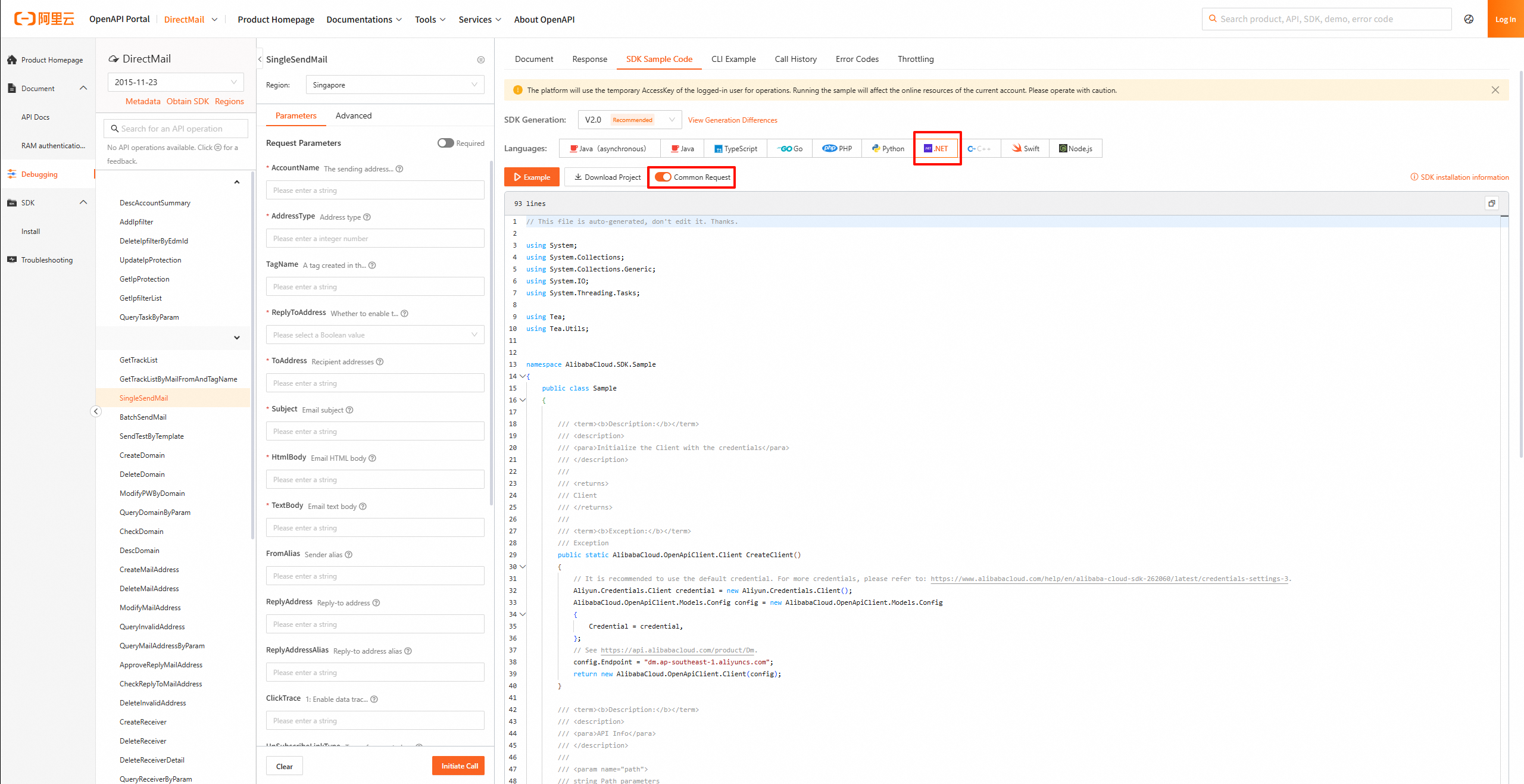
Una vez obtenido el código, cambie el método de paso de parámetros de URL a Body.
A continuación, la imagen muestra dos modificaciones clave:
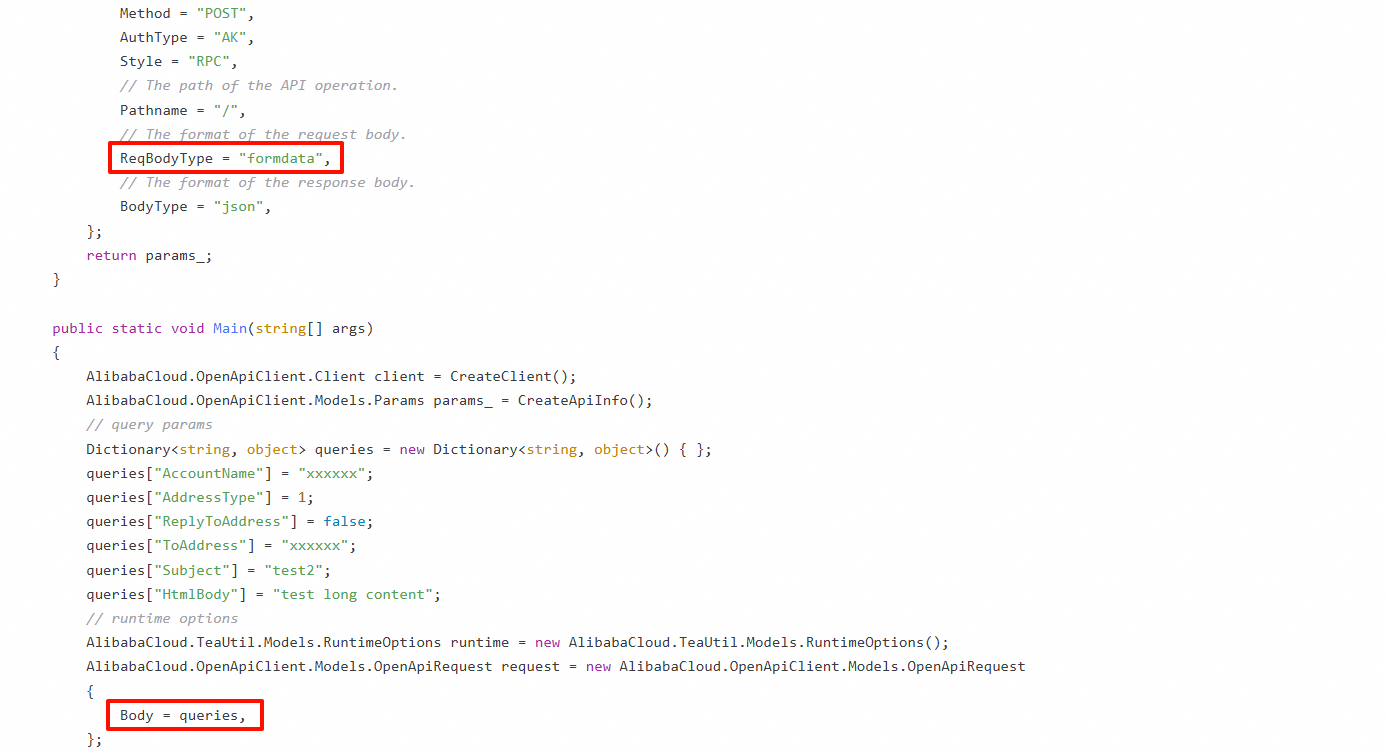
Código modificado:
using System;
using System.Collections;
using System.Collections.Generic;
using System.IO;
using System.Threading.Tasks;

using Tea;
using Tea.Utils;

namespace AlibabaCloud.SDK.Sample
{
    public class Sample
    {

        /**
         * Use an AccessKey pair to initialize the client.
         * @return Client
         * @throws Exception
         */
        public static AlibabaCloud.OpenApiClient.Client CreateClient()
        {
            // Leaking the code may expose your AccessKey pair and compromise the security of all your resources. The following sample code is for reference only.
            // Use the more secure Security Token Service (STS) method. For more information, see the related documents below.
            AlibabaCloud.OpenApiClient.Models.Config config = new AlibabaCloud.OpenApiClient.Models.Config
            {
                // Required. Make sure that the ALIBABA_CLOUD_ACCESS_KEY_ID environment variable is set.
                AccessKeyId = "xxxxxx",
                // Required. Make sure that the ALIBABA_CLOUD_ACCESS_KEY_SECRET environment variable is set.
                AccessKeySecret = "xxxxxx",
            };
            // For more information about endpoints, see the related documents.
            config.Endpoint = "dm.aliyuncs.com";
            return new AlibabaCloud.OpenApiClient.Client(config);
        }

        /**
         * API-related information
         * @param path params
         * @return OpenApi.Params
         */
        public static AlibabaCloud.OpenApiClient.Models.Params CreateApiInfo()
        {
            AlibabaCloud.OpenApiClient.Models.Params params_ = new AlibabaCloud.OpenApiClient.Models.Params
            {
                // The name of the API operation.
                Action = "SingleSendMail",
                // The version of the API operation.
                Version = "2015-11-23",
                // The protocol.
                Protocol = "HTTPS",
                // The HTTP method.
                Method = "POST",
                AuthType = "AK",
                Style = "RPC",
                // The path of the API operation.
                Pathname = "/",
                // The format of the request body.
                ReqBodyType = "formdata",
                // The format of the response body.
                BodyType = "json",
            };
            return params_;
        }

        public static void Main(string[] args)
        {
            AlibabaCloud.OpenApiClient.Client client = CreateClient();
            AlibabaCloud.OpenApiClient.Models.Params params_ = CreateApiInfo();
            // query params
            Dictionary<string, object> queries = new Dictionary<string, object>() { };
            queries["AccountName"] = "xxxxxx";
            queries["AddressType"] = 1;
            queries["ReplyToAddress"] = false;
            queries["ToAddress"] = "xxxxxx";
            queries["Subject"] = "test2";
            queries["HtmlBody"] = "test long content";
            // runtime options
            AlibabaCloud.TeaUtil.Models.RuntimeOptions runtime = new AlibabaCloud.TeaUtil.Models.RuntimeOptions();
            AlibabaCloud.OpenApiClient.Models.OpenApiRequest request = new AlibabaCloud.OpenApiClient.Models.OpenApiRequest
            {
                Body = queries,
            };
            // When you copy the code to run, print the return value of the API operation.
            // The return value is of the Map type. You can obtain three types of data from the Map: the response body, response headers, and the HTTP status code.
            client.CallApi(params_, request, runtime);
        }

    }
}
Referencias: