Cuando se activa una regla de función personalizada, Cloud Config invoca la función asociada en Function Compute para evaluar sus recursos y devolver un resultado de cumplimiento. Esta página explica la estructura del código de la función y los parámetros de entrada mediante un ejemplo en Python.
Regla de función personalizada
Una regla de función personalizada utiliza una función de Function Compute para definir y ejecutar su lógica de evaluación.
Escenarios
Si las reglas administradas y las reglas condicionales no satisfacen sus requisitos de cumplimiento, escriba funciones personalizadas para evaluaciones complejas. Encontrará escenarios adicionales y ejemplos de código a continuación en la biblioteca de ejemplos de reglas de función personalizada.
Mecanismo
La siguiente figura muestra el flujo de ejecución de una regla de función personalizada.
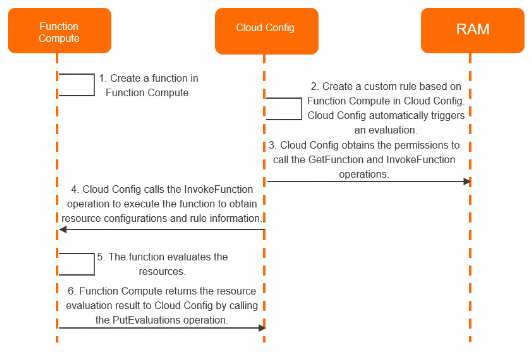
Pasos de ejecución:
Cree una función en Function Compute.
-
Cree una regla personalizada basada en la función dentro de Cloud Config. Esto activa automáticamente una evaluación.
NotaCloud Config activa automáticamente una evaluación tras la creación de la regla.
Cloud Config utiliza su rol vinculado al servicio (AliyunServiceRoleForConfig) para obtener permisos para las operaciones de API GetFunction y InvokeFunction.
Cloud Config llama a la operación de API InvokeFunction para ejecutar la función y le transmite el elemento de configuración y la información de la regla.
La función evalúa el recurso.
-
La función llama a la operación de API PutEvaluations para devolver el resultado de la evaluación de cumplimiento a Cloud Config.
Cloud Config guarda y muestra el resultado en la consola. Posteriormente, puede corregir los recursos que no cumplen las normas o entregar datos a otros servicios de Alibaba Cloud.
Código de la función
Una regla consiste en una lógica de evaluación almacenada en una función. Cloud Config invoca esta función durante la auditoría. El código de la función tiene dos partes:
-
handlerEl elemento
handleres la función de entrada que se invoca cuando se activa la regla. Debe especificar el handler al crear una función en la consola de Function Compute. Handlers.NotaCloud Config solo admite event handlers.
-
put_evaluationsEsta función llama a la operación de API PutEvaluations para enviar el resultado de la evaluación de cumplimiento a Cloud Config.
A continuación se presenta un ejemplo de código en Python:
# #!/usr/bin/env python
# # -*- encoding: utf-8 -*-
import json
import logging

from aliyunsdkcore.client import AcsClient
from aliyunsdkcore.request import CommonRequest

logger = logging.getLogger()
# The compliance type of a resource.
COMPLIANCE_TYPE_COMPLIANT = 'COMPLIANT'
COMPLIANCE_TYPE_NON_COMPLIANT = 'NON_COMPLIANT'
COMPLIANCE_TYPE_NOT_APPLICABLE = 'NOT_APPLICABLE'
# The delivery type of a resource configuration.
CONFIGURATION_TYPE_COMMON = 'COMMON'
CONFIGURATION_TYPE_OVERSIZE = 'OVERSIZE'
CONFIGURATION_TYPE_NONE = 'NONE'

# The entry function that orchestrates and processes the business logic.
def handler(event, context):
    """
    The handler function.
    :param event: The event.
    :param context: The context.
    :return: The evaluation result.
    """
    # Validate the event. You can copy this code block.
    evt = validate_event(event)
    if not evt:
        return None
    creds = context.credentials
    rule_parameters = evt.get('ruleParameters')
    result_token = evt.get('resultToken')
    invoking_event = evt.get('invokingEvent')
    ordering_timestamp = evt.get('orderingTimestamp')

    # The configuration of the resource. The trigger of the rule must be set to Configuration Change. When you create or manually run a rule, Cloud Config invokes the function to evaluate all resources one by one. If the configuration of a resource changes, Cloud Config automatically invokes the function to evaluate the resource based on the change information.
    configuration_item = invoking_event.get('configurationItem')
    account_id = configuration_item.get('accountId')
    resource_id = configuration_item.get('resourceId')
    resource_type = configuration_item.get('resourceType')
    region_id = configuration_item.get('regionId')

    # Check whether the size of the delivered resource configuration is greater than or equal to 100 KB. If it is, you must call the GetDiscoveredResource operation to query the resource details.
    configuration_type = invoking_event.get('configurationType')
    if configuration_type and configuration_type == CONFIGURATION_TYPE_OVERSIZE:
        resource_result = get_discovered_resource(creds, resource_id, resource_type, region_id)
        resource_json = json.loads(resource_result)
        configuration_item["configuration"] = resource_json["DiscoveredResourceDetail"]["Configuration"]

    # Evaluate the resource. You must implement the evaluation logic based on your business requirements. The following code is for reference only.
    compliance_type, annotation = evaluate_configuration_item(
        rule_parameters, configuration_item)

    # Set the evaluation result. The format must comply with the following example.
    evaluations = [
        {
            'accountId': account_id,
            'complianceResourceId': resource_id,
            'complianceResourceType': resource_type,
            'complianceRegionId': region_id,
            'orderingTimestamp': ordering_timestamp,
            'complianceType': compliance_type,
            'annotation': annotation
        }
    ]

    # Submit the evaluation result to Cloud Config. You can copy this code block.
    put_evaluations(creds, result_token, evaluations)
    return evaluations

# Evaluate the resource based on the rule information and resource configuration. You must implement the evaluation logic based on your business requirements. The following code is for reference only.
def evaluate_configuration_item(rule_parameters, configuration_item):
    """
    The evaluation logic.
    :param rule_parameters: The rule information.
    :param configuration_item: The resource configuration.
    :return: The compliance type.
    """
    # Initialize the return value.
    compliance_type = COMPLIANCE_TYPE_NON_COMPLIANT
    annotation = None

    # Obtain the full resource configuration.
    full_configuration = configuration_item['configuration']
    if not full_configuration:
        annotation = 'Configuration is empty.'
        return compliance_type, annotation

    # Convert the configuration to the JSON format.
    configuration = parse_json(full_configuration)
    if not configuration:
        annotation = 'Configuration:{} is invalid.'.format(full_configuration)
        return compliance_type, annotation
    return compliance_type, annotation

def validate_event(event):
    """
    Validate the event.
    :param event: The event.
    :return: A JSON object.
    """
    if not event:
        logger.error('Event is empty.')
    evt = parse_json(event)
    logger.info('Loading event: %s .' % evt)

    if 'resultToken' not in evt:
        logger.error('ResultToken is empty.')
        return None
    if 'ruleParameters' not in evt:
        logger.error('RuleParameters is empty.')
        return None
    if 'invokingEvent' not in evt:
        logger.error('InvokingEvent is empty.')
        return None
    return evt

def parse_json(content):
    """
    Convert data to the JSON format.
    :param content: A JSON string.
    :return: A JSON object.
    """
    try:
        return json.loads(content)
    except Exception as e:
        logger.error('Parse content:{} to json error:{}.'.format(content, e))
        return None

# Submit the evaluation result to Cloud Config. You can copy this code block.
def put_evaluations(creds, result_token, evaluations):
    """
    Call an API operation to return and write the evaluation result.
    :param creds: The credentials of the function.
    :param result_token: The result token.
    :param evaluations: The evaluation results.
    :return: None
    """
    # The service-linked role for Function Compute must have the AliyunConfigFullAccess policy attached.
    client = AcsClient(creds.access_key_id, creds.access_key_secret, region_id='ap-southeast-1')

    # Create a request and set its parameters. The domain name is config.ap-southeast-1.aliyuncs.com.
    request = CommonRequest()
    request.set_domain('config.ap-southeast-1.aliyuncs.com')
    request.set_version('2019-01-08')
    request.set_action_name('PutEvaluations')
    request.add_body_params('ResultToken', result_token)
    request.add_body_params('Evaluations', evaluations)
    request.add_body_params('SecurityToken', creds.security_token)
    request.set_method('POST')

    try:
        response = client.do_action_with_exception(request)
        logger.info('PutEvaluations with request: {}, response: {}.'.format(request, response))
    except Exception as e:
        logger.error('PutEvaluations error: %s' % e)

# Retrieve the full resource details. You can copy this code block.
def get_discovered_resource(creds, resource_id, resource_type, region_id):
    """
    Call an API operation to obtain the resource configuration details.
    :param creds: The credentials of the function.
    :param resource_id: The resource ID.
    :param resource_type: The resource type.
    :param region_id: The ID of the region in which the resource resides.
    :return: The resource details.
    """
    # The service-linked role for Function Compute must have the AliyunConfigFullAccess policy attached.
    client = AcsClient(creds.access_key_id, creds.access_key_secret, region_id='ap-southeast-1')

    request = CommonRequest()
    request.set_domain('config.ap-southeast-1.aliyuncs.com')
    request.set_version('2020-09-07')
    request.set_action_name('GetDiscoveredResource')
    request.add_query_param('ResourceId', resource_id)
    request.add_query_param('ResourceType', resource_type)
    request.add_query_param('Region', region_id)
    request.add_query_param('SecurityToken', creds.security_token)
    request.set_method('GET')

    try:
        response = client.do_action_with_exception(request)
        resource_result = str(response, encoding='utf-8')
        return resource_result
    except Exception as e:
logger.error('GetDiscoveredResource error: %s' % e)Consulte el campo configuration del elemento de configuración en la consola de Cloud Config para identificar los nombres de los parámetros de su regla. Consulte Step 6 en View resource information.
Entradas de la función
Los parámetros de entrada de la función consisten en un elemento de configuración y la información de la regla. El contenido enviado a Function Compute varía según el Trigger de la regla.
Para obtener los parámetros de entrada de la función en Function Compute, View invocation logs.
-
Si el Trigger de la regla está configurado únicamente como Periodic, Cloud Config no envía elementos de configuración a Function Compute.
Cuando una regla se ejecuta por primera vez, de forma programada o manualmente, Cloud Config envía un único registro sin elemento de configuración. Ejemplo:
{ "orderingTimestamp": 1716365226714, "invokingEvent": { "accountId": 120886317861****, "messageType": "ScheduledNotification", "notificationCreationTimestamp": 1716365226714, "configurationType": "NONE" }, "ruleParameters": { "CpuCount": "2" }, "resultToken": "HLQr3BZx/C+DLjwudFcYdXxZFPF2HnGqlg1uHceZ5kDEFeQF2K5LZGofyhn+GE4NP5VgkwANUH3qcdeSjWwODk1ymtmLWLzFV4JForVWYIKdbwwhbDBOgVwF7Ov9c3uVCNz/KpxNElwhTzMkZB95U1vmLs4vUYXuB/Txw4jiCYBYZZnVumhwXWswTLvAhIe5Y451FckObyM3I47AaB+4KtDW3I5q8O+Kx7eSYkqqGTawmJEYjvWXz9CHHMLFtNYyJX54a35mpVdxFSvgeXYDJTStxqb+d9UH/162fZh7T78OHxpQZgl8bcXzZhml****" } -
Si el Trigger de la regla incluye Configuration Changes, Cloud Config envía el elemento de configuración a Function Compute.
En la primera ejecución, en ejecuciones programadas o manuales, Cloud Config envía los elementos de configuración uno por uno. Cuando se crea o modifica un recurso, Cloud Config envía únicamente el elemento de configuración afectado. Ejemplo:
{
    "orderingTimestamp":1695786337959,
    "invokingEvent":{
        "accountId":120886317861****,
        "messageType":"Manual",
        "notificationCreationTimestamp":1695786337959,
        "configurationType":"COMMON",
        "configurationItem":{
            "accountId":120886317861****,
            "arn":"acs:ecs:ap-southeast-1:120886317861****:instance/i-t4n0vr6x7v54jdbu****",
            "availabilityZone":"ap-southeast-1a",
            "regionId":"ap-southeast-1",
            "configuration":"{\\"ResourceGroupId\\":\\"\\",\\"Memory\\":4096,\\"InstanceChargeType\\":\\"PostPaid\\",\\"Cpu\\":2,\\"OSName\\":\\"Alibaba Cloud Linux  3.2104 LTS 64\xe4\xbd\x8d\\",\\"InstanceNetworkType\\":\\"vpc\\",\\"InnerIpAddress\\":{\\"IpAddress\\":[]},\\"ExpiredTime\\":\\"2099-12-31T15:59Z\\",\\"ImageId\\":\\"aliyun_3_x64_20G_alibase_20230727.vhd\\",\\"EipAddress\\":{\\"AllocationId\\":\\"\\",\\"IpAddress\\":\\"\\",\\"InternetChargeType\\":\\"\\"},\\"ImageOptions\\":{},\\"VlanId\\":\\"\\",\\"HostName\\":\\"iZt4n0vr6x7v54jdbuk****\\",\\"Status\\":\\"Running\\",\\"HibernationOptions\\":{\\"Configured\\":false},\\"MetadataOptions\\":{\\"HttpTokens\\":\\"\\",\\"HttpEndpoint\\":\\"\\"},\\"InstanceId\\":\\"i-t4n0vr6x7v54jdbu****\\",\\"StoppedMode\\":\\"Not-applicable\\",\\"CpuOptions\\":{\\"ThreadsPerCore\\":2,\\"Numa\\":\\"ON\\",\\"CoreCount\\":1},\\"StartTime\\":\\"2023-08-18T09:02Z\\",\\"DeletionProtection\\":false,\\"VpcAttributes\\":{\\"PrivateIpAddress\\":{\\"IpAddress\\":[\\"192.168.XX.XX\\"]},\\"VpcId\\":\\"vpc-t4nmwd0l9a7aj09yr****\\",\\"VSwitchId\\":\\"vsw-t4njclm0dlz2szayi****\\",\\"NatIpAddress\\":\\"\\"},\\"SecurityGroupIds\\":{\\"SecurityGroupId\\":[\\"sg-t4n5pulxj2lvechw****\\"]},\\"InternetChargeType\\":\\"PayByTraffic\\",\\"InstanceName\\":\\"zs-test-peer****\\",\\"DeploymentSetId\\":\\"\\",\\"InternetMaxBandwidthOut\\":0,\\"SerialNumber\\":\\"8c3fadf7-2ea1-4486-84ce-7784aeb7****\\",\\"OSType\\":\\"linux\\",\\"CreationTime\\":\\"2023-08-18T09:02Z\\",\\"AutoReleaseTime\\":\\"\\",\\"Description\\":\\"\\",\\"InstanceTypeFamily\\":\\"ecs.c7\\",\\"DedicatedInstanceAttribute\\":{\\"Tenancy\\":\\"\\",\\"Affinity\\":\\"\\"},\\"PublicIpAddress\\":{\\"IpAddress\\":[]},\\"GPUSpec\\":\\"\\",\\"NetworkInterfaces\\":{\\"NetworkInterface\\":[{\\"Type\\":\\"Primary\\",\\"PrimaryIpAddress\\":\\"192.168.XX.XX\\",\\"MacAddress\\":\\"00:16:3e:04:XX:XX\\",\\"NetworkInterfaceId\\":\\"eni-t4n16tmnpp794y1o****\\",\\"PrivateIpSets\\":{\\"PrivateIpSet\\":[{\\"PrivateIpAddress\\":\\"192.168.XX.XX\\",\\"Primary\\":true}]}}]},\\"SpotPriceLimit\\":0.0,\\"SaleCycle\\":\\"\\",\\"DeviceAvailable\\":true,\\"InstanceType\\":\\"ecs.c7.large\\",\\"OSNameEn\\":\\"Alibaba Cloud Linux  3.2104 LTS 64 bit\\",\\"SpotStrategy\\":\\"NoSpot\\",\\"IoOptimized\\":true,\\"ZoneId\\":\\"ap-southeast-1a\\",\\"ClusterId\\":\\"\\",\\"EcsCapacityReservationAttr\\":{\\"CapacityReservationPreference\\":\\"\\",\\"CapacityReservationId\\":\\"\\"},\\"DedicatedHostAttribute\\":{\\"DedicatedHostId\\":\\"\\",\\"DedicatedHostName\\":\\"\\",\\"DedicatedHostClusterId\\":\\"\\"},\\"GPUAmount\\":0,\\"OperationLocks\\":{\\"LockReason\\":[]},\\"InternetMaxBandwidthIn\\":-1,\\"Recyclable\\":false,\\"RegionId\\":\\"ap-southeast-1\\",\\"CreditSpecification\\":\\"\\"}",
            "captureTime":1695786337959,
            "resourceCreateTime":1692349320000,
            "resourceId":"i-t4n0vr6x7v54jdbu****",
            "resourceName":"zs-test-peer****",
            "resourceGroupId":"rg-acfmw3ty5y7****",
            "resourceType":"ACS::ECS::Instance",
            "tags":"{}"
        }
    },
    "ruleParameters":{
        "CpuCount":"2"
    },
    "resultToken":"HLQr3BZx/C+DLjwudFcYdXxZFPF2HnGqlg1uHceZ5kDEFeQF2K5LZGofyhn+GE4NP5VgkwANUH3qcdeSjWwODk1ymtmLWLzFV4JForVWYIKdbwwhbDBOgVwF7Ov9c3uVCNz/KpxNElwhTzMkZB95U1vmLs4vUYXuB/Txw4jiCYBYZZnVumhwXWswTLvAhIe5Y451FckObyM3I47AaB+4KtDW3I5q8O+Kx7eSYkqqGTawmJEYjvWXz9CHHMLFtNYyJX54a35mpVdxFSvgeXYDJTStxqb+d9UH/162fZh7T78OHxpQZgl8bcXzZhml****"
}
Si un elemento de configuración tiene un tamaño igual o superior a 100 KB, Cloud Config envía únicamente un resumen del recurso sin el campo
configuration. Ejemplo:NotaPara obtener la configuración completa del recurso, puede llamar a la operación de API GetDiscoveredResource.
{
    "orderingTimestamp":1695786337959,
    "invokingEvent":{
        "accountId":120886317861****,
        "messageType":"Manual",
        "notificationCreationTimestamp":1695786337959,
        "configurationType":"OVERSIZE",
        "configurationItem":{
            "accountId":120886317861****,
            "arn":"acs:ecs:ap-southeast-1:120886317861****:instance/i-t4n0vr6x7v54jdbu****",
            "availabilityZone":"ap-southeast-1a",
            "regionId":"ap-southeast-1",
            "captureTime":1695786337959,
            "resourceCreateTime":1692349320000,
            "resourceId":"i-t4n0vr6x7v54jdbu****",
            "resourceName":"zs-test-peer****",
            "resourceGroupId":"rg-acfmw3ty5y7****",
            "resourceType":"ACS::ECS::Instance",
            "tags":"{}"
        }
    },
    "ruleParameters":{
        "CpuCount":"2"
    },
    "resultToken":"HLQr3BZx/C+DLjwudFcYdXxZFPF2HnGqlg1uHceZ5kDEFeQF2K5LZGofyhn+GE4NP5VgkwANUH3qcdeSjWwODk1ymtmLWLzFV4JForVWYIKdbwwhbDBOgVwF7Ov9c3uVCNz/KpxNElwhTzMkZB95U1vmLs4vUYXuB/Txw4jiCYBYZZnVumhwXWswTLvAhIe5Y451FckObyM3I47AaB+4KtDW3I5q8O+Kx7eSYkqqGTawmJEYjvWXz9CHHMLFtNYyJX54a35mpVdxFSvgeXYDJTStxqb+d9UH/162fZh7T78OHxpQZgl8bcXzZhml****"
}
La siguiente tabla enumera los principales parámetros de entrada de la función por categoría.
|
Categoría |
Parámetro |
Descripción |
|
Elemento de configuración |
configurationItem |
Objeto JSON que representa el estado de configuración del recurso en un momento específico, e incluye el ID del recurso, tipo, región, marca temporal de creación, etiquetas y configuración completa. |
|
configurationType |
Tipo de entrega del elemento de configuración. Valores válidos:
|
|
|
Información de la regla |
orderingTimestamp |
Marca temporal de inicio de la evaluación. |
|
invokingEvent |
Evento de invocación. |
|
|
accountId |
ID de la cuenta asociada al evento de invocación. |
|
|
messageType |
Tipo de mensaje. Valores válidos:
|
|
|
notificationCreationTimestamp |
Marca temporal de activación de la regla. |
|
|
ruleParameters |
Parámetros de entrada de la regla personalizada, que incluyen nombres de parámetros y valores esperados. |
|
|
resultToken |
Token obligatorio para enviar resultados de evaluación mediante la operación de API PutEvaluations. |