Una vez que instrumenta una aplicación mediante SkyWalking y reporta sus datos de rastreo a Managed Service for OpenTelemetry, Managed Service for OpenTelemetry comienza a monitorear la aplicación. Puede consultar diversos datos de monitoreo, como la topología de la aplicación, trazas de llamadas, transacciones con excepciones, transacciones lentas y análisis de SQL. Este tema describe cómo utilizar el SDK de SkyWalking .NET Core para instrumentar una aplicación y reportar sus datos.
Requisitos previos
Inicie sesión en la consola de ARMS. En el panel de navegación izquierdo, haga clic en Integration Center.
En la página Integration Center, haga clic en la tarjeta SkyWalking dentro de la sección Server-side Applications.
-
En el panel SkyWalking, haga clic en la pestaña Start Integration y seleccione la región donde desea reportar los datos.
NotaAl acceder a una región por primera vez, los recursos se inicializan automáticamente en dicha ubicación.
-
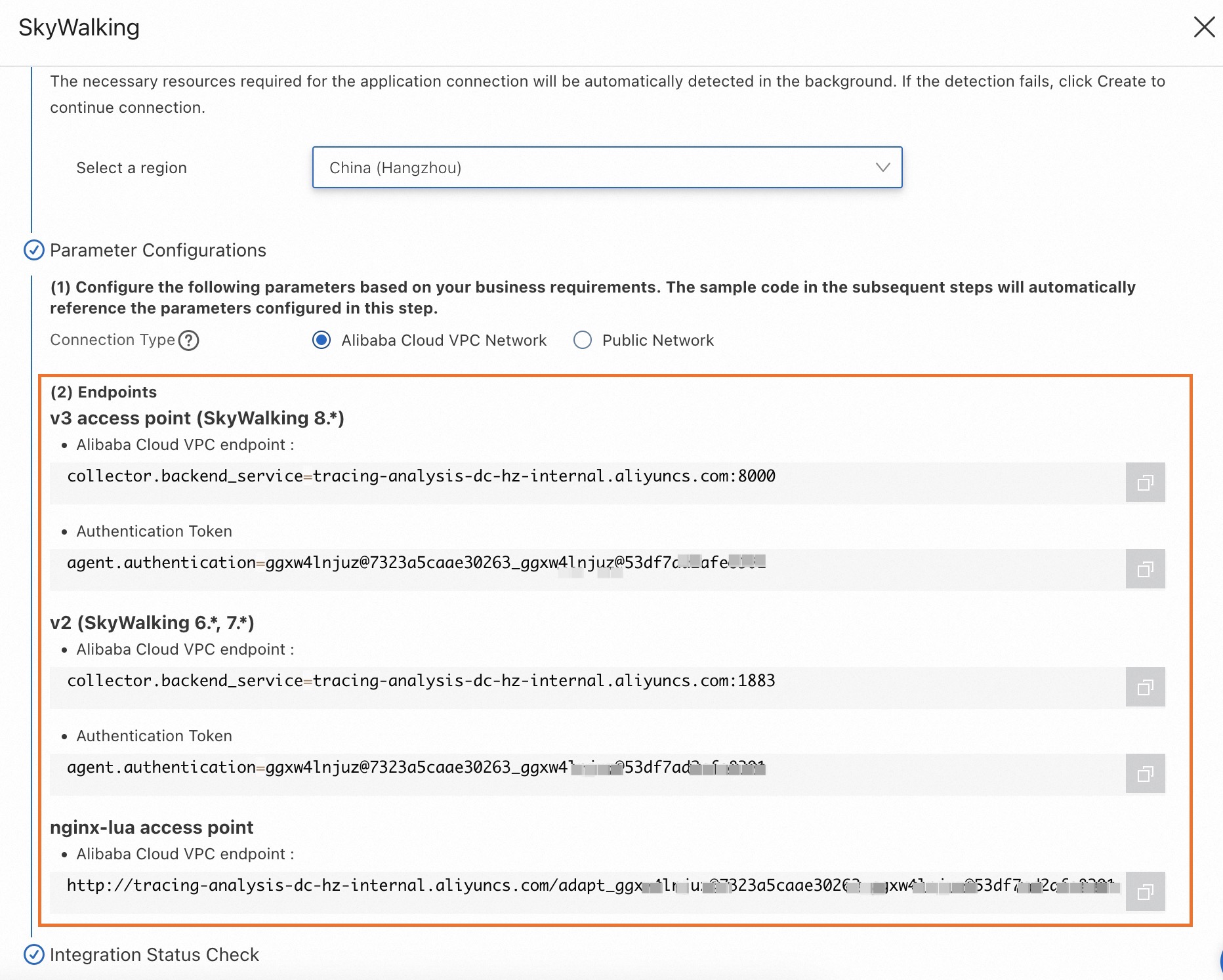
Configure el parámetro Connection Type y copie un endpoint.
Si su servicio está desplegado en Alibaba Cloud y reside en la región seleccionada, se recomienda establecer este parámetro en Alibaba Cloud VPC Network. De lo contrario, establézcalo en Public Network.
Contexto
SkyWalking es una herramienta de código abierto para el monitoreo del rendimiento de aplicaciones (APM), diseñada para microservices y arquitecturas nativas de la nube o basadas en contenedores como Docker, Kubernetes y Mesos. En esencia, SkyWalking funciona como un sistema de rastreo distribuido.
Demostración de ejemplo
Para obtener un ejemplo funcional completo, consulte el repositorio SkyWalking Demo.
Instrumentación de una aplicación .NET con SkyWalking
-
Instale el agente de .NET.
Vaya al directorio raíz de su proyecto y ejecute los siguientes comandos.
# Install the .NET Agent dotnet add package SkyAPM.Agent.AspNetCore # Add environment variables export ASPNETCORE_HOSTINGSTARTUPASSEMBLIES=SkyAPM.Agent.AspNetCore export SKYWALKING__SERVICENAME=<service-name> -
Configure las propiedades del agente de .NET.
Cree un archivo
skyapm.jsonmediante uno de los siguientes métodos.Método 1: Utilice la herramienta SkyAPM.DotNet.CLI para generar el archivo de configuración de propiedades.
Método 2: Cree un archivo
skyapm.jsonen el directorio raíz de su proyecto y copie el siguiente contenido en dicho archivo.
dotnet tool install -g SkyAPM.DotNet.CLI # Set the environment variable. Replace /path/to with the path to your .dotnet/tools directory. export PATH="$PATH:/path/to/.dotnet/tools/" dotnet skyapm config <service-name> <endpoint>{ "SkyWalking": { "ServiceName": <service-name>, "Namespace": "", "HeaderVersions": [ "sw8" ], "Sampling": { "SamplePer3Secs": -1, "Percentage": -1.0, "LogSqlParameterValue": false }, "Logging": { "Level": "Information", "FilePath": "logs/skyapm-{Date}.log" }, "Transport": { "Interval": 3000, "ProtocolVersion": "v8", "QueueSize": 30000, "BatchSize": 3000, "gRPC": { "Servers": <endpoint>, "Authentication": <token>, "Timeout": 100000, "ConnectTimeout": 100000, "ReportTimeout": 600000 } } } }Parámetros
-
Parámetros obligatorios
<service-name>: El nombre del servicio.<endpoint>: El endpoint obtenido en la sección "Requisitos previos".<token>: El token de autenticación para el endpoint. Obtenga este token tal como se describe en la sección "Requisitos previos".
-
Parámetros opcionales
SamplePer3Secs: La cantidad de muestras que se recopilan cada tres segundos.Percentage: El porcentaje de muestreo. Por ejemplo, para muestrear el 10 % de las trazas, establezca este valor en 10.Logging: Configura el registro y la depuración.Levelespecifica el nivel de registro, mientras queFilePathdefine la ubicación y el nombre del archivo de registro.
-
Reinicie su proyecto de .NET.
dotnet run
-
Revise los registros locales del agente. Al ejecutar el proyecto, se genera un archivo
skyapm-<date>.logen la carpetalogs. Si falla el reporte de datos, puede utilizar este archivo de registro para depurar el problema.2023-07-27 10:04:08.396 +08:00 [skywalking-net-demo] [Information] SkyApm.InstrumentStartup : Initializing ... 2023-07-27 10:04:08.477 +08:00 [skywalking-net-demo] [Information] SkyApm.Service.RegisterService : Loaded instrument service [Skyxxx] 2023-07-27 10:04:08.477 +08:00 [skywalking-net-demo] [Information] SkyApm.Service.LogReportService : Loaded instrument service [Skxxx] 2023-07-27 10:04:08.477 +08:00 [skywalking-net-demo] [Information] SkyApm.Service.PingService : Loaded instrument service [SkyApm.xxx] 2023-07-27 10:04:08.477 +08:00 [skywalking-net-demo] [Information] SkyApm.Service.SegmentReportService : Loaded instrument servicexxx 2023-07-27 10:04:08.477 +08:00 [skywalking-net-demo] [Information] SkyApm.Service.CLRStatsService : Loaded instrument service [Skyxxx] 2023-07-27 10:04:08.477 +08:00 [skywalking-net-demo] [Information] SkyApm.Sampling.SimpleCountSamplingInterceptor : Loaded instruxxx 2023-07-27 10:04:08.477 +08:00 [skywalking-net-demo] [Information] SkyApm.Transport.Grpc.ConnectService : Loaded instrument servicxxx 2023-07-27 10:04:08.486 +08:00 [skywalking-net-demo] [Information] SkyApm.Transport.Grpc.ConnectionManager : Connected server[tracixxx] 2023-07-27 10:04:08.486 +08:00 [skywalking-net-demo] [Information] SkyApm.Diagnostics.TracingDiagnosticProcessorObserver : Loaded dxxx 2023-07-27 10:04:08.486 +08:00 [skywalking-net-demo] [Information] SkyApm.InstrumentStartup : Started SkyAPM .NET Core Agent. 2023-07-27 10:04:13.512 +08:00 [skywalking-net-demo] [Information] SkyApm.Diagnostics.TracingDiagnosticProcessorObserver : Loaded dxxx 2023-07-27 10:04:13.552 +08:00 [skywalking-net-demo] [Information] SkyApm.Diagnostics.TracingDiagnosticProcessorObserver : Loaded dxxx 2023-07-27 10:04:13.605 +08:00 [skywalking-net-demo] [Information] SkyApm.Service.RegisterService : Reported Service Instance Propexxx 2023-07-27 10:04:20.525 +08:00 [skywalking-net-demo] [Information] SkyApm.Transport.Grpc.V8.SegmentReporter : Report 14 trace segmexxx 2023-07-27 10:04:20.534 +08:00 [skywalking-net-demo] [Error] SkyApm.Transport.Grpc.SegmentReporter : Report trace segment fail. Grpc.Core.RpcException: Status(StatusCode="Unimplemented", Detail="Method not found: skywalking.v3.LogReportService/collect") at SkyApm.Transport.Grpc.LoggerReporter.ReportAsync(IReadOnlyCollection`1 loggerRequests, CancellationToken cancellationToken)
Referencias
Para compilar el agente desde el código fuente, ejecute los siguientes comandos.
# Download the source code
git clone https://github.com/SkyAPM/SkyAPM-dotnet.git
# Enter the root directory
cd SkyAPM-dotnet/
# Switch to the target tag
git checkout [tagname]
git submodule init
git submodule update
dotnet restore
dotnet build src/SkyApm.Transport.Grpc.Protocol
dotnet build skyapm-dotnet.sln
Preguntas frecuentes
Puede producirse un error al ejecutar el comando dotnet skyapm config si no está instalada la versión requerida del framework de .NET.
dotnet skyapm config net-app 192.168.0.1:11800
You must install or update .NET to run this application.
App: /Users/whlongxi/.dotnet/tools/dotnet-skyapm
Architecture: arm64
Framework: 'Microsoft.NETCore.App', version '6.0.0' (arm64)
.NET location: /usr/local/share/dotnet
The following frameworks were found:
  7.0.9 at [/usr/local/share/dotnet/shared/Microsoft.NETCore.App]
Learn about framework resolution:
https://aka.ms/dotnet/app-launch-failed
To install missing framework, download:
https://aka.ms/dotnet-core-applaunch?framework=Microsoft.NETCore.App&framework_version=6.0.0&arch=arm64&rid=osx.13-arm64
Solución 1 (recomendada): La herramienta
dotnet-skyapmúnicamente genera el archivo de configuraciónskyapm.json. Puede crear y configurar este archivo manualmente tal como se describió anteriormente.Solución 2: Utilice .NET 6.0.