Después de instrumentar su aplicación con SkyWalking y enviar datos de rastreo distribuido a Managed Service for OpenTelemetry, Managed Service for OpenTelemetry comienza a monitorear su aplicación. Posteriormente, puede consultar diversos datos de monitoreo, como la topología de la aplicación, trazas, transacciones con errores, transacciones lentas y análisis de SQL. Este tema describe cómo usar el agente de SkyWalking para Python para habilitar la instrumentación automática y reportar los datos de la aplicación.
Requisitos previos
Ha descargado el agente de Python para Apache SkyWalking. Se recomienda utilizar la versión más reciente.
Ha agregado el agente de SkyWalking para Python a su proyecto de Python.
-
Inicie sesión en la consola de ARMS. En el panel de navegación izquierdo, haga clic en Integration Center.
En la página Integration Center, haga clic en la tarjeta SkyWalking dentro de la sección Server-side Applications.
-
En el panel SkyWalking, haga clic en la pestaña Start Integration y seleccione la región donde desea reportar los datos.
NotaAl acceder a una región por primera vez, los recursos se inicializan automáticamente en dicha ubicación.
-
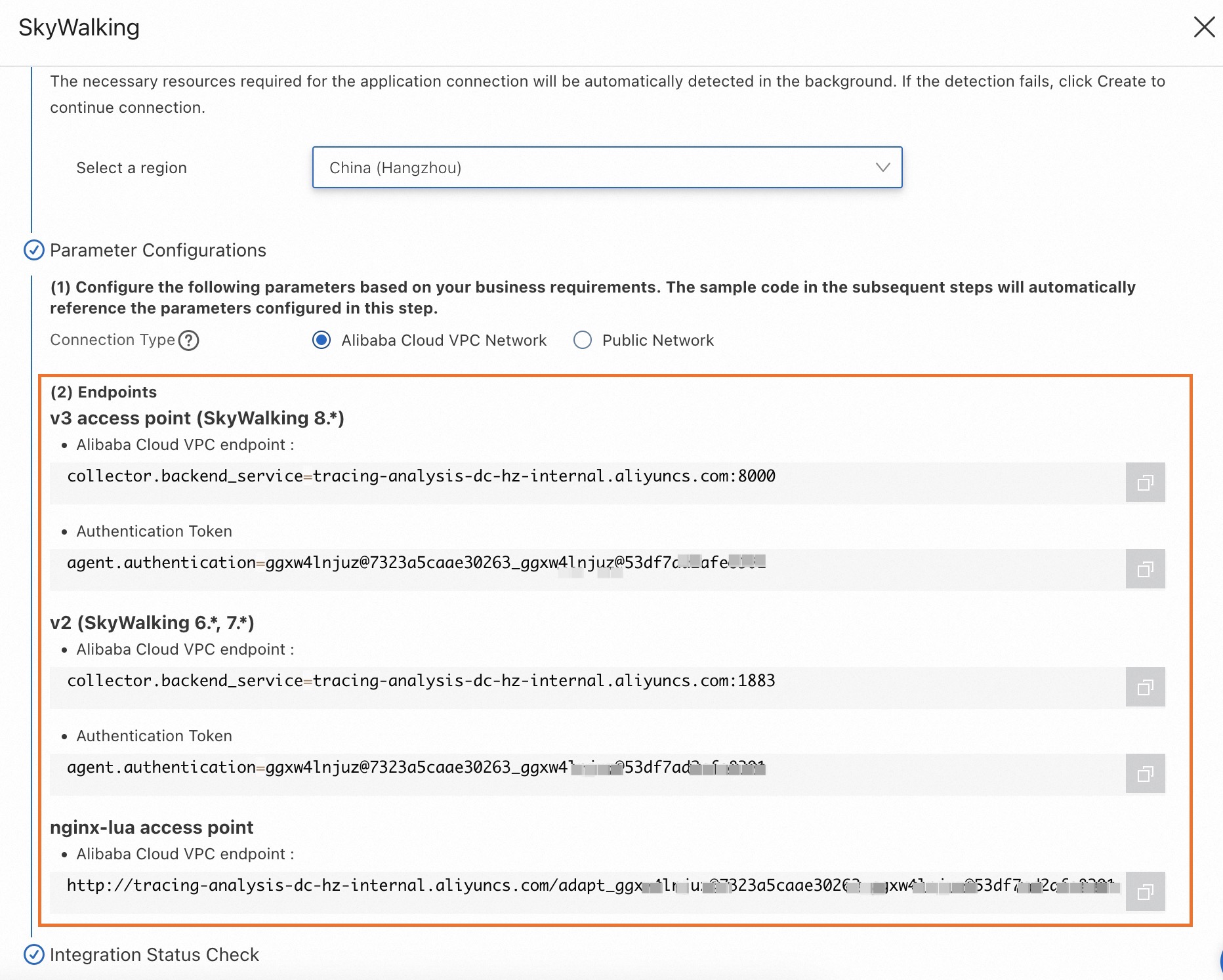
Configure el parámetro Connection Type y copie un endpoint.
Si su servicio está desplegado en Alibaba Cloud y reside en la región seleccionada, se recomienda establecer este parámetro en Alibaba Cloud VPC Network. De lo contrario, establézcalo en Public Network.
Contexto
SkyWalking es una herramienta popular de código abierto para el monitoreo del rendimiento de aplicaciones (APM), diseñada para microservices y arquitecturas nativas de la nube o basadas en contenedores, como Docker, Kubernetes y Mesos. En esencia, SkyWalking funciona como un sistema de rastreo distribuido.
skywalking-python es la biblioteca oficial de agentes de Python para SkyWalking. Puede integrar skywalking-python para monitorear aplicaciones escritas en Python. Admite la instrumentación automática de numerosas bibliotecas de terceros, tales como Kafka, HTTP, AIOHTTP, Redis y WebSockets.
Aplicación de ejemplo
Repositorio de la aplicación de ejemplo: Demostración de SkyWalking
Esta demostración es un ejemplo sencillo basado en Flask que reenvía solicitudes e interactúa con una base de datos MySQL. El agente de SkyWalking monitorea la aplicación y reporta los datos correspondientes.
Habilitación de la instrumentación automática para una aplicación de Python
Puede configurar los parámetros del agente de SkyWalking para Python directamente en los archivos de su proyecto o mediante variables de entorno.
Configuración de parámetros en el código
Modifique los parámetros de config.init en el archivo de su proyecto de Python. En la aplicación de ejemplo, los archivos correspondientes son proxy/TestProxy.py y controller/TestController.py.
from skywalking import config
config.init(ConfigurationName = ConfigurationValue)
Configuración de parámetros como variables de entorno
Agregue el siguiente contenido a su archivo de variables de entorno y reinicie la aplicación para que los cambios surtan efecto.
export SW_AGENT_ConfigurationName=ConfigurationValuePara entornos de contenedores Docker, puede configurar las variables de entorno bajo la opción environment en el archivo docker-compose.yaml.
-
Configure el endpoint y el token.
-
Importe SkyWalking en su archivo de Python.
from skywalking import agent, config -
Configure el endpoint y el token de autenticación.
Reemplace
<endpoint>y<auth-token>con el endpoint y el token de autenticación que obtuvo en la sección de requisitos previos.config.init(agent_collector_backend_services='<endpoint>', agent_authentication='<auth-token>')
-
-
Configure un nombre de servicio como identificador de la aplicación.
config.init(agent_name='<service name>') -
Configure el protocolo de reporte de datos. El único protocolo compatible es gRPC.
### The only available reporting protocol is 'grpc'.
config.init(agent_protocol='<protocol>')
Configure otros parámetros opcionales según sea necesario. Para obtener más información, consulte la documentación oficial de Apache SkyWalking.
Reinicie la aplicación.
Preguntas frecuentes
-
¿Qué debo hacer si ocurre el error
Method not found: skywalking.v3.LogReportService/collectal reportar datos mediante gRPC?grpc._channel._InactiveRpcError: <_InactiveRpcError of RPC that terminated with: status = StatusCode.UNIMPLEMENTED details = "Method not found: skywalking.v3.LogReportService/collect" debug_error_string = "UNKNOWN:Error received from peer {grpc_message:"Method not found: skywalking.v3.LogReportService/collect", grpc_status:12, created_time:"2023-07-05T15:58:00"}" >Establezca
agent_log_reporter_activeenFalsedentro de la llamada aconfig.init.config.init(agent_log_reporter_active=False) -
¿Qué debo hacer si ocurre el error
Method not found: skywalking.v3.MeterReportService/collectal reportar datos mediante gRPC?grpc._channel._InactiveRpcError: <_InactiveRpcError of RPC that terminated with: status = StatusCode.UNIMPLEMENTED details = "Method not found: skywalking.v3.MeterReportService/collect" debug_error_string = "UNKNOWN:Error received from peer {grpc_message:"Method not found: skywalking.v3.MeterReportService/collect", grpc_status:12, created_time:"2023-07-05T16:00:00+08:00"}" >La consola no admite el reporte de datos de
metric. En la llamada aconfig.init, establezcaagent_meter_reporter_activeenFalse.config.init(agent_meter_reporter_active=False)