Todos los productos
Search
Centro de documentos

Application Real-Time Monitoring Service:Send alert events to EventBridge

Última actualización: Sep 04, 2026

Cuando se activan alertas en un entorno de producción complejo, suele ser necesario desencadenar acciones automatizadas, como la corrección automática o la integración con sistemas de tickets. Application Real-Time Monitoring Service (ARMS) Alert Management se integra con EventBridge para reenviar los eventos del ciclo de vida de las alertas (activadas, asignadas, comentadas y resueltas) a un bus de eventos personalizado. A partir de ahí, EventBridge enruta los eventos a los consumidores finales según las reglas que usted defina.

Funcionamiento

  1. ARMS publica los eventos de alerta en su bus de eventos personalizado de EventBridge mediante una integración de notificaciones.

  2. Cada evento cumple con la especificación CloudEvents 1.0 y es compatible con el formato de webhook de código abierto Alertmanager.

  3. Puede consumir los eventos de EventBridge para conectarse a plataformas de terceros, lo que le permite implementar correcciones automatizadas o integrar sistemas de tickets.

Paso 1: Crear recursos de EventBridge

Antes de configurar la integración de ARMS, cree un bus de eventos y un origen de eventos en EventBridge.

  1. Cree un bus de eventos personalizado. Para más detalles, consulte Manage custom event buses. Una vez creado el bus de eventos, copie el public endpoint desde la página Event Bus Overview. Este valor es necesario para el paso 2.
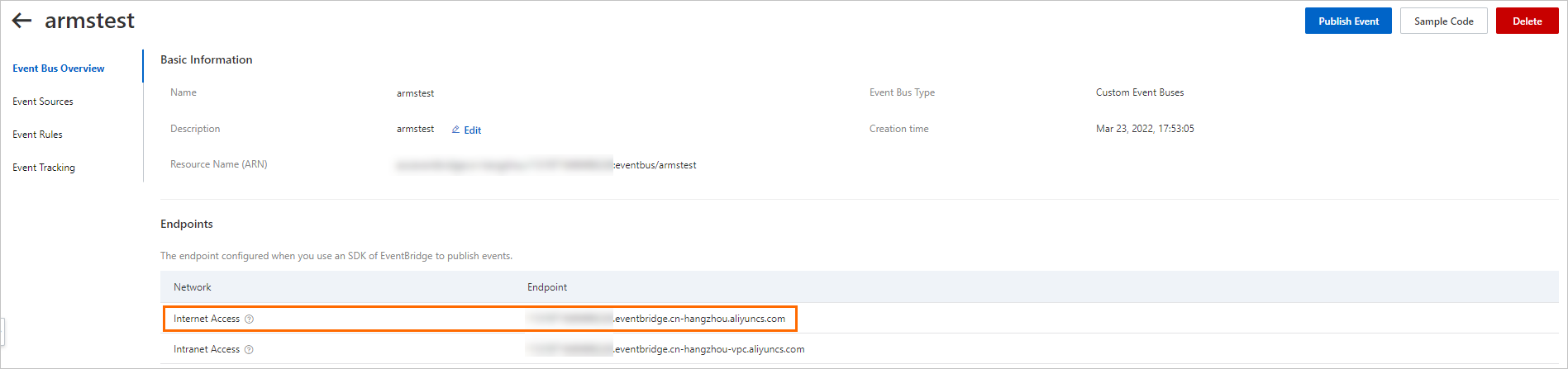
    Event Bus public endpoint

  2. Agregue un origen de eventos personalizado al bus de eventos. Para más detalles, consulte Manage custom event sources. Tome nota del nombre del origen de eventos, ya que también necesitará este valor en el paso 2.
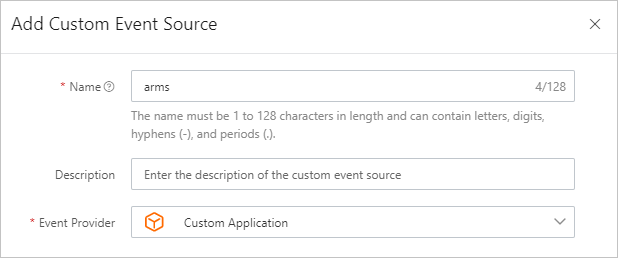
    Custom event sources

Paso 2: Configurar la integración de EventBridge en ARMS

  1. Inicie sesión en la consola de ARMS.

  2. En el panel de navegación izquierdo, seleccione Alert Management > Integrations.

  3. Haga clic en la pestaña Notification Integration y luego haga clic en EventBridge.

  4. En el cuadro de diálogo Add Integration, configure los siguientes parámetros y haga clic en Save.

    Parámetro

    Descripción

    Ejemplo

    Name

    Nombre para mostrar de esta integración.

    EventBridge integration

    Description

    Opcional. Breve descripción de la integración.

    --

    Endpoint

    El endpoint público del bus de eventos que creó en el paso 1.

    https://xxxx.eventbridge.cn-hangzhou.aliyuncs.com

    AccessKey

    El AccessKey ID de su cuenta de Alibaba Cloud. Para más detalles, consulte Obtain an AccessKey pair.

    LTAI5tXxx

    AccessKey Secret

    El AccessKey secret de su cuenta de Alibaba Cloud. Para más detalles, consulte Obtain an AccessKey pair.

    xXxXxXx

    Message Bus Name

    El nombre del bus de eventos que creó en el paso 1.

    armstest

    regionId

    El ID de región donde reside el bus de eventos.

    cn-hangzhou

    Event Source Name

    El nombre del origen de eventos que creó en el paso 1.

    arms

Paso 3: Configurar una política de notificaciones

Vincule la integración de EventBridge a una política de notificaciones para que las alertas coincidentes se reenvíen a EventBridge.

  1. En la consola de ARMS, vaya a la configuración de su política de notificaciones.

  2. Cree o edite una política de notificaciones. En el campo Ticket System, seleccione la integración de EventBridge que creó en el paso 2.

Para más detalles, consulte Create and manage a notification policy.

Verificar la integración

Una vez completada la configuración, confirme que los eventos llegan a EventBridge:

  1. Inicie sesión en la consola de EventBridge.

  2. Abra su bus de eventos personalizado y compruebe si hay eventos entrantes. Para más detalles, consulte Query events.

  3. Haga clic en Event Detail en la columna Actions para inspeccionar el payload del evento.

Tipos de eventos

ARMS envía un evento por cada acción del ciclo de vida de la alerta. Cada evento utiliza un valor distinto para type.

Código de evento

Acción de alerta

aliyun:arms:alarm:create

Alerta activada

aliyun:arms:alarm:claim

Alerta asignada

aliyun:arms:alarm:comment

Comentario agregado a la alerta

aliyun:arms:alarm:close

Alerta resuelta

Las notificaciones repetidas configuradas en una política de notificaciones se envían únicamente a los destinatarios, como un grupo de DingTalk o un webhook. Estas repeticiones no generan un nuevo envío de eventos a EventBridge. EventBridge entrega un evento solo cuando cambia el estado de una alerta; una notificación repetida refleja el estado continuo de la misma alerta, no un cambio de estado.

Referencia del payload de eventos

Todos los eventos cumplen con la especificación CloudEvents 1.0. El objeto data.data es compatible con el formato de webhook de código abierto Alertmanager.

Campos de nivel superior

Campo

Tipo

Descripción

id

string

ID único del evento.

source

string

Origen del evento. Siempre es arms.

type

string

Código de evento de la tabla anterior.

specversion

string

Versión de CloudEvents. Siempre es 1.0.

datacontenttype

string

Tipo de contenido. Siempre es application/json.

subject

string

URL única de la alerta en la consola de ARMS.

aliyuneventbusname

string

Nombre del bus de eventos destino.

aliyunregionid

string

ID de región del bus de eventos.

aliyunaccountid

string

ID de la cuenta de Alibaba Cloud.

aliyunpublishtime

string

Marca de tiempo de publicación del evento (ISO 8601).

aliyunoriginalaccountid

string

ID original de la cuenta de Alibaba Cloud.

aliyunpublishaddr

string

Dirección IP del publicador del evento.

data

object

Payload específico del evento. Véase a continuación.

Campos del objeto data

Campo

Tipo

Presente en

Descripción

owner

string

Todos los eventos

Propietario de la alerta (el contacto especificado en la política de notificaciones).

handler

string

claim, comment, close

Responsable de atender la alerta.

operator

string

claim, comment, close

Usuario que realizó la acción.

comment

string

Solo comment

Contenido del comentario.

solution

string

Solo close

Solución registrada al resolver la alerta.

timestamp

number

Todos los eventos

Marca de tiempo Unix en milisegundos.

data

object

Todos los eventos

Payload de alerta compatible con Alertmanager. Véase a continuación.

Campos del objeto data.data (compatible con Alertmanager)

Campo

Tipo

Descripción

status

string

firing o resolved.

level

string

Nivel de severidad de la alerta (por ejemplo, P2).

dispatchRuleName

string

Nombre de la regla de despacho (por ejemplo, O & M team).

startTime

string

Hora de inicio de la alerta.

endTime

string

Hora de finalización de la alerta. Presente solo cuando la alerta está resuelta.

externalURL

string

URL a la página de detalles de la alerta en la consola de ARMS.

receiver

string

Identificador del receptor.

alerts

array

Arreglo de objetos de alerta individuales.

commonLabels

object

Etiquetas compartidas por todas las alertas del grupo.

commonAnnotations

object

Anotaciones compartidas por todas las alertas del grupo.

groupLabels

object

Etiquetas utilizadas para agrupar alertas.

Campos del objeto alerts[]

Campo

Tipo

Descripción

fingerprint

string

Hash único que identifica la alerta.

status

string

firing o resolved.

startsAt

string

Hora de inicio de la alerta (ISO 8601).

endsAt

string

Hora de finalización de la alerta (ISO 8601).

labels

object

Etiquetas clave-valor que incluyen severity, regionId, alertname y metadatos específicos de ARMS.

annotations

object

Anotaciones clave-valor que incluyen message.

Campos específicos de cada tipo de evento

La estructura data.data compatible con Alertmanager permanece igual en todos los tipos de eventos. Los siguientes campos del objeto data varían según el tipo de evento:

Tipo de evento

**Campos adicionales en data**

Alerta activada (create)

owner

Alerta asignada (claim)

owner, handler, operator

Comentario agregado (comment)

owner, handler, operator, comment

Alerta resuelta (close)

owner, handler, operator, solution

Ejemplo: evento de alerta activada

{
    "datacontenttype": "application/json",
    "aliyunaccountid": "11xxxxxxxxxxx",
    "data": {
        "owner": "xx",  // The owner of the alert. Set the value to the contact that is specified in the notification policy.
        "data": {        // The content of the alert. The alert content is compatible with the event format of the open source Alertmanager. For more information, see the official documentation of Prometheus (https://prometheus.io/docs/alerting/latest/configuration/#webhook_config).
            "alerts": [
                {
                    "fingerprint": "9b115ab3762a47b51a8efcb516d4aa50",
                    "annotations": {
                        "message": "Manually triggered test alert"
                    },
                    "startsAt": "2022-06-07T09:22:01.645000000Z",
                    "endsAt": "2022-06-07T09:27:39.099000000Z",
                    "labels": {
                        "severity": "error",
                        "regionId": "cn-hangzhou",
                        "_aliyun_arms_denoise_code": "0",
                        "_aliyun_arms_integration_name": "Custom integration",
                        "alertname": "Manually triggered alert",
                        "_aliyun_arms_product_type": "CUSTOM",
                        "_aliyun_arms_userid": "11xxxxxxxxxxx",
                        "_aliyun_arms_integration_id": "616",
                        "_aliyun_arms_is_denoise_filtered": "false"
                    },
                    "status": "firing"
                }
            ],
            "commonLabels": {
                "severity": "error",
                "regionId": "cn-hangzhou",
                "_aliyun_arms_denoise_code": "0",
                "_aliyun_arms_integration_name": "Custom integration",
                "alertname": "Manually triggered alert",
                "_aliyun_arms_product_type": "CUSTOM",
                "_aliyun_arms_userid": "11xxxxxxxxxxx",
                "_aliyun_arms_integration_id": "616",
                "_aliyun_arms_is_denoise_filtered": "false"
            },
            "externalURL": "https://arms.console.alibabacloud.com/#/alarm/alert/detail/12345",
            "groupLabels": {
                "alertname": "Manually triggered alert",
            },
            "receiver": "",
            "level": "P2",
            "dispatchRuleName": "O & M team",
            "startTime": "2022-06-07 17:22:01",
            "commonAnnotations": {
                "message": "Manually triggered test alert"
            },
            "status": "firing"
        },
        "timestamp": 1654593783951
    },
    "subject": "https://arms.console.alibabacloud.com/#/alarm/alert/detail/12345", // The globally unique URL of the alert.
    "aliyunoriginalaccountid": "11xxxxxxxxxxx",
    "source": "arms",
    "type": "aliyun:arms:alarm:create",
    "aliyunpublishtime": "2022-06-07T09:23:04.003Z",
    "specversion": "1.0",
    "aliyuneventbusname": "armstest",
    "id": "d997f8c775d4d15b05f3346d5863fdc6******_create",
    "aliyunregionid": "cn-hangzhou",
    "aliyunpublishaddr": "xx.xx.xx.xx"
}

Ejemplo: evento de alerta asignada

{
    "datacontenttype": "application/json",
    "aliyunaccountid": "11xxxxxxxxxxx",
    "data": {
        "owner": "xx", // The owner of the alert.
        "handler": "xx", // The handler of the alert.
        "data": { // The content of the alert. The alert content is compatible with the event format of the open source Alertmanager. For more information, see the official documentation of Prometheus (https://prometheus.io/docs/alerting/latest/configuration/#webhook_config).
            "alerts": [
                {
                    "fingerprint": "9b115ab3762a47b51a8efcb516d4aa50",
                    "annotations": {
                        "message": "Manually triggered test alert"
                    },
                    "startsAt": "2022-06-07T09:20:43.780000000Z",
                    "endsAt": "2022-06-07T09:25:43.780000000Z",
                    "labels": {
                        "severity": "error",
                        "regionId": "cn-hangzhou",
                        "_aliyun_arms_denoise_code": "0",
                        "_aliyun_arms_integration_name": "Custom integration",
                        "alertname": "Manually triggered alert",
                        "_aliyun_arms_product_type": "CUSTOM",
                        "_aliyun_arms_userid": "11xxxxxxxxxxx",
                        "_aliyun_arms_integration_id": "616",
                        "_aliyun_arms_is_denoise_filtered": "false"
                    },
                    "status": "firing"
                }
            ],
            "commonLabels": {
                "severity": "error",
                "regionId": "cn-hangzhou",
                "_aliyun_arms_denoise_code": "0",
                "_aliyun_arms_integration_name": "Custom integration",
                "alertname": "Manually triggered alert",
                "_aliyun_arms_product_type": "CUSTOM",
                "_aliyun_arms_userid": "11xxxxxxxxxxx",
                "_aliyun_arms_integration_id": "616",
                "_aliyun_arms_is_denoise_filtered": "false"
            },
            "externalURL": "https://arms.console.alibabacloud.com/#/alarm/alert/detail/12345",
            "groupLabels": {
                "alertname": "Manually triggered alert",
            },
            "receiver": "",
            "level": "P2",
            "dispatchRuleName": "O & M team",
            "startTime": "2022-06-07 17:20:43",
            "commonAnnotations": {
                "message": "Manually triggered test alert"
            },
            "status": "firing"
        },
        "operator": "xx", // The operator of the alert.
        "timestamp": 1654593717195
    },
    "subject": "https://arms.console.alibabacloud.com/#/alarm/alert/detail/12345",
    "aliyunoriginalaccountid": "11xxxxxxxxxxx",
    "source": "arms",
    "type": "aliyun:arms:alarm:claim",
    "aliyunpublishtime": "2022-06-07T09:21:57.362Z",
    "specversion": "1.0",
    "aliyuneventbusname": "armstest",
    "id": "59e174db-f843-473a-9d3e-df3421******",
    "aliyunregionid": "cn-hangzhou",
    "aliyunpublishaddr": "118.31.XX.XX"
}

Ejemplo: evento de comentario agregado a alerta

{
    "datacontenttype": "application/json",
    "aliyunaccountid": "11xxxxxxxxxxx",
    "data": {
        "owner": "xx", // The owner of the alert.
        "handler": "xx", // The handler of the alert.
        "data": {  // The content of the alert. The alert content is compatible with the event format of the open source Alertmanager. For more information, see the official documentation of Prometheus (https://prometheus.io/docs/alerting/latest/configuration/#webhook_config).
            "alerts": [
                {
                    "fingerprint": "9b115ab3762a47b51a8efcb516d4aa50",
                    "annotations": {
                        "message": "Manually triggered test alert"
                    },
                    "startsAt": "2022-06-07T09:20:44.000000000Z",
                    "endsAt": "2022-06-07T09:22:00.000000000Z",
                    "labels": {
                        "severity": "error",
                        "regionId": "cn-hangzhou",
                        "_aliyun_arms_denoise_code": "0",
                        "_aliyun_arms_integration_name": "Custom integration",
                        "alertname": "Manually triggered alert",
                        "_aliyun_arms_product_type": "CUSTOM",
                        "_aliyun_arms_userid": "11xxxxxxxxxxx",
                        "_aliyun_arms_integration_id": "616",
                        "_aliyun_arms_is_denoise_filtered": "false"
                    },
                    "status": "resolved"
                }
            ],
            "commonLabels": {
                "severity": "error",
                "regionId": "cn-hangzhou",
                "_aliyun_arms_denoise_code": "0",
                "_aliyun_arms_integration_name": "Custom integration",
                "alertname": "Manually triggered alert",
                "_aliyun_arms_product_type": "CUSTOM",
                "_aliyun_arms_userid": "11xxxxxxxxxxx",
                "_aliyun_arms_integration_id": "616",
                "_aliyun_arms_is_denoise_filtered": "false"
            },
            "externalURL": "https://arms.console.alibabacloud.com/#/alarm/alert/detail/12345",
            "groupLabels": {
                "alertname": "Manually triggered alert",
            },
            "receiver": "",
            "level": "P2",
            "dispatchRuleName": "O & M team",
            "startTime": "2022-06-07 17:20:44",
            "endTime": "2022-06-07 17:22:00",
            "commonAnnotations": {
                "message": "Manually triggered test alert"
            },
            "status": "resolved"
        },
        "comment": "Solution: False positive", // The content of the comment.
        "operator": "xx", // The operator of the alert.
        "timestamp": 1654593720385
    },
    "subject": "https://arms.console.alibabacloud.com/#/alarm/alert/detail/12345",
    "aliyunoriginalaccountid": "11xxxxxxxxxxx",
    "source": "arms",
    "type": "aliyun:arms:alarm:comment",
    "aliyunpublishtime": "2022-06-07T09:22:00.435Z",
    "specversion": "1.0",
    "aliyuneventbusname": "armstest",
    "id": "ef38ca1b-89cb-4c7c-9052-b73e15******",
    "aliyunregionid": "cn-hangzhou",
    "aliyunpublishaddr": "118.31.XX.XX"
}

Ejemplo: evento de alerta resuelta

{
    "datacontenttype": "application/json",
    "aliyunaccountid": "11xxxxxxxxxxx",
    "data": {
        "owner": "xx", // The owner of the alert.
        "handler": "xx", // The handler of the alert.
        "data": { // The content of the alert. The alert content is compatible with the event format of the open source Alertmanager. For more information, see the official documentation of Prometheus (https://prometheus.io/docs/alerting/latest/configuration/#webhook_config).
            "alerts": [
                {
                    "fingerprint": "9b115ab3762a47b51a8efcb516d4aa50",
                    "annotations": {
                        "message": "Manually triggered test alert"
                    },
                    "startsAt": "2022-06-07T09:20:44.000000000Z",
                    "endsAt": "2022-06-07T09:22:00.000000000Z",
                    "labels": {
                        "severity": "error",
                        "regionId": "cn-hangzhou",
                        "_aliyun_arms_denoise_code": "0",
                        "_aliyun_arms_integration_name": "Custom integration",
                        "alertname": "Manually triggered alert",
                        "_aliyun_arms_product_type": "CUSTOM",
                        "_aliyun_arms_userid": "11xxxxxxxxxxx",
                        "_aliyun_arms_integration_id": "616",
                        "_aliyun_arms_is_denoise_filtered": "false"
                    },
                    "status": "resolved"
                }
            ],
            "commonLabels": {
                "severity": "error",
                "regionId": "cn-hangzhou",
                "_aliyun_arms_denoise_code": "0",
                "_aliyun_arms_integration_name": "Custom integration",
                "alertname": "Manually triggered alert",
                "_aliyun_arms_product_type": "CUSTOM",
                "_aliyun_arms_userid": "11xxxxxxxxxxx",
                "_aliyun_arms_integration_id": "616",
                "_aliyun_arms_is_denoise_filtered": "false"
            },
            "externalURL": "https://arms.console.alibabacloud.com/#/alarm/alert/detail/12345",
            "groupLabels": {
                "alertname": "Manually triggered alert",
            },
            "receiver": "",
            "level": "P2",
            "dispatchRuleName": "O&M team",
            "startTime": "2022-06-07 17:20:44",
            "endTime": "2022-06-07 17:22:00",
            "commonAnnotations": {
                "message": "Manually triggered test alert"
            },
            "status": "resolved"
        },
        "solution": "", // The solution of the alert.
        "operator": "xx", // The operator of the alert.
        "timestamp": 1654593720279
    },
    "subject": "https://arms.console.alibabacloud.com/#/alarm/alert/detail/12345",
    "aliyunoriginalaccountid": "11xxxxxxxxxxx",
    "source": "arms",
    "type": "aliyun:arms:alarm:close",
    "aliyunpublishtime": "2022-06-07T09:22:00.352Z",
    "specversion": "1.0",
    "aliyuneventbusname": "armstest",
    "id": "d997f8c775d4d15b05f3346d5863fdc6******_close",
    "aliyunregionid": "cn-hangzhou",
    "aliyunpublishaddr": "xx.xx.xx.xx"
}

Pasos siguientes