By default, Alibaba Cloud provides Anti-DDoS Origin Basic to protect domains that are added to WAF by using a CNAME record. This service helps defend against common network and transport layer DDoS attacks. This topic describes how Anti-DDoS Origin Basic works and how to respond if blackhole filtering is triggered.
How it works
Protection capabilities
When you add a domain to WAF by using a CNAME record, the system assigns a dedicated virtual IP (VIP) to receive your service traffic. This VIP is not shared with other tenants. Within the same WAF instance:
Without an exclusive IP address or intelligent load balancing enabled, all domains share a single VIP.
With an exclusive IP address enabled, each domain is assigned its own dedicated VIP.
With intelligent load balancing configured, all domains share multiple VIPs.
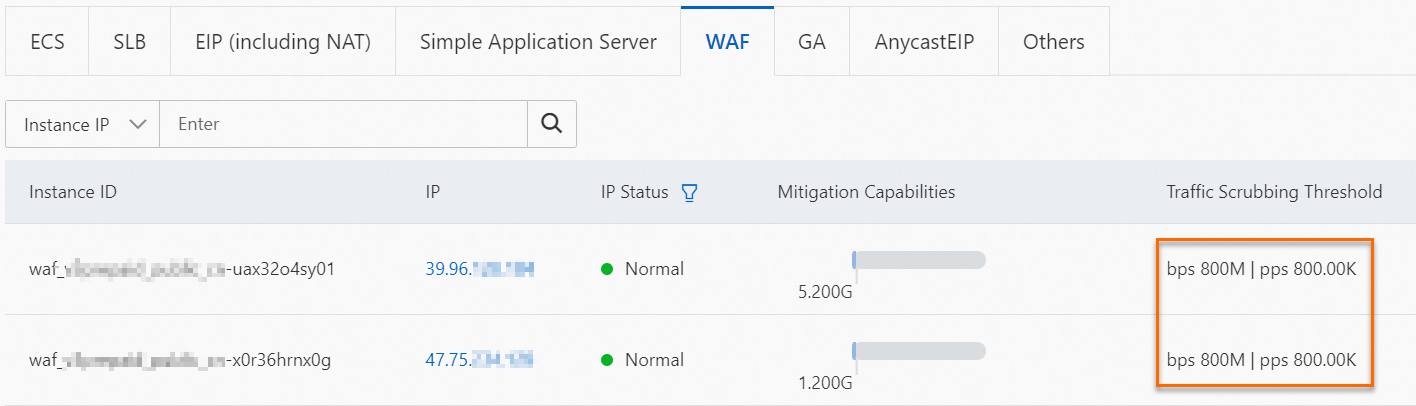
Alibaba Cloud provides Anti-DDoS Origin Basic protection for each WAF VIP free of charge. The free Mitigation Capabilities varies by region. To view the protection capacity for your VIP, navigate to the Assets page and click the WAF tab.
Traffic scrubbing
During a DDoS attack, Anti-DDoS Origin Basic monitors, analyzes, and filters network traffic. It identifies and blocks malicious traffic, allowing only legitimate traffic to reach the WAF VIP to ensure service availability.
Anti-DDoS Origin Basic initiates traffic scrubbing when incoming traffic meets the scrubbing conditions. While your instance is undergoing traffic scrubbing, a notification appears in the banner at the top of the WAF 3.0 console.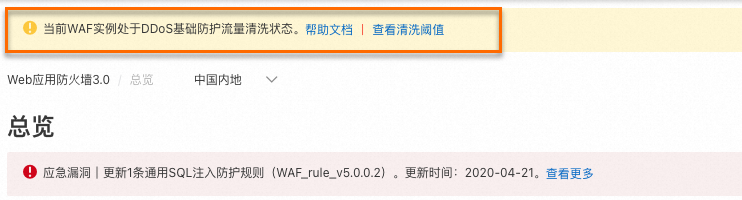
Scrubbing conditions
Anti-DDoS Origin Basic uses two conditions to trigger traffic scrubbing:
AI-powered analysis: Using Alibaba Cloud's big data capabilities, the system automatically learns your typical traffic baseline. It uses algorithms to identify abnormal traffic patterns and detect potential DDoS attacks.
Threshold detection: The incoming traffic volume reaches the configured BPS/PPS scrubbing threshold.
Traffic scrubbing begins only when both conditions are met.
Scrubbing threshold
Anti-DDoS Origin Basic performs traffic scrubbing by filtering attack packets and rate-limiting traffic. The system provides a default scrubbing threshold for the following metrics:
BPS (Bits per Second) scrubbing threshold: When the inbound traffic rate exceeds this threshold, traffic scrubbing is triggered.
PPS (Packets per Second) scrubbing threshold: When the inbound packet rate exceeds this threshold, traffic scrubbing is triggered.
The scrubbing threshold for WAF is determined by the actual queries per second (QPS) of your services. The following table describes how the threshold is calculated.
Type
Value
Maximum BPS scrubbing threshold (Mbps)
MAX(800, QPS*4.5/150)
Maximum PPS scrubbing threshold (pps)
MAX(800000, QPS*4.5)
The actual scrubbing threshold is subject to the value displayed in the console.
View and configure the scrubbing threshold
The scrubbing threshold is set to the maximum by default. If an attack is not large enough to trigger this threshold, you can lower it.
Go to the Assets page. Click the WAF tab, find the target VIP, and view the maximum BPS and PPS scrubbing thresholds in the Traffic Scrubbing Threshold column.
Optional: Modify the scrubbing threshold.
Find the target VIP and click the IP address. In the IP Address Details panel, click Traffic Scrubbing Settings.
In the Traffic Scrubbing Settings panel, set the Traffic Scrubbing Threshold and click OK.
Default: Anti-DDoS Origin Basic automatically adjusts the scrubbing threshold based on the traffic load of the WAF VIP.
Manual:
BPS threshold: Must not exceed 1.5 times the current public bandwidth of the instance and be at least 60 Mbit/s.
PPS threshold: Must not exceed 1.5 times the current PPS specification of the instance and be at least 12,000 packets/s.
Blackhole filtering
When the peak attack traffic (in bps) to a WAF VIP exceeds its DDoS protection capacity, the VIP enters a blackhole state. In this state, all traffic to the VIP is dropped, including legitimate requests and attack traffic.
When this happens, a notification appears in the banner at the top of the WAF 3.0 console.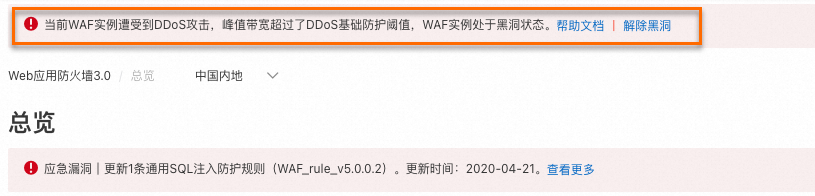
To avoid prolonged service disruption when a VIP is blackholed, we recommend you configure alert notifications in Message Center and specify alert contacts. For instructions, see Configure alert notifications in Message Center.
Respond to blackhole filtering
Prevent blackhole filtering
The most effective way to prevent blackhole filtering is to purchase a dedicated DDoS protection product. Although the Exclusive IP Addresses and Shared Cluster-based Intelligent Load Balancing features in WAF do not directly provide DDoS defense and cannot be enabled while a WAF VIP is undergoing traffic scrubbing or is in a blackhole state, enabling them for critical domains can significantly reduce the impact of DDoS attacks.
Purchase a DDoS protection product: A higher protection capacity raises the blackhole threshold, making blackhole filtering less likely during a DDoS attack. If the protection provided by Anti-DDoS Origin Basic is insufficient for your business needs, we recommend purchasing a DDoS protection product, such as Anti-DDoS Origin or Anti-DDoS Proxy, to enhance your defense capabilities. For guidance on choosing a product, see How to choose a DDoS protection product.
Enable an exclusive IP address: By default, all domains within the same WAF instance share one VIP. After enabling the exclusive IP address feature, the system assigns a dedicated WAF VIP to a specific domain, isolating it from other domains. For more information, see Exclusive IP addresses for domain names.
The blackhole status of a dedicated VIP and a shared VIP are independent of each other.
If a dedicated VIP enters a blackhole state and you disable the Exclusive IP Addresses feature, the attack traffic originally targeting that IP may be redirected to the shared VIP, affecting the services of other domains that use it.
Enable shared cluster-based intelligent load balancing: Intelligent load balancing provides a WAF instance with at least three protection nodes in different regions to enable automatic multi-node disaster recovery. Combined with intelligent DNS resolution and a least-time-to-origin algorithm, it ensures the shortest path and lowest latency for traffic from the protection node to your origin server. For more information, see Intelligent load balancing.
When a protection node in one region enters a blackhole state due to an attack, the system automatically switches to a healthy node to maintain service for your origin server.
NoteIf a client or an intermediate proxy has cached the DNS record of a blackholed node, requests may still be routed to that node, causing them to fail.
If you disable Shared Cluster-based Intelligent Load Balancing, any protection node entering a blackhole state will disrupt the corresponding traffic path and affect service access to the origin.
Handle an ongoing incident
DDoS protection services allow you to deactivate blackhole filtering for a VIP and restore service.
Without a purchased DDoS protection product (using Anti-DDoS Origin Basic): Only automatic deactivation of blackhole filtering is supported; manual deactivation is not available. After a DDoS attack ends, the system automatically deactivates blackhole filtering after a period of time. You can view the scheduled deactivation time on the Assets page of the Traffic Security console. The more frequently blackhole filtering is triggered for an account, the longer the duration of subsequent blackhole states will be.
With a purchased DDoS protection product: Both manual and automatic deactivation are supported. Manual deactivation allows you to restore services more quickly. For more information, see Deactivate blackhole filtering.
FAQ
Identify the attacked domain
Typically, an attacker resolves a domain protected by WAF to obtain its WAF VIP and then launches a DDoS attack against that IP address. High-volume DDoS attacks primarily target the WAF VIP, making it impossible to identify the targeted domain from the attack traffic alone.
Preventing blackholing by changing the WAF VIP
Changing the WAF VIP does not solve the underlying problem.
While a WAF instance is undergoing traffic scrubbing or is in a blackhole state, the system may assign the same WAF VIP that was previously attacked, even if you delete and re-add all domains or release and repurchase the instance. If an attacker targets your domain name, they can simply resolve the domain's DNS record (for example, by using ping) to find the new VIP and continue the attack.
DDoS vs. HTTP flood attacks and WAF
Volumetric DDoS attacks primarily target the IP layer (Layer 4), while HTTP flood attacks target the application layer (Layer 7), such as with HTTP GET/POST floods. WAF is effective against HTTP flood attacks. However, defending against high-volume DDoS attacks requires sufficient bandwidth resources to absorb all traffic before it can be scrubbed. This type of defense requires a dedicated DDoS protection service.
Choosing between Anti-DDoS Proxy and WAF
An HTTP flood attack uses proxy servers to overwhelm a target with a high volume of seemingly legitimate requests, which exhausts server resources and degrades performance.
Alibaba Cloud offers two main products for this type of protection: WAF and Anti-DDoS Proxy. Each has different strengths in protection capacity and policy granularity, allowing you to choose based on your specific business needs:
Protection product | WAF | Anti-DDoS Proxy |
Use cases | Low-intensity HTTP flood attacks, but require fine-grained control over application-layer access or protection against mixed bot attacks. | High-intensity, complex HTTP flood attacks. |
Core capabilities |
|
|
Selection advice
If your services experience high-intensity HTTP flood attacks, we recommend you prioritize Anti-DDoS Proxy.
If the attack intensity is lower, but you have high requirements for application-layer policy granularity or bot behavior management, we recommend you prioritize WAF.