This topic describes how to keep your accelerated domain name accessible after its ICP filing expires.
Problem
In compliance with laws and regulations in the Chinese mainland, ApsaraVideo VOD cannot provide acceleration services for domain names without a valid ICP filing. If your acceleration region is set to Chinese mainland (ICP Filing Required) or Global Acceleration (ICP Filing Required), and the ICP filing for your domain name expires, ApsaraVideo VOD suspends its acceleration service.
Solutions
Solution 1: Change the acceleration region for the domain name.
If you only need to accelerate content delivery outside the Chinese mainland, we recommend changing the acceleration region to Outside Chinese Mainland (ICP Filing Not Required). This region does not use nodes in the Chinese mainland and does not provide acceleration services within the Chinese mainland. Pricing varies by acceleration region. For more information, see Pricing of ApsaraVideo VOD.
Log on to the ApsaraVideo VOD console.
In the left-side navigation pane, choose Configuration Management.
Choose CDN Configuration > Domain Names.
Find the target domain name and click Configure in the Actions column.
In the Basic Information section, click Modify to the right of Acceleration Region.
Change the Acceleration Region to Outside Chinese Mainland (ICP Filing Not Required).
Click OK.
- Method 2: Temporarily resolve your domain name to the origin server. You can resume content acceleration after the domain name obtains a valid ICP number.
The following steps take a domain name registered with Alibaba Cloud as an example. If your domain name is registered with another provider, the configuration procedure is similar.
- Log in to the Alibaba Cloud DNS console.
- On the Manage DNS page, find your domain name and click Configure in the Actions column.
- Click Add Record and create an A record to replace the CNAME record.
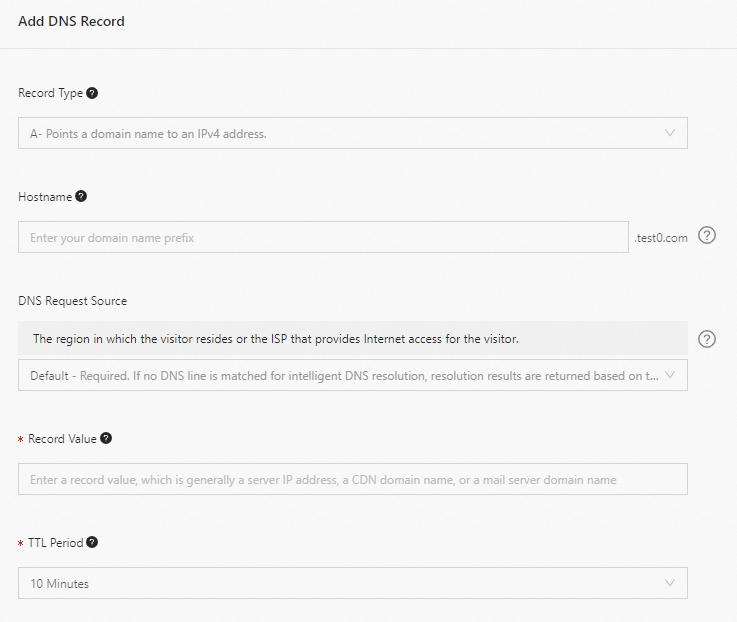
Parameter Description Example Type Select A. A Host The prefix of the accelerated domain name. - If the accelerated domain name is
www.aliyun.com, enterwww. - If the accelerated domain name is
aliyun.com, enter@. - If the accelerated domain name is
*.aliyun.com, enter*.
ISP Line The resolution line for DNS requests. Keep the default value. Value The IP address (IPv4) or domain name of the origin server. 10.10.10.10 TTL The cache duration. The smaller the value, the faster the record change takes effect. The default value is 10 minutes. Keep the default value. - If the accelerated domain name is
- Click Confirm.