Overview
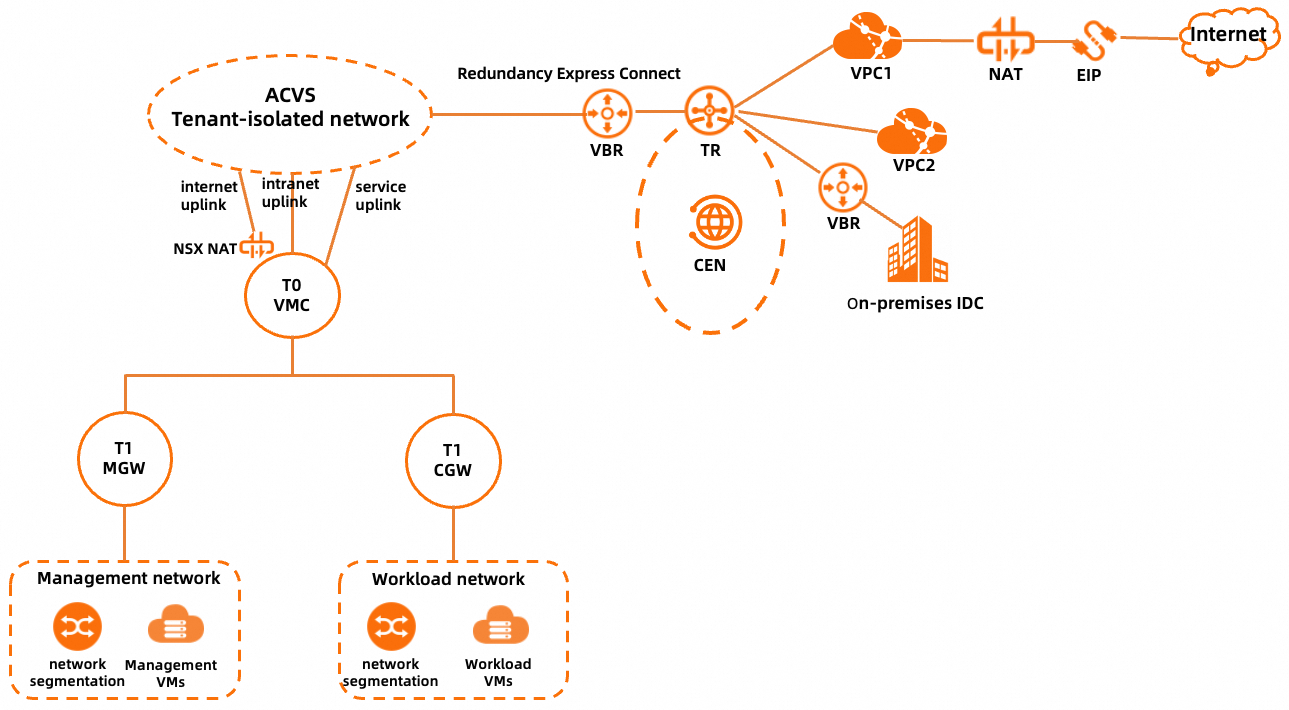
Component | Description |
Management network | The management network segment of a dedicated VMware environment, which is an underlay network segment that includes the ESXi management, vMotion, and vSAN subnets. The management network is a subnet that is split from the network segment of the dedicated VMware environment. For more information, see Create a PrivateCloud instance by using the same account as that for a CEN instance. |
Management VMs | The VMs on which the management components of Alibaba Cloud VMware Service (ACVS) reside, including vCenter Server, NSX Manager, and NSX Edge. |
Workload network | The network on which workload VMs reside. After you add an NSX overlay network segment in the ACVS console, you can go to the NSX Manager console to create the workload network segment. |
Workload VMs | The VMs that are created based on your business requirements. Workload VMs are connected to the workload network by using network interface controllers (NICs). |
T1 MGW | A VMware NSX tier-1 logical router. T1 MGW connects the management network of a dedicated VMware environment to T0 VMC and provides the north-south firewall service for the management network. |
T1 CGW | A VMware NSX tier-1 logical router. T1 CGW connects the workload network to T0 VMC. |
T0 VMC | A VMware NSX tier-0 logical router. T0 VMC connects the logical network of NSX to the ACVS tenant-isolated network and provides the NAT service for Internet access and three uplink interfaces. |
Internet uplink | An uplink interface of T0 VMC. This uplink interface is used to forward network traffic for accessing the Internet. |
Intranet uplink | An uplink interface of T0 VMC. This uplink interface is used to forward the network traffic for accessing a virtual private cloud (VPC) or a on-premises data center. |
Service uplink | An uplink interface of T0 VMC. This uplink interface is not enabled. |
NSX NAT | The NAT service provided by T0 VMC. If a workload VM needs to access the Internet, the IP address of the workload VM is first translated into an intermediate address by using SNAT on NSX NAT, routed to an Internet NAT gateway of Alibaba Cloud, and then translated into an elastic IP address (EIP) by using SNAT on the Internet NAT gateway for Internet access. A workload VM can also provide services for the Internet by using DNAT on an Internet NAT gateway and then another DNAT on NSX NAT. |
ACVS tenant-isolated network | The network on which tenants are isolated from each other. This network is used to connect VMware NSX to a Cloud Enterprise Network (CEN) instance. |
Path of accessing a VPC in the same region
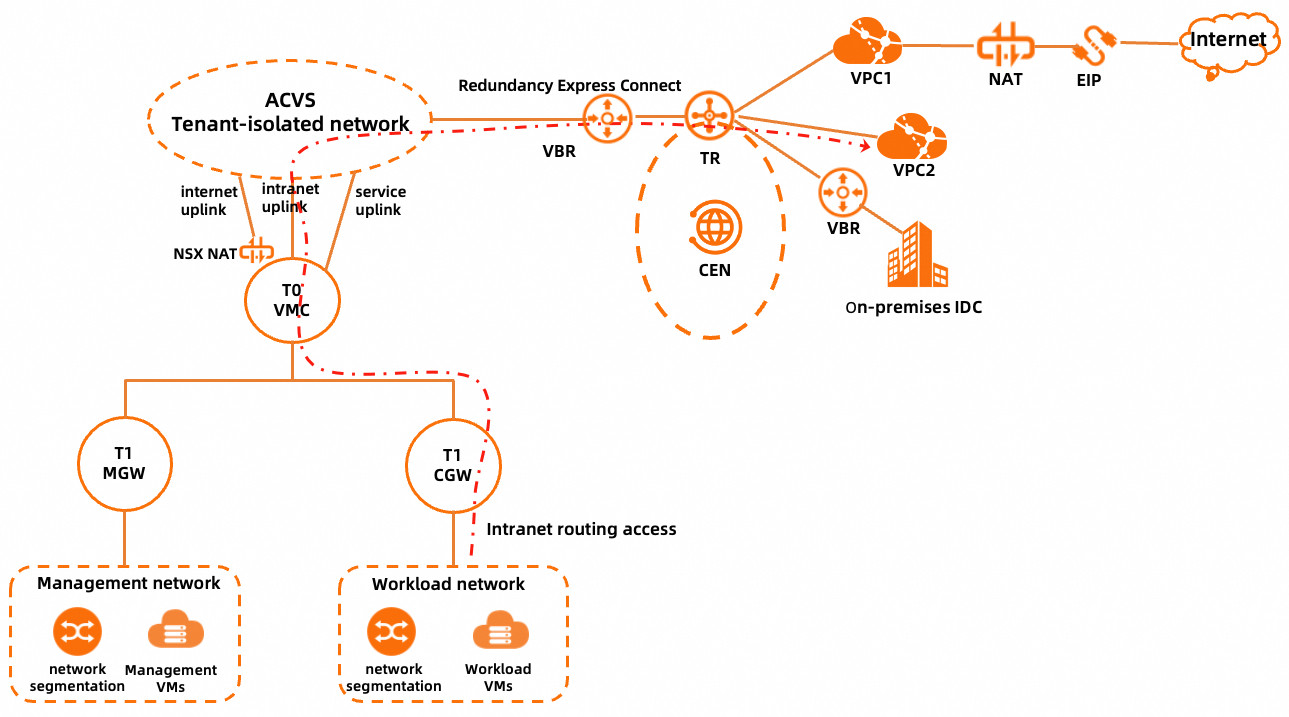
The workload network of a PrivateCloud instance is connected to a VPC by using routes, and no NAT is required. To implement the access, make sure that the following requirements are met:
The VPC is attached to the CEN instance.
The route table associated with the four Express Connect circuits of the PrivateCloud instance by using associated forwarding on the transit router contains route entries to the VPC.
The route table associated with the VPC by using associated forwarding on the transit router contains route entries to the workload network of the PrivateCloud instance.
The preceding two requirements are applicable only to Enterprise Edition transit routers. If a Basic Edition transit router is used, the virtual border routers (VBRs) of the Express Connect circuits of the PrivateCloud instance and the VPC are automatically associated with the same route table.
The route table of the VPC contains route entries to the PrivateCloud instance. You can add static routes or enable the route synchronization feature in the CEN console.
A custom route is added for the network segment of the VPC on the Interconnection Configuration tab of the details page of the PrivateCloud instance in the ACVS console.
If a Basic Edition transit router is used, go to the Interconnection Configuration tab of the details page of the PrivateCloud instance in the ACVS console and add the VPC on the Access VPC tab.
A firewall rule for accessing the VPC is added on the Computer Gateway tab of the Gateway Firewall page in the NSX Manager console.
Path of accessing a on-premises data center in the same region by using Express Connect circuits
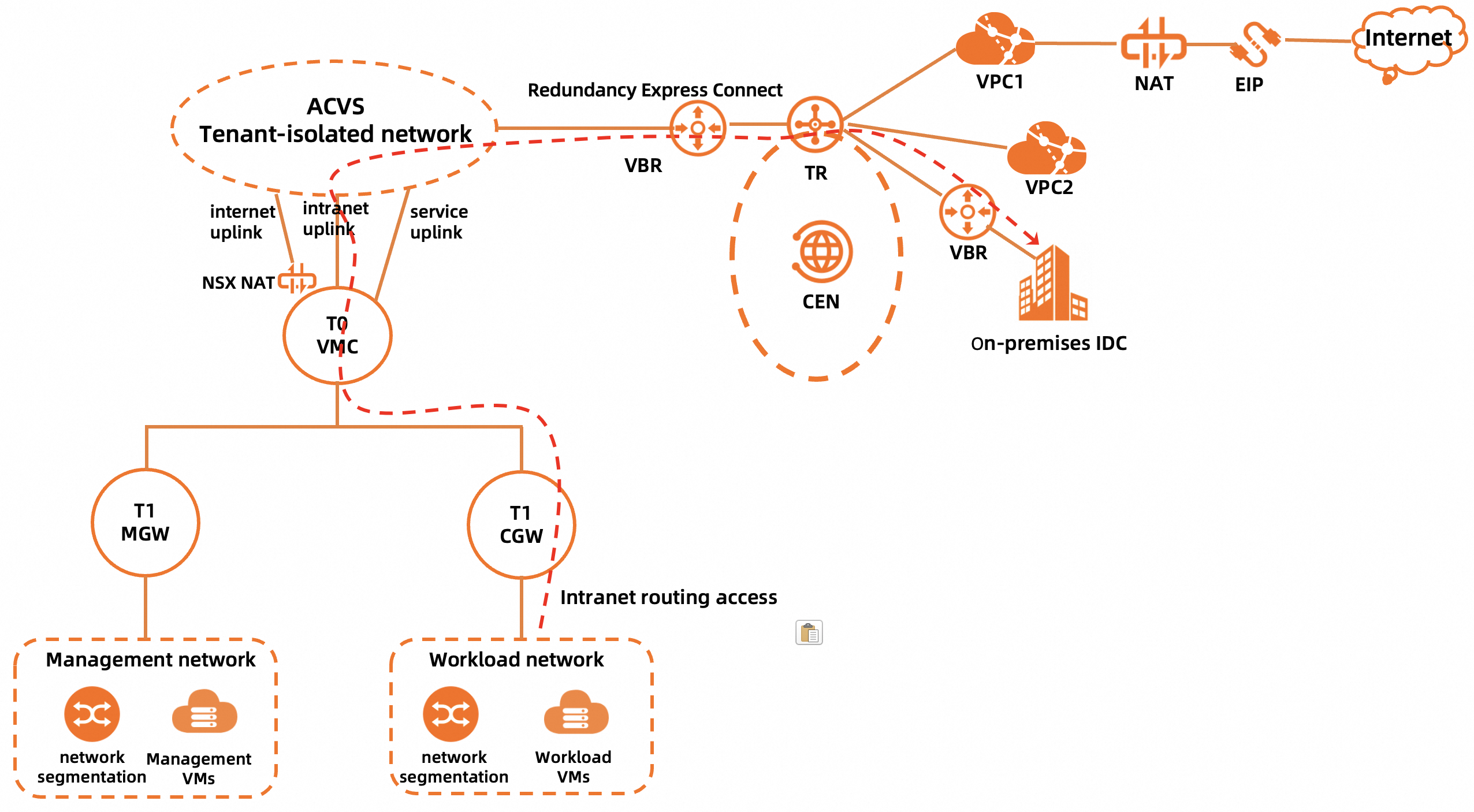
The workload network of a PrivateCloud instance is connected to a on-premises data center by using routes, and no NAT is required. To implement the access, make sure that the following requirements are met:
The on-premises data center is connected to the CEN instance by using Express Connect circuits.
The route table associated with the four Express Connect circuits of the PrivateCloud instance by using associated forwarding on the transit router contains route entries to the on-premises data center.
The route table associated with the Express Connect circuits of the on-premises data center by using associated forwarding on the transit router contains route entries to the workload network of the PrivateCloud instance.
The preceding two requirements are applicable only to Enterprise Edition transit routers. If a Basic Edition transit router is used, the VBRs of the Express Connect circuits of the PrivateCloud instance and the VBRs of the Express Connect circuits of the on-premises data center are automatically associated with the same route table.
The route for accessing the workload network of the PrivateCloud instance is added in the on-premises data center.
The network segment of the on-premises data center is added on the Cloud and On-premises Interconnection tab of the Interconnection Configuration tab of the details page of the PrivateCloud instance in the ACVS console.
A firewall rule for accessing the on-premises data center is added on the Computer Gateway tab of the Gateway Firewall page in the NSX Manager console.
Path of accessing a on-premises data center in the same region by using a public VPN gateway
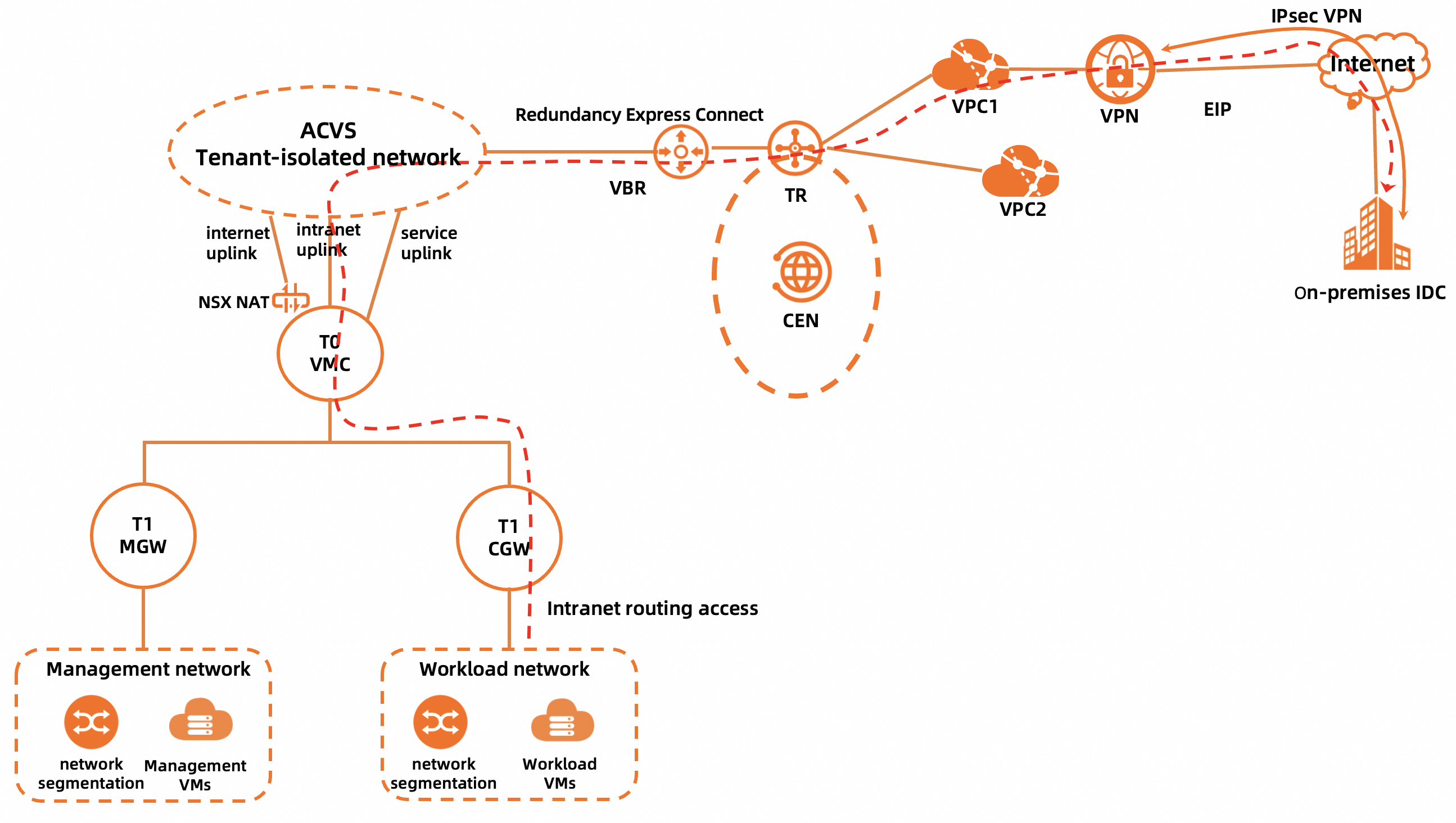
The workload network of a PrivateCloud instance is connected to a on-premises data center by using routes, and no NAT is required. To implement the access, make sure that the following requirements are met:
The on-premises data center is connected to a VPC by using a public VPN gateway.
If the public VPN gateway is associated with a transit router of CEN, the path is similar to that Path of accessing a on-premises data center in the same region by using Express Connect circuits.
The workload network segment of the PrivateCloud instance is added to the local or peer network of IPsec-VPN connections.
The workload network segment of the PrivateCloud instance needs to be added to the peer network in the IPsec-VPN configurations of the gateway in the on-premises data center and to the local network in the IPsec-VPN configurations of the public VPN gateway on Alibaba Cloud.
The route for accessing the workload network of the PrivateCloud instance is added in the on-premises data center.
The route entries to the on-premises data center in the route table of the VPC are advertised to the CEN instance.
The route table associated with the four Express Connect circuits of the PrivateCloud instance by using associated forwarding on the transit router contains route entries to the on-premises data center.
The route table associated with the VPC by using associated forwarding on the transit router contains route entries to the workload network of the PrivateCloud instance.
The preceding two requirements are applicable only to Enterprise Edition transit routers. If a Basic Edition transit router is used, the virtual border routers (VBRs) of the Express Connect circuits of the PrivateCloud instance and the VPC are automatically associated with the same route table.
The network segment of the on-premises data center is added on the Cloud and On-premises Interconnection tab of the Interconnection Configuration tab of the details page of the PrivateCloud instance in the ACVS console.
A firewall rule for accessing the on-premises data center is added on the Computer Gateway tab of the Gateway Firewall page in the NSX Manager console.
Path of accessing the Internet
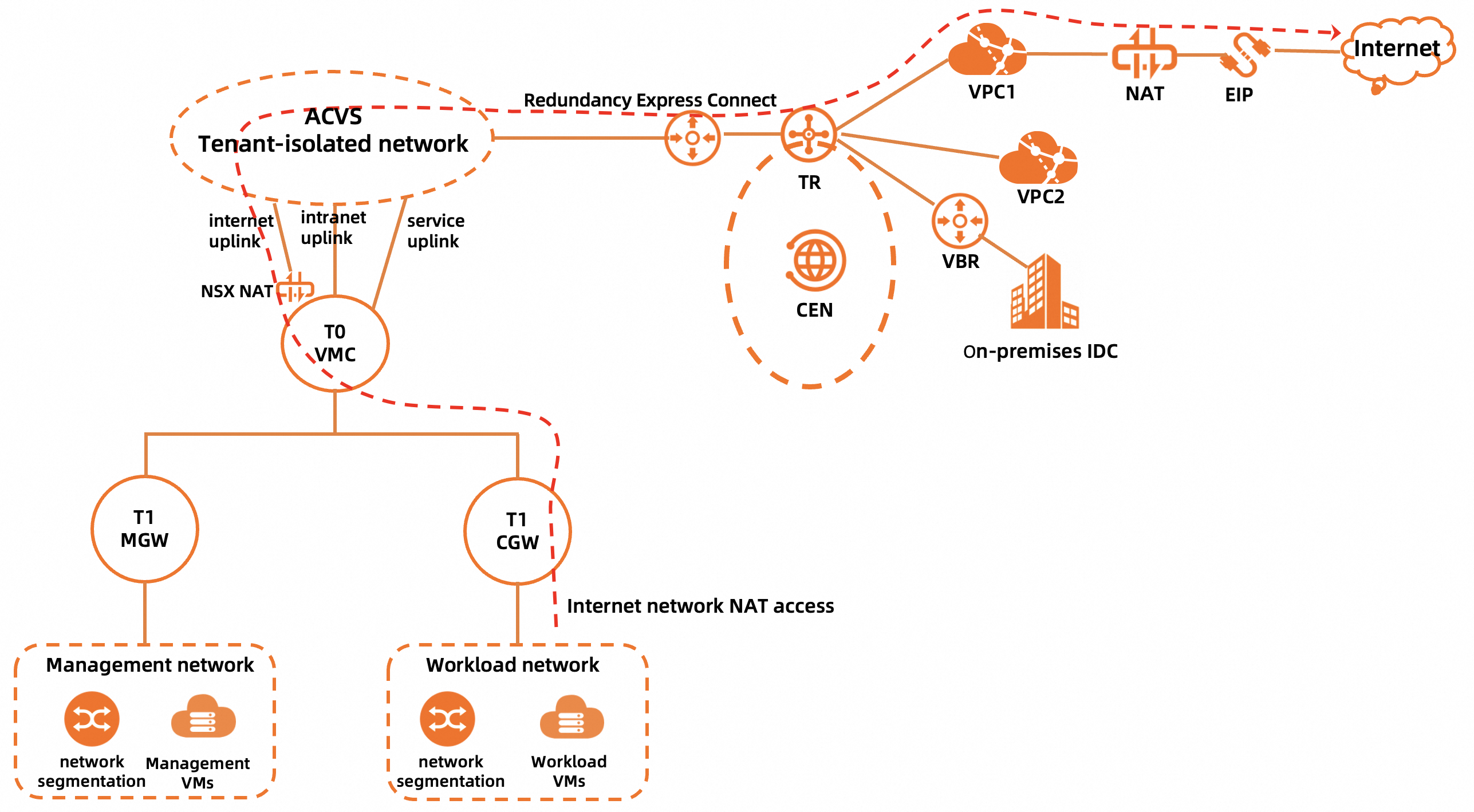
If an access request from your workload VM does not match exact route entries on the T0 VMC logical router and only matches the default route 0.0.0.0/0, NSX NAT on T0 VMC performs SNAT on the request. Then, the request passes through the Internet uplink, ACVS tenant-isolated network, and Express Connect circuit to reach the transit router. The transit router forwards the request to the Internet NAT gateway in VPC1 based on the default route 0.0.0.0/0 in the route table of the transit router. After the source IP address is translated again by using SNAT, the workload VM can access the Internet by using an EIP. To implement the access, make sure that the following requirements are met:
An Internet NAT gateway is created in the VPC associated with the PrivateCloud instance, and the Internet NAT gateway is associated with an EIP. In this example, VPC1 is used.
The default route 0.0.0.0/0 is advertised to the CEN instance.
A firewall rule for accessing the Internet is added and the Applied To parameter is set to Internet Interface on the Computer Gateway tab of the Gateway Firewall page in the NSX Manager console.
Internet Access in Outbound Direction is enabled on the Internet Access tab of the details page of the PrivateCloud instance in the ACVS console.