Tablestore uses its search index feature to provide vector retrieval. You can use this feature to find the most similar data items in large datasets. If you are not satisfied with the vector retrieval results for semantic search, refer to this topic to optimize the performance.
Vector retrieval scoring formulas
Tablestore vector retrieval (KnnVectorQuery) uses numerical vectors to perform approximate nearest neighbor queries. This is suitable for scenarios such as retrieval-augmented generation (RAG), recommendation systems, similarity detection, natural language processing, and semantic search. For more information about how to use vector retrieval, see Vector retrieval.
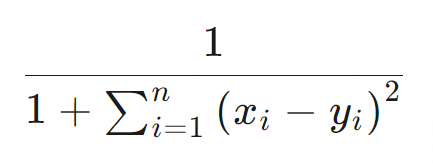
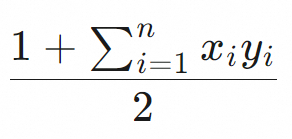
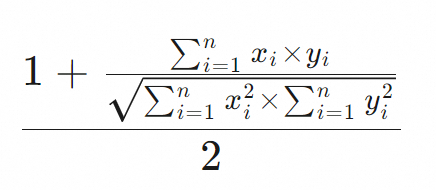
Vector retrieval supports the Euclidean distance (euclidean), cosine similarity (cosine), and dot product (dot_product) distance measures. Each distance measure has a different scoring formula. Tablestore uses these scoring formulas to evaluate the similarity between vectors. The following table describes the scoring formulas.
|
MetricType |
Scoring formula |
|
Euclidean distance (euclidean) |
|
|
Dot product (dot_product) |
|
|
Cosine similarity (cosine) |
|
Troubleshooting and analysis
1. Check the sorting method
When you use vector retrieval, you can sort the results by score using ScoreSort. By default, results are sorted by primary key.
2. Adjust how you use BoolQuery
If you combine a KnnVectorQuery (vector retrieval) with a BoolQuery (multi-conditional query), you can set the search index query type to KnnVectorQuery and add the BoolQuery conditions to the Filter (vector retrieval filter) parameter. This method does not affect the score calculation.
If you set the query type to BoolQuery and use KnnVectorQuery as a sub-condition, other query conditions in the BoolQuery may affect the score calculation. For more information, see Usage with BoolQuery.
The following Java code provides a sample for vector retrieval.
private static void knnVectorQuery(SyncClient client) {
    SearchQuery searchQuery = new SearchQuery();
    KnnVectorQuery query = new KnnVectorQuery();
    query.setFieldName("Col_Vector");
    query.setTopK(10); // Return the top K nearest neighbors.
    query.setFloat32QueryVector(new float[]{0.1f, 0.2f, 0.3f, 0.4f});
    // The nearest neighbor vectors must meet the condition: Col_Keyword=hangzhou && Col_Long<4.
    query.setFilter(QueryBuilders.bool()
            .must(QueryBuilders.term("Col_Keyword", "hangzhou"))
            .must(QueryBuilders.range("Col_Long").lessThan(4))
    );
    searchQuery.setQuery(query);
    searchQuery.setLimit(10);
    // Sort by score.
    searchQuery.setSort(new Sort(Collections.singletonList(new ScoreSort())));
    SearchRequest searchRequest = new SearchRequest("<TABLE_NAME>", "<SEARCH_INDEX_NAME>", searchQuery);
    SearchRequest.ColumnsToGet columnsToGet = new SearchRequest.ColumnsToGet();
    columnsToGet.setColumns(Arrays.asList("Col_Keyword", "Col_Long"));
    searchRequest.setColumnsToGet(columnsToGet);
    // Access the Search interface.
    SearchResponse resp = client.search(searchRequest);
    for (SearchHit hit : resp.getSearchHits()) {
        // Print the score.
        System.out.println(hit.getScore());
        // Print the data.
        System.out.println(hit.getRow());
    }
}
3. Check the vector generation quality
Tablestore calculates the similarity of vector data. Tablestore does not evaluate the quality of vector generation. An external embedding model generates both the vectors in the database and the query vectors. In highly specialized scenarios, the generated vectors may not be effective. You can troubleshoot this issue as follows:
-
Calculate the score directly without using Tablestore.
-
You can define the query vector as
vector aand the vector that you want to retrieve from the Tablestore table asvector b.NoteYou can obtain the data for
vector busing the search index, secondary index, or wide table data read APIs. -
You can calculate
score ausing theMetricFunction.COSINE.compare(a, b)method. This method is provided in the demo code in Appendix: Demo code for vector retrieval scoring formulas.
-
-
Calculate the score using Tablestore.
You can use the Tablestore vector retrieval feature to query
vector a. Then, checkscore bfor each row in the returned results. -
Comparative analysis
If the Tablestore vector retrieval results do not include the row that contains
vector b, thenscore bfor each returned row is theoretically higher thanscore a.This result confirms that the unsatisfactory vector retrieval results are caused by the poor performance of the embedding model. The retrieval results contain only vector data with scores higher than your expected result. Therefore, the expected result is not returned.
-
Recommended solutions.
This issue usually occurs in specialized domains. For example, specific terms in biomedicine may not perform well with a general-purpose embedding model. Terms that are semantically similar in a specialized domain may not be considered semantically similar by the model. In this case, you can consider the following solutions:
-
You can find an embedding model for your specific domain.
ModelScope provides many ready-to-use embedding models. You can choose models for specialized domains such as government affairs, E-commerce, healthcare, law, and finance. For more information, see Embedding Model List.
-
You can collect a large amount of professional corpus data and use this data to train a suitable embedding model.
-
Appendix: Demo code for vector retrieval scoring formulas
The following Java code demonstrates the scoring formulas for the supported distance measures.
import java.util.concurrent.ThreadLocalRandom;

public class CompareVector {

    public static void main(String[] args) {
        // a is the query vector
        float[] a = randomVector(512);
        // b is the vector from the row in the index that you expect to be returned
        float[] b = randomVector(512);
        // Select the similarity measure algorithm that you set in your search index and output the score
        System.out.println(MetricFunction.COSINE.compare(a, b));
    }

    public static float[] randomVector(int dim) {
        float[] vec = new float[dim];
        for (int i = 0; i < dim; i++) {
            vec[i] = ThreadLocalRandom.current().nextFloat();
            if (ThreadLocalRandom.current().nextBoolean()) {
                vec[i] = -vec[i];
            }
        }
        return l2normalize(vec, true);
    }

    public static float[] l2normalize(float[] v, boolean throwOnZero) {
        double squareSum = 0.0f;
        int dim = v.length;
        for (float x : v) {
            squareSum += x * x;
        }
        if (squareSum == 0) {
            if (throwOnZero) {
                throw new IllegalArgumentException("normalize a zero-length vector");
            } else {
                return v;
            }
        }
        double length = Math.sqrt(squareSum);
        for (int i = 0; i < dim; i++) {
            v[i] /= length;
        }
        return v;
    }

    public enum MetricFunction {
        /**
         * Euclidean distance.
         */
        EUCLIDEAN {
            @Override
            public float compare(float[] v1, float[] v2) {
                return 1 / (1 + VectorUtil.squareDistance(v1, v2));
            }
        },

        /**
         * Dot product.
         */
        DOT_PRODUCT {
            @Override
            public float compare(float[] v1, float[] v2) {
                return (1 + VectorUtil.dotProduct(v1, v2)) / 2;
            }
        },

        /**
         * Cosine.
         */
        COSINE {
            @Override
            public float compare(float[] v1, float[] v2) {
                return (1 + VectorUtil.cosine(v1, v2)) / 2;
            }
        };

        public abstract float compare(float[] v1, float[] v2);
    }


    static final class VectorUtil {

        private static void checkParam(float[] a, float[] b) {
            if (a.length != b.length) {
                throw new IllegalArgumentException("vector dimensions differ: " + a.length + "!=" + b.length);
            }
        }

        public static float dotProduct(float[] a, float[] b) {
            checkParam(a, b);
            float res = 0f;
            for (int i = 0; i < a.length; i++) {
                res += b[i] * a[i];
            }
            return res;
        }

        public static float cosine(float[] a, float[] b) {
            checkParam(a, b);
            float sum = 0.0f;
            float norm1 = 0.0f;
            float norm2 = 0.0f;
            for (int i = 0; i < a.length; i++) {
                float elem1 = a[i];
                float elem2 = b[i];
                sum += elem1 * elem2;
                norm1 += elem1 * elem1;
                norm2 += elem2 * elem2;
            }
            return (float) (sum / Math.sqrt((double) norm1 * (double) norm2));
        }

        public static float squareDistance(float[] a, float[] b) {
            checkParam(a, b);
            float sum = 0.0f;
            for (int i = 0; i < a.length; i++) {
                float difference = a[i] - b[i];
                sum += difference * difference;
            }
            return sum;
        }
    }
}