Deploying an SSL certificate requires matching certificate files to your web server type (such as Nginx, Apache, or IIS). This guide provides local and server-side methods to accurately identify your server, ensuring you select the correct installation procedure.
Method 1: Perform a quick local check
If the server hides its Server information or uses a proxy service such as a Content Delivery Network (CDN) or Load Balancing, this method might return the proxy server's type instead of the origin server type. If the result is not what you expect, use Method 2 for final confirmation.
Use browser developer tools
In a browser such as Chrome, Edge, or Firefox, access the target website.
Press
F12to open Developer Tools and check the server type as shown in the following figure.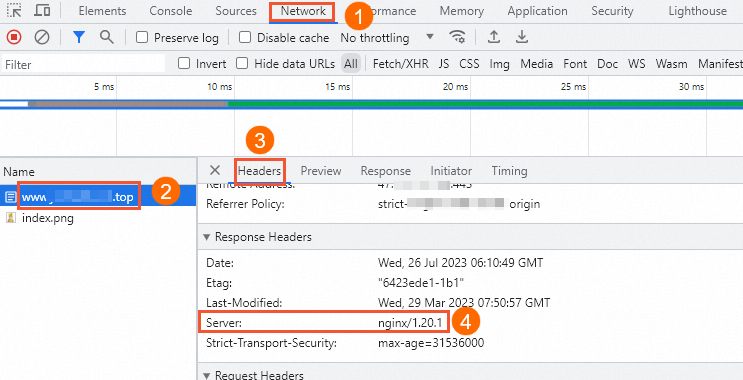
Use a command-line tool (cURL)
In the command-line terminal on your local computer, run the following command. Replace yourdomain with your actual domain name.
curl -sIL https://yourdomainIn the output, find the last Server response header. This is the line that starts with server: or Server: . The value that follows is the server name.
Method 2: Log on to the server to confirm
Logging on to the server is the most accurate and reliable way to identify the web server type. The following examples assume the server uses port 80 or 443.
Linux
Run the following command in the terminal. Identify the web server based on the process name in the output.
sudo netstat -tlnp | grep -E ':(80|443)\s+'Windows
Start Resource Monitor. Press
Win + R, enterresmon, and press Enter.Switch to the Network tab and click Listening Ports.
Find the record where the Port is 80 or 443. Identify the web server from the process information in the Image column.
Method 3: Consult your engineer
If you still cannot identify the web server type with the methods above, consult your development or operations engineer.
Next step
Select the appropriate certificate installation guide based on your server type.