You can use data filtering plugins to filter logs based on specific conditions. The filtering result determines whether a log record is collected.
Data filtering plugin overview
Simple Log Service provides the following types of data filtering plugins. You can select one based on your requirements.
Plugin name | Type | Description |
Filter | Native | Set a whitelist regular expression to collect only logs whose field values fully match the specified regular expression. |
Filter Logs | Extension | Supports two filtering modes:
|
Entry point
If you want to use a Logtail plug-in to process logs, you can add a Logtail plug-in configuration when you create or modify a Logtail configuration. For more information, see Overview.
Differences between native and extension plugins
Native plugins are implemented in C++ and offer higher performance.
Extension plugins are implemented in Go and offer a rich and flexible ecosystem. You can use extension plugins if your business logs are too complex to be processed by native plugins.
Performance limits of extension plugins
When you use extension plugins to process logs, LoongCollector consumes more resources, primarily CPU. If necessary, you can adjust the LoongCollector parameter settings to perform optimization for long log transmission delays.
If the generation speed of raw data exceeds 5 MB/s, we recommend that you do not use complex plugin combinations to process logs. Instead, you can use extension plugins for simple processing and then use data transformation for further processing.
Log collection limits
Extension plugins process text logs in line mode. This means that file-level metadata, such as
__tag__:__path__and__topic__, is stored in each log record.Adding an extension plugin affects tag-related features in the following ways:
The contextual query and LiveTail features become unavailable. To use these features, you must add an aggregators configuration.
The
__topic__field is renamed to__log_topic__. If you add an aggregators configuration, both the__topic__and__log_topic__fields exist in the log. If you do not need the__log_topic__field, you can use the drop field plugin to delete it.Fields such as
__tag__:__path__no longer have a native field index. You must create a field index for them.
Filter plugin (native)
The filter plugin filters logs based on the values of specified log fields.
Configuration description
Parameter | Description |
Whitelist | Collects only logs that meet the whitelist conditions. Set the target field name and the regular expression for filtering. This regular expression supports only full-text matching, not partial keyword matching. For information about how to configure regular expressions, see Regular expression tutorial. The conditions for multiple whitelists are combined with a logical AND. The following examples show how to use whitelists:
|
Filter Logs plugin (extension)
You can use the processor_filter_regex or processor_filter_key_regex plugin to filter logs. This section describes the parameters and provides configuration examples for each plugin.
Limits
Text logs and container standard output support only form-based configurations. Other input sources support only JSON configurations.
The Go regular expression engine is based on RE2 and has the following limitations compared to the PCRE engine:
Differences in named group syntax
Go uses the
(?P<name>...)syntax, not the(?<name>...)syntax used by PCRE.Unsupported regular expression patterns
Assertion:
(?=...),(?!...),(?<=...), and(?<!...).Conditional expression:
(?(condition)true|false).Recursive matching:
(?R)and(?0).Subprogram reference:
(?&name)and(?P>name).Atomic group:
(?>...).
When you debug regular expressions with tools such as Regex101, avoid using the unsupported patterns. Otherwise, the plugin cannot process the logs.
processor_filter_regex (filter by value using regular expressions)
This plugin filters logs by matching the values of specified log fields with regular expressions.
Form-based configuration
Parameters
Set Processor Type to Filter Logs By Value Using Regular Expressions. The following table describes the parameters.
NoteA log is collected only if the value of a log field fully matches the regular expression in the Collect Logs section and does not match the regular expression in the Discard Logs section. Otherwise, the log is discarded.
Parameter
Description
Collect Logs
Enter a log field name and a regular expression that the field value must match. If the target field value in the raw log matches the regular expression, the log is collected.
You can add multiple key-value pairs. The conditions are combined with a logical AND.
Discard Logs
Enter a log field and a regular expression that the field value must match. If the value of any field in the log matches its corresponding regular expression, the log is discarded.
You can add multiple key-value pairs. The conditions are combined with a logical OR.
Example
To collect only logs in which the value of the ip field starts with 10, the value of the method field is POST, and the value of the browser field is not aliyun.*, use the following configuration:
Raw logs
Log 1
"ip" : "10.**.**.**"
"method" : "POST"
"browser" : "aliyun-sdk-java"
Log 2
"ip" : "10.**.**.**"
"method" : "POST"
"browser" : "chrome"
Log 3
"ip" : "192.168.*.*"
"method" : "POST"
"browser" : "ali-sls-ilogtail"
Logtail plugin configuration

Result
Log
Collected
Reason
Log 1
No
The value of the browser field matches the regular expression in Discard Logs.
Log 2
Collection
Meets the conditions.
Log 3
No
The value of the ip field does not match the regular expression in Collect Logs.
JSON configuration
Parameters
Set the type parameter to processor_filter_regex. The following table describes the parameters in detail.
NoteA log is collected only if the value of a log field fully matches the regular expression specified for Include and does not match the regular expression specified for Exclude. Otherwise, the log is discarded.
Parameter
Type
Required
Description
Include
JSON Object
No
The key is a log field and the value is a regular expression that the field value must match. The conditions for multiple key-value pairs are combined with a logical AND. If the value of a log field matches the corresponding regular expression, the log is collected.
Exclude
JSON Object
No
The key is a log field and the value is a regular expression that the field value must match. The conditions for multiple key-value pairs are combined with a logical OR. If the value of any field in the log matches its corresponding regular expression, the log is discarded.
Example
To collect only logs in which the value of the ip field starts with 10, the value of the method field is POST, and the value of the browser field is not aliyun.*, use the following configuration:
Raw logs
Log 1
"ip" : "10.**.**.**"
"method" : "POST"
"browser" : "aliyun-sdk-java"
Log 2
"ip" : "10.**.**.**"
"method" : "POST"
"browser" : "chrome"
Log 3
"ip" : "192.168.*.*"
"method" : "POST"
"browser" : "ali-sls-ilogtail"
Logtail plugin configuration
{
   "type" : "processor_filter_regex",
    "detail" : {
         "Include" : {
            "ip" : "10\..*",
            "method" : "POST"
         },
         "Exclude" : {
            "browser" : "aliyun.*"
         }
    }
}
Result
Log
Collected
Reason
Log 1
No
The value of the browser field matches the regular expression in Exclude.
Log 2
Collection
Meets the conditions.
Log 3
No
The value of the ip field does not match the regular expression in Include.
processor_filter_key_regex (filter by key using regular expressions)
This plugin filters logs by matching the names of log fields with regular expressions.
Form-based configuration
Parameters
Set Processor Type to Filter Logs By Key Using Regular Expressions. The following table describes the parameters.
NoteA log is collected only if a log field name fully matches the regular expression in the Collect Logs section and does not match the regular expression in the Discard Logs section. Otherwise, the log is discarded.
Parameter
Description
Collect Logs
Specify a regular expression for log field names. The conditions for multiple fields are combined with a logical AND. If a log field name matches the regular expression, the log is collected.
Discard Logs
Specify a regular expression for log field names. The conditions for multiple fields are combined with a logical OR. If any log field name matches the regular expression, the log is discarded.
Example
To collect logs that contain field names starting with request, use the following configuration:
Raw logs
Log 1
"request_time" : 20
"request_length": 2314
"request_method" : "POST"
"browser" : "aliyun-sdk-java"
Log 2
"request_time" : 70
"request_method" : "GET"
"ip" : "192.168.**.**"
Log 3
"browser" : "ali-sls-ilogtail"
"status" : 200
Logtail plugin configuration
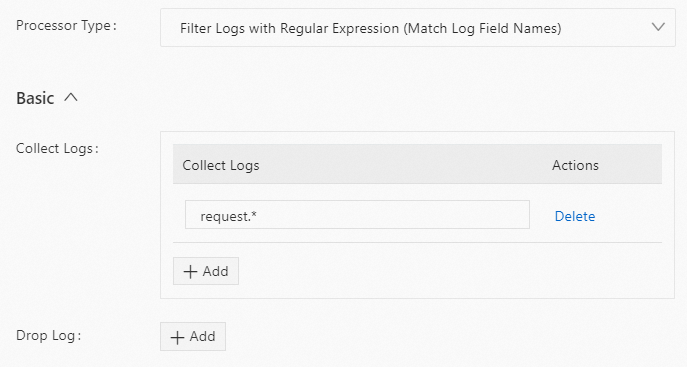
Result
Log
Data Collection
Reason
Log 1
Collection
The request_time, request_length, and request_method fields match the regular expression in Collect Logs.
Log 2
Collection
The request_time and request_length fields match the regular expression specified in Collect Logs.
Log 3
No
The log does not contain any fields that match the regular expression in Collect Logs.
JSON configuration
Parameters
Set the type parameter to processor_filter_key_regex. The following table describes the parameters in detail.
NoteA log is collected only if a log field name fully matches a regular expression specified for Include and does not match any regular expression specified for Exclude. Otherwise, the log is discarded.
Parameter
Type
Required
Description
Include
string[]
No
Specify a regular expression for log field names. The conditions for multiple fields are combined with a logical AND. If a log field name matches the regular expression, the log is collected.
Exclude
string[]
No
Specify a regular expression for log field names. The conditions for multiple fields are combined with a logical OR. If any log field name matches the regular expression, the log is discarded.
Example
To collect logs that contain field names starting with request, use the following configuration:
Raw logs
Log 1
"request_time" : 20
"request_length": 2314
"request_method" : "POST"
"browser" : "aliyun-sdk-java"
Log 2
"request_time" : 70
"request_method" : "GET"
"ip" : "192.168.**.**"
Log 3
"browser" : "ali-sls-ilogtail"
"status" : 200
Logtail plugin configuration
{
   "type" : "processor_filter_key_regex",
    "detail" : {
         "Include" : [
            "request.*"
         ]
    }
}
Result
Log
Collection
Reason
Log 1
Collection
The request_time, request_length, and request_method fields match the regular expression in Include.
Log 2
Collection
The request_time and request_length fields match the regular expression specified in Include.
Log 3
No
The log does not contain any fields that match the regular expression in Include.
References
You can call the following API operations to configure a Logtail pipeline:
To configure processing plugins in the console, see the following topics:
Collect container logs from a cluster using Kubernetes CRDs (standard output/file)