When you query and analyze log data, you often need to join it with data from external tables to enrich your analysis. This topic describes how to run a JOIN query on data from a Simple Log Service logstore and an external table in Object Storage Service (OSS).
Prerequisites
-
Log data is continuously collected. For more information, see Data collection.
-
Indexes are created for the log data. For more information, see Create indexes.
-
An OSS bucket is created. For more information, see Create buckets.
Background
For example, a payment company wants to analyze how factors like user age, region, and gender influence payment habits. The company uses Simple Log Service to collect real-time payment behavior logs, which include payment methods and amounts. The company stores user attribute data, such as region, age, and gender, in OSS. To address this scenario, the query and analysis engine of Simple Log Service lets you run a JOIN query on data from a logstore and an external data source, such as a MySQL database or OSS. You can use the SQL JOIN syntax to combine user attribute data with behavioral data to analyze metrics related to user attributes.
Joining log data with data in OSS provides the following benefits:
-
Reduce costs: You can store infrequently updated data in OSS to reduce storage costs. You can also read data over an internal network to avoid outbound traffic fees.
-
Lower operational overhead: You do not need to migrate data into a single storage system.
-
Save time: Use SQL to analyze data and get results in seconds. You can also save frequently used queries as charts for quick access to the results.
Procedure
-
Create a CSV file and upload it to OSS.
ImportantYou can associate multiple OSS files. The maximum size of a single file is 50 MB. Compression is not supported. Regular expressions are not supported for parameters.
-
Create a file named
user.csvand paste the following content into it.userid,nick,gender,province,age 1,User A,male,Shanghai,18 2,User B,female,Zhejiang,19 3,User C,male,Guangdong,18 -
Upload the
user.csvfile to OSS. For more information, see Upload objects.
-
Log on to the Simple Log Service console.
In the Projects section, click the one you want.

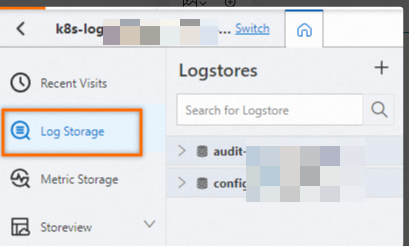
On the tab, click the logstore you want.
-
Enter a query and analysis statement, and then select a time range.
Use a SQL statement to define a virtual external table that maps to an OSS object. In this example, the external table is named
user_meta1.* | create table user_meta1 ( userid bigint, nick varchar, gender varchar, province varchar, age bigint) with ( endpoint='oss-cn-hangzhou-internal.aliyuncs.com',accessid='<your AccessKey ID>',accesskey='<your AccessKey secret>',bucket='testoss',objects=ARRAY['user.csv'],type='oss')If the query returns a result of true, the statement was executed successfully.
In the query statement, define the foreign table name, table schema, and other parameters. Use the WITH clause to specify OSS access information and file information. The following table describes the parameters.
Parameter
Description
Example
Foreign table name
The name of the virtual foreign table.
user_meta1
Table schema
The column names and data types of the table.
(userid bigint, nick varchar, gender varchar, province varchar, age bigint)
Endpoint
The endpoint for accessing OSS. For more information, see Regions and endpoints.
ImportantYou must use an internal network endpoint. Public endpoints are not supported.
oss-cn-hangzhou-internal.aliyuncs.com
Accessid
The AccessKey ID and AccessKey Secret of an Alibaba Cloud account. We recommend that you use the AccessKey pair of a RAM user that has permissions to access the OSS data source. For more information about how to grant permissions to a RAM user, see Grant permissions to a RAM user. For more information about how to obtain an AccessKey pair, see AccessKey pair.
LTAI****************
Accesskey
yourAccessKeySecret
Bucket
The name of the OSS bucket where the CSV file is stored.
examplebucket
Objects
The CSV files or OSS directories to query. The objects parameter is an array that can contain multiple files or directories. Note the following:
-
When you specify a directory, its name must end with a forward slash (
/). For example, if you specifytest_dir/, the foreign table is associated with all CSV files in the test_dir/ directory of the specified bucket. -
Limitation: The total number of files cannot exceed 100.
-
'user.csv'
-
'test_dir/'
-
'user.csv','test_dir/','my_dir/'
Type
The type of the external data source. The value must be oss.
oss
-
-
Verify that the external store is defined.
Execute the following statement. If the returned result is the content of the table that you previously defined, the external store is successfully defined. In this statement, user_meta1 is the external store that you defined. Please replace it based on your actual situation.
* | select * from user_meta1For example, if the result contains fields such as
userid,nick,gender,province, andageand their corresponding data, the external store is defined successfully. -
Run a JOIN query on the logstore and the OSS external table.
Execute the following query and analysis statement to associate the log ID in Simple Log Service with the userid in the OSS file to enrich the log information. In the statement, test_accesslog is the Logstore name, l is the Logstore alias, and user_meta1 is the external store table that you defined. Replace them with your actual values.
* | select * from test_accesslog l join user_meta1 u on l.userid = u.useridJOIN query examples:
-
Count access requests by gender.
* | select u.gender, count(1) from test_accesslog l join user_meta1 u on l.userid = u.userid group by u.gender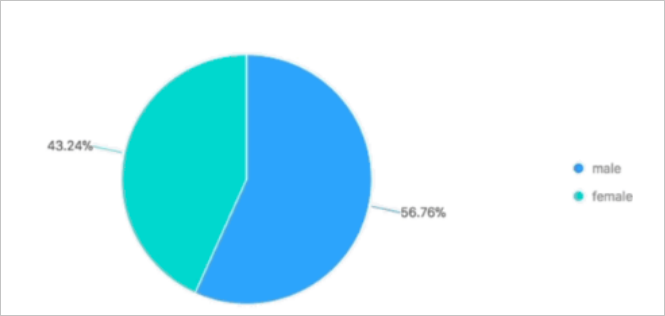
-
Count access requests by age group.
* | select u.age, count(1) from test_accesslog l join user_meta1 u on l.userid = u.userid group by u.age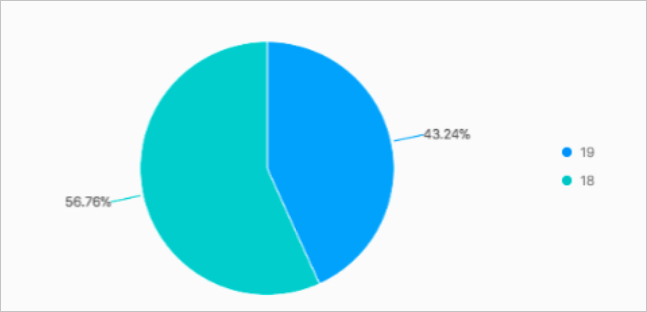
-
Analyze access trends over time by age group.
* | select date_trunc('minute',__time__) as minute, count(1) ,u.age from test_accesslog l join user_meta1 u on l.userid = u.userid group by u.age,minute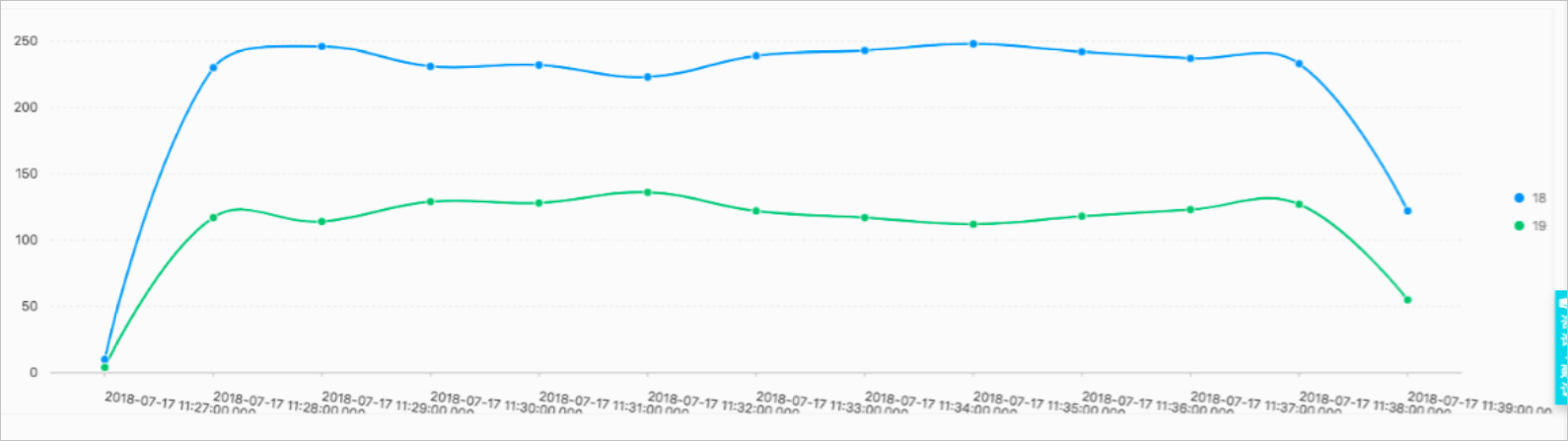
-