Log Service provides security check functions that use the globally shared asset library from WhiteHat Security. These functions check if an IP address, domain name, or URL in your logs is suspicious. This topic describes their syntax and provides examples.
Use cases
You can use security check functions in the following scenarios:
- In industries with demanding service operations, such as internet, gaming, and consulting, IT and security personnel can promptly detect and respond to suspicious access, attacks, and intrusions.
- In industries that must protect internal assets, such as banking, securities, and e-commerce, IT and security personnel can identify internal access to suspicious websites or the download of trojans and respond immediately.
Features
The security check functions provide the following features:
- Reliable: Powered by the continuously updated, globally shared asset library from WhiteHat Security.
- Fast: Check millions of IP addresses, domain names, or URLs in seconds.
- Simple: Get results from any network log by calling three SQL functions: security_check_ip, security_check_domain, and security_check_url.
- Flexible: Support for interactive queries, data visualization, and alert creation.
Functions
Log Service supports the following security check functions.
Important If you want to use strings in analytic statements, you must enclose strings in single quotation marks (''). Strings that are not enclosed or enclosed in double quotation marks ("") indicate field names or column names. For example, 'status' indicates the status string, and status or "status" indicates the status log field.
| Function | Syntax | Description |
| security_check_ip function | security_check_ip(x) | Checks whether an IP address is suspicious. |
| security_check_domain function | security_check_domain(x) | Checks whether a domain name is suspicious. |
| security_check_url function | security_check_url(x) | Checks whether a URL is suspicious. |
security_check_ip
Syntax
security_check_ip(x)Parameters
| Parameter | Description |
| x | The IP address to check. |
Return value type
Returns a bigint value. The possible values are:
- 1: The IP address is suspicious.
- 0: The IP address is secure.
Examples
Use the client_ip field to find suspicious clients that access your website.
- Query statement
* | SELECT client_ip, ip_to_country(client_ip,'en') AS country, ip_to_provider(client_ip) AS provider, count(1) AS PV WHERE security_check_ip(client_ip) = 1 GROUP BY client_ip ORDER BY PV DESC - The query returns a table with four columns: client_ip, country, provider, and PV. The table shows the source country, provider, and page views for each suspicious client IP address.
security_check_domain
Syntax
security_check_domain(x)Parameters
| Parameter | Description |
| x | The domain name to check. |
Return value type
Returns a bigint value. The possible values are:
- 1: The domain name is suspicious.
- 0: The domain name is secure.
Examples
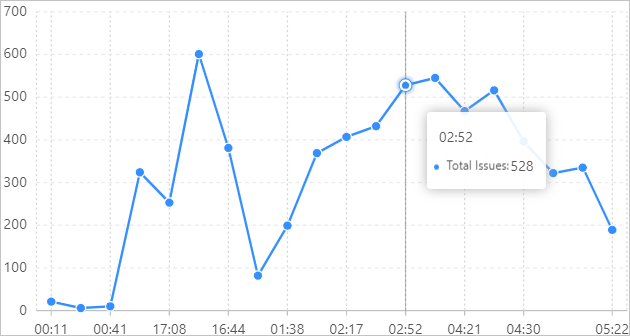
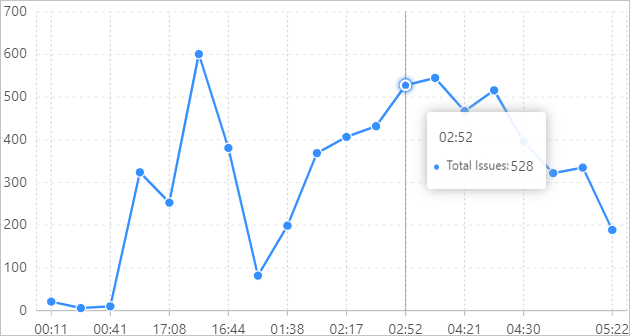
This example calculates the number of suspicious access attempts per minute and displays the result as a line chart.
- Query statement
status : * | SELECT count_if( security_check_domain (http_referer) != 0 ) AS "Total Issues", time_series(__time__, '1m', '%H:%i:%s', '0') AS time GROUP BY time - Query results
security_check_url
Syntax
security_check_url(x)Parameters
| Parameter | Description |
| x | The URL to check. |
Return value type
Returns a bigint value. The possible values are:
- 1: The URL is suspicious.
- 0: The URL is secure.
Examples
This example calculates the number of secure access attempts per minute and displays the result as a line chart.
- Query statement
status : * | SELECT count_if( security_check_url (request_uri) = 0 ) AS "Total Secure Count", time_series(__time__, '1m', '%H:%i', '0') as time GROUP BY time LIMIT 20 - Query results