After you enable the log collection feature for cloud services in the new version of Log Audit Service, you can query and analyze the collected logs in the default Logstore to which logs are collected. For more information, see Usage notes of cloud service log collection. This topic describes the log types that are supported by cloud services and runtimes.
Cloud services
Prerequisites
The log collection feature is enabled for your cloud service. For more information, see Configure the collection of operational logs.
Entry point
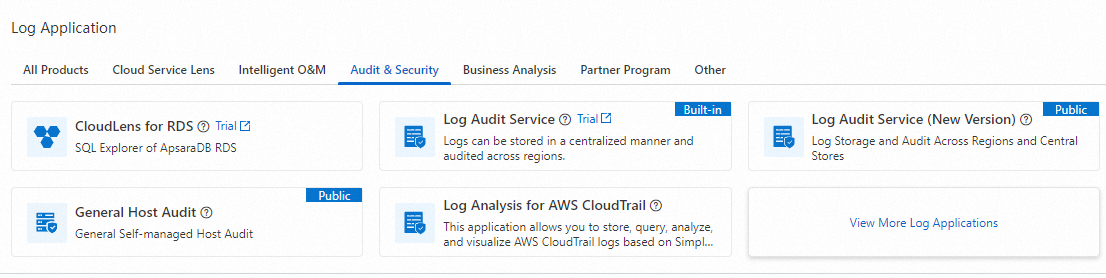
Log on to the Simple Log Service console. In the Log Application section, choose .
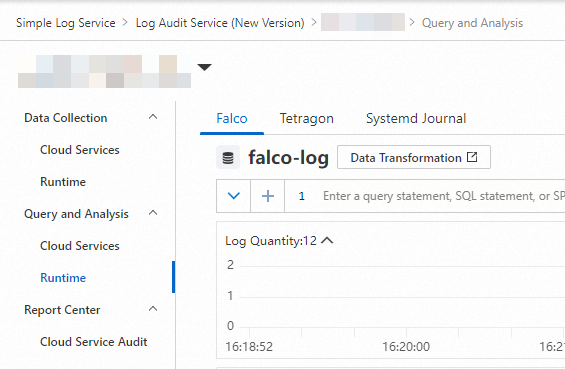
Click the project that you want to manage. In the left-side navigation pane of the page that appears, choose . On the Cloud Services page, click the cloud service that you want to manage. On the page that appears, query and analyze the logs that are collected from the cloud service.
Log types
Cloud service category | Cloud service name | Log type |
Cloud native | ||
Storage | Object Storage Service (OSS) | |
Network | Application Load Balancer (ALB) | |
Classic Load Balancer (CLB) | ||
Virtual Private Cloud (VPC) | ||
Enterprise foundation service | Alibaba Cloud DNS (DNS) | |
Security | Web Application Firewall 2.0 (WAF 2.0) | |
WAF 3.0 (subscription) and WAF 3.0 (pay-as-you-go) | ||
Security Center and Security Center (pay-as-you-go) | ||
Security logs (For more information, see Vulnerability logs, Baseline logs, Alert logs, Configuration assessment logs, Network defense logs, Application defense logs, and Malicious file detection logs.) | ||
Anti-DDoS Origin | ||
Anti-DDoS Proxy (Chinese Mainland) and Anti-DDoS Proxy (Outside Chinese Mainland) | ||
Cloud Firewall and Cloud Firewall (pay-as-you-go) |
Runtimes
Prerequisites
The log collection feature is enabled for your runtime. For more information, see Configure the log collection feature for runtimes.
Entry point
Log on to the Simple Log Service console. In the Log Application section, choose .
Click the project that you want to manage. In the left-side navigation pane of the page that appears, choose . On the Runtime page, click the application tab that you want to manage. Then, query and analyze the logs that are collected from the application.
Log types
Application | Log type |
Tetragon | |
Falco | |
Systemd Journal |