You can use data transformation plug-ins to change the format of raw logs, convert IP addresses to geographic locations, or convert logs into metrics or traces.
Data security plugin overview
Simple Log Service (SLS) provides the following types of data transformation plug-ins. You can select a plug-in based on your requirements.
|
Plug-in name |
Type |
Description |
|
Convert IP addresses |
Extension |
Converts an IP address to a geographic location (country, province, city, longitude, and latitude). |
|
Convert logs to metrics |
Extension |
Converts logs to SLS metric data. |
|
Convert logs to traces |
Extension |
Converts logs to SLS trace data. |
Entry point
To use a Logtail plugin for log processing, add it when you create or modify a Logtail configuration. For more information, see Overview.
Convert IP addresses plug-in
You can use the processor_geoip plug-in to convert IP addresses in logs to geographic locations, such as country, province, city, longitude, and latitude. This section describes the parameters and provides configuration examples for the processor_geoip plug-in.
Configuration description
-
The Logtail installation package does not include a GeoIP database. You must manually download a GeoIP database to the server where Logtail is installed and specify its path in the configuration. We recommend that you download a database with City-level granularity. For more information, see MaxMind GeoLite2.
-
Ensure that the database is in the MMDB format.
-
Form-based configuration: This method is available when you collect text logs and container standard output.
-
JSON configuration: This method is not available when you collect text logs.
Form-based configuration
-
Parameters
Set the Processor Type to Convert IP Addresses. The following table describes the parameters.
Parameter
Description
Source Field
The name of the source field whose value you want to convert from an IP address.
GeoIP Database Path
The full path of the GeoIP database. Example:
/user/data/GeoLite2-City_20180102/GeoLite2-City.mmdb.Keep Source Field
If you select this option, the source field is kept in the log after parsing.
Report Error On Missing Source Field
If you select this option, the system reports an error if the specified source field is not found in the raw log.
Report Error On Parsing Failure
If you select this option, the system reports an error if the IP address is invalid or not found in the database.
Language
The language property. The default value is zh-CN.
ImportantEnsure that your GeoIP database contains the specified language.
-
Example
The following example shows how to convert an IP address in a log to its corresponding geographic location:
-
Raw log
"source_ip" : "**.**.**.**" -
Logtail plug-in configuration
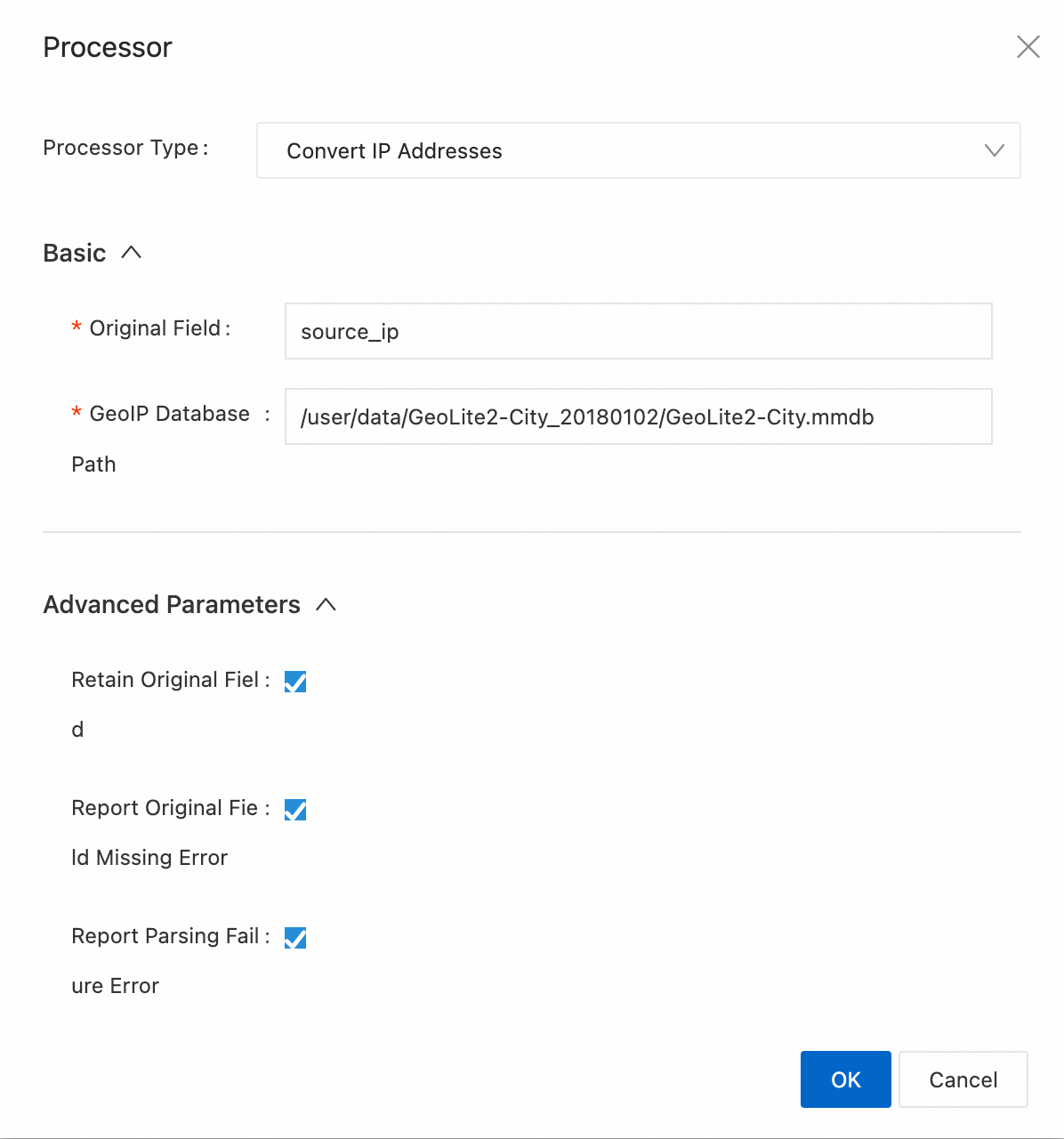
-
Result
"source_ip" : "**.**.**.**"
"source_ip_province_" : "Zhejiang"
"source_ip_city_" : "Hangzhou"
"source_ip_province_code_" : "ZJ"
"source_ip_country_code_" : "CN"
"source_ip_longitude_" : "120.********"
"source_ip_latitude_" : "30.********"
-
JSON configuration
-
Parameters
Set type to processor_geoip. The following table describes the parameters in detail.
Parameter
Type
Required
Description
SourceKey
String
Yes
The name of the source field whose value you want to convert from an IP address.
DBPath
String
Yes
The full path of the GeoIP database. Example: /user/data/GeoLite2-City_20180102/GeoLite2-City.mmdb.
NoKeyError
Boolean
No
Specifies whether the system reports an error if the specified source field is not found in the raw log.
-
`true`: Reports an error.
-
`false` (default): Does not report an error.
NoMatchError
Boolean
No
Specifies whether the system reports an error if the IP address is invalid or not found in the database.
-
`true` (default): Reports an error.
-
`false`: Does not report an error.
KeepSource
Boolean
No
Specifies whether to keep the source field in the log after parsing.
-
`true` (default): Keeps the field.
-
`false`: Does not keep the field.
Language
String
No
The language property. The default value is zh-CN.
ImportantEnsure that your GeoIP database contains the specified language.
-
-
Example
The following example shows how to convert an IP address in a log to its corresponding geographic location:
-
Raw log
"source_ip" : "**.**.**.**" -
Logtail plug-in configuration
{ "type": "processor_geoip", "detail": { "SourceKey": "source_ip", "NoKeyError": true, "NoMatchError": true, "KeepSource": true, "DBPath" : "/user/local/data/GeoLite2-City_20180102/GeoLite2-City.mmdb" } } -
Result
"source_ip" : "**.**.**.**"
"source_ip_city_" : "Hangzhou"
"source_ip_province_code_" : "ZJ"
"source_ip_country_code_" : "CN"
"source_ip_longitude_" : "120.********"
"source_ip_latitude_" : "30.********"
-
Convert logs to metrics plug-in
You can use the processor_log_to_sls_metric plug-in to convert collected logs to SLS metrics. This section describes the parameters and provides configuration examples for the processor_log_to_sls_metric plug-in.
Configuration description
The processor_log_to_sls_metric plug-in is supported in Logtail 1.7.1 and later.
Form configuration
For Processor Type, select Convert Log To Metric. The following table describes the parameters.
-
Parameters
Parameter
Description
MetricTimeKey
Specifies the time field in the log. This field is mapped to the
__time_nano__field in the time series data. By default, the value of the__time__field is extracted from the log.Ensure that the specified field is a valid timestamp in the correct format. Unix timestamps in seconds (10 digits), milliseconds (13 digits), microseconds (16 digits), or nanoseconds (19 digits) are supported.
MetricLabelKeys
Specifies a list of keys for the
__labels__field. The keys must match the regular expression^[a-zA-Z_][a-zA-Z0-9_]*$. The values cannot contain vertical bars (|) or#$#. For more information, see Time series data (Metric).You cannot add the
__labels__field to the MetricLabelKeys parameter. If the__labels__field exists in the source fields, its value is appended to the new__labels__field.MetricValues
Specifies the metric name and metric value.
-
The metric name corresponds to the
__name__field and must match the regular expression^[a-zA-Z_:][a-zA-Z0-9_:]*$. -
The metric value corresponds to the
__value__field and must be of the Double type.
For more information, see Time series data (Metric) .
CustomMetricLabels
Specifies custom
__labels__fields. The keys must match the regular expression^[a-zA-Z_][a-zA-Z0-9_]*$. The values cannot contain vertical bars (|) or#$#. For more information, see Time series data (Metric) .IgnoreError
Specifies whether to output an error log if no logs match.
-
-
Example
-
Raw log
{ "script_md5":"8c6aebe9****c27f", "remote_addr":"123.XX.XX.123", "remote_user":"-", "time_local":"15/Aug/2023:12:03:20", "method":"GET", "url":"/www.a.com", "protocol":"HTTP/1.1", "status":"404", "body_bytes_sent":"4146", "http_referer":"-", "http_user_agent":"curl/7.74.0", "http_x_forwarded_for":"-", "__labels__":"field1#$#field1|field2#$#field2|tag1#$#tag1|tag2#$#tag2", "body_bytes_sent_name":"body_bytes_sent", "status_name":"status", "httptime":"1692101000", "__time__":"1692101000" } -
Logtail plug-in configuration
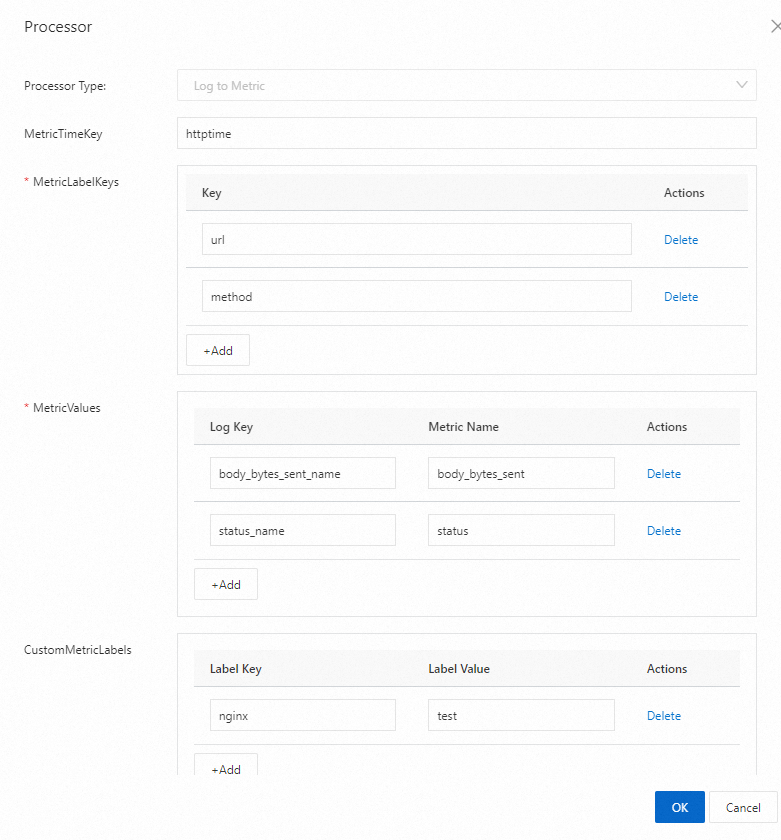
-
Result
-
First time series data
{ "__labels__":"field1#$#field1|field2#$#field2|method#$#GET|nginx#$#test|tag1#$#tag1|tag2#$#tag2|url#$#/www.a.com", "__name__":"body_bytes_sent", "__value__":"4146", "__time_nano__":"1692101000000000000", "__time__":"1692101000" } -
Second time series data
{
    "__labels__":"field1#$#field1|field2#$#field2|method#$#GET|nginx#$#test|tag1#$#tag1|tag2#$#tag2|url#$#/www.a.com",
    "__name__":"status",
    "__value__":"404",
    "__time_nano__":"1692101000000000000",
    "__time__":"1692101000"
}
-
-
JSON configuration
Set type to processor_log_to_sls_metric. The following table describes the parameters in detail.
-
Parameters
Parameter
Type
Required
Description
MetricTimeKey
String
No
Specifies the time field in the log. This field is mapped to the
__time_nano__field in the time series data. By default, the value of the__time__field is extracted from the log.Ensure that the specified field is a valid timestamp in the correct format. Unix timestamps in seconds (10 digits), milliseconds (13 digits), microseconds (16 digits), or nanoseconds (19 digits) are supported.
MetricLabelKeys
[]String
Yes
Specifies a list of keys for the
__labels__field. The keys must match the regular expression^[a-zA-Z_][a-zA-Z0-9_]*$. The values cannot contain vertical bars (|) or#$#. For more information, see Time series data (Metric).You cannot add the
__labels__field to the MetricLabelKeys parameter. If the__labels__field exists in the source fields, its value is appended to the new__labels__field.MetricValues
Map
Yes
Specifies the metric name and metric value.
-
The metric name corresponds to the
__name__field and must match the regular expression^[a-zA-Z_:][a-zA-Z0-9_:]*$. -
The metric value corresponds to the
__value__field and must be of the Double type.
For more information, see Time series data (Metric) .
CustomMetricLabels
Map
No
Specifies custom
__labels__fields. The keys must match the regular expression^[a-zA-Z_][a-zA-Z0-9_]*$. The values cannot contain vertical bars (|) or#$#. For more information, see Time series data (Metric) .IgnoreError
Boolean
No
Specifies whether to output an error log if no logs match. The default value is false, which indicates that no error log is output.
-
-
Example
-
Raw log
{ "script_md5":"8c6aebe9****c27f", "remote_addr":"123.XX.XX.123", "remote_user":"-", "time_local":"15/Aug/2023:12:03:20", "method":"GET", "url":"/www.a.com", "protocol":"HTTP/1.1", "status":"404", "body_bytes_sent":"4146", "http_referer":"-", "http_user_agent":"curl/7.74.0", "http_x_forwarded_for":"-", "__labels__":"field1#$#field1|field2#$#field2|tag1#$#tag1|tag2#$#tag2", "body_bytes_sent_name":"body_bytes_sent", "status_name":"status", "httptime":"1692101000", "__time__":"1692101000" } -
Logtail plug-in configuration
{ "processors":[ { "detail":{ "CustomMetricLabels":{ "nginx":"test" }, "IgnoreError":false, "MetricLabelKeys":[ "url", "method" ], "MetricTimeKey":"httptime", "MetricValues":{ "body_bytes_sent_name":"body_bytes_sent", "status_name":"status" } }, "type":"processor_log_to_sls_metric" } ] } -
Result
-
First time series data
{ "__labels__":"field1#$#field1|field2#$#field2|method#$#GET|nginx#$#test|tag1#$#tag1|tag2#$#tag2|url#$#/www.a.com", "__name__":"body_bytes_sent", "__value__":"4146", "__time_nano__":"1692101000000000000", "__time__":"1692101000" } -
Second time series data
{
    "__labels__":"field1#$#field1|field2#$#field2|method#$#GET|nginx#$#test|tag1#$#tag1|tag2#$#tag2|url#$#/www.a.com",
    "__name__":"status",
    "__value__":"404",
    "__time_nano__":"1692101000000000000",
    "__time__":"1692101000"
}
-
-
Convert logs to traces plug-in
You can use the processor_otel_trace plug-in to convert collected logs to SLS traces. This section describes the parameters and provides configuration examples for the processor_otel_trace plug-in.
Configuration description
The processor_otel_trace plug-in is supported in Logtail 1.7.1 and later.
Form configuration
Set the Processor Type to Convert Log To Trace. The following table describes the parameters.
-
Parameters
Parameter
Description
SourceKey
The name of the source field.
Format
The format after conversion. Valid values:
-
protobuf
-
json
-
protojson
NoKeyError
Specifies whether to report an error if the source field does not exist in the log. The default value is false.
TraceIDNeedDecode
Specifies whether to perform Base64 decoding on the TraceID. The default value is false.
If you set Format to protojson and the TraceID is Base64-encoded, you must set TraceIDNeedDecode to true. Otherwise, the conversion fails.
SpanIDNeedDecode
Specifies whether to perform Base64 decoding on the SpanID. The default value is false.
If you set Format to protojson and the SpanID is Base64-encoded, you must set SpanIDNeedDecode to true. Otherwise, the conversion fails.
ParentSpanIDNeedDecode
Specifies whether to perform Base64 decoding on the ParentSpanID. The default value is false.
If you set Format to protojson and the ParentSpanID is Base64-encoded, you must set ParentSpanIDNeedDecode to true. Otherwise, the conversion fails.
-
-
Example
-
Raw log
INFO OtlpJsonLoggingSpanExporter - {"resource":{"attributes":[]},"scopeSpans":[{"scope":{"name":"io.opentelemetry.spring-webmvc-3.1","version":"1.26.0-alpha","attributes":[]},"spans":[{"traceId":"a7adbcb0921fa4a5b90615d0ad38ef95","spanId":"eecaa7e1b63c9f61","parentSpanId":"fa85fcee7fe0e0e8","name":"HelloWorldController.sayHello","kind":1,"startTimeUnixNano":"1696659118615748056","endTimeUnixNano":"1696659128701715998","attributes":[{"key":"thread.id","value":{"intValue":"48"}},{"key":"thread.name","value":{"stringValue":"http-nio-18080-exec-1"}}],"events":[],"links":[],"status":{}}]},{"scope":{"name":"io.opentelemetry.tomcat-7.0","version":"1.26.0-alpha","attributes":[]},"spans":[{"traceId":"a7adbcb0921fa4a5b90615d0ad38ef95","spanId":"fa85fcee7fe0e0e8","name":"GET /hello","kind":2,"startTimeUnixNano":"1696659118479360000","endTimeUnixNano":"1696659128703706165","attributes":[{"key":"http.status_code","value":{"intValue":"200"}},{"key":"user_agent.original","value":{"stringValue":"curl/7.84.0"}},{"key":"net.host.name","value":{"stringValue":"localhost"}},{"key":"http.response_content_length","value":{"intValue":"12"}},{"key":"http.target","value":{"stringValue":"/hello"}},{"key":"net.sock.peer.addr","value":{"stringValue":"127.0.0.1"}},{"key":"net.host.port","value":{"intValue":"18080"}},{"key":"net.sock.peer.port","value":{"intValue":"53649"}},{"key":"thread.id","value":{"intValue":"48"}},{"key":"thread.name","value":{"stringValue":"http-nio-18080-exec-1"}},{"key":"http.route","value":{"stringValue":"/hello"}},{"key":"net.sock.host.addr","value":{"stringValue":"127.0.0.1"}},{"key":"net.protocol.name","value":{"stringValue":"http"}},{"key":"net.protocol.version","value":{"stringValue":"1.1"}},{"key":"http.scheme","value":{"stringValue":"http"}},{"key":"http.method","value":{"stringValue":"GET"}}],"events":[],"links":[],"status":{}}]}],"schemaUrl":"https://opentelemetry.io/schemas/1.19.0"} -
Logtail plug-in configuration
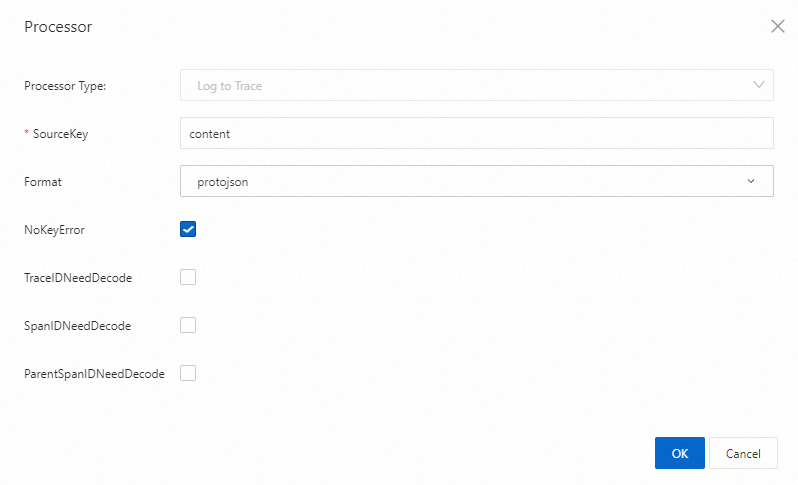
-
Result
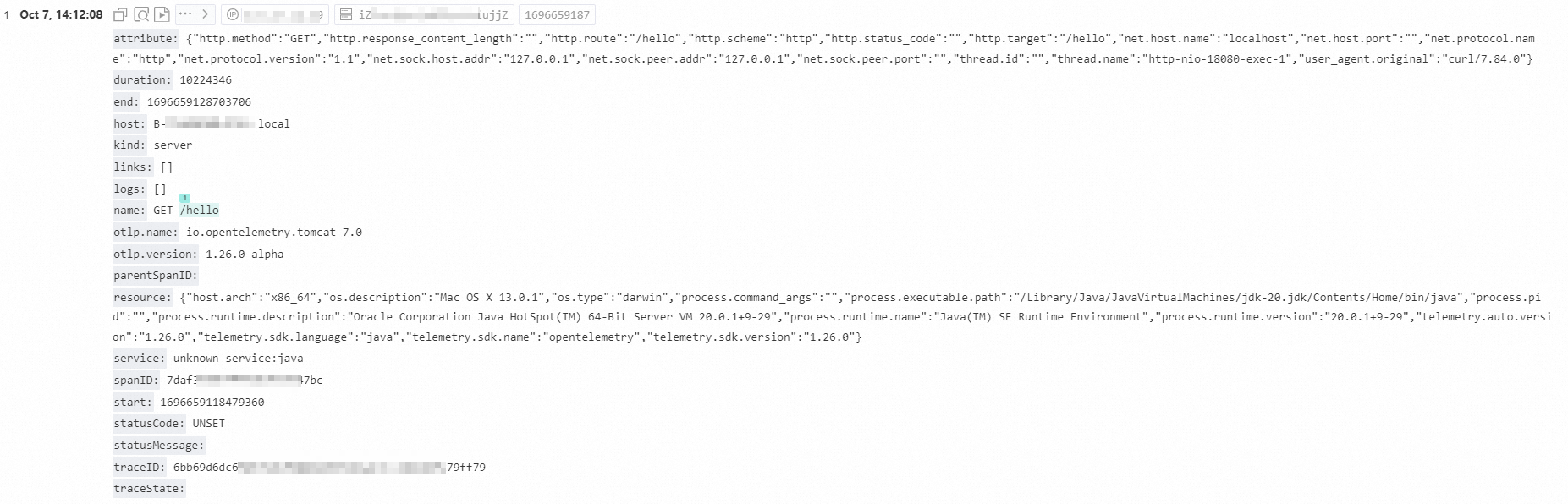
-
Configuration using JSON
Set type to processor_otel_trace. The following table describes the parameters in detail.
-
Parameters
Parameter
Type
Required
Description
SourceKey
String
Yes
The name of the source field.
Format
String
Yes
The format after conversion. Valid values: protobuf, json, protojson.
NoKeyError
Boolean
No
Specifies whether to report an error if the source field does not exist in the log. The default value is false.
TraceIDNeedDecode
Boolean
No
Specifies whether to perform Base64 decoding on the TraceID. The default value is false.
If you set Format to protojson and the TraceID is Base64-encoded, you must set TraceIDNeedDecode to true. Otherwise, the conversion fails.
SpanIDNeedDecode
Boolean
No
Specifies whether to perform Base64 decoding on the SpanID. The default value is false.
If you set Format to protojson and the SpanID is Base64-encoded, you must set SpanIDNeedDecode to true. Otherwise, the conversion fails.
ParentSpanIDNeedDecode
Boolean
No
Specifies whether to perform Base64 decoding on the ParentSpanID. The default value is false.
If you set Format to protojson and the ParentSpanID is Base64-encoded, you must set ParentSpanIDNeedDecode to true. Otherwise, the conversion fails.
-
Example
-
Raw log
INFO OtlpJsonLoggingSpanExporter - {"resource":{"attributes":[]},"scopeSpans":[{"scope":{"name":"io.opentelemetry.spring-webmvc-3.1","version":"1.26.0-alpha","attributes":[]},"spans":[{"traceId":"a7adbcb0921fa4a5b90615d0ad38ef95","spanId":"eecaa7e1b63c9f61","parentSpanId":"fa85fcee7fe0e0e8","name":"HelloWorldController.sayHello","kind":1,"startTimeUnixNano":"1696659118615748056","endTimeUnixNano":"1696659128701715998","attributes":[{"key":"thread.id","value":{"intValue":"48"}},{"key":"thread.name","value":{"stringValue":"http-nio-18080-exec-1"}}],"events":[],"links":[],"status":{}}]},{"scope":{"name":"io.opentelemetry.tomcat-7.0","version":"1.26.0-alpha","attributes":[]},"spans":[{"traceId":"a7adbcb0921fa4a5b90615d0ad38ef95","spanId":"fa85fcee7fe0e0e8","name":"GET /hello","kind":2,"startTimeUnixNano":"1696659118479360000","endTimeUnixNano":"1696659128703706165","attributes":[{"key":"http.status_code","value":{"intValue":"200"}},{"key":"user_agent.original","value":{"stringValue":"curl/7.84.0"}},{"key":"net.host.name","value":{"stringValue":"localhost"}},{"key":"http.response_content_length","value":{"intValue":"12"}},{"key":"http.target","value":{"stringValue":"/hello"}},{"key":"net.sock.peer.addr","value":{"stringValue":"127.0.0.1"}},{"key":"net.host.port","value":{"intValue":"18080"}},{"key":"net.sock.peer.port","value":{"intValue":"53649"}},{"key":"thread.id","value":{"intValue":"48"}},{"key":"thread.name","value":{"stringValue":"http-nio-18080-exec-1"}},{"key":"http.route","value":{"stringValue":"/hello"}},{"key":"net.sock.host.addr","value":{"stringValue":"127.0.0.1"}},{"key":"net.protocol.name","value":{"stringValue":"http"}},{"key":"net.protocol.version","value":{"stringValue":"1.1"}},{"key":"http.scheme","value":{"stringValue":"http"}},{"key":"http.method","value":{"stringValue":"GET"}}],"events":[],"links":[],"status":{}}]}],"schemaUrl":"https://opentelemetry.io/schemas/1.19.0"} -
Logtail plug-in configuration
{ "processors": [ { "type": "processor_split_log_regex", "detail": { "PreserveOthers": true, "SplitKey": "content", "SplitRegex": "INFO\\sOtlpJsonLoggingSpanExporter\\s.+" } }, { "type": "processor_regex", "detail": { "SourceKey": "content", "Regex": "INFO\\sOtlpJsonLoggingSpanExporter\\s-(\\s.+)", "Keys": [ "trace_data" ] } }, { "detail": { "SourceKey": "trace_data", "Format": "protojson", "NoKeyError": true }, "type": "processor_otel_trace" } ] } -
Result
-
References
-
Configure a Logtail pipeline using API operations:
-
GetLogtailPipelineConfig - Get a Logtail pipeline configuration
-
ListLogtailPipelineConfig - List Logtail pipeline configurations
-
CreateLogtailPipelineConfig - Create a Logtail pipeline configuration
-
DeleteLogtailPipelineConfig - Delete a Logtail pipeline configuration
-
UpdateLogtailPipelineConfig - Update a Logtail pipeline configuration
-
-
Configure a processing plug-in in the console:
-
Collect container logs from a cluster using Kubernetes CRDs (standard output/file)