Field processing plugins are used to add, delete, modify, pack, expand, and extract fields.
Example of field processing
The following table shows the data structure of a raw log after it is saved to Simple Log Service (SLS). The table compares the results of using the field extraction plugin in anchor mode with the results of not using a plugin. Using an extraction plugin structures your data, which makes subsequent queries easier.
Raw log | Without a field processing plugin | Using the field extraction plugin in anchor mode |
| Content: "time:2022.09.12 20:55:36\t json:{\"key1\" : \"xx\", \"key2\": false, \"key3\":123.456, \"key4\" : { \"inner1\" : 1, \"inner2\" : false}}" | Field values are extracted in anchor mode. The field names are set to time, val_key1, val_key2, val_key3, value_key4_inner1, and value_key4_inner2. |
Overview of field processing plugins
SLS provides the following types of field processing plugins.
Plugin | Type | Description |
Extract fields | Extended | Supports the following modes:
|
Add fields | Extended | Adds new fields to a log. |
Drop fields | Extended | Deletes specified fields. |
Rename fields | Extended | Changes field names. |
Pack fields | Extended | Packs multiple fields into a single JSON object. |
Expand JSON fields | Extended | Expands a JSON string field into separate fields. |
Map field values | Extended | Replaces or transforms field values based on a mapping table. |
Replace strings | Extended | Performs full-text replacement, regular expression-based replacement, or escape character removal for text logs. |
Entry point
To use a Logtail plugin for log processing, add it when you create or modify a Logtail configuration. For more information, see Overview.
Limits
Text logs and container standard output support only the form-based configuration. Other input sources support only the JSON configuration.
The following limits apply when you extract fields in regex mode.
The Go regular expression engine is based on RE2. Compared to the PCRE engine, it has the following limitations:
Differences in named group syntax
Go uses the
(?P<name>...)syntax, not the(?<name>...)syntax used by PCRE.Unsupported regular expression patterns
Assertions:
(?=...),(?!...),(?<=...),(?<!...).Conditional expressions:
(?(condition)true|false).Recursive matching:
(?R),(?0).Subroutine references:
(?&name),(?P>name).Atomic groups:
(?>...).
When you debug regular expressions with tools such as Regex101, avoid the unsupported patterns listed above. Otherwise, the plugin cannot process the logs.
Extract fields plugin
Extracts log fields in regex mode, anchor mode, CSV mode, single-character delimiter mode, Multi-character Delimiter mode, key-value pair mode, or Grok mode.
Regex mode
Extracts target fields using a regular expression.
Form-based configuration
Parameters
Set Processor Type to Extract Field (Regex Mode). The following table describes the parameters.
Parameter
Description
Original Field
The name of the source field.
Regular Expression
The regular expression. Use parentheses
()to mark the fields to be extracted.New Field
The names for the extracted content. You can add multiple field names.
Report Original Field Missing Error
If you select this option, an error is reported if the source field is not found in the raw log.
Report Regex Mismatch Error
If you select this option, an error is reported if the regular expression does not match the value of the source field.
Retain Original Field
If you select this option, the source field is kept in the parsed log.
Retain Original Field If Parsing Fails
If you select this option, the source field is kept in the parsed log if parsing fails.
Full Regex Match
If you select this option, field values are extracted only if all fields set in New Field match the source field value based on the specified regular expression.
Example
Extract the value of the content field in regex mode and set the field names to
ip,time, method, url, request_time, request_length, status, length, ref_url, and browser. The following is an example configuration:Raw log
"content" : "10.200.**.** - - [10/Aug/2022:14:57:51 +0800] \"POST /PutData? Category=YunOsAccountOpLog&AccessKeyId=<yourAccessKeyId>&Date=Fri%2C%2028%20Jun%202013%2006%3A53%3A30%20GMT&Topic=raw&Signature=<yourSignature> HTTP/1.1\" 0.024 18204 200 37 \"-\" \"aliyun-sdk-java"Logtail plugin configuration
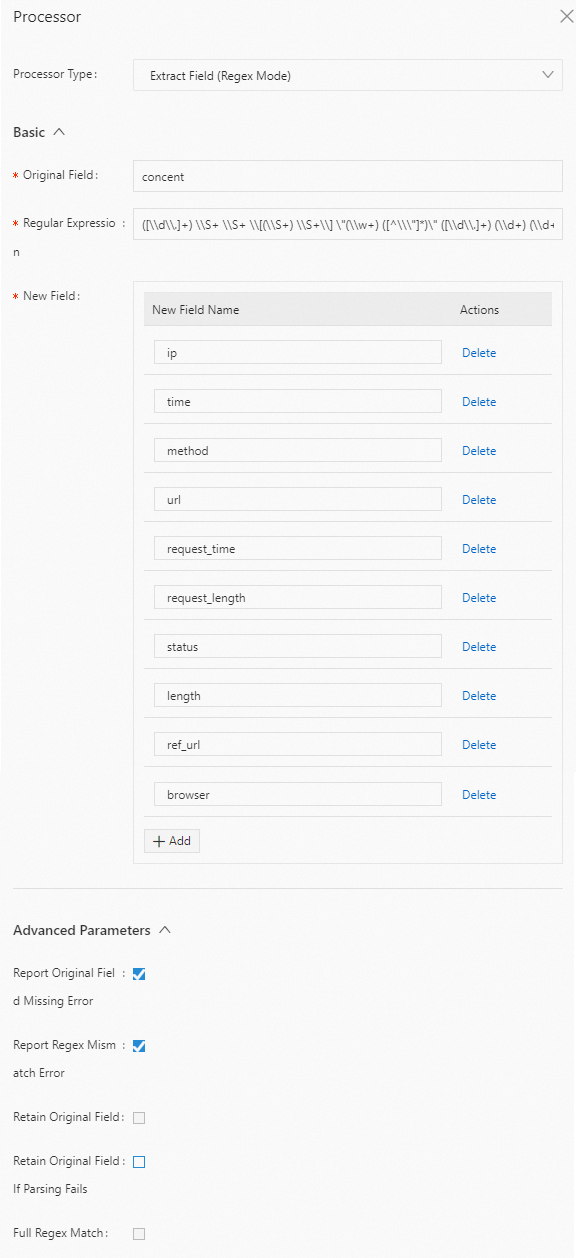
Result
"ip" : "10.200.**.**" "time" : "10/Aug/2022:14:57:51" "method" : "POST" "url" : "/PutData?Category=YunOsAccountOpLog&AccessKeyId=<yourAccessKeyId>&Date=Fri%2C%2028%20Jun%202013%2006%3A53%3A30%20GMT&Topic=raw&Signature=<yourSignature>" "request_time" : "0.024" "request_length" : "18204" "status" : "200" "length" : "27" "ref_url" : "-" "browser" : "aliyun-sdk-java"
JSON configuration
Parameters
Set type to processor_regex. The following table describes the parameters in detail.
Parameter
Type
Required
Description
SourceKey
String
Yes
The name of the source field.
Regex
String
Yes
The regular expression. Use parentheses
()to mark the fields to be extracted.Keys
String array
Yes
The names for the extracted content. Example: ["ip", "time", "method"].
NoKeyError
Boolean
No
Specifies whether to report an error if the source field is not found in the raw log.
true: An error is reported.
false (default): No error is reported.
NoMatchError
Boolean
No
Specifies whether to report an error if the regular expression does not match the value of the source field.
true (default): An error is reported.
false: No error is reported.
KeepSource
Boolean
No
Specifies whether to keep the source field in the parsed log.
true: Keep the source field.
false (default): Do not keep the source field.
FullMatch
Boolean
No
Specifies whether to extract field values only when a full match is found.
true (default): Field values are extracted only if all fields that you set in the Keys parameter match the value of the source field based on the regular expression in the Regex parameter.
false: Field values are extracted even if only a partial match is found.
KeepSourceIfParseError
Boolean
No
Specifies whether to keep the source field in the parsed log if parsing fails.
true (default): Keep the source field.
false: Do not keep the source field.
Example
Extract the value of the content field in regex mode and set the field names to ip, time, method, url, request_time, request_length, status, length, ref_url, and browser. The following is an example configuration:
Raw log
"content" : "10.200.**.** - - [10/Aug/2022:14:57:51 +0800] \"POST /PutData? Category=YunOsAccountOpLog&AccessKeyId=<yourAccessKeyId>&Date=Fri%2C%2028%20Jun%202013%2006%3A53%3A30%20GMT&Topic=raw&Signature=<yourSignature> HTTP/1.1\" 0.024 18204 200 37 \"-\" \"aliyun-sdk-java"Logtail plugin configuration
{ "type" : "processor_regex", "detail" : {"SourceKey" : "content", "Regex" : "([\\d\\.]+) \\S+ \\S+ \\[(\\S+) \\S+\\] \"(\\w+) ([^\\\"]*)\" ([\\d\\.]+) (\\d+) (\\d+) (\\d+|-) \"([^\\\"]*)\" \"([^\\\"]*)\" (\\d+)", "Keys" : ["ip", "time", "method", "url", "request_time", "request_length", "status", "length", "ref_url", "browser"], "NoKeyError" : true, "NoMatchError" : true, "KeepSource" : false } }Result
"ip" : "10.200.**.**" "time" : "10/Aug/2022:14:57:51" "method" : "POST" "url" : "/PutData?Category=YunOsAccountOpLog&AccessKeyId=<yourAccessKeyId>&Date=Fri%2C%2028%20Jun%202013%2006%3A53%3A30%20GMT&Topic=raw&Signature=<yourSignature>" "request_time" : "0.024" "request_length" : "18204" "status" : "200" "length" : "27" "ref_url" : "-" "browser" : "aliyun-sdk-java"
Anchor mode
Extracts fields by specifying start and end keywords. If the field is in JSON format, you can expand it.
Form-based configuration
Parameters
Set Processor Type to Extract Field (Anchor Mode). The following table describes the parameters.
Parameter
Description
Original Field
The name of the source field.
Anchor Parameters
List of anchor parameters.
Start Keyword
The start keyword. If you leave this parameter empty, the match starts from the beginning of the string.
End Keyword
The end keyword. If you leave this parameter empty, the match extends to the end of the string.
New Field
The name for the extracted content.
Field Type
The type of the field. Valid values are string and json.
JSON Expansion
Specifies whether to expand the JSON field.
Character to Concatenate Expanded Keys
The connector for JSON expansion. The default value is an underscore (_).
Maximum Depth of JSON Expansion
The maximum depth for JSON expansion. The default value is 0, which means no limit.
Report Original Field Missing Error
If you select this option, an error is reported if the source field is not found in the raw log.
Report Keywords Missing Error
If you select this option, an error is reported if no matching delimited item is found in the raw log.
Retain Original Field
If you select this option, the source field is kept in the parsed log.
Example
Extract the value of the content field in anchor mode and set the field names to time, val_key1, val_key2, val_key3, value_key4_inner1, and value_key4_inner2. The following is an example configuration:
Raw log
"content" : "time:2022.09.12 20:55:36\t json:{\"key1\" : \"xx\", \"key2\": false, \"key3\":123.456, \"key4\" : { \"inner1\" : 1, \"inner2\" : false}}"Logtail plugin configuration
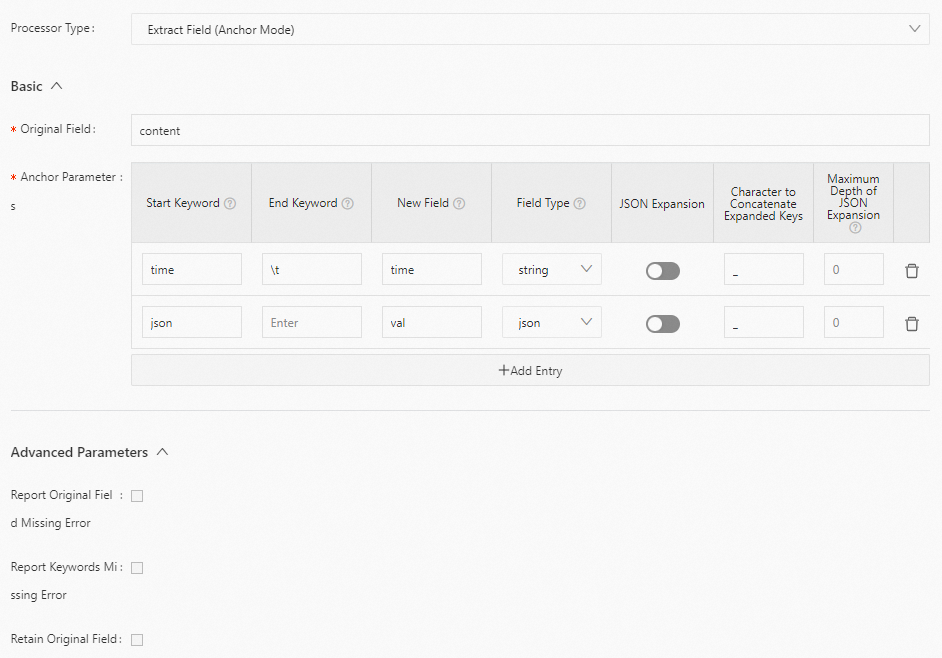
Result
"time" : "2022.09.12 20:55:36"
"val_key1" : "xx"
"val_key2" : "false"
"val_key3" : "123.456"
"value_key4_inner1" : "1"
"value_key4_inner2" : "false"
JSON configuration
Parameters
Set type to processor_anchor. The following table describes the parameters in detail.
Parameter
Type
Required
Description
SourceKey
String
Yes
The name of the source field.
Anchors
Anchor array
Yes
Calibration items.
Start
String
Yes
The start keyword. If this is empty, it matches the beginning of the string.
Stop
String
Yes
The end keyword. If this is empty, it matches the end of the string.
FieldName
String
Yes
The name for the extracted content.
FieldType
String
Yes
The type of the field. Valid values are string and json.
ExpondJson
Boolean
No
Specifies whether to expand the JSON field.
true: Expand the field.
false (default): Do not expand the field.
This parameter takes effect only when FieldType is set to json.
ExpondConnecter
String
No
The connector for JSON expansion. The default value is an underscore (_).
MaxExpondDepth
Int
No
The maximum depth for JSON expansion. The default value is 0, which means no limit.
NoAnchorError
Boolean
No
Specifies whether to report an error if a delimited item is not found.
true: An error is reported.
false (default): No error is reported.
NoKeyError
Boolean
No
Specifies whether to report an error if the source field is not found in the raw log.
true: An error is reported.
false (default): No error is reported.
KeepSource
Boolean
No
Specifies whether to keep the source field in the parsed log.
true: Keep the source field.
false (default): Do not keep the source field.
Example
Extract the value of the content field in anchor mode and set the field names to time, val_key1, val_key2, val_key3, value_key4_inner1, and value_key4_inner2. The following is an example configuration:
Raw log
"content" : "time:2022.09.12 20:55:36\t json:{\"key1\" : \"xx\", \"key2\": false, \"key3\":123.456, \"key4\" : { \"inner1\" : 1, \"inner2\" : false}}"Logtail plugin configuration
{ "type" : "processor_anchor", "detail" : {"SourceKey" : "content", "Anchors" : [ { "Start" : "time", "Stop" : "\t", "FieldName" : "time", "FieldType" : "string", "ExpondJson" : false }, { "Start" : "json:", "Stop" : "", "FieldName" : "val", "FieldType" : "json", "ExpondJson" : true } ] } }Result
"time" : "2022.09.12 20:55:36"
"val_key1" : "xx"
"val_key2" : "false"
"val_key3" : "123.456"
"value_key4_inner1" : "1"
"value_key4_inner2" : "false"
CSV mode
Parses logs in CSV format.
Form-based configuration
Parameters
Set Processor Type to Extract Field (CSV Mode). The following table describes the parameters.
Parameter
Description
Original Field
The name of the source field.
New Field
The names for the extracted content. You can add multiple field names.
ImportantIf the number of fields to be split is smaller than the number of fields in New Field, the extra fields in New Field are ignored.
Delimiter
The separator. The default value is a comma (,).
Retain Excess Part
If you select this option, the system keeps the remaining content if the number of fields to be split is larger than the number of fields in New Field.
Parse Excess Part
If you select this option, the system parses the remaining content and uses the value of Name Prefix of Field to which Excess Part is Assigned as the prefix for the names of the remaining fields.
If you select Retain Excess Part but do not select Parse Excess Part, the remaining content is stored in the _decode_preserve_ field.
NoteIf the remaining content is not in the standard CSV format, you must standardize it before storing it.
Name Prefix of Field to which Excess Part is Assigned
The prefix for the names of the remaining fields. For example, if you set this to expand_, the field names are expand_1, expand_2, and so on.
Ignore Spaces before Field
If you select this option, the system ignores leading spaces in field values.
Retain Original Field
If you select this option, the source field is kept in the parsed log.
Report Original Field Missing Error
If you select this option, an error is reported if the source field is not found in the log.
Example
Extract the value of the csv field. The following is an example configuration:
Raw log
{
    "csv": "2022-06-09,192.0.2.0,\"{\"\"key1\"\":\"\"value\"\",\"\"key2\"\":{\"\"key3\"\":\"\"string\"\"}}\"",
    ......
}
Logtail plugin configuration
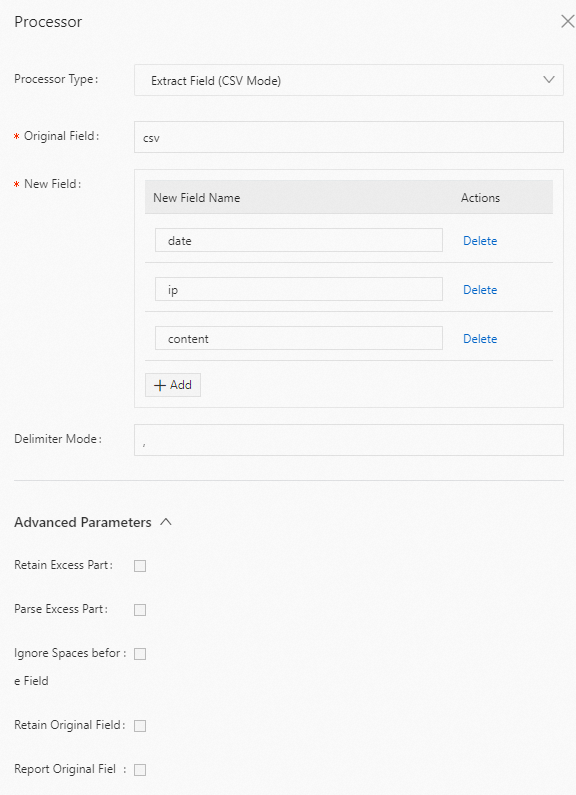
Result
{
    "date": "2022-06-09",
    "ip": "192.0.2.0",
    "content": "{\"key1\":\"value\",\"key2\":{\"key3\":\"string\"}}"
    ......

}
JSON configuration
Parameters
Set type to processor_csv. The following table describes the parameters in detail.
Parameter
Type
Required
Description
SourceKey
String
Yes
The name of the source field.
SplitKeys
String array
Yes
The names for the extracted content. Example: ["date", "ip", "content"].
ImportantIf the number of fields to be split is smaller than the number of fields in the SplitKeys parameter, the extra fields in the SplitKeys parameter are ignored.
PreserveOthers
Boolean
No
Specifies whether to keep the remaining part if the number of fields to be split is larger than the number of fields in the SplitKeys parameter.
true: Keep the remaining part.
false (default): Do not keep the remaining part.
ExpandOthers
Boolean
No
Specifies whether to parse the remaining part.
true: Parse the remaining part.
Use the ExpandOthers parameter to parse the remaining part and the ExpandKeyPrefix parameter to specify the prefix for the names of the remaining fields.
false (default): Do not parse the remaining part.
If you set PreserveOthers to true and ExpandOthers to false, the remaining content is stored in the _decode_preserve_ field.
NoteIf the remaining content is not in the standard CSV format, you must standardize it before storing it.
ExpandKeyPrefix
String
No
The prefix for the names of the remaining fields. For example, if you set this to expand_, the field names are expand_1, expand_2, and so on.
TrimLeadingSpace
Boolean
No
Specifies whether to Ignore Spaces before Field in field values.
true: Ignore Spaces before Field.
false (default): Do not Ignore Spaces before Field.
SplitSep
String
No
The separator. The default value is a comma (,).
KeepSource
Boolean
No
Specifies whether to keep the source field in the parsed log.
true: Keep the source field.
false (default): Do not keep the source field.
NoKeyError
Boolean
No
Specifies whether to report an error if the source field is not found in the raw log.
true: An error is reported.
false (default): No error is reported.
Example
Extract the value of the csv field. The following is an example configuration:
Raw log
{
    "csv": "2022-06-09,192.0.2.0,\"{\"\"key1\"\":\"\"value\"\",\"\"key2\"\":{\"\"key3\"\":\"\"string\"\"}}\"",
    ......
}
Logtail plugin configuration
 {
    ......
    "type":"processor_csv",
    "detail":{
        "SourceKey":"csv",
        "SplitKeys":["date", "ip", "content"],
    }
    ......
}
Result
{
    "date": "2022-06-09",
    "ip": "192.0.2.0",
    "content": "{\"key1\":\"value\",\"key2\":{\"key3\":\"string\"}}"
    ......

}
Single-character delimiter mode
Extracts fields using a single-character delimiter. This mode supports using a quote character to enclose fields that contain the separator.
Form-based configuration
Parameters
Set Processor Type to Extract Field (Single-character Delimiter Mode). The following table describes the parameters.
Parameter
Description
Original Field
The name of the source field.
Delimiter
The separator. It must be a single character. You can set it to a non-printable character, such as \u0001.
New Field
The names for the extracted content.
Use Quote
Specifies whether to use a quote character.
Quote
The quote character. It must be a single character. You can set it to a non-printable character, such as \u0001.
Report Original Field Missing Error
If you select this option, an error is reported if the source field is not found in the raw log.
Report Delimiter Mismatch Error
If you select this option, an error is reported if the log cannot be split by the specified separator.
Retain Original Field
If you select this option, the source field is kept in the parsed log.
Example
Extract the value of the content field using a vertical bar (|) as the separator and set the field names to ip, time, method, url, request_time, request_length, status, length, ref_url, and browser. The following is an example configuration:
Raw log
"content" : "10.**.**.**|10/Aug/2022:14:57:51 +0800|POST|PutData?
Category=YunOsAccountOpLog&AccessKeyId=<yourAccessKeyId>&Date=Fri%2C%2028%20Jun%202013%2006%3A53%3A30%20GMT&Topic=raw&Signature=<yourSignature>|0.024|18204|200|37|-|
aliyun-sdk-java"
Logtail plugin configuration
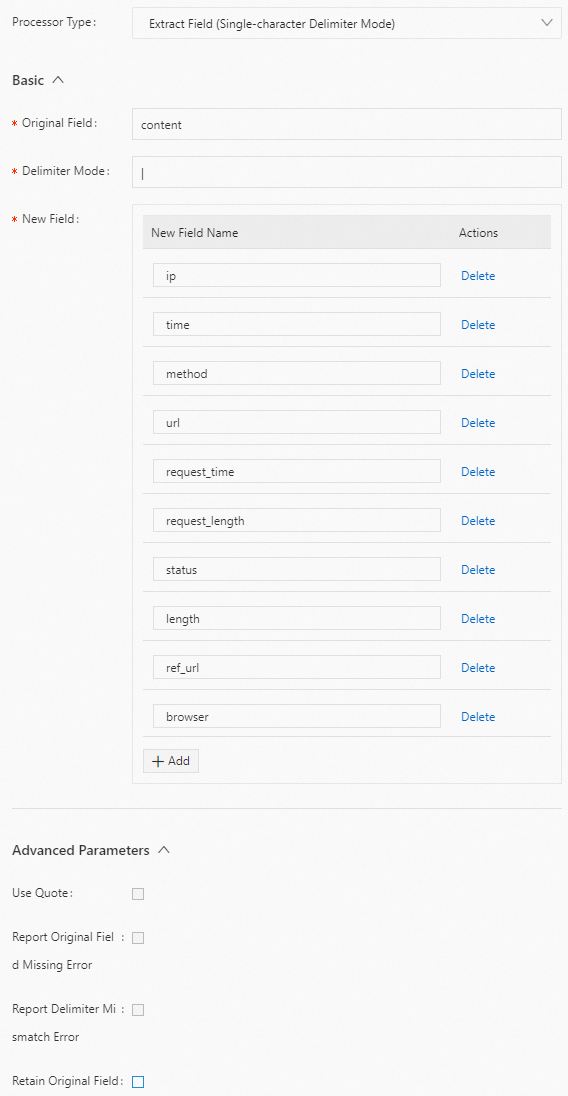
Result
"ip" : "10.**.**.**"
"time" : "10/Aug/2022:14:57:51 +0800"
"method" : "POST"
"url" : "/PutData?Category=YunOsAccountOpLog&AccessKeyId=<yourAccessKeyId>&Date=Fri%2C%2028%20Jun%202013%2006%3A53%3A30%20GMT&Topic=raw&Signature=<yourSignature>"
"request_time" : "0.024"
"request_length" : "18204"
"status" : "200"
"length" : "27"
"ref_url" : "-"
"browser" : "aliyun-sdk-java"
JSON configuration
Parameters
Set type to processor_split_char. The following table describes the parameters in detail.
Parameter
Type
Required
Description
SourceKey
String
Yes
The name of the source field.
SplitSep
String
Yes
The separator. It must be a single character. You can set it to a non-printable character, such as \u0001.
SplitKeys
String array
Yes
The names for the extracted content. Example: ["ip", "time", "method"].
PreserveOthers
Boolean
No
Specifies whether to keep the remaining part if the number of fields to be split is larger than the number of fields in the SplitKeys parameter.
true: Keep the remaining part.
false (default): Do not keep the remaining part.
QuoteFlag
Boolean
No
Specifies whether to use a quote character.
true: Enabled
false (default): Do not use a quote character.
Quote
String
No
The quote character. It must be a single character. You can set it to a non-printable character, such as \u0001.
This parameter takes effect only when QuoteFlag is set to true.
NoKeyError
Boolean
No
Specifies whether to report an error if the source field is not found in the raw log.
true: An error is reported.
false (default): No error is reported.
NoMatchError
Boolean
No
Specifies whether to report an error if the specified separator does not match the separator in the log.
true: An error is reported.
false (default): No error is reported.
KeepSource
Boolean
No
Specifies whether to keep the source field in the parsed log.
true: Keep the source field.
false (default): Do not keep the source field.
Example
Extract the value of the content field using a vertical bar (|) as the separator and set the field names to ip, time, method, url, request_time, request_length, status, length, ref_url, and browser. The following is an example configuration:
Raw log
"content" : "10.**.**.**|10/Aug/2022:14:57:51 +0800|POST|PutData?
Category=YunOsAccountOpLog&AccessKeyId=<yourAccessKeyId>&Date=Fri%2C%2028%20Jun%202013%2006%3A53%3A30%20GMT&Topic=raw&Signature=<yourSignature>|0.024|18204|200|37|-|
aliyun-sdk-java"
Logtail plugin configuration
{
   "type" : "processor_split_char",
   "detail" : {"SourceKey" : "content",
      "SplitSep" : "|",
      "SplitKeys" : ["ip", "time", "method", "url", "request_time", "request_length", "status", "length", "ref_url", "browser"]
  }
}
Result
"ip" : "10.**.**.**"
"time" : "10/Aug/2022:14:57:51 +0800"
"method" : "POST"
"url" : "/PutData?Category=YunOsAccountOpLog&AccessKeyId=<yourAccessKeyId>&Date=Fri%2C%2028%20Jun%202013%2006%3A53%3A30%20GMT&Topic=raw&Signature=<yourSignature>"
"request_time" : "0.024"
"request_length" : "18204"
"status" : "200"
"length" : "27"
"ref_url" : "-"
"browser" : "aliyun-sdk-java"
Multi-character Delimiter mode
Extracts fields using a Multi-character Delimiter. This mode does not support using a quote character to enclose fields.
Form-based configuration
Parameters
Set Processor Type to Extract Field (Multi-character Delimiter Mode). The following table describes the parameters.
Parameter
Description
Original Field
The name of the source field.
Delimiter String
The separator. You can set it to a non-printable character, such as \u0001\u0002.
New Field
The names for the extracted log content.
ImportantIf splitting the log produces fewer fields than the number of fields specified in New Field, the extra field names in New Field are ignored.
Report Original Field Missing Error
If you select this option, an error is reported if the source field is not found in the log.
Report Delimiter Mismatch Error
If you select this option, an error is reported if the log cannot be split by the specified separator.
Retain Original Field
If you select this option, the source field is kept in the parsed log.
Retain Excess Part
If you select this option, the system keeps the remaining content if splitting the log produces more fields than the number of fields specified in New Field.
Parse Excess Part
If you select this option, the system parses the remaining content if splitting the log produces more fields than the number of fields in New Field. Use Name Prefix of Field to which Excess Part is Assigned to specify the prefix for the names of the remaining fields.
Name Prefix of Field to which Excess Part is Assigned
The prefix for the names of the remaining fields. For example, if you set this to expand_, the field names are expand_1, expand_2, and so on.
Example
Extract the value of the content field using the separator |#| and set the field names to ip, time, method, url, request_time, request_length, status, expand_1, expand_2, and expand_3. The following is an example configuration:
Raw log
"content" : "10.**.**.**|#|10/Aug/2022:14:57:51 +0800|#|POST|#|PutData?
Category=YunOsAccountOpLog&AccessKeyId=<yourAccessKeyId>&Date=Fri%2C%2028%20Jun%202013%2006%3A53%3A30%20GMT&Topic=raw&Signature=<yourSignature>|#|0.024|#|18204|#|200|#|27|#|-|#|
aliyun-sdk-java"
Logtail plugin configuration
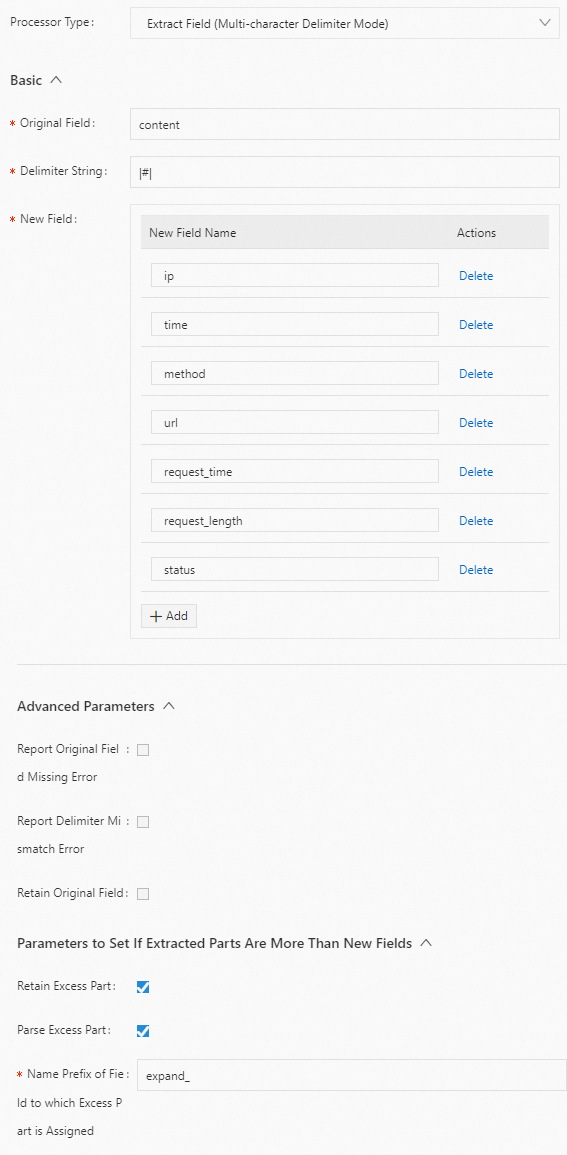
Result
"ip" : "10.**.**.**"
"time" : "10/Aug/2022:14:57:51 +0800"
"method" : "POST"
"url" : "/PutData?Category=YunOsAccountOpLog&AccessKeyId=<yourAccessKeyId>&Date=Fri%2C%2028%20Jun%202013%2006%3A53%3A30%20GMT&Topic=raw&Signature=<yourSignature>"
"request_time" : "0.024"
"request_length" : "18204"
"status" : "200"
"expand_1" : "27"
"expand_2" : "-"
"expand_3" : "aliyun-sdk-java"
JSON configuration
Parameters
Set type to processor_split_string. The following table describes the parameters in detail.
Parameter
Type
Required
Description
SourceKey
String
Yes
The name of the source field.
SplitSep
String
Yes
The separator. You can set it to a non-printable character, such as \u0001\u0002.
SplitKeys
String array
Yes
The names for the extracted log content. Example: ["key1","key2"].
NoteIf the number of fields to be split is smaller than the number of fields in the SplitKeys parameter, the extra fields in the SplitKeys parameter are ignored.
PreserveOthers
Boolean
No
Specifies whether to keep the remaining part if the number of fields to be split is larger than the number of fields in the SplitKeys parameter.
true: Keep the remaining part.
false (default): Do not keep the remaining part.
ExpandOthers
Boolean
No
Specifies whether to parse the remaining part if the number of fields to be split is larger than the number of fields in the SplitKeys parameter.
true: Parse the remaining part.
Use the ExpandOthers parameter to parse the remaining part and the ExpandKeyPrefix parameter to specify the prefix for the names of the remaining fields.
false (default): Do not parse the remaining part.
ExpandKeyPrefix
String
No
The prefix for the names of the remaining fields. For example, if you set this to expand_, the field names are expand_1, expand_2, and so on.
NoKeyError
Boolean
No
Specifies whether to report an error if the source field is not found in the raw log.
true: An error is reported.
false (default): No error is reported.
NoMatchError
Boolean
No
Specifies whether to report an error if the specified separator does not match the separator in the log.
true: An error is reported.
false (default): No error is reported.
KeepSource
Boolean
No
Specifies whether to keep the source field in the parsed log.
true: Keep the source field.
false (default): Do not keep the source field.
Example
Extract the value of the content field using the separator |#| and set the field names to ip, time, method, url, request_time, request_length, status, expand_1, expand_2, and expand_3. The following is an example configuration:
Raw log
"content" : "10.**.**.**|#|10/Aug/2022:14:57:51 +0800|#|POST|#|PutData?
Category=YunOsAccountOpLog&AccessKeyId=<yourAccessKeyId>&Date=Fri%2C%2028%20Jun%202013%2006%3A53%3A30%20GMT&Topic=raw&Signature=<yourSignature>|#|0.024|#|18204|#|200|#|27|#|-|#|
aliyun-sdk-java"
Logtail plugin configuration
{
   "type" : "processor_split_string",
   "detail" : {"SourceKey" : "content",
      "SplitSep" : "|#|",
      "SplitKeys" : ["ip", "time", "method", "url", "request_time", "request_length", "status"],
      "PreserveOthers" : true,
      "ExpandOthers" : true,
      "ExpandKeyPrefix" : "expand_"
  }
}
Result
"ip" : "10.**.**.**"
"time" : "10/Aug/2022:14:57:51 +0800"
"method" : "POST"
"url" : "/PutData?Category=YunOsAccountOpLog&AccessKeyId=<yourAccessKeyId>&Date=Fri%2C%2028%20Jun%202013%2006%3A53%3A30%20GMT&Topic=raw&Signature=<yourSignature>"
"request_time" : "0.024"
"request_length" : "18204"
"status" : "200"
"expand_1" : "27"
"expand_2" : "-"
"expand_3" : "aliyun-sdk-java"
Key-value pair mode
Extracts fields by splitting key-value pairs.
The processor_split_key_value plugin is supported in Logtail 0.16.26 and later.
Form-based configuration
Parameters
Set Processor Type to Extract Field (Key-value Pair Mode). The following table describes the parameters.
Parameter
Description
Original Field
The name of the source field.
Key-value Pair Delimiter
The separator between key-value pairs. The default value is a tab character
\t.Key-value Delimiter
The separator between a key and a value in a key-value pair. The default value is a colon (:).
Retain Original Field
If you select this option, the system keeps the source field.
Report Original Field Missing Error
If you select this option, an error is reported if the source field is not found in the log.
Drop Key-value Pairs That Fail to Match Delimiter
If you select this option, the system discards a key-value pair if it does not contain the specified key-value separator.
Report Key and Value Delimiter Missing Error
If you select this option, an error is reported if a key-value pair does not contain the specified key-value separator.
Report Empty Key Error
If you select this option, an error is reported if a key is empty after splitting.
Quote
If a value is enclosed in quote characters, the value within the quote characters is extracted. You can set multiple characters.
ImportantIf a backslash (\) is used to escape a quote character within a quoted value, the backslash (\) is retained as part of the value.
Examples
Example 1: Split key-value pairs.
Split the value of the content field into key-value pairs. The separator between key-value pairs is a tab character
\t, and the separator within a key-value pair is a colon (:). The following is an example configuration:Raw log
"content": "class:main\tuserid:123456\tmethod:get\tmessage:\"wrong user\""Logtail plugin configuration
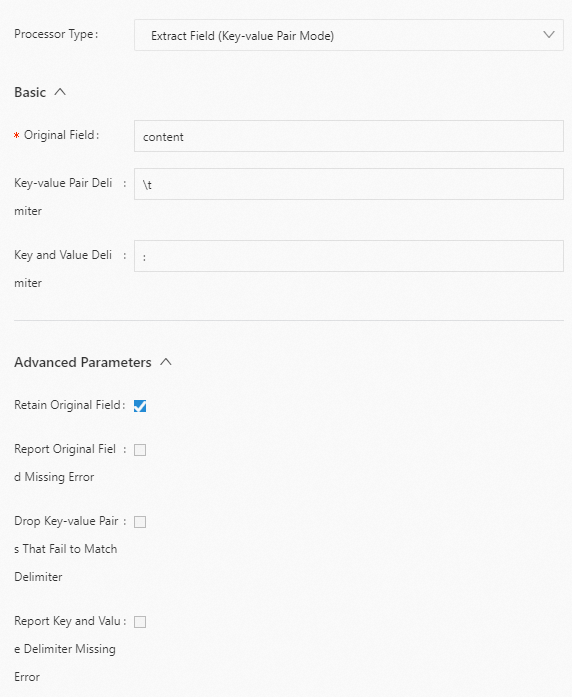
Result
"content": "class:main\tuserid:123456\tmethod:get\tmessage:\"wrong user\""
"class": "main"
"userid": "123456"
"method": "get"
"message": "\"wrong user\""
Example 2: Split key-value pairs that contain quote characters.
Split the value of the content field into key-value pairs. The separator between key-value pairs is a tab character
\t, the separator within a key-value pair is a colon (:), and the quote character is a double quotation mark ("). The following is an example configuration:Raw log
"content": "class:main http_user_agent:\"User Agent\" \"Chinese\" \"hello\\t\\\"ilogtail\\\"\\tworld\""Logtail plugin configuration
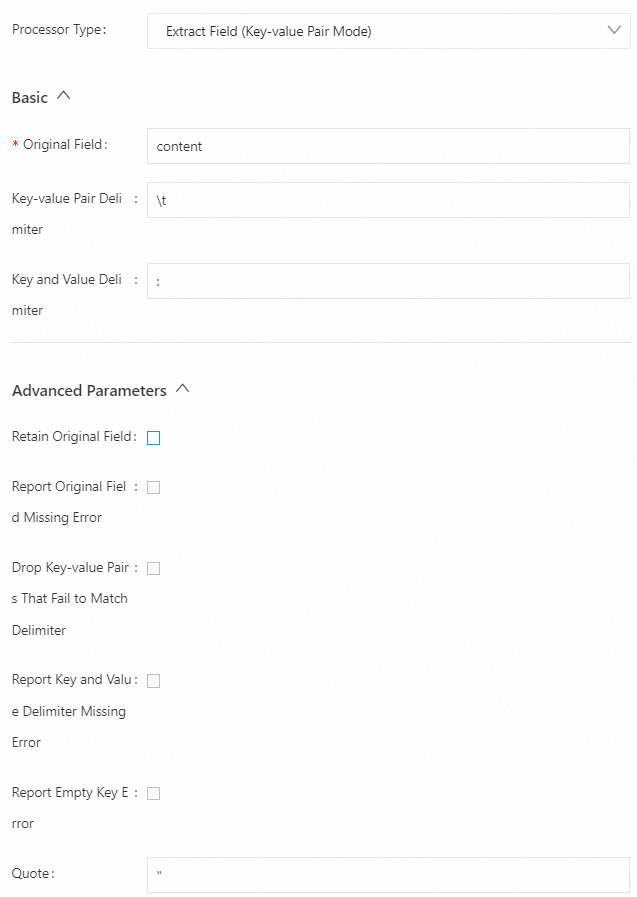
Result
"class": "main",
"http_user_agent": "User Agent",
"no_separator_key_0": "Chinese",
"no_separator_key_1": "hello\t\"ilogtail\"\tworld",
Example 3: Split key-value pairs that contain multi-character quote characters.
Split the value of the content field into key-value pairs. The separator between key-value pairs is a tab character
\t, the separator within a key-value pair is a colon (:), and the quote character is a double quotation mark (""). The following is an example configuration:Raw log
"content": "class:main http_user_agent:\"\"\"User Agent\"\"\" \"\"\"Chinese\"\"\""Logtail plugin configuration

Result
"class": "main",
"http_user_agent": "User Agent",
"no_separator_key_0": "Chinese",
JSON configuration
Parameters
Set type to processor_split_key_value. The following table describes the parameters in detail.
Parameter
Type
Required
Description
SourceKey
string
Yes
The name of the source field.
Delimiter
string
No
The separator between key-value pairs. The default value is a tab character
\t.Separator
string
No
The separator between a key and a value in a key-value pair. The default value is a colon (:).
KeepSource
Boolean
No
Specifies whether to keep the source field in the parsed log.
true: Keep the source field.
false (default): Do not keep the source field.
ErrIfSourceKeyNotFound
Boolean
No
Specifies whether to report an error if the source field is not found in the raw log.
true (default): An error is reported.
false: No error is reported.
DiscardWhenSeparatorNotFound
Boolean
No
Specifies whether to discard the key-value pair if no matching separator is found.
true: Discard the pair.
false (default): Do not discard the pair.
ErrIfSeparatorNotFound
Boolean
No
Specifies whether to report an error when the specified separator is not found.
true (default): An error is reported.
false: No error is reported.
ErrIfKeyIsEmpty
Boolean
No
Specifies whether to report an error when a key is empty after splitting.
true (default): An error is reported.
false: No error is reported.
Quote
String
No
The quote character. If this is set and a value is enclosed in quote characters, the value within the quote characters is extracted. You can set multiple characters. By default, the quote character feature is disabled.
ImportantIf the quote character is a double quotation mark (""), you must add an escape character, which is a backslash (\).
If a backslash (\) is used with a quote character within the quote characters, the backslash (\) is included as part of the value.
Examples
Example 1: Split key-value pairs.
Split the value of the content field into key-value pairs. The separator between key-value pairs is a tab character
\t, and the separator within a key-value pair is a colon (:). The following is an example configuration:Raw log
"content": "class:main\tuserid:123456\tmethod:get\tmessage:\"wrong user\""Logtail plugin configuration
{
  "processors":[
    {
      "type":"processor_split_key_value",
      "detail": {
        "SourceKey": "content",
        "Delimiter": "\t",
        "Separator": ":",
        "KeepSource": true
      }
    }
  ]
}
Result
"content": "class:main\tuserid:123456\tmethod:get\tmessage:\"wrong user\""
"class": "main"
"userid": "123456"
"method": "get"
"message": "\"wrong user\""
Example 2: Split key-value pairs.
Split the value of the content field into key-value pairs. The separator between key-value pairs is a tab character
\t, the separator within a key-value pair is a colon (:), and the quote character is a double quotation mark ("). The following is an example configuration:Raw log
"content": "class:main http_user_agent:\"User Agent\" \"Chinese\" \"hello\\t\\\"ilogtail\\\"\\tworld\""Logtail plugin configuration
{
  "processors":[
    {
      "type":"processor_split_key_value",
      "detail": {
        "SourceKey": "content",
        "Delimiter": " ",
        "Separator": ":",
        "Quote": "\""
      }
    }
  ]
}
Result
"class": "main",
"http_user_agent": "User Agent",
"no_separator_key_0": "Chinese",
"no_separator_key_1": "hello\t\"ilogtail\"\tworld",
Example 3: Split key-value pairs.
Split the value of the content field into key-value pairs. The separator between key-value pairs is a tab character
\t, the separator within a key-value pair is a colon (:), and the quote character is a triple quotation mark ("""). The following is an example configuration:Raw log
"content": "class:main http_user_agent:\"\"\"User Agent\"\"\" \"\"\"Chinese\"\"\""Logtail plugin configuration
{
  "processors":[
    {
      "type":"processor_split_key_value",
      "detail": {
        "SourceKey": "content",
        "Delimiter": " ",
        "Separator": ":",
        "Quote": "\"\"\""
      }
    }
  ]
}
Result
"class": "main",
"http_user_agent": "User Agent",
"no_separator_key_0": "Chinese",
Grok mode
Extracts target fields using Grok expressions.
The processor_grok plugin is supported in Logtail 1.2.0 and later.
Form-based configuration
Parameters
Set Processor Type to Extract Field (Grok Mode). The following table describes the parameters.
Parameter
Description
Original Field
The name of the source field.
Grok Expression Array
An array of Grok expressions. The processor_grok plugin attempts to match the log against the expressions in this list from top to bottom and returns the result of the first successful match.
For a list of default supported expressions, see processor_grok. If the expression you need is not in the list, enter a custom Grok expression in Custom Grok Patterns.
NoteConfiguring multiple Grok expressions may affect performance. Use no more than five expressions.
Custom Grok Patterns
Enter a custom rule name and Grok expression.
Custom Grok Pattern File Directory
The directory where the custom Grok pattern files are located. The processor_grok plugin reads all files in the directory.
ImportantAfter updating a custom Grok pattern file, you must restart Logtail for the changes to take effect.
Maximum Timeout
The maximum time to try extracting fields with a Grok expression, in milliseconds. If you set this to 0 or leave it empty, it means no timeout.
Retain Logs that Fails to be Parsed
If you select this option, the system keeps the log if parsing fails.
Retain Original Field
If you select this option, the source field is kept in the parsed log.
Report Original Field Missing Error
If you select this option, an error is reported if the source field is not found in the raw log.
Report No Expressions Matched Error
If you select this option, an error is reported if none of the expressions in Grok Expression Array match the log.
Report Match Timeout Error
If you select this option, an error is reported if a match times out.
Example
Extract the value of the content field in Grok mode and name the extracted fields year, month, and day. The following is an example configuration:
Raw log
"content" : "2022 October 17"Logtail plugin configuration
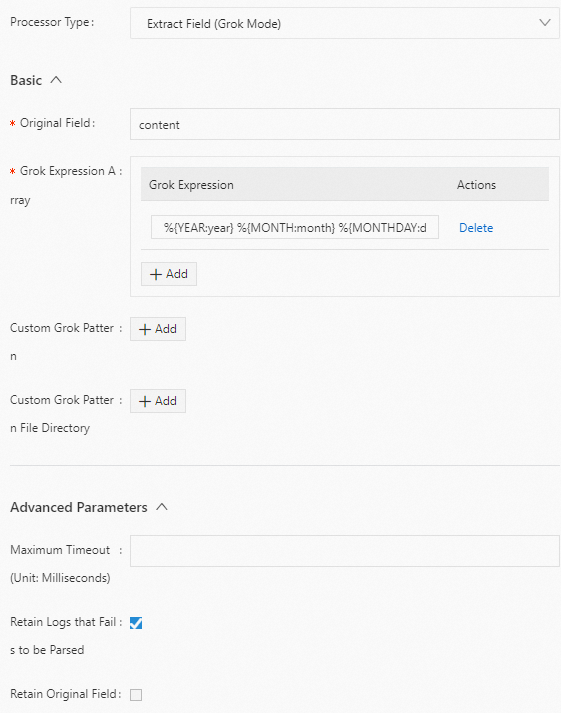
Result
"year":"2022"
"month":"October"
"day":"17"
JSON configuration
Parameters
Set type to processor_grok. The following table describes the parameters in detail.
Parameter
Type
Required
Description
CustomPatternDir
String array
No
The directory where the custom Grok pattern files are located. The processor_grok plugin reads all files in the directory.
If this parameter is not added, no custom Grok pattern files are imported.
ImportantAfter updating a custom Grok pattern file, you must restart Logtail for the changes to take effect.
CustomPatterns
Map
No
The custom GROK patterns. The key is the rule name, and the value is the Grok expression.
For a list of default supported expressions, see processor_grok. If the expression you need is not in the list, enter a custom Grok expression in Match.
If this parameter is not added, no custom GROK patterns are used.
SourceKey
String
No
The name of the source field. The default value is the content field.
Match
String array
Yes
An array of Grok expressions. The processor_grok plugin attempts to match the log against the expressions in this list from top to bottom and returns the result of the first successful match.
NoteConfiguring multiple Grok expressions may affect performance. Use no more than five expressions.
TimeoutMilliSeconds
Long
No
The maximum time to try extracting fields with a Grok expression, in milliseconds.
If this parameter is not added or is set to 0, it means no timeout.
IgnoreParseFailure
Boolean
No
Specifies whether to ignore logs that fail to be parsed.
true (default): Ignore the logs.
false: Deletes the item.
KeepSource
Boolean
No
Specifies whether to keep the source field after successful parsing.
true (default): Keep the source field.
false: Discard the source field.
NoKeyError
Boolean
No
Specifies whether to report an error if the source field is not found in the raw log.
true: An error is reported.
false (default): No error is reported.
NoMatchError
Boolean
No
Specifies whether to report an error if none of the expressions set in the Match parameter match the log.
true (default): An error is reported.
false: No error is reported.
TimeoutError
Boolean
No
Specifies whether to report an error if a match times out.
true (default): An error is reported.
false: No error is reported.
Example 1
Extract the value of the content field in Grok mode and name the extracted fields year, month, and day. The following is an example configuration:
Raw log
"content" : "2022 October 17"Logtail plugin configuration
{
   "type" : "processor_grok",
   "detail" : {
      "KeepSource" : false,
      "Match" : [
         "%{YEAR:year} %{MONTH:month} %{MONTHDAY:day}"
      ],
      "IgnoreParseFailure" : false
   }
}
Result
"year":"2022"
"month":"October"
"day":"17"
Example 2
Extract the value of the content field from multiple logs and parse them into different results based on different Grok expressions. The following is an example configuration:
Raw logs
{
    "content" : "begin 123.456 end"
}
{
    "content" : "2019 June 24 \"I am iron man"\"
}
{
    "content" : "WRONG LOG"
}
{
    "content" : "10.0.0.0 GET /index.html 15824 0.043"
}
Logtail plugin configuration
{
        "type" : "processor_grok",
        "detail" : {
                "CustomPatterns" : {
                        "HTTP" : "%{IP:client} %{WORD:method} %{URIPATHPARAM:request} %{NUMBER:bytes} %{NUMBER:duration}"
                },
                "IgnoreParseFailure" : false,
                "KeepSource" : false,
                "Match" : [
                        "%{HTTP}",
                        "%{WORD:word1} %{NUMBER:request_time} %{WORD:word2}",
                        "%{YEAR:year} %{MONTH:month} %{MONTHDAY:day} %{QUOTEDSTRING:motto}"
                ],
                "SourceKey" : "content"
        },
}
Result
For the first log, the processor_grok plugin fails to match it against the first expression
%{HTTP}in the Match parameter, but successfully matches it against the second expression%{WORD:word1} %{NUMBER:request_time} %{WORD:word2}. Therefore, the extraction result is based on the second expression.Because the KeepSource parameter is set to false, the content field in the raw log is discarded.
For the second log entry, the processor_grok plugin fails to match the entry against the first expression
%{HTTP}and the second expression%{WORD:word1} %{NUMBER:request_time} %{WORD:word2}in the Match parameter, but successfully matches it against the third expression%{YEAR:year} %{MONTH:month} %{MONTHDAY:day} %{QUOTEDSTRING:motto}. Therefore, the plugin returns the extraction result based on the third expression.For the third log, the processor_grok plugin fails to match it against any of the three expressions in the Match parameter. Because you set the IgnoreParseFailure parameter to false, the third log is discarded.
For the fourth log, the processor_grok plugin successfully matches it against the first expression
%{HTTP}in the Match parameter. Therefore, the extraction result is based on the first expression.
{
  "word1":"begin",
  "request_time":"123.456",
  "word2":"end",
}
{
  "year":"2019",
  "month":"June",
  "day":"24",
  "motto":"\"I am iron man"\",
}
{
  "client":"10.0.0.0",
  "method":"GET",
  "request":"/index.html",
  "bytes":"15824",
  "duration":"0.043",
}
Add fields plugin
Use the processor_add_fields plugin to add log fields. This section describes the parameters and provides an example configuration for the processor_add_fields plugin.
Configuration
The processor_add_fields plugin is supported in Logtail 0.16.28 and later.
Form-based configuration
Parameters
Set Processor Type to Add Field. The following table describes the parameters.
Parameter
Description
Add Field
The names and values of the fields to add. You can add multiple fields.
Ignore New Fields with Same Name
Specifies whether to ignore a field if a field with the same name already exists.
Example
Add the
aaa2and aaa3 fields. The following is an example configuration:Raw log
"aaa1":"value1"Logtail plugin configuration
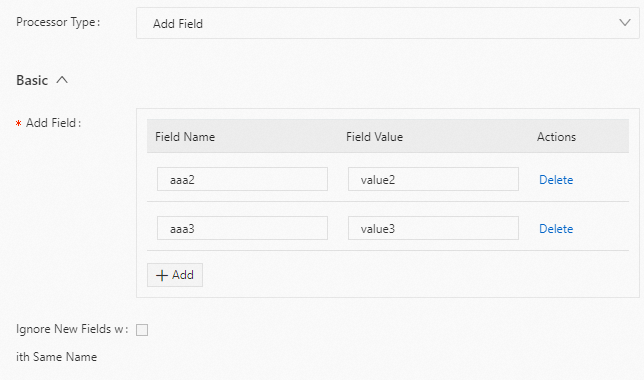
Result
"aaa1":"value1"
"aaa2":"value2"
"aaa3":"value3"
JSON configuration
Parameters
Set
typetoprocessor_add_fields. The following table describes the parameters indetail.Parameter
Type
Required
Description
Fields
Map
Yes
The names and values of the fields to add. This is in key-value pair format. You can add multiple fields.
IgnoreIfExist
Boolean
No
Specifies whether to ignore a field if a field with the same name already exists.
true: Ignore the field.
false (default): Do not ignore the field.
Example configuration
Add the aaa2 and aaa3 fields. The following is an example configuration:
Raw log
"aaa1":"value1"Logtail plugin configuration
{
  "processors":[
    {
      "type":"processor_add_fields",
      "detail": {
        "Fields": {
          "aaa2": "value2",
          "aaa3": "value3"
        }
      }
    }
  ]
}
Result
"aaa1":"value1"
"aaa2":"value2"
"aaa3":"value3"
Drop fields plugin
Use the processor_drop plugin to drop log fields. This section describes the parameters and provides an example configuration for the processor_drop plugin.
Configuration
The processor_drop plugin is supported in Logtail 0.16.28 and later.
Form-based configuration
Parameters
Set Processor Type to Drop Field. The following table describes the parameters.
Parameter
Description
Drop Field
The fields to drop. You can specify multiple fields.
Example
Drop the
aaa1andaaa2fields from the log. The following is an example configuration:Raw log
"aaa1":"value1"
"aaa2":"value2"
"aaa3":"value3"
Logtail plugin configuration
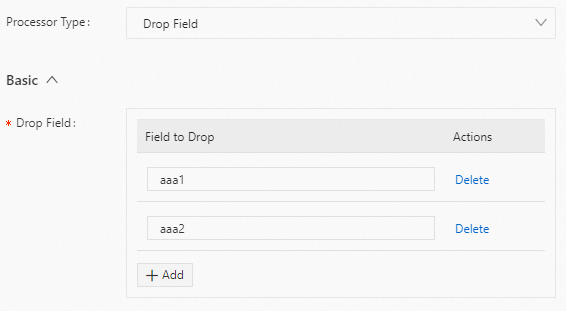
Result
"aaa3":"value3"
JSON configuration
Parameters
Set type to processor_drop. The following table describes the parameters in detail.
Parameter
Type
Required
Description
DropKeys
String array
Yes
The fields to drop. You can specify multiple fields.
Example
Drop the aaa1 and aaa2 fields from the log. The following is an example configuration:
Raw log
"aaa1":"value1"
"aaa2":"value2"
"aaa3":"value3"
Logtail plugin configuration
{
  "processors":[
    {
      "type":"processor_drop",
      "detail": {
        "DropKeys": ["aaa1","aaa2"]
      }
    }
  ]
}
Result
"aaa3":"value3"
Rename fields plugin
Use the processor_rename plugin to rename fields. This section describes the parameters and provides an example configuration for the processor_rename plugin.
Configuration
The processor_rename plugin is supported in Logtail 0.16.28 and later.
Form-based configuration
Parameter settings
Set Processor Type to Rename Fields. The following table describes the parameters.
Parameter
Description
Original Field
The source field to be renamed.
New Field
The new name for the field.
Report Original Field Missing Error
If you select this option, an error is reported if the source field is not found in the log.
Example
Rename the
aaa1field to bbb1 and the aaa2 field to bbb2. The following is an example configuration:Raw log
"aaa1":"value1"
"aaa2":"value2"
"aaa3":"value3"
Logtail plugin configuration
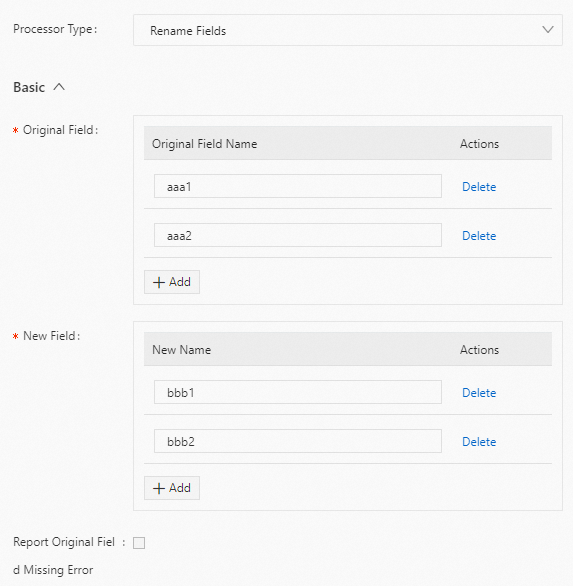
Result
"bbb1":"value1"
"bbb2":"value2"
"aaa3":"value3"
JSON configuration
Parameter settings
Set
typetoprocessor_rename. The following table describes the parameters in thedetailobject.Parameter
Type
Required
Description
NoKeyErrorBoolean
No
Specifies whether to report an error if the source field is not found in the log.
true: An error is reported.
false (default): No error is reported.
SourceKeysString array
Yes
The source fields to be renamed.
DestKeysString array
Yes
The new names for the fields.
Example
Rename the
aaa1field tobbb1and theaaa2field tobbb2. The following is an example configuration:Raw log
"aaa1":"value1"
"aaa2":"value2"
"aaa3":"value3"
Logtail plugin configuration
{
  "processors":[
    {
      "type":"processor_rename",
      "detail": {
        "SourceKeys": ["aaa1","aaa2"],
        "DestKeys": ["bbb1","bbb2"],
        "NoKeyError": true
      }
    }
  ]
}
Result
"bbb1":"value1"
"bbb2":"value2"
"aaa3":"value3"
Pack fields plugin
You can use the processor_packjson plugin to pack one or more fields into a JSON object field. This section describes the parameters and provides a configuration example for the processor_packjson plugin.
Configuration
The processor_packjson plugin is supported in Logtail 0.16.28 and later.
Form-based configuration
Parameters
Set Processor Type to Encapsulate Fields. The following table describes the parameters.
Parameter
Description
Original Field
The source fields to be packed.
New Field
The field after packing.
Retain Original Fields
If you select this option, the source fields are kept in the parsed log.
Report Original Field Missing Error
If you select this option, an error is reported if a source field is not found in the raw log.
Example
Pack the specified a and b fields into a JSON field named d_key. The following is an example configuration:
Raw log
"a":"1"
"b":"2"
Logtail plugin configuration
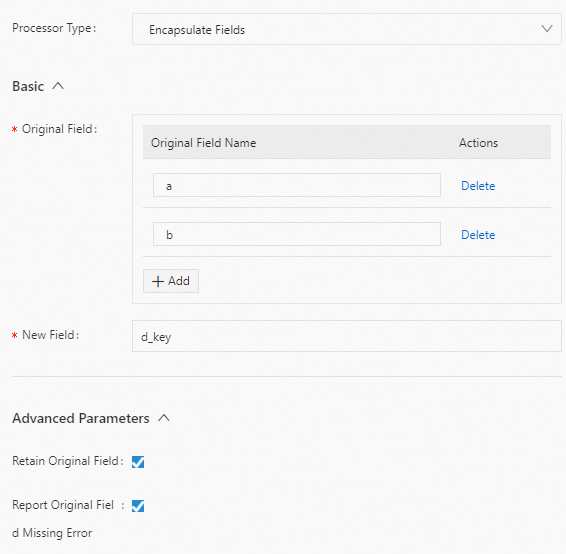
Result
"a":"1"
"b":"2"
"d_key":"{\"a\":\"1\",\"b\":\"2\"}"
JSON configuration
Parameters
Set type to processor_packjson. The following table describes the parameters in detail.
Parameter
Type
Required
Description
SourceKeys
String array
Yes
The source fields to be packed.
DestKey
String
No
The field after packing.
KeepSource
Boolean
No
Specifies whether to keep the source fields in the parsed log.
true (default): Keep the source fields.
false: Do not keep the source fields.
AlarmIfIncomplete
Boolean
No
Specifies whether to report an error if a source field is not found in the raw log.
true (default): An error is reported.
false: No error is reported.
Example configuration
Pack the specified a and b fields into a JSON field named d_key. The following is an example configuration:
Raw log
"a":"1"
"b":"2"
Logtail plugin configuration
{
  "processors":[
    {
      "type":"processor_packjson",
      "detail": {
        "SourceKeys": ["a","b"],
        "DestKey":"d_key",
        "KeepSource":true,
        "AlarmIfEmpty":true
      }
    }
  ]
}
Result
"a":"1"
"b":"2"
"d_key":"{\"a\":\"1\",\"b\":\"2\"}"
Expand JSON field plugin
Use the processor_json plugin to expand a JSON field. This section describes the parameters and provides an example configuration for the processor_json plugin.
Configuration
The processor_json plugin is supported in Logtail 0.16.28 and later.
Form-based configuration
Parameters
Set Processor Type to Expand JSON Field. The following table describes the parameters.
Parameter
Description
Original Field
The name of the source field to expand.
JSON Expansion Depth
The depth of the JSON expansion. The default value is 0, which indicates no limit. A value of 1 indicates the current level.
Character to Concatenate Expanded Keys
The connector for JSON expansion. The default value is an underscore (_).
Name Prefix of Expanded Keys
The prefix to add to the field names during JSON expansion.
Expand Array
Specifies whether to expand array types. This parameter is available in Logtail 1.8.0 and later.
Retain Original Field
If you select this option, the source field is kept in the parsed log.
Report Original Field Missing Error
If you select this option, an error is reported if the source field is not found in the raw log.
Use Name of Original Field as Name Prefix of Expanded Keys
If you select this option, the source field name is used as the prefix for all expanded JSON field names.
Retain Raw Logs If Parsing Fails
If you select this option, the raw log is kept if parsing fails.
Example
This example expands the
s_keyfield. It usesjas a prefix and the source field names_keyas the prefix for the expanded field names. The following is an example configuration:Raw log (file path read by Logtail)
{"s_key":"{\"k1\":{\"k2\":{\"k3\":{\"k4\":{\"k51\":\"51\",\"k52\":\"52\"},\"k41\":\"41\"}}}}"}Logtail plugin configuration

Result

JSON configuration
Parameters
Set
typetoprocessor_json. The following table describes the parameters indetail.Parameter
Type
Required
Description
SourceKey
String
Yes
The name of the source field to be expanded.
NoKeyError
Boolean
No
Specifies whether to report an error if the source field is not found in the raw log.
true (default): An error is reported.
false: No error is reported.
ExpandDepth
Int
No
The depth of JSON expansion. The default value is 0, which means no limit. A value of 1 indicates the current level, and so on.
ExpandConnector
String
No
The connector for JSON expansion. The default value is an underscore (_).
Prefix
String
No
The prefix to add to the field names during JSON expansion.
KeepSource
Boolean
No
Specifies whether to keep the source field in the parsed log.
true (default): Keep the source field.
false: Do not keep the source field.
UseSourceKeyAsPrefix
Boolean
No
Specifies whether to use the source field name as the prefix for all expanded JSON field names.
KeepSourceIfParseError
Boolean
No
Specifies whether to keep the raw log if parsing fails.
true (default): Keep the raw log.
false: Do not keep the raw log.
ExpandArray
Boolean
No
Specifies whether to expand array types. This parameter is supported in Logtail 1.8.0 and later.
false (default): Do not expand arrays.
true: Expand arrays. For example,
{"k":["1","2"]}is expanded to{"k[0]":"1","k[1]":"2"}.
Example
This example expands the
s_keyfield. It usesjas a prefix and the source field names_keyas the prefix for the expanded field names. The following is an example configuration:Raw log (file path read by Logtail)
{"s_key":"{\"k1\":{\"k2\":{\"k3\":{\"k4\":{\"k51\":\"51\",\"k52\":\"52\"},\"k41\":\"41\"}}}}"}Logtail plugin configuration
{
  "processors":[
    {
      "type":"processor_json",
      "detail": {
        "SourceKey": "content",
        "NoKeyError":true,
        "ExpandDepth":0,
        "ExpandConnector":"-",
        "Prefix":"j",
        "KeepSource": false,
        "UseSourceKeyAsPrefix": true
      }
    }
  ]
}
Result
Map field values plugin
The processor_dict_map plugin maps field values. This section describes its parameters and provides an example configuration.
Configuration
Form-based configuration
Set Processor Type to Field Value Mapping. The following table describes the parameters.
Parameter | Description |
Original Field | The source field name. |
New Field | The name of the mapped field. |
Mapping Dictionary | A dictionary that maps keys to values. Use this parameter to directly configure a small mapping dictionary. This avoids the need for a local CSV dictionary file. Important The Mapping Dictionary configuration does not take effect if you set Local Dictionary. |
Local Dictionary | A dictionary file in CSV format. This file uses a comma (,) as the separator and double quotation marks (") to enclose field references. |
Process Missing Original Field | Select this option to handle cases where the source field is missing from a raw log. The system then fills the result field with the value specified in Value to Fill New Field. |
Maximum Mapping Dictionary Size | The maximum size of the mapping dictionary. The default value is 1000, which means you can store up to 1000 mapping rules. To limit the memory usage of the plugin on the server, decrease this value. |
Method to Process Raw Log | Specifies how to handle cases where the mapped field already exists in the raw log.
|
JSON configuration
Set type to processor_dict_map. The following table describes the parameters for detail.
Parameter | Type | Required | Description |
SourceKey | String | Yes | The source field name. |
MapDict | Map | No | A mapping dictionary. Use this parameter to directly configure a small mapping dictionary. This avoids the need for a local CSV dictionary file. Important The MapDict parameter does not take effect if you set the DictFilePath parameter. |
DictFilePath | String | No | A dictionary file in CSV format. This file uses a comma (,) as the separator and double quotation marks (") to enclose field references. |
DestKey | String | No | The name of the mapped field. |
HandleMissing | Boolean | No | Specifies whether to process a raw log if the target field is missing.
|
Missing | String | No | The value to use for the result field when the source field is missing from the raw log. The default value is This parameter takes effect only when you set HandleMissing to true. |
MaxDictSize | Int | No | The maximum size of the mapping dictionary. The default value is 1000, which means you can store up to 1000 mapping rules. To limit the memory usage of the plugin on the server, decrease this value. |
Mode | String | No | Specifies how to handle cases where the mapped field already exists in the raw log.
|
String replacement
Use the processor_string_replace plugin to replace the full text of a log, replace text based on a regular expression, or remove escape characters.
Configuration description
The processor_string_replace plugin is supported in Logtail 1.6.0 and later.
Form-based configuration
Set Processor Type to String Replacement. The following table describes the parameters.
Parameter | Description |
Original Field | The name of the source field. |
Match Mode | Specifies the match method. Valid values:
|
Matched Content | Enter the content to match.
|
Replaced By | The string to use for replacement.
|
New Field | Specify a new field for the replaced content. |
JSON configuration
Set the type parameter to processor_string_replace. The following table describes the parameters in the detail object.
Parameter | Type | Required | Description |
| String | Yes | The name of the source field. |
| String | Yes | Specifies the match method. Valid values:
|
| String | No | Enter the content to match.
|
| String | No | The string to use for replacement. The default value is "".
|
| String | No | Specify a new field for the replaced content. If you do not specify this parameter, no new field is created. |
Configuration examples
Replace content using string match
Use a string match to replace Error: in the content field with an empty string.
Form-based configuration
Raw log:
"content": "2023-05-20 10:01:23 Error: Unable to connect to database."Logtail plugin configuration:

Result:
"content": "2023-05-20 10:01:23 Unable to connect to database."
JSON configuration
Raw log:
"content": "2023-05-20 10:01:23 Error: Unable to connect to database."Logtail plugin configuration:
{
  "processors":[
    {
      "type":"processor_string_replace",
      "detail": {
        "SourceKey": "content",
        "Method": "const",
        "Match": "Error: ",
        "ReplaceString": ""
      }
    }
  ]
}
Result:
"content": "2023-05-20 10:01:23 Unable to connect to database.",
Replace content using a regular expression
Use a regular expression to replace strings in the content field that match the regular expression \\u\w+\[\d{1,3};*\d{1,3}m|N/A with an empty string.
Form-based configuration
Raw log:
"content": "2022-09-16 09:03:31.013 \u001b[32mINFO \u001b[0;39m \u001b[34m[TID: N/A]\u001b[0;39m [\u001b[35mThread-30\u001b[0;39m] \u001b[36mc.s.govern.polygonsync.job.BlockTask\u001b[0;39m : Block collection------end------\r"Logtail plugin configuration:

Result:
"content": "2022-09-16 09:03:31.013 INFO [TID: ] [Thread-30] c.s.govern.polygonsync.job.BlockTask : Block collection------end------\r",
JSON configuration
Raw log:
"content": "2022-09-16 09:03:31.013 \u001b[32mINFO \u001b[0;39m \u001b[34m[TID: N/A]\u001b[0;39m [\u001b[35mThread-30\u001b[0;39m] \u001b[36mc.s.govern.polygonsync.job.BlockTask\u001b[0;39m : Block collection------end------\r"Logtail plugin configuration:
{
  "processors":[
    {
      "type":"processor_string_replace",
      "detail": {
        "SourceKey": "content",
        "Method": "regex",
        "Match": "\\\\u\\w+\\[\\d{1,3};*\\d{1,3}m|N/A",
        "ReplaceString": ""
      }
    }
  ]
}
Result:
"content": "2022-09-16 09:03:31.013 INFO [TID: ] [Thread-30] c.s.govern.polygonsync.job.BlockTask : Block collection------end------\r",
Replace content using regular expression groups
Use regular expression groups to replace 16 in the content field with */24 and write the result to a new field named new_ip.
When you replace content using regular expression groups, the replacement string cannot contain {}. You can use only formats such as $1 and $2.
Form-based configuration
Raw log:
"content": "10.10.239.16"Logtail plugin configuration:

Result:
"content": "10.10.239.16",
"new_ip": "10.10.239.*/24",
JSON configuration
Raw log:
"content": "10.10.239.16"Logtail plugin configuration:
{
  "processors":[
    {
      "type":"processor_string_replace",
      "detail": {
        "SourceKey": "content",
        "Method": "regex",
        "Match": "(\\d.*\\.)\\d+",
        "ReplaceString": "$1*/24",
        "DestKey": "new_ip"
      }
    }
  ]
}
Result:
"content": "10.10.239.16",
"new_ip": "10.10.239.*/24",
Remove escape characters
Form-based configuration
Raw log:
"content": "{\\x22UNAME\\x22:\\x22\\x22,\\x22GID\\x22:\\x22\\x22,\\x22PAID\\x22:\\x22\\x22,\\x22UUID\\x22:\\x22\\x22,\\x22STARTTIME\\x22:\\x22\\x22,\\x22ENDTIME\\x22:\\x22\\x22,\\x22UID\\x22:\\x222154212790\\x22,\\x22page_num\\x22:1,\\x22page_size\\x22:10}"Logtail plugin configuration:

Result:
"content": "{\"UNAME\":\"\",\"GID\":\"\",\"PAID\":\"\",\"UUID\":\"\",\"STARTTIME\":\"\",\"ENDTIME\":\"\",\"UID\":\"2154212790\",\"page_num\":1,\"page_size\":10}",
JSON configuration
Raw log:
"content": "{\\x22UNAME\\x22:\\x22\\x22,\\x22GID\\x22:\\x22\\x22,\\x22PAID\\x22:\\x22\\x22,\\x22UUID\\x22:\\x22\\x22,\\x22STARTTIME\\x22:\\x22\\x22,\\x22ENDTIME\\x22:\\x22\\x22,\\x22UID\\x22:\\x222154212790\\x22,\\x22page_num\\x22:1,\\x22page_size\\x22:10}"Logtail plugin configuration:
{
  "processors":[
    {
      "type":"processor_string_replace",
      "detail": {
        "SourceKey": "content",
        "Method": "unquote"
      }
    }
  ]
}
Result:
"content": "{\"UNAME\":\"\",\"GID\":\"\",\"PAID\":\"\",\"UUID\":\"\",\"STARTTIME\":\"\",\"ENDTIME\":\"\",\"UID\":\"2154212790\",\"page_num\":1,\"page_size\":10}",
References
Configure Logtail pipelines using API operations:
Configure processing plugins in the console:
Collect container logs (standard output and files) from a cluster using a Kubernetes CRD