Use data security plugins to mask and encrypt sensitive data.
Plugin effect example
The following table shows the data structure of a raw log after it is saved to Simple Log Service. The table compares the results of using the native data masking plugin with the results of not using any plugin.
Raw log | Without a plugin | With the data masking plugin |
| Content: "[{'account':'1812213231432969','password':'04a23f38'}, {'account':'1812213685634','password':'123a'}]" | Content: "[{'account':'1812213231432969','password':'********'}, {'account':'1812213685634','password':'********'}]" |
Data security plugin overview
Simple Log Service provides the following types of data security plugins. You can select a plugin based on your needs.
Plugin name | Type | Description |
Data masking | Native | Masks and replaces log fields. |
Data masking | Extension | Replaces sensitive data with a specified string or an MD5 hash. |
Field encryption | Extension | Encrypts the content of specified fields. |
Data encoding and decoding | Extension | Decodes data from Base64, or encodes data to Base64 or MD5. |
Entry point
If you want to use a Logtail plug-in to process logs, you can add a Logtail plug-in configuration when you create or modify a Logtail configuration. For more information, see Overview.
Differences between native and extension plugins
Native plugins are implemented in C++ for better performance.
Extension plugins are implemented in Go to provide a rich and flexible ecosystem. You can use extension plugins if your business logs are too complex to be processed by native plugins.
Performance limits of extension plugins
When you use extension plugins to process logs, LoongCollector consumes more resources, primarily CPU. If necessary, you can adjust the LoongCollector parameter settings to perform optimization for long log transmission latency.
If the generation speed of raw data exceeds 5 MB/s, avoid using a complex combination of plugins to process logs. You can use extension plugins for simple processing and then use data transformation for further processing.
Log collection limits
Extension plugins process text logs in line mode. This means file-level metadata, such as
__tag__:__path__and__topic__, is stored in each log.Adding an extension plugin affects features related to tags:
The context query and LiveTail features become unavailable. To use these features, you must add an aggregator configuration.
The
__topic__field is renamed to__log_topic__. If you add an aggregator configuration, both the__topic__and__log_topic__fields exist in the log. If you do not need the__log_topic__field, you can use the drop field plugin to delete it.Fields such as
__tag__:__path__no longer have a native field index. You must create a field index for them.
Data masking plugin (native)
The data masking plugin masks logs.
Configuration description
Parameter | Description |
Source Field | The source field that stores the log content before parsing. |
Masking Method | The masking method. Valid values:
|
Replacement String | If you set Masking Method to const, enter a string to replace the sensitive content. |
Prefix Content Expression | The expression for the content that precedes the sensitive content. This expression is used to find the sensitive content. The expression must follow the RE2 syntax. For more information, see RE2 Syntax. |
Expression for Replacing Content | The expression for the sensitive content. The expression must follow the RE2 syntax. For more information, see RE2 Syntax. |
Replace All Matches |
|
Source field
content:[{'account':'1812213231432969','password':'04a23f38'}, {'account':'1812213685634','password':'123a'}]Logtail configuration
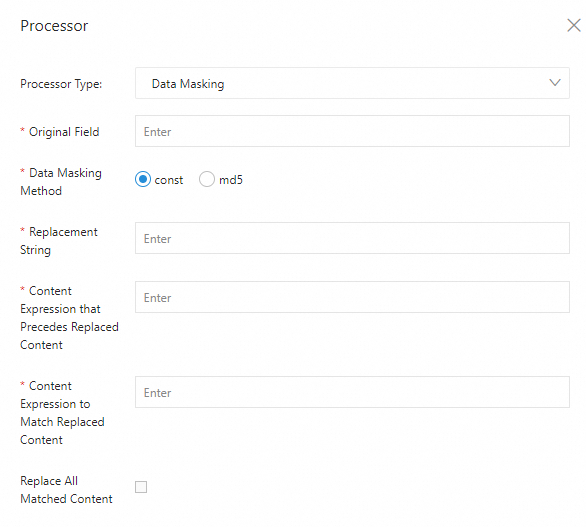
Parsing result
[{'account':'1812213231432969','password':'********'}, {'account':'1812213685634','password':'********'}]
Data masking plugin (extension)
You can use the processor_desensitize plugin to replace sensitive data in logs with a specified string or an MD5 hash. This section describes the parameters and provides an example of the processor_desensitize plugin.
Limits
Form-based configuration: Available when you collect text logs and container standard output.
JSON configuration: Not available when you collect text logs.
Configuration instructions
The processor_desensitize plugin is supported in Logtail 1.3.0 and later.
Form-based configuration
Set Processor Type to Data Masking. The following table describes the parameters.
Parameters
Parameter
Description
Source Field
The name of the log field.
Masking Method
The masking method. Valid values:
String Replacement: Replaces sensitive content with a string. You can specify the destination string in the Replacement String parameter.
md5: Replaces sensitive content with its corresponding MD5 hash.
Sensitive Data Content
The method to extract sensitive content. Valid values:
Full Field: Extracts all content. This replaces all content in the destination field.
Regular Expression: Uses a regular expression to extract sensitive content.
Replacement String
The string that is used to replace the sensitive content.
This parameter is required if you set Masking Method to String Replacement.
Sensitive Content Prefix Regex
The regular expression that matches the prefix of the sensitive content.
This parameter is required if you set Sensitive Data Content to Regular expression.
Sensitive Content Regex
The regular expression that matches the sensitive content.
This parameter is required if you set Sensitive Data Content to Regular expression.
Example
Replace all content in the destination field with a string.
Raw log
"password" : "123abcdefg"Logtail plugin processing configuration
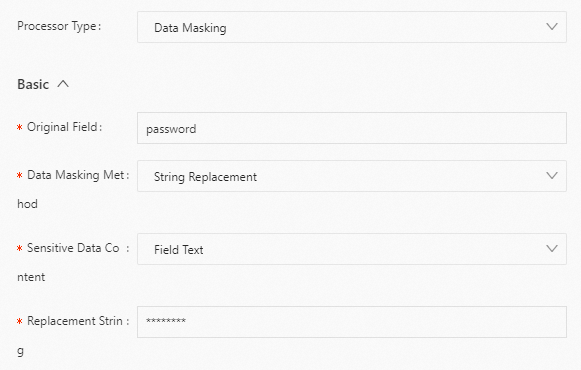
Result
"password":"********"
JSON configuration
Set type to processor_desensitize. The following table describes the parameters in detail.
Parameters
Parameter
Type
Required
Description
SourceKey
String
Yes
The name of the log field.
Method
String
Yes
The masking method. Valid values:
const: Replaces sensitive content with a string. You can specify the destination string in the ReplaceString parameter.
md5: Replaces sensitive content with its corresponding MD5 hash.
Match
String
No
The method to extract sensitive content. Valid values:
full (default): Extracts all content. This replaces all content in the destination field.
regex: Uses a regular expression to extract sensitive content.
ReplaceString
String
No
The string that is used to replace the sensitive content.
This parameter is required if you set Method to const.
RegexBegin
String
No
The regular expression that matches the prefix of the sensitive content.
This parameter is required if you set Match to regex.
RegexContent
String
No
The regular expression that matches the sensitive content.
This parameter is required if you set Match to regex.
Examples
Example 1
Replace all content in the destination field with a string. To do this, set Method to const and Match to full.
Raw log
"password" : "123abcdefg"Logtail plugin processing configuration
{
  "type" : "processor_desensitize",
  "detail" : {
    "SourceKey" : "password",
    "Method" : "const",
    "Match" : "full",
    "ReplaceString": "********"
  }
}
Result
"password":"********"
Example 2
You can use a regular expression to specify the sensitive content in the destination field and replace it with the corresponding MD5 hash. To do this, set Method to md5 and Match to regex.
Raw log
"content" : "[{'account':'1234567890','password':'abc123'}]"Logtail plugin processing configuration
{
   "type" : "processor_desensitize",
   "detail" : {
      "SourceKey" : "content",
      "Method" : "md5",
      "Match" : "regex",
      "RegexBegin": "'password':'",
      "RegexContent": "[^']*"
   }
}
Result
"content":"[{'account':'1234567890','password':'e99a18c428cb38d5f260853678922e03'}]"
Field encryption plugin (extension)
You can use the processor_encrypt plugin to encrypt specified fields. This section describes the parameters and provides an example of the processor_encrypt plugin.
Configuration description
Form-based configuration
Set Processor Type to Field Encryption. The following table describes the parameters.
Parameter | Description |
Source Fields | The source fields to encrypt. You can add multiple fields. |
Key | The encryption key. The key must be a 64-character hexadecimal string. |
Initialization Vector | The initialization vector (IV) for encryption. The IV must be a 32-character hexadecimal string. The default value is |
Save Path | The file path from which to read the encryption parameters. If this parameter is not configured, the file path specified in Input Configuration of the Logtail configuration is used. |
Keep Source Data On Failure | If you select this option and encryption fails, the system retains the original field value. If you do not select this option and encryption fails, the field value is replaced with |
JSON configuration
Set type to processor_encrypt. The following table describes the parameters in detail.
Parameter | Type | Required | Description |
SourceKey | Array of strings | Yes | The names of the source fields. |
EncryptionParameters | Object | Yes | The configurations of the key. |
Key | String | Yes | The encryption key. The key must be a 64-character hexadecimal string. |
IV | String | No | The initialization vector (IV) for encryption. The IV must be a 32-character hexadecimal string. The default value is |
KeyFilePath | Boolean | No | The file path from which to read the encryption parameters. If this parameter is not configured, the file path specified in Input Configuration of the Logtail configuration is used. |
KeepSourceValueIfError | String | No | Specifies whether to retain the original field value if encryption fails.
|
Data encoding and decoding plugin (extension)
You can use the processor_base64_encoding, processor_base64_decoding, or processor_md5 plugin to encode or decode field values. This section describes the parameters and provides examples for each plugin.
Limits
Form-based configuration: Available when you collect text logs and container standard output.
JSON configuration: Not available when you collect text logs.
Base64 encoding
Base64 decoding
MD5 encoding
References
Configure a Logtail pipeline by calling API operations:
GetLogtailPipelineConfig - Obtains the configurations of a Logtail pipeline
ListLogtailPipelineConfig - Lists the configurations of Logtail pipelines
CreateLogtailPipelineConfig - Creates a Logtail pipeline configuration
DeleteLogtailPipelineConfig - Deletes a Logtail pipeline configuration
UpdateLogtailPipelineConfig - Updates a Logtail pipeline configuration
Configure a processing plugin in the console:
Collect container logs (standard output or files) from a cluster using Kubernetes CRDs