Gateway Load Balancer (GWLB) is a load balancer that functions at the third layer (network layer) of the Open Systems Interconnection (OSI) model. It enhances the security and availability of application systems by transparently distributing traffic to different backend servers.
Instance status
The following table describes the different states of a GWLB instance and whether specific operations are supported in each state.
Instance state | State description | Whether instance locked and why | Instance deletion allowed | Instance configuration update allowed |
Running | The instance is running as expected. | N/A | Yes | Yes |
Creating | The instance is being created. | N/A | No | No |
Updating Configuration | The configuration of the instance is being updated. | N/A | No | |
Stopped | The instance stops running. | Locked (Overdue Payment): The instance is locked due to overdue payments. Renew your instance at your earliest opportunity. The instance resumes providing services after it is unlocked. | No |
IP version
GWLB instances support the IPv4 protocol version, which means GWLB supports IPv4 traffic access.
A GWLB instance communicates with backend servers using a private IPv4 address, which is assigned by the subnet where the GWLB instance resides.
Cross-zone forwarding
By default, cross-zone forwarding is enabled. When a GWLB instance receives client traffic, each GWLB instance distributes the traffic among backend servers in all enabled zones within the same region. Currently, the cross-zone forwarding feature cannot be disabled.
Network MTU
The maximum transmission unit (MTU) of a network connection is the size of the largest packet that can be transmitted over the connection. An MTU includes the size of IP headers and payload but excludes the size of Ethernet headers.
GWLB MTU limit:
The maximum packet size supported by GWLB is 1500 bytes. Therefore, any packet exceeding 1500 bytes will be discarded and not transmitted.
MTU settings for network virtual devices:
A GWLB instance encapsulates IP traffic with a Geneve header before forwarding it to a Network Virtual Appliance (NVA). Since this Geneve encapsulation adds 68 bytes of overhead to the original packet, you must ensure the following to properly handle original packets up to 1500 bytes:
Jumbo Frames must be enabled on the ECS instance where the NVA is deployed.
The MTU of the NVA's network interface must be set to at least 1568 bytes.
This MTU value must be configured from within the NVA's image itself. Please consult the appliance's official documentation or your vendor's guide for instructions.
When a GWLB instance encapsulates IP traffic with a Geneve header to forward it to a network virtual device, it adds 68 bytes to the original packet. It is recommended to set the MTU of the network virtual device to at least 1568 bytes (1500 bytes for the original packet size plus 68 bytes for the Geneve header encapsulation) to ensure it can handle packets up to 1500 bytes.
IP fragmentation:
GWLB does not support IP fragmentation. If the original packet size exceeds 1500 bytes, it cannot be fragmented into smaller segments for transmission.
Path MTU Discovery (PMTUD):
GWLB does not generate ICMP messages to indicate fragmentation is needed, so PMTUD is not supported.
Connection idle timeout
The connection idle timeout is the maximum amount of time a network connection can remain idle (without any data being transmitted) before it is closed. For GWLB, the idle timeout behavior depends on the flow scheduling algorithm and the traffic type.
TCP traffic handling
When the flow scheduling algorithm is five-tuple hash:
GWLB actively tracks the state of TCP connections. If a connection remains idle for the duration of the timeout period, the connection is closed. The GWLB instance will then route subsequent packets as a new flow, potentially to a different backend server. Any traffic associated with the closed connection will be dropped.
The idle timeout defaults to 350 seconds. You can customize this value in the listener settings to be anywhere from 60 to 6000 seconds, depending on your business needs.
Properly configuring the TCP connection idle timeout can optimize resource management and connection reliability:
Increasing the idle timeout: This is suitable for scenarios requiring long-lived connections (e.g., financial transactions, database interactions, ERP systems) or to align with the timeout settings of backend NVAs like firewalls. This prevents premature connection termination by GWLB, which could cause service disruptions. Example: If your backend firewall has an idle timeout of 3,600 seconds, you should set the GWLB idle timeout to be slightly higher (e.g., 3,700 seconds).
Decreasing the idle timeout: This is ideal for scenarios with short-lived traffic or where resources need to be released quickly (e.g., bursty requests, infrequently accessed services). This allows for the timely release of inactive connections, reducing resource consumption.
NoteIf GWLB detects that a TCP connection has been actively closed (e.g., with a FIN or RST packet) before the idle timeout is reached, it will immediately remove the connection's state information.
When the flow scheduling algorithm is two-tuple or three-tuple hash:
GWLB identifies flows based on a 2-tuple (source IP, destination IP) or a 3-tuple (source IP, destination IP, protocol) to ensure that packets from the same flow are consistently forwarded to the same backend server. If no data is transmitted during the idle timeout period, the state is cleared. Subsequent packets are then treated as a new flow and may be routed to a different backend server.
The idle timeout is fixed at a default of 350 seconds and cannot be modified.
Non-TCP traffic handling
For non-TCP traffic such as UDP, although it is a connectionless protocol, GWLB still maintains a flow state based on the scheduling algorithm to ensure that packets from the same flow are consistently forwarded to the same backend server. If no data is transmitted during the idle timeout period, the state is cleared, and subsequent packets are treated as a new flow.
The idle timeout for all non-TCP traffic is fixed at 120 seconds and cannot be modified.
Traffic processing mode
By default, the traffic processing mode for a GWLB instance is Load balancing, which means that when GWLB receives traffic from the GWLB endpoint, it forwards the traffic to backend servers for processing.
During network emergencies, network issue diagnostics, or Network Virtual Appliance (NVA) upgrade and maintenance, when the backend NVAs associated with GWLB are unavailable, you can change the traffic processing mode for GWLB to Bypass. In this mode, when GWLB receives traffic from the GWLB endpoint, the traffic is directly returned to the GWLB endpoint without being forwarded to backend NVAs, ensuring that your services are not interrupted.
By default, Traffic Processing Mode is unavailable. To use the feature, contact your account manager to apply for activation.
Traffic processing mode | Load balancing | Bypass |
GWLB behavior | When GWLB receives traffic from the GWLB endpoint, it forwards the traffic to backend servers for processing. | When GWLB receives traffic from the GWLB endpoint, the traffic is directly returned to the GWLB endpoint without being forwarded to backend servers. |
Networking diagram |  |  |
Use scenarios | Default mode. In this mode, third-party firewalls process business traffic properly. | Mainly used during network and third-party firewall maintenance.
|
Remarks | - |
|
Console
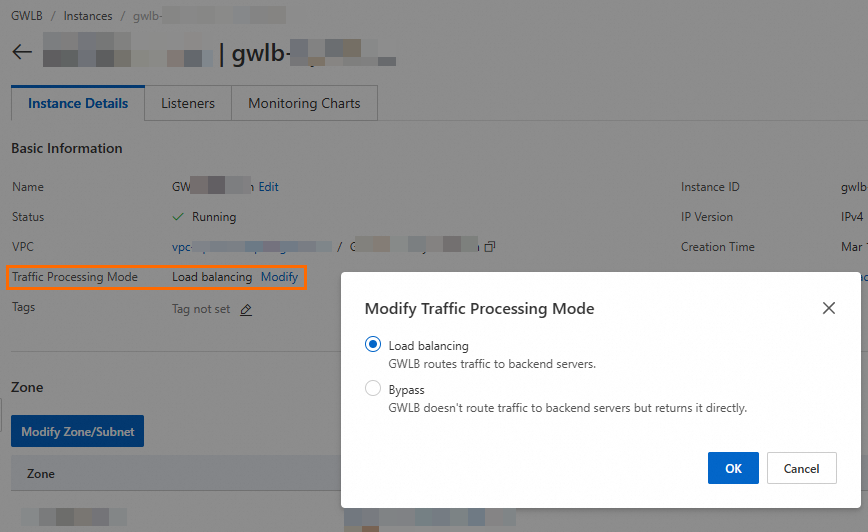
In the GWLB console, on the instance details page, click Modify corresponding to Traffic Processing Mode and switch the traffic processing mode.
API
You can switch the traffic processing mode for GWLB by setting the TrafficMode parameter in the UpdateLoadBalancerAttribute API.
Enumeration values for the TrafficMode parameter:
LoadBalance (default)
ByPass
To query the current traffic processing mode for GWLB, see:
Before you switch GWLB to bypass mode, ensure you understand and accept the risks caused by backend NVAs not working.
Before you switch GWLB to load balancing mode, if business traffic is transmitted over stateful protocols, you must configure backend NVAs (such as firewalls) to work with GWLB to prevent existing connections from being interrupted.
Working principles:
TCP three-way handshakes: A three-way handshake is typically required to establish a TCP connection. This process includes the client sending a SYN segment, the server responding with an SYN-ACK (Synchronize-Acknowledge) segment, and the client sending an ACK (Acknowledge) segment.
When GWLB is in bypass mode, requests are directly forwarded to the service application by GWLB. On the contrary, in load balancing mode, GWLB forwards requests to the backend NVAs for filtering before forwarding them to the service application. In this case, if the backend NVAs require SYN segments to establish or identify a connection, when packets transmitted over existing connections reach the NVAs, their session states cannot be identified. This causes the connections to interrupt but does not affect new connections. If you want to ensure that the existing connections are not interrupted, you must enable TCP sessions without SYN segments on the NVAs.
Example configuration: For FortiGate firewalls, enable
tcp-session-without-synin the firewall policy. For more details, refer to the official documentation provided by your specific firewall vendor.