When multiple ECS instances need to access a Tair (Redis OSS-compatible) instance, you can add security groups to the Tair whitelist. After adding security groups, the Tair instance will allow all associated instances in the security group (such as ECS and Elastic Container Instance) to access it through private IP and public IP addresses.
Procedure
The IP access control takes effect only for instances, such as ECS instances, that are associated with the security group. It is not related to the custom CIDR blocks or IP addresses that are configured in the security group.
The Tair instance must be compatible with Redis 4.0 (latest minor version) or later. For more information about how to upgrade the major version, see Major version upgrade.
Log on to the console and go to the Instances page. In the top navigation bar, select the region in which the instance that you want to manage resides. Then, find the instance and click the instance ID.
In the left-side navigation pane, click Whitelist Settings.
Click the Security Groups tab.
On the Security Groups tab, click Add Security Group.
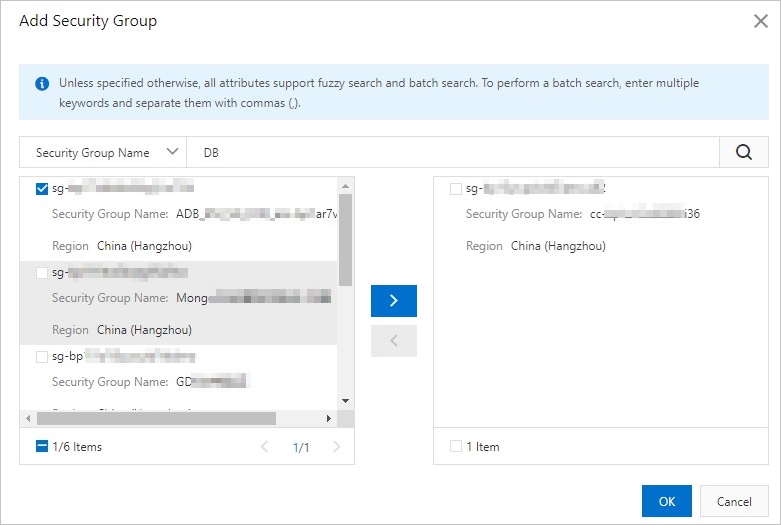
In the dialog box that appears, select the security groups that you want to add as whitelists.
You can use a Security Group Name or Security Group ID to perform fuzzy search.
Figure 3. Add security groups
 Note
NoteYou can add up to 10 security groups as whitelists for each instance.
Click OK.
(Optional) To remove all security groups, click Delete.