Error 1709 occurs when InnoDB's 767-byte index column size limit is exceeded. Fix it by enabling innodb_large_prefix and switching the table to the Dynamic or Compressed row format.
Understand the error
ERROR 1709 (HY000): Index column size too large. The maximum column size is 767 bytes.InnoDB enforces a 767-byte limit on index column size for tables using the Compact or Redundant row format. Multi-byte character sets consume more bytes per character, so long VARCHAR or CHAR columns hit this limit quickly.
The table below shows the maximum indexable column length for common character sets:
| Character set | Bytes per character | Max indexable length (Compact/Redundant) | Max indexable length (Dynamic/Compressed) |
|---|---|---|---|
utf8mb3 | 3 | 255 characters (767 ÷ 3) | 1,024 characters (3,072 ÷ 3) |
utf8mb4 | 4 | 191 characters (767 ÷ 4) | 768 characters (3,072 ÷ 4) |
latin1 | 1 | 767 characters | 3,072 characters |
For example, with utf8mb4, creating an index on a VARCHAR(255) or CHAR(255) column fails because 255 × 4 = 1,020 bytes exceeds the 767-byte limit. See the MySQL documentation for details.
Resolve the error
Resolving the error requires two steps: enabling the innodb_large_prefix parameter, then changing the table's row format to Dynamic or Compressed.
Step 1: Enable innodb_large_prefix
Log on to the ApsaraDB RDS console and go to the Parameters page for your instance.
Set
innodb_large_prefixtoONand click Submit Parameters.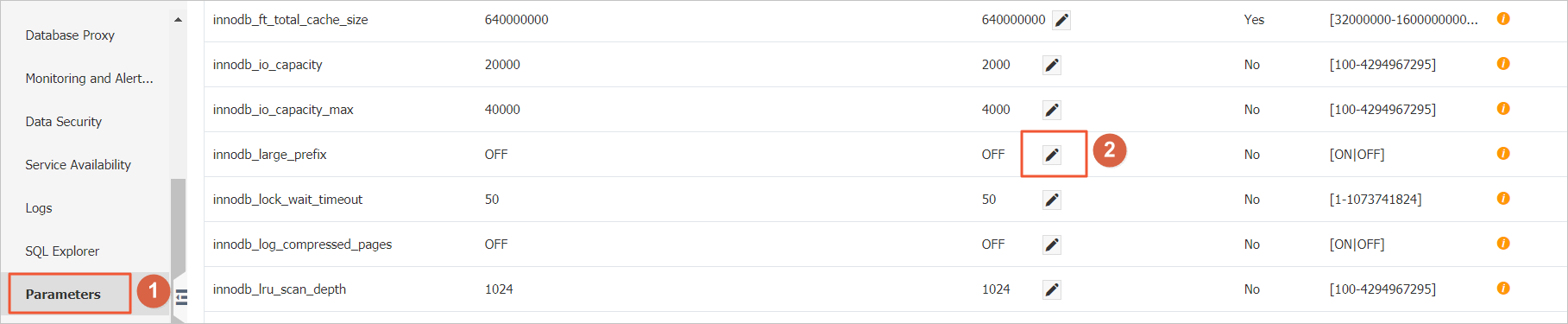
After you enable innodb_large_prefix, InnoDB tables in Dynamic and Compressed row formats support index column sizes up to 3,072 bytes. The parameter change is automatically synchronized to all read-only instances under the primary instance.
Step 2: Set the table row format to Dynamic or Compressed
For new tables, specify ROW_FORMAT=DYNAMIC or ROW_FORMAT=COMPRESSED in the CREATE TABLE statement:
CREATE TABLE idx_length_test_02 (
    id   INT AUTO_INCREMENT PRIMARY KEY,
    name VARCHAR(255)
) ROW_FORMAT=DYNAMIC DEFAULT CHARSET=utf8mb4;
For existing tables, alter the row format with one of the following statements:
ALTER TABLE <table name> ROW_FORMAT=DYNAMIC;
ALTER TABLE <table name> ROW_FORMAT=COMPRESSED;
After both steps are complete, retry creating the index to confirm the error is resolved.