This topic provides guidelines for new users to test the performance of an ApsaraDB RDS for MySQL instance and submit a test report. After you submit a test report, you can receive additional discounts for instance renewal. If your test report is rated excellent, you are offered with substantial incentives from Alibaba Cloud.
Prerequisites
- An ApsaraDB RDS for MySQL instance is created in the ApsaraDB for RDS console. For more information, see Create an ApsaraDB RDS for MySQL instance.
- An ECS instance is created. For more information, see Create an instance by using the wizard.
Background information
ApsaraDB RDS for MySQL test activities.
The following performance metrics are tested:
- Transactions per second (TPS)
The number of transactions that are executed by the RDS instance per second. A transaction is executed only after it is committed.
- Use SysBench to test the performance of online transactional processing (OLTP) for executing a read/write transaction that consists of 18 read and write SQL statements.
- Use SysBench to test the performance of OLTP for executing a read-only transaction that consists of 14 read SQL statements: 10 SQL statements are used to query data based on primary keys and 4 SQL statements are used to query data based on specified ranges.
- Use SysBench to test the performance of OLTP for executing a write-only transaction that consists of four write SQL statements: two UPDATE statements, one DETELE statement, and one INSERT statement.
- Queries per second (QPS)
The number of SQL statements that are executed by the RDS instance per second. These SQL statements include INSERT, SELECT, UPDATE, DETELE, and COMMIT.
SysBench parameters
| Parameter | Description |
| db-driver | The database engine that the RDS instance runs. |
| mysql-host | The endpoint used to connect to the RDS instance. |
| mysql-port | The port used to connect to the RDS instance. |
| mysql-user | The username of the account used to manage the RDS instance. |
| mysql-password | The password of the account used to manage the RDS instance. |
| mysql-db | The name of the RDS instance |
| table_size | The size of tables used for the test. |
| tables | The number of tables used for the test. |
| events | The number of requests sent for the test. |
| time | The time taken for the test. |
| threads | The number of threads invoked for the test. |
| percentile | The percentage of execution durations that you want to analyze for the test to obtain an average execution duration. The default value is 95%. It allows you to obtain the average time that is required to execute a request for 95% of all the scenarios. |
| report-interval | The time interval at which you want to generate a test progress report. The value 0 specifies not to generate test progress reports but only to generate a final test report. |
| skip-trx | Specifies whether to skip transactions. Valid values:
|
Test procedure
- Log on to your ECS instance and run the following commands to install SysBench:
sudo yum install gcc gcc-c++ autoconf automake make libtool mysql-devel git mysql git clone https://github.com/akopytov/sysbench.git ## Download the SysBench software package from GitHub. cd sysbench ## Open the SysBench installation directory. git checkout 1.0.18 ## Switch to SysBench 1.0.18. ./autogen.sh ## Execute the autogen.sh script. ./configure --prefix=/usr --mandir=/usr/share/man make ## Compile SysBench. make install - Test the performance of OLTP for executing read/write, read-only, and write-only transactions.
- Test the performance of OLTP for executing read/write transactions.
Run the following commands to perform the test (for more information, see SysBench parameters):
##Prepare the data used for the test.
sysbench --db-driver=mysql --mysql-host=XXX --mysql-port=XXX --mysql-user=XXX --mysql-password=XXX --mysql-db=sbtest --table_size=25000 --tables=100 --events=0 --time=300  --threads=XXX oltp_read_write prepare

##Run your workload.
sysbench --db-driver=mysql --mysql-host=XXX --mysql-port=XXX --mysql-user=XXX --mysql-password=XXX --mysql-db=sbtest --table_size=25000 --tables=100 --events=0 --time=300   --threads=XXX --percentile=95 --report-interval=1 oltp_read_write run

##Delete the data used for the test.
sysbench --db-driver=mysql --mysql-host=XXX --mysql-port=XXX --mysql-user=XXX --mysql-password=XXX --mysql-db=sbtest --table_size=25000 --tables=100 --events=0 --time=300   --threads=XXX --percentile=95  oltp_read_write cleanup
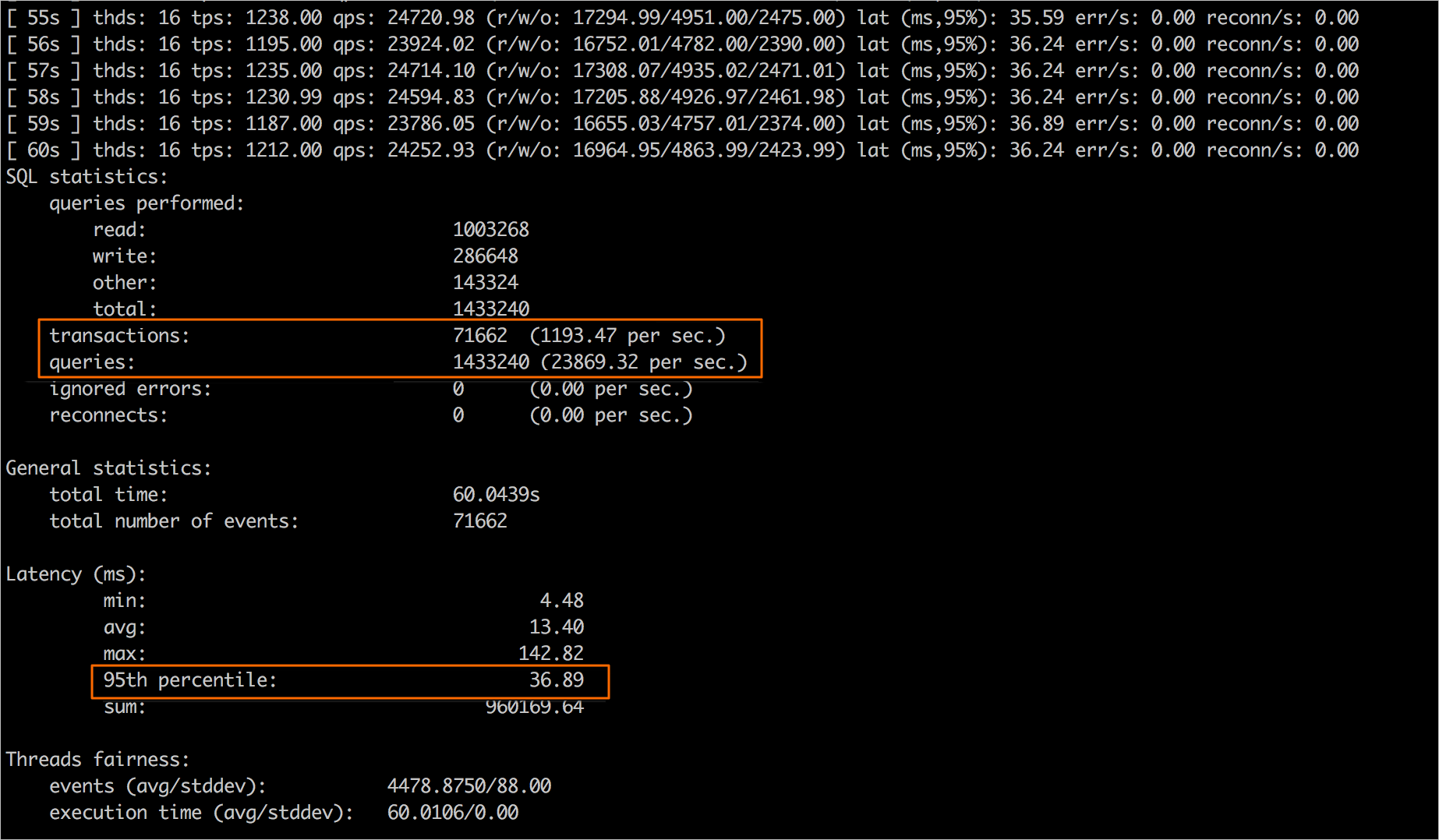
Sample test results:
- QPS: 23869.32
- TPS: 1193.47
- Response time (RT): 36.89 ms
- Test the performance of OLTP for executing read-only transactions.
Run the following commands to perform the test (for more information, see SysBench parameters):
##Prepare the data used for the test.
sysbench --db-driver=mysql --mysql-host=XXX --mysql-port=XXX --mysql-user=XXX --mysql-password=XXX --mysql-db=sbtest --table_size=25000 --tables=100 --events=0 --time=300  --threads=XXX  oltp_read_only prepare

##Run your workload.
sysbench --db-driver=mysql --mysql-host=XXX --mysql-port=XXX --mysql-user=XXX --mysql-password=XXX --mysql-db=sbtest --table_size=25000 --tables=100 --events=0 --time=300  --threads=XXX --percentile=95 --skip-trx=1 --report-interval=1 oltp_read_only run

##Delete the data used for the test.
sysbench --db-driver=mysql --mysql-host=XXX --mysql-port=XXX --mysql-user=XXX --mysql-password=XXX --mysql-db=sbtest --table_size=25000 --tables=100 --events=0 --time=300   --threads=XXX --percentile=95 oltp_read_only cleanup
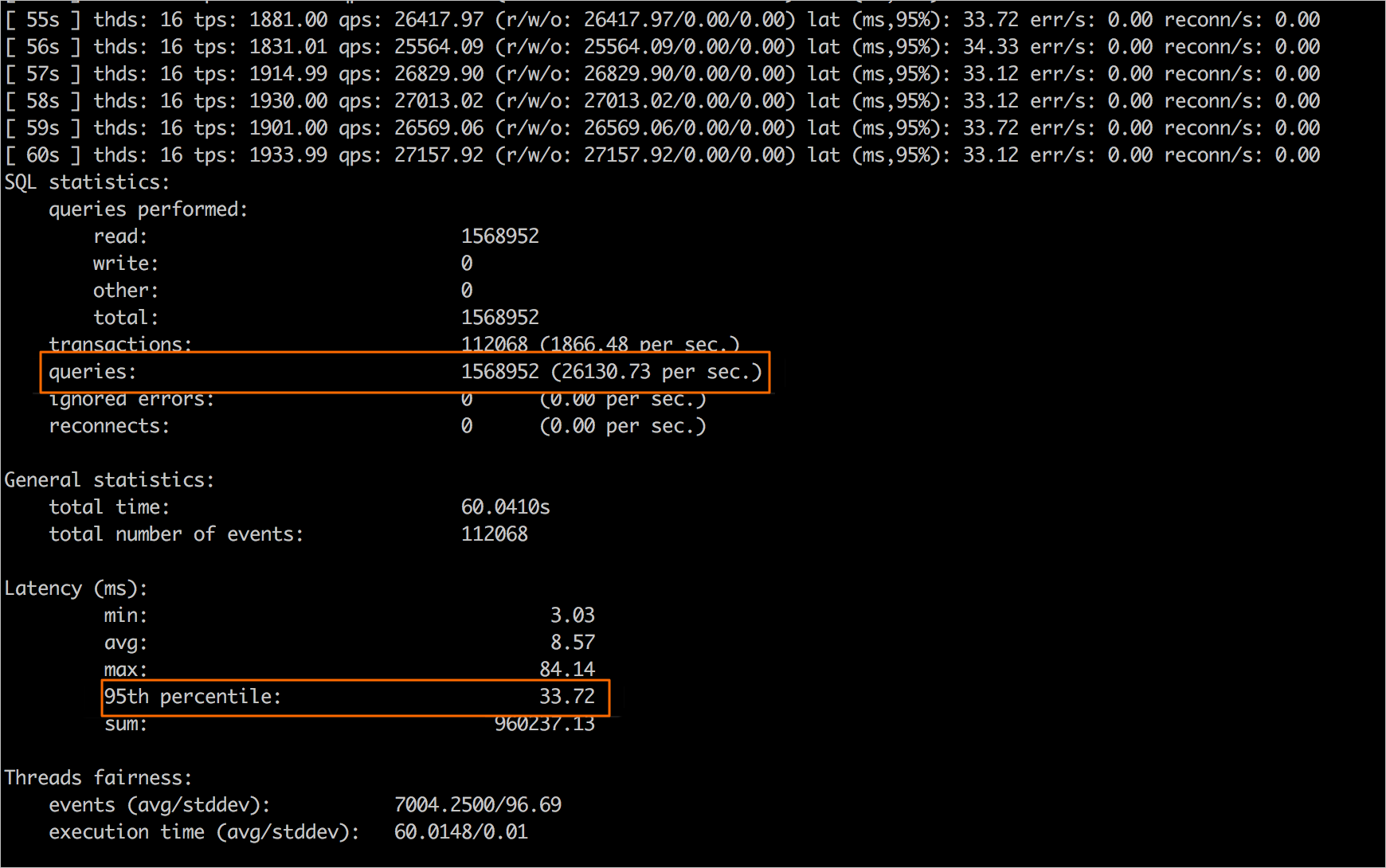
Sample test results:
- QPS: 26130.73
- RT: 33.72 ms
- Test the performance of OLTP for executing write-only transactions.
Run the following commands to perform the test (for more information, see SysBench parameters):
##Prepare the data used for the test.
sysbench --db-driver=mysql --mysql-host=XXX --mysql-port=XXX --mysql-user=XXX --mysql-password=XXX --mysql-db=sbtest --table_size=25000 --tables=100 --events=0 --time=300  --threads=XXX  oltp_write_only prepare

##Run your workload.
sysbench --db-driver=mysql --mysql-host=XXX --mysql-port=XXX --mysql-user=XXX --mysql-password=XXX --mysql-db=sbtest --table_size=25000 --tables=100 --events=0 --time=300   --threads=XXX --percentile=95 --report-interval=1 oltp_write_only run

##Delete the data used for the test.
sysbench --db-driver=mysql --mysql-host=XXX --mysql-port=XXX --mysql-user=XXX --mysql-password=XXX --mysql-db=sbtest --table_size=25000 --tables=100 --events=0 --time=300   --threads=XXX --percentile=95  oltp_write_only cleanup
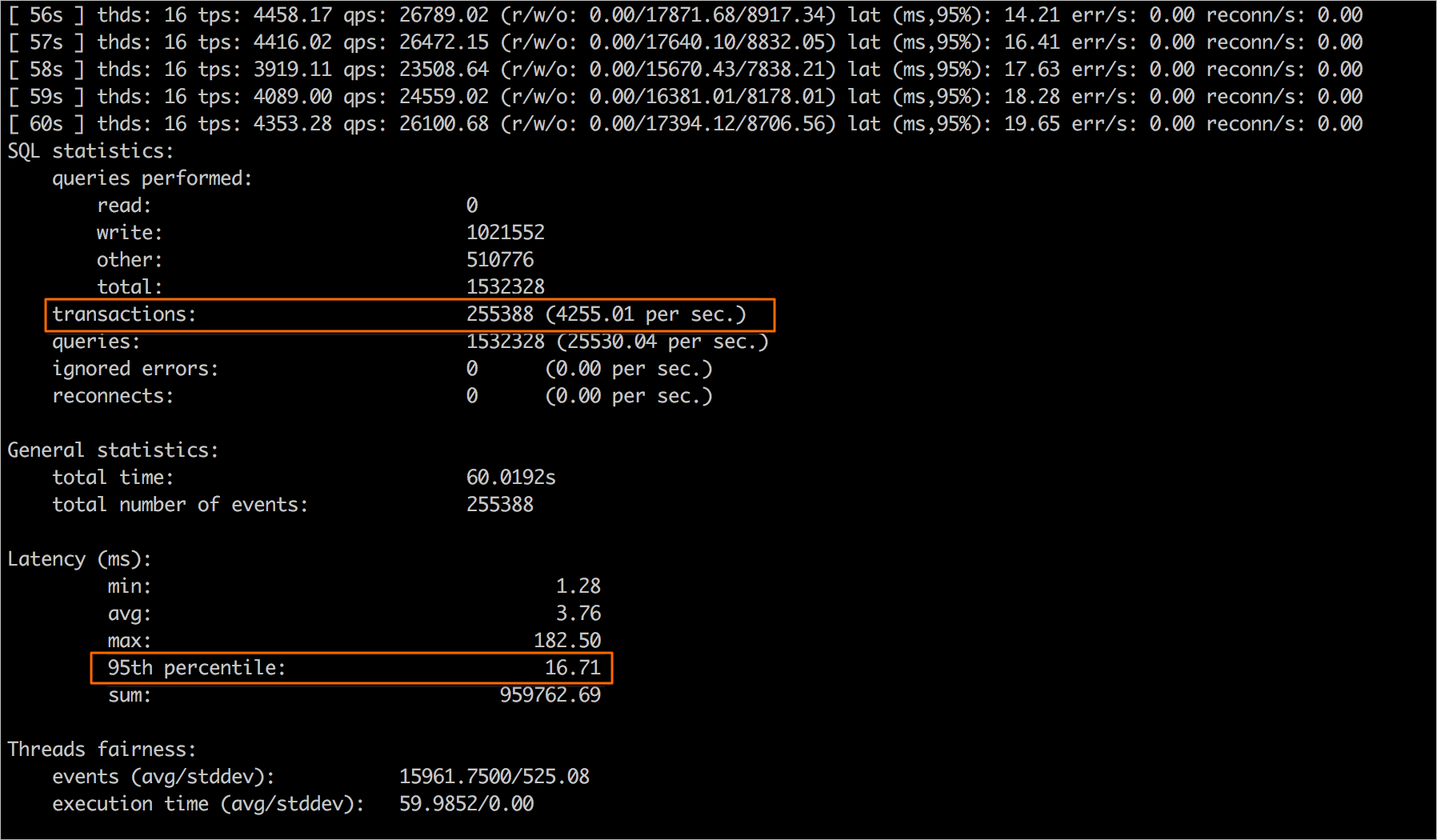
Sample test results:
- TPS: 4255.01
- RT: 16.71 ms
- Test the performance of OLTP for executing read/write transactions.
- Download the ApsaraDB RDS for MySQL performance test report template, prepare your own test report based on the template, and then submit your test report.