This topic describes how to use the get_rds_backup.py tool to download ApsaraDB RDS for MySQL backup files to a local server. You can specify a custom time range. By default, the tool downloads the previous day's backup files.
A reminder from Alibaba Cloud:
Before you perform high-risk operations such as modifying the configurations or data of your instances, we recommend that you check the disaster recovery and fault tolerance capabilities of the instances to ensure data security.
Before you modify the configurations or data of an instance, such as an Elastic Compute Service (ECS) instance or an ApsaraDB RDS instance, we recommend that you create snapshots or enable backup for the instance. For example, you can enable log backup for an ApsaraDB RDS instance.
If you have granted permissions on sensitive information or submitted sensitive information in the Alibaba Cloud Management Console, we recommend that you modify the sensitive information at the earliest opportunity. Sensitive information includes usernames and passwords.
Prerequisites
Storage class of the ApsaraDB RDS for MySQL instance: High-performance local disk. Cloud disks are not supported.
Python environment: Python 3.7 or later.
Operating system: The script is compatible with Linux, Windows, and other operating systems that support Python 3.7 or later.
Procedure
On your local server, install Python 3.7 or later and the ApsaraDB RDS SDK for Python. Run the following command to install the ApsaraDB RDS SDK for Python. For more information, see ApsaraDB RDS SDK for Python Reference.
# Install the RDS SDK (API version 2014-08-15)
pip install alibabacloud_rds20140815
Make sure that your local server can access the public endpoint of the RDS instance.
NoteIf the RDS instance does not have a public endpoint, apply for one.
If a whitelist is not configured, configure an IP whitelist.
Download the get_rds_backup.py script file to your local server.
NoteAfter you download the script, you must specify the RDS instance ID, AccessKey secret, and backup directory in the script. The locations where you need to enter this information are indicated by comments in the script.
Run the following command to execute the get_rds_backup.py script file:
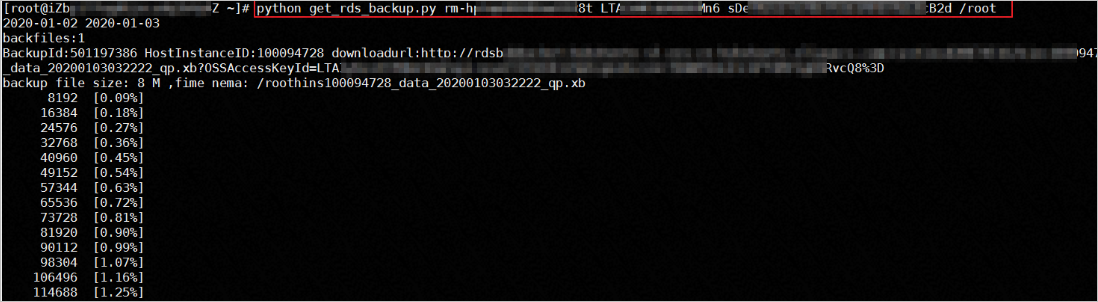
python get_rds_backup.py [$RDS_ID] [$Access_Key_ID] [$Access_Key_Secret] [$Backup_Dir]Note[$RDS_ID]: The ID of the target RDS instance. You can find the ID on the Basic Information page of the instance. Example:rm-hp38****2i07.[$Access_Key_ID]: The AccessKey ID of your Resource Access Management (RAM) user. If you do not have a RAM user, create one.[$Access_Key_Secret]: The AccessKey secret of your RAM user.[$Backup_Dir]: The directory on your local server where you want to save the backup files. Make sure that the directory has sufficient disk space to prevent download failures.By default, the script downloads the previous day's backup files. To change the time range, modify the values of the starttime and endtime variables in the script.
The following figure shows an sample output.
References
Applicable scope
ApsaraDB RDS for MySQL