PolarDB is a next-generation cloud native database developed in-house by Alibaba Cloud. Built on a compute-storage decoupled architecture, it combines the strengths of integrated hardware and software to deliver database services with second-level elasticity, high performance, massive storage capacity, and secure, reliable operation. PolarDB for PostgreSQL Enterprise Edition is 100% compatible with multiple versions of native PostgreSQL, including PostgreSQL 11, 14, 15, 16, and 17. Based on the Cloud Native design philosophy, it combines the stability, reliability, high performance, and scalability of commercial databases with the simplicity, openness, and rapid iteration of open source cloud databases.
What is PolarDB for PostgreSQL Enterprise Edition
PolarDB for PostgreSQL Enterprise Edition uses an architecture that separates compute and storage. All compute nodes share a single copy of data, which delivers minute-level configuration upgrades and downgrades, second-level fault recovery, global data consistency, and free data backup and disaster recovery services.
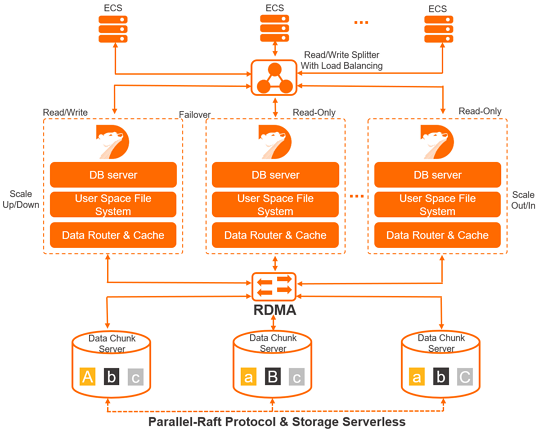
PolarDB for PostgreSQL Enterprise Edition has a product architecture with the following features:
One primary node and multiple read-only nodes
PolarDB uses a multi-node cluster architecture. A cluster contains one primary node and up to 15 read-only nodes. The primary node handles read and write requests, and the read-only nodes handle read requests only. The primary node and the read-only nodes use active-active failover to provide high availability (HA) for the database.
Read/write splitting is a transparent, highly available, and adaptive load balancing capability that PolarDB provides at no charge by default. The cluster endpoint automatically forwards SQL requests to the nodes of PolarDB, which provides aggregated, high-throughput concurrent SQL processing.
Compute-storage decoupling
PolarDB adopts a compute-storage decoupled design philosophy, which meets the strict requirement to elastically scale a cluster based on business growth in a public cloud computing environment.
The compute nodes of the database (Database Engine Server) store only metadata, while data files and redo logs are stored on remote storage nodes (Database Storage Server). The compute nodes need to synchronize only the metadata related to redo logs, which significantly reduces the replication delay between the primary node and the read-only nodes. In addition, when the primary node fails, a read-only node can quickly be promoted to the primary node.
High-speed link interconnection
The compute nodes and the storage nodes of the database are interconnected over a high-speed network, and data is transferred over an RDMA network, so that I/O performance is no longer a bottleneck.
Shared distributed storage
Multiple compute nodes share a single copy of data instead of each compute node storing its own copy, which significantly reduces storage costs. Based on the newly built distributed block storage (Distributed Storage) and file system (Distributed Filesystem), storage capacity scales smoothly online. It is not limited by the capacity of a single database server and can handle hundreds of TB of data.
Multiple data replicas and the Parallel-RAFT protocol
Data on the database storage nodes is stored in multiple replicas to ensure data reliability, and the Parallel-RAFT protocol ensures data consistency.
Why choose PolarDB for PostgreSQL Enterprise Edition
Easy to use
PolarDB for PostgreSQL Enterprise Edition is fully compatible with PostgreSQL. Your code and applications require no modifications or only minor modifications.
Reduced costs
Decoupled compute nodes and storage: Multiple compute nodes share the same storage. When you add a read-only node, you pay only for the compute node, which significantly reduces the cost of scaling out.
Serverless storage: You do not need to manually configure the storage space. It automatically scales based on the data volume, and you pay only for the database capacity that you actually use.
Extreme performance
The database kernel is deeply optimized and uses physical replication, an RDMA high-speed network, and distributed shared storage to significantly improve performance.
A cluster contains one primary node and up to 15 read-only nodes, which meets the performance requirements of high-concurrency workloads and is especially suitable for read-heavy workloads.
In a shared-storage cluster with one primary node and multiple read-only nodes, data needs to be modified only once, and the change takes effect on all nodes immediately.
OLTP performance is significantly improved. More than 500,000 read requests per second and more than 150,000 write requests per second are supported.
Massive storage capacity that supports hundreds of TB of data
The distributed block storage design and file system ensure that the storage capacity is not limited by the specifications of a single node and can be easily scaled. A single cluster supports up to 500 TB of storage space by default.
PolarStore (PSL4/PSL5) supports petabyte-level storage. If you have such requirements, Contact us to reserve the required resources.
High availability, high reliability, and data security
The shared distributed storage design eliminates the risk of inconsistent secondary database data caused by asynchronous replication in a primary-secondary architecture. This ensures zero data loss for the entire database cluster when any single point of failure occurs.
The multi-zone architecture keeps data backups in multiple zones, which provides disaster recovery and backup for the database.
The cluster endpoint uses the LSN (Log Sequence Number) to ensure global consistency when data is read, which avoids inconsistencies caused by replication delay between the primary and secondary nodes.
Redo-based physical replication is used instead of WAL-based streaming replication, which improves the efficiency and stability of replication between the primary and secondary nodes. Even DDL operations such as adding indexes or columns to a large table do not cause database delays.
Comprehensive measures such as a whitelist, VPC networks, and multi-replica data storage secure every stage of database data access, storage, and management.
Rapid elasticity to handle uncertain business growth
Configuration upgrades and downgrades take effect in 5 minutes.
Container virtualization and shared distributed block storage technologies enable the CPU and memory of the database server to be scaled out quickly.
Adding or removing nodes takes effect in 5 minutes.
You can improve performance or reduce costs by dynamically adding or removing nodes. The cluster endpoint masks the underlying changes, so that your applications are unaware of nodes being added or removed.
Lock-free backup
The snapshot technology of the underlying distributed storage backs up a database with terabytes of data in minutes. The entire backup process requires no locking, which improves efficiency and reduces the impact.
How to use PolarDB for PostgreSQL Enterprise Edition
You can manage a PolarDB for PostgreSQL Enterprise Edition cluster in the following ways, including creating clusters, creating databases, and creating accounts.
Console: Provides a graphical web interface that is easy to use.
CLI: You can use the command-line interface (CLI) to complete all operations in the console.
SDK: You can use the software development kit (SDK) to complete all operations in the console.
API: You can use the API to complete all operations in the console.
After you create a PolarDB for PostgreSQL Enterprise Edition cluster, you can connect to the cluster in the following ways:
DMS: You can connect to a PolarDB cluster by using DMS to develop databases in the web interface.
Client: You can use a common database client tool to connect to a PolarDB cluster. For example, you can use pgAdmin.