The LLM-Clean Special Content (MaxCompute) component strips boilerplate and noise from raw text—navigation breadcrumbs, author metadata, timestamps, URLs, non-printable characters, and HTML markup—before you use the text as large language model (LLM) training data. It runs on MaxCompute resources and integrates with Machine Learning Designer in the Platform for AI (PAI) console.
Limitations
LLM-Clean Special Content (MaxCompute) supports only MaxCompute resources.
How it works
The component processes text in the following order:
-
Splits text into lines using line breaks.
-
Removes navigation information.
-
Removes author information.
-
Removes source information (first five lines only).
-
Removes URLs.
-
Removes non-printable characters.
-
Parses and cleans HTML markup.
Steps 3 and 4 are order-dependent. If navigation and author information are removed in steps 2 and 3, the "first five lines" in step 4 are counted from the remaining text, not the original text.
The following table describes how each operation identifies and removes content:
| Operation | Trigger type | Trigger condition | Scope |
|---|---|---|---|
| Remove navigation information | Keywords | 'Homepage>', 'Homepage»', 'Homepage/', 'Homepage|' |
Full text |
| Regex | 'Current location:.*[>]{1,}', 'Location:.*[>]{1,}' |
Full text | |
| Remove author information | Keywords + special characters | Line contains one of the keywords and at least one of . ? ! ; : . ? ! ; , , ! |
Full text |
| Remove source information | Regex | r'(\d{4}[-/year]\d{1,2}[-/month]\d{1,2}[day]{0,}\s\d{1,2}:\d{1,2}:\d{1,2})' |
First 5 lines |
| Regex | r'\d{4}[-/]\d{1,2}[-/]\d{1,2}.*[Source: | Edit:]' |
First 5 lines | |
| Remove URLs | Regex | r'(https?|http)?:\/\/[\w\.\/\?\=\&\%\-\_]+' |
Full text |
| Remove non-printable characters | Regex | '[\001\002\003\004\005\006\007\x08\x09\x0b\x0c\x0d\x0e\x0f\x10\x11\x12\x13\x14\x15\x16\x17\x18\x19\x1a]+' |
Full text |
| Parse HTML markup | Tag replacement | Replaces <li> and <ol> with \n*, removes </li> and </ol>, then parses the HTML |
Full text |
Author information keywords
The author information removal step matches lines that contain one of the following keywords and at least one special character:
'Newspaper reporter', 'Source:', 'Edit:', 'Login | Register', 'Address of this topic:', 'Date of publication:', 'Addition time:', 'Share to:', '"Scan"', 'Related links:', 'Lottery', 'Website navigation', '| Contact us', 'Homepage', 'Current location:', 'Published at', 'Location: '
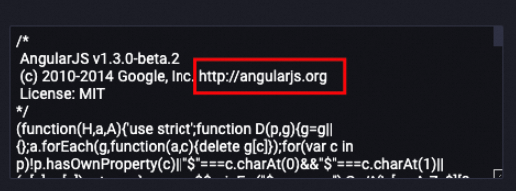
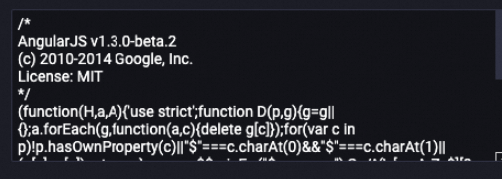
Example: URL removal
The following example shows a text snippet before and after URL removal.
Before processing:
After processing:
Configure the component
Configure the following parameters in Machine Learning Designer in the PAI console.
| Tab | Parameter | Required | Description | Default value |
|---|---|---|---|---|
| Fields Setting | Select Target Column | Yes | The columns to process. Select one or more columns. | No default value |
| Output table lifecycle | No | The retention period for temporary tables generated by the component, in days. Valid values: positive integers. After the lifecycle period elapses, the temporary tables are recycled. | 28 | |
| Tuning | Number of CPUs per instance of map task | No | The number of CPUs for each map task instance. Valid values: [50, 800]. | 100 |
| The memory size per instance of map task | No | The memory size for each map task instance. Unit: MB. Valid values: [256, 12288]. | 1024 | |
| The maximum size of input data for a map | No | The maximum amount of input data that each map task instance processes. Unit: MB. Valid values: [1, Integer.MAX_VALUE]. | 256 |