Object Storage Service (OSS) provides two ways to calculate the total storage size of objects under a specific key prefix: bucket inventory and object listing. Use inventory for large-scale or recurring queries; use object listing for small buckets or one-off checks.
Choose a method
| Method | How it works | Use when |
|---|---|---|
| Bucket inventory | Generates a daily CSV report listing objects and their metadata, filtered by prefix | Your bucket contains a large number of objects (for example, 10 billion), or you need recurring storage usage reports |
| Object listing | Issues a ListObjects API call to retrieve objects matching a prefix in real time | Your bucket contains a small number of objects (for example, thousands), or you need an immediate, one-off check |
Use bucket inventory
The following example shows how to calculate the total storage size of objects with the bill/ key prefix by exporting an inventory list.
Step 1: Configure an inventory
On the Buckets page of the OSS console, click the target bucket.
In the left-side navigation pane, choose Data Management > Bucket Inventory.
On the Bucket Inventory page, click Create Inventory.
In the Create Inventory panel, configure the following parameters, keep the defaults for all other parameters, and click OK.
Parameter Value Description Rule Name inventory001A unique name for this inventory rule Inventory Storage Bucket Select a bucket in the current region The destination bucket that stores the generated inventory CSV files. It must be in the same region and under the same Alibaba Cloud account Frequency Daily How often OSS generates the inventory list Optional Fields Object Size The metadata fields to include in the inventory. Select Object Size to include each object's size in bytes Object Prefix bill/OSS includes only objects whose keys start with this prefix 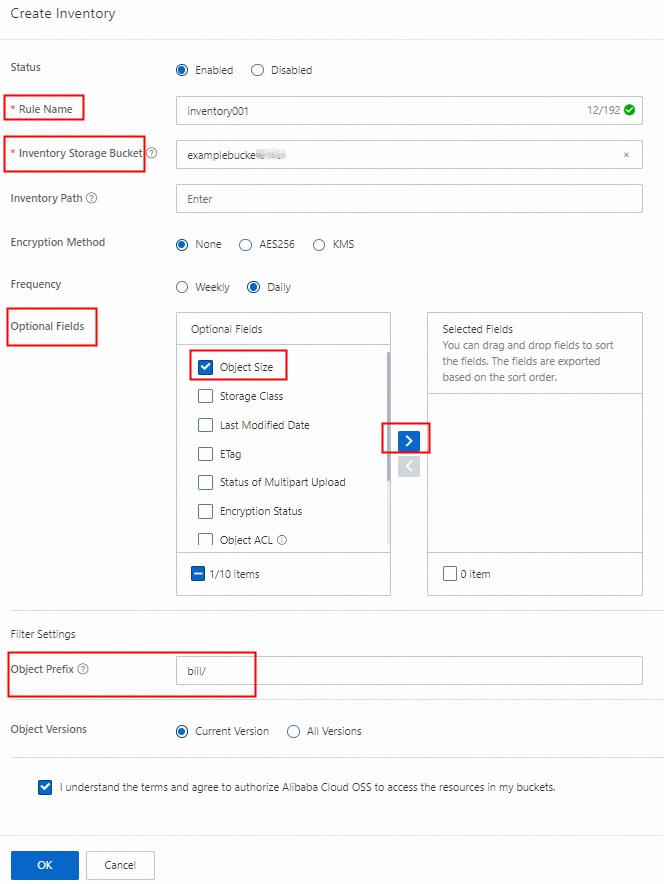
Step 2: Calculate the total storage size
After the first inventory list is generated:
In the OSS console, go to the Objects page and navigate to the
{bucketName}/{inventoryName}/data/path.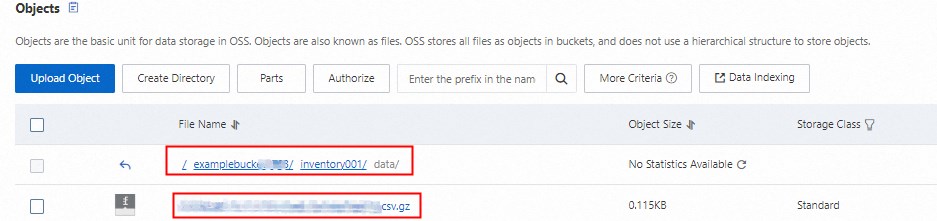
Click
 > Download to download the inventory file (named with a
 .csv.gzsuffix), then decompress it.Open the CSV file and sum the values in column C. The total is the storage size of all objects with the
bill/prefix, in bytes.
Step 3: Delete the inventory (optional)
Inventory lists are stored as objects in the destination bucket and incur storage charges. If you only need a one-time result, delete the inventory rule after you get the first list.

List objects
Use OSS SDKs
The following examples use ListObjects to iterate over all objects with a specific key prefix and sum their sizes. Both examples read access credentials from environment variables — set OSS_ACCESS_KEY_ID and OSS_ACCESS_KEY_SECRET before running.
Java
import com.aliyun.oss.*;
import com.aliyun.oss.common.auth.CredentialsProviderFactory;
import com.aliyun.oss.common.auth.EnvironmentVariableCredentialsProvider;
import com.aliyun.oss.common.comm.SignVersion;
import com.aliyun.oss.model.*;

import java.util.List;

public class Demo {
    public static void main(String[] args) throws Exception {
        // Replace with the endpoint for your bucket's region.
        // Example: https://oss-cn-hangzhou.aliyuncs.com
        String endpoint = "https://oss-cn-hangzhou.aliyuncs.com";
        // Replace with the region ID that matches the endpoint. Example: cn-hangzhou
        String region = "cn-hangzhou";
        // Credentials are read from OSS_ACCESS_KEY_ID and OSS_ACCESS_KEY_SECRET
        EnvironmentVariableCredentialsProvider credentialsProvider =
                CredentialsProviderFactory.newEnvironmentVariableCredentialsProvider();

        String bucketName = "examplebucket";
        String keyPrefix = "bill/";

        ClientBuilderConfiguration clientBuilderConfiguration = new ClientBuilderConfiguration();
        // Use V4 signature algorithm
        clientBuilderConfiguration.setSignatureVersion(SignVersion.V4);
        OSS ossClient = OSSClientBuilder.create()
                .endpoint(endpoint)
                .credentialsProvider(credentialsProvider)
                .clientConfiguration(clientBuilderConfiguration)
                .region(region)
                .build();

        long totalSize = 0L;

        try {
            ObjectListing objectListing = null;
            do {
                // List top-level objects and subdirectories under the prefix
                ListObjectsRequest request = new ListObjectsRequest(bucketName)
                        .withDelimiter("/")
                        .withPrefix(keyPrefix);
                if (objectListing != null) {
                    request.setMarker(objectListing.getNextMarker());
                }
                objectListing = ossClient.listObjects(request);

                // Recursively calculate the size of each subdirectory
                List<String> folders = objectListing.getCommonPrefixes();
                for (String folder : folders) {
                    long folderSize = calculateFolderLength(ossClient, bucketName, folder);
                    totalSize += folderSize;
                    System.out.println(folder + " : " + (folderSize / 1024) + " KB");
                }

                // Add the size of objects directly under the prefix
                List<OSSObjectSummary> sums = objectListing.getObjectSummaries();
                for (OSSObjectSummary s : sums) {
                    totalSize += s.getSize();
                    System.out.println(s.getKey() + " : " + (s.getSize() / 1024) + " KB");
                }
            } while (objectListing.isTruncated());

            System.out.println("Total size: " + (totalSize / 1024) + " KB");
        } catch (OSSException oe) {
            System.out.println("OSS error — " + oe.getErrorMessage());
            System.out.println("Error code: " + oe.getErrorCode());
            System.out.println("Request ID: " + oe.getRequestId());
            System.out.println("Host ID: " + oe.getHostId());
        } catch (ClientException ce) {
            System.out.println("Client error — " + ce.getMessage());
        } finally {
            if (ossClient != null) {
                ossClient.shutdown();
            }
        }
    }

    // Calculate the total storage size of objects with the specified key prefix.
    // MaxKeys defaults to 100; the maximum value is 1000.
    private static long calculateFolderLength(OSS ossClient, String bucketName, String folder) {
        long size = 0L;
        ObjectListing objectListing = null;
        do {
            ListObjectsRequest request = new ListObjectsRequest(bucketName)
                    .withPrefix(folder)
                    .withMaxKeys(1000);
            if (objectListing != null) {
                request.setMarker(objectListing.getNextMarker());
            }
            objectListing = ossClient.listObjects(request);
            List<OSSObjectSummary> sums = objectListing.getObjectSummaries();
            for (OSSObjectSummary s : sums) {
                size += s.getSize();
            }
        } while (objectListing.isTruncated());
        return size;
    }
}
Python
# -*- coding: utf-8 -*-
import oss2
from oss2.credentials import EnvironmentVariableCredentialsProvider

# Credentials are read from OSS_ACCESS_KEY_ID and OSS_ACCESS_KEY_SECRET
auth = oss2.ProviderAuth(EnvironmentVariableCredentialsProvider())

# Replace with the endpoint and bucket name for your region
bucket = oss2.Bucket(auth, 'https://oss-cn-hangzhou.aliyuncs.com', 'examplebucket')

prefix = 'bill/'

def calculate_storage_size(prefix):
    total_size = 0
    # ObjectIterator handles pagination automatically
    for obj in oss2.ObjectIterator(bucket, prefix=prefix):
        total_size += obj.size
    return total_size

if __name__ == "__main__":
    size = calculate_storage_size(prefix)
    print(f'Total size of objects with prefix "{prefix}": {size} bytes')
Use ossutil
You can query the total storage size of objects with a specific key prefix by using ossutil. For more information, see du.