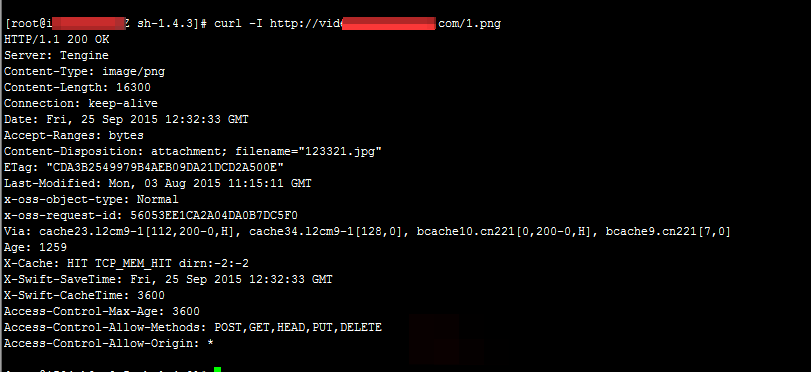
This topic describes the causes of and solutions to the issue that Object Storage Service (OSS) resources accelerated by Alibaba Cloud CDN cannot be accessed by using CDN-accelerated domain names after you configure CORS rules.
Problem description
After you configure a cross-origin resource sharing (CORS) rule in the OSS console, you fail to access OSS resources by using CDN-accelerated domain names.
Causes
-
Points of presence (POPs) of Alibaba Cloud CDN have cached original response headers before CORS is configured. As a result, a cross-origin request fails because the browser receives the expired response headers.
-
You did not set CDN-accelerated domain names as allowed origins, or did not specify valid custom request headers or HTTP methods, such as GET, POST, and DELETE.
Solutions
-
Log on to the Alibaba Cloud CDN console.
-
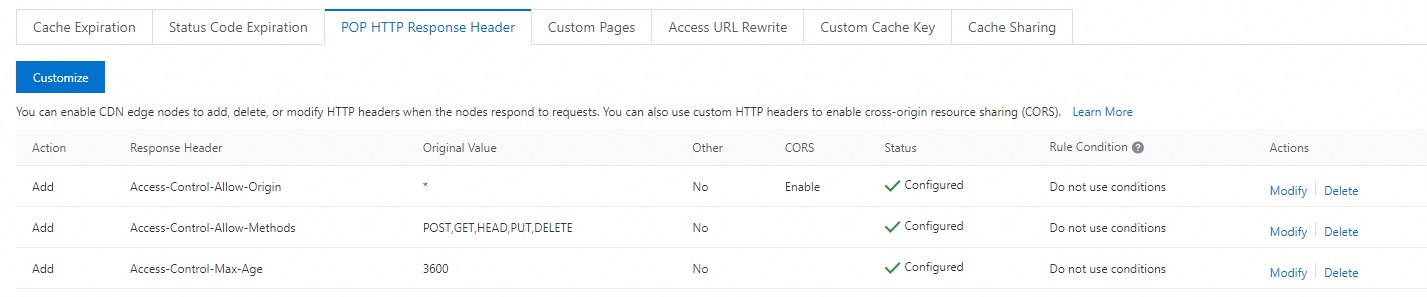
In the Modify Outgoing Response Header dialog box, configure the custom response headers and corresponding header values as described in the following table.
NoteThe following parameter configurations are for reference only. Change the value of each header based on your business requirements.
Response Header
Header Value
Access-Control-Allow-OriginSet the value to an asterisk (*) and enable cross-origin validation.
Access-Control-Allow-MethodsPOST,GET,HEAD,PUT,DELETE
Access-Control-Max-Age3600
The following figure shows the result after configuration.
After you configure the preceding headers, the preceding headers are included in responses if you access OSS resources over POPs to ensure that CORS can work as expected. Test results: