Previous topics focused on using RAM users, which use long-term credentials. These credentials pose a significant security risk if compromised because they remain active until manually revoked.
To continue the previous example, consider an application that allows users to upload data to an OSS bucket named ram-test-app. As your user base grows, you need a secure way to authorize these uploads while ensuring data isolation between users.
You can use Security Token Service (STS) for scenarios that require temporary access. STS lets you issue short-lived credentials with granular policies that grant only the minimum required permissions.
Create a role
Based on the previous example, app users store personal data in a bucket named ram-test-app. Follow these steps to create the roles:
- Create a RAM user named
ram_test_app. Do not grant any permissions to this user. The user inherits permissions when it assumes a role. - Create two roles: one for read operations and another for write operations.
- Open the RAM console and choose .
- For the role type, select User role.
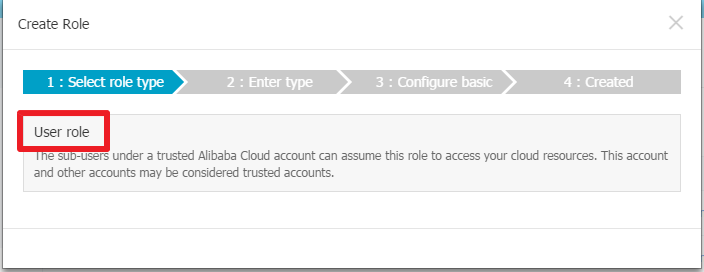
- Keep the default settings for the role type, as the role will be used by your Alibaba Cloud account.
- Configure the basic information for the role.
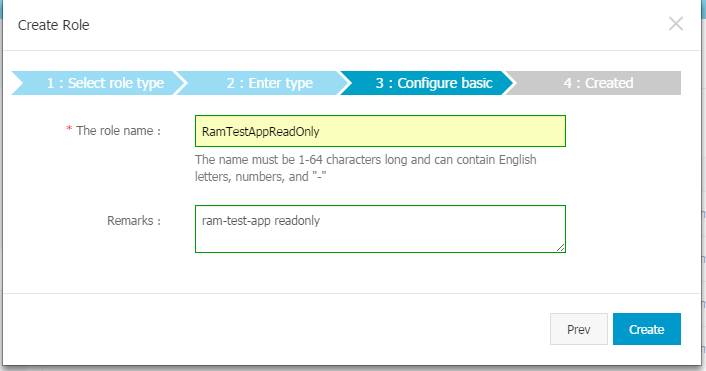
- A new role has no permissions by default. You must attach a custom authorization policy. The following policy grants read-only access:
{
"Version": "1",
"Statement": [
 {
   "Effect": "Allow",
   "Action": [
     "oss:ListObjects",
     "oss:GetObject"
   ],
   "Resource": [
     "acs:oss:*:*:ram-test-app",
     "acs:oss:*:*:ram-test-app/*"
   ]
 }
]
}
This policy grants read-only permissions for the
ram-test-appbucket.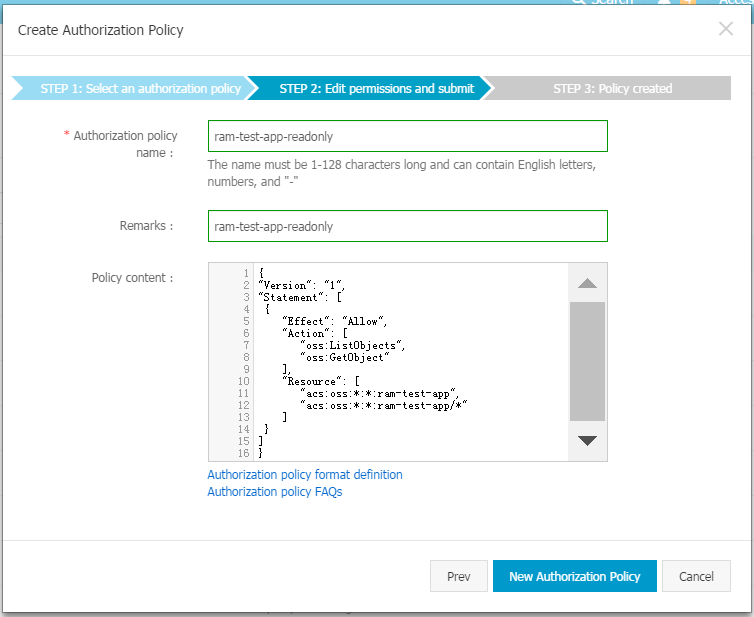
- After creating the policy, attach it to the
RamTestAppReadOnlyrole.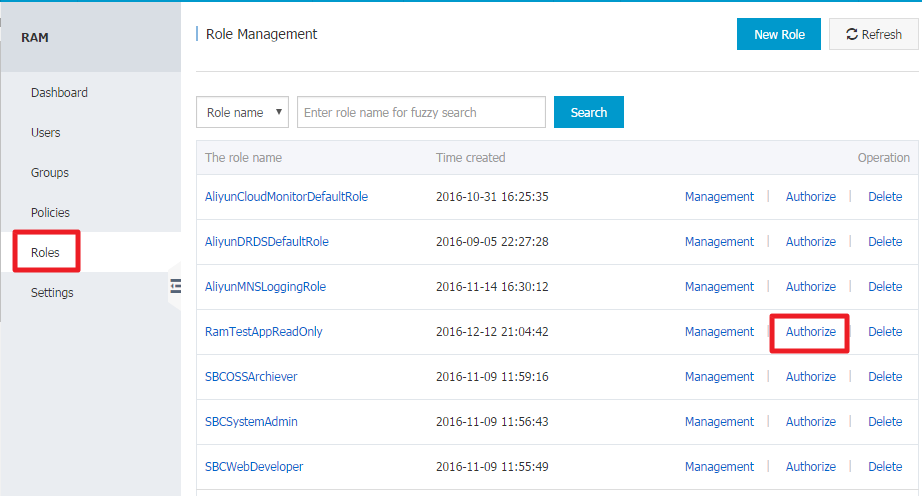
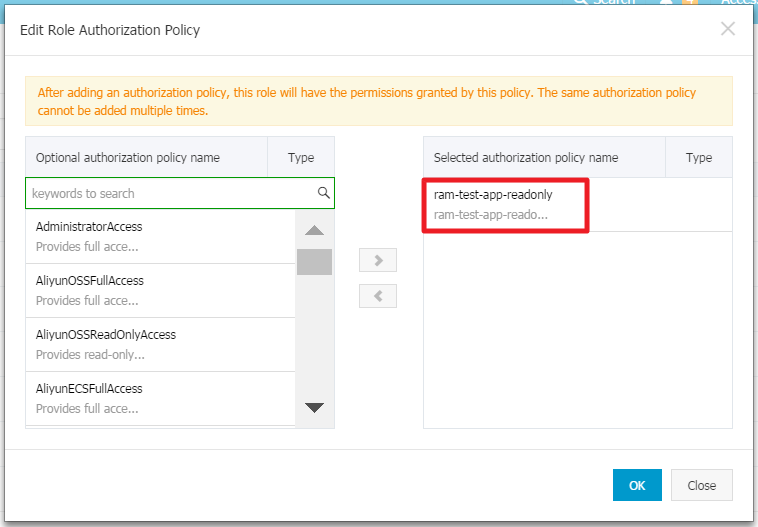
- Follow the same procedure to create a role named
RamTestAppWrite. Create and attach a custom policy that grants write permissions to theram-test-appbucket. The policy is as follows:{ "Version": "1", "Statement": [ { "Effect": "Allow", "Action": [ "oss:DeleteObject", "oss:ListParts", "oss:AbortMultipartUpload", "oss:PutObject" ], "Resource": [ "acs:oss:*:*:ram-test-app", "acs:oss:*:*:ram-test-app/*" ] } ] }You have now created two roles:
RamTestAppReadOnlyfor read access andRamTestAppWritefor write access to theram-test-appbucket.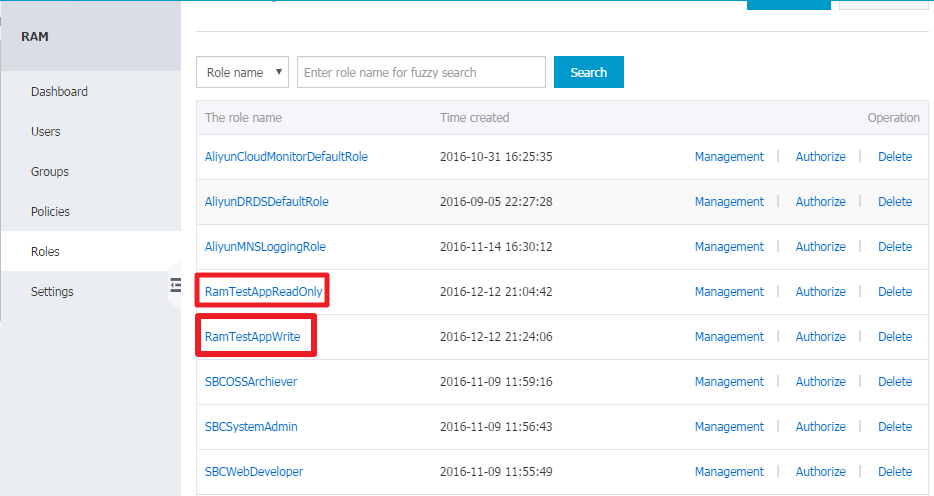
Authorize temporary access
After creating the roles, you can use them to grant temporary access to OSS.
A RAM user must be authorized to assume a role. To avoid security risks, you must explicitly grant this permission only to the RAM users that require it.
- Create two custom authorization policies that grant permission to assume the roles. The policies are as follows:

{
"Statement": [
 {
   "Action": "sts:AssumeRole",
   "Effect": "Allow",
   "Resource": "acs:ram::1894******722283:role/ramtestappreadonly"
 }
],
"Version": "1"
}
Use the same method to create the second custom authorization policy:
{
"Statement": [
 {
   "Action": "sts:AssumeRole",
   "Effect": "Allow",
   "Resource": "acs:ram::1894******722283:role/ramtestappwrite"
 }
],
"Version": "1"
}
The
Resourcevalue is the Alibaba Cloud Resource Name (ARN) of the role. You can find the role ARN on the page. - Attach these two authorization policies to the
ram_test_appRAM user.
This example uses a simple Python command-line tool, sts.py, to demonstrate the process. The following command calls the AssumeRole operation:
$python ./sts.py AssumeRole RoleArn=acs:ram::1894******722283:role/ramtestappreadonly RoleSessionName=usr001 Policy='{"Version":"1","Statement":[{"Effect":"Allow","Action":["oss:ListObjects","oss:GetObject"],"Resource":["acs:oss:*:*:ram-test-app","acs:oss:*:*:ram-test-app/*"]}]}' DurationSeconds=1000 --id=id --secret=secretRoleArn: The ARN of the role to assume. You can find the role ARN on the page.RoleSessionName: A user-defined name for the session. It is recommended to use an identifier that distinguishes between application users.Policy: An optional inline session policy that further restricts the permissions of the temporary credentials.DurationSeconds: The duration, in seconds, for which the credentials are valid. The value can range from 900 to 3,600.idandsecret: The AccessKey ID and AccessKey secret of the RAM user that will assume the role.
The optional Policy parameter is used to further restrict the permissions of the temporary credentials. The final effective permissions are the intersection of the role's permissions policy and this session policy.
Passing a session policy provides greater flexibility. For example, you can restrict uploads to a specific path based on the user, which helps isolate user data.
Let's test the configuration. First, use the console to upload a file named test.txt with the content ststest to the ram-test-app bucket.
Then, try to access the bucket directly by using the credentials of the ram_test_app user.
[admin@NGIS-CWWF344M01C /home/admin/oss_test]
$./osscmd get oss://ram-test-app/test.txt test.txt --host=oss-cn-hangzhou.aliyuncs.com -i oOhue******Frogv -k OmVwFJO3qcT0******FhOYpg3p0KnA
Error Headers:
[('content-length', '229'), ('server', 'AliyunOSS'), ('connection', 'keep-alive'), ('x-oss-request-id', '564A94D444F4D8B2225E4AFE'), ('date', 'Tue, 17 Nov 2015 02:45:40 GMT'), ('content-type', 'application/xml')]
Error Body:
<?xml version="1.0" encoding="UTF-8"?>
<Error>
  <Code>AccessDenied</Code>
  <Message>AccessDenied</Message>
  <RequestId>564A94D444F4D8B2225E4AFE</RequestId>
  <HostId>ram-test-app.oss-cn-hangzhou.aliyuncs.com</HostId>
</Error>
Error Status:
403
get Failed!
[admin@NGIS-CWWF344M01C /home/admin/oss_test]
$./osscmd put test.txt  oss://ram-test-app/test.txt  --host=oss-cn-hangzhou.aliyuncs.com -i oOhue******Frogv -k OmVwFJO3qcT0******FhOYpg3p0KnA
100%  Error Headers:
[('content-length', '229'), ('server', 'AliyunOSS'), ('connection', 'keep-alive'), ('x-oss-request-id', '564A94E5B1119B445B9F8C3A'), ('date', 'Tue, 17 Nov 2015 02:45:57 GMT'), ('content-type', 'application/xml')]
Error Body:
<?xml version="1.0" encoding="UTF-8"?>
<Error>
  <Code>AccessDenied</Code>
  <Message>AccessDenied</Message>
  <RequestId>564A94E5B1119B445B9F8C3A</RequestId>
  <HostId>ram-test-app.oss-cn-hangzhou.aliyuncs.com</HostId>
</Error>
Error Status:
403
put Failed!
As expected, the access attempt fails with an AccessDenied error because the ram_test_app RAM user has no direct permissions to access OSS.
Now, use STS to obtain credentials for downloading a file. For simplicity, this example passes a session policy that is identical to the role's policy. The expiration time is 3,600 seconds by default, and the app user is identified as usr001. Follow these steps:
- Request temporary credentials by using STS.
[admin@NGIS-CWWF344M01C /home/admin/oss_test] $python ./sts.py AssumeRole RoleArn=acs:ram::1894******722283:role/ramtestappreadonly RoleSessionName=usr001 Policy='{"Version":"1","Statement":[{"Effect":"Allow","Action":["oss:ListObjects","oss:GetObject"],"Resource":["acs:oss:*:*:ram-test-app","acs:oss:*:*:ram-test-app/*"]}]}' --id=oOhue******Frogv --secret=OmVwFJO3qcT0******FhOYpg3p0KnA https://sts.aliyuncs.com/?SignatureVersion=1.0&Format=JSON&Timestamp=2015-11-17T03%3A07%3A25Z&RoleArn=acs%3Aram%3A%3A1894******722283%3Arole%2Framtestappreadonly&RoleSessionName=usr001&AccessKeyId=oOhu******3Frogv&Policy=%7B%22Version%22%3A%221%22%2C%22Statement%22%3A%5B%7B%22Effect%22%3A%22Allow%22%2C%22Action%22%3A%5B%22oss%3AListObjects%22%2C%22oss%3AGetObject%22%5D%2C%22Resource%22%3A%5B%22acs%3Aoss%3A%2A%3A%2A%3Aram-test-app%22%2C%22acs%3Aoss%3A%2A%3A%2A%3Aram-test-app%2F%2A%22%5D%7D%5D%7D&SignatureMethod=HMAC-SHA1&Version=2015-04-01&Signature=bshxPZpwRJv5ch3SjaBiXLodwq0%3D&Action=AssumeRole&SignatureNonce=53e1be9c-8cd8-11e5-9b86-008cfa5e4938 { "AssumedRoleUser": { "Arn": "acs:ram::1894******722283:role/ramtestappreadonly/usr001", "AssumedRoleId": "317446******426289:usr001" }, "Credentials": { "AccessKeyId": "STS.3mQEbNf******wa180Le", "AccessKeySecret": "B1w7rCbR4dzGwNYJ******3PiPqKZ3gjQhAxb6mB", "Expiration": "2015-11-17T04:07:25Z", "SecurityToken": "CAESvAMIARKAASQQ******7683CGlhdGsv2/di8uI+X******DxM5FTd0fp5wpPK/7UctYH2MJ///c4yMN1PUCcEHI1zppCINmpDG2XeNA3OS16JwS6ESmI50sHyWBmsYkCJW15gXnfhz/OK+mSp1bYxlfB33qfgCFe97Ijeuj8RMgqFx0Hny2BzGhhTVFMuM21RRWJOZnR5Yzl1T3dhMTgwTGUiEjMxNzQ0NjM0NzY1NzQyNjI4OSoGdXNyMDAxMJTrgJ2RKjoGUnNhTUQ1QpsBCgExGpUBCgVBbG******CgxBY3Rpb25FcXVhbHMSBkFjdGlvbhogCg9vc3M6TGlzdE9iamVjdHMKDW9zczpHZXRPYmplY3QSUgoOUmVzb3VyY2VFcXVhbHMSCFJlc291cmNlGjYKGGFjczpvc3M6KjoqOnJhbS10ZXN0LWFwcAoaYWNzOm9zczoq******FtLXRlc3QtYXBwLypKEDE4OTQxODk3Njk3MjIyODNSBTI2ODQyWg9Bc3N1bWVkUm9sZVVzZXJgAGoSMzE3NDQ2MzQ3NjU3NDI2Mjg5chJyYW10ZXN0YXBwcmVhZG9ubHk=" }, "RequestId": "8C009F64-F19D-4EC1-A3AD-7A718CD0B49B" } - Use the temporary credentials to download the file. The
sts_tokenparameter corresponds to theSecurityTokenreturned by the STS API call.[admin@NGIS-CWWF344M01C /home/admin/oss_test] $./osscmd get oss://ram-test-app/test.txt test.txt --host=oss-cn-hangzhou.aliyuncs.com -i STS.3mQEbNf******wa180Le -k B1w7rCbR4dzGwNYJ******3PiPqKZ3gjQhAxb6mB --sts_token=CAESvAMIARKAASQQ******7683CGlhdGsv2/di8uI+X******DxM5FTd0fp5wpPK/7UctYH2MJ///c4yMN1PUCcEHI1zppCINmpDG2XeNA3OS16JwS6ESmI50sHyWBmsYkCJW15gXnfhz/OK+mSp1bYxlfB33qfgCFe97Ijeuj8RMgqFx0Hny2BzGhhTVFMuM21RRWJOZnR5Yzl1T3dhMTgwTGUiEjMxNzQ0NjM0NzY1NzQyNjI4OSoGdXNyMDAxMJTrgJ2RKjoGUnNhTUQ1QpsBCgExGpUBCgVBbG******CgxBY3Rpb25FcXVhbHMSBkFjdGlvbhogCg9vc3M6TGlzdE9iamVjdHMKDW9zczpHZXRPYmplY3QSUgoOUmVzb3VyY2VFcXVhbHMSCFJlc291cmNlGjYKGGFjczpvc3M6KjoqOnJhbS10ZXN0LWFwcAoaYWNzOm9zczoq******FtLXRlc3QtYXBwLypKEDE4OTQxODk3Njk3MjIyODNSBTI2ODQyWg9Bc3N1bWVkUm9sZVVzZXJgAGoSMzE3NDQ2MzQ3NjU3NDI2Mjg5chJyYW10ZXN0YXBwcmVhZG9ubHk= 100% The object test.txt is downloaded to test.txt, please check. 0.061(s) elapsed - The file download is successful. Next, try to upload a file by using the same credentials.
[admin@NGIS-CWWF344M01C /home/admin/oss_test]
 $./osscmd put test.txt oss://ram-test-app/test.txt  --host=oss-cn-hangzhou.aliyuncs.com -i STS.3mQEbNf******wa180Le -k B1w7rCbR4dzGwNYJ******3PiPqKZ3gjQhAxb6mB --sts_token=CAESvAMIARKAASQQ******7683CGlhdGsv2/di8uI+X******DxM5FTd0fp5wpPK/7UctYH2MJ///c4yMN1PUCcEHI1zppCINmpDG2XeNA3OS16JwS6ESmI50sHyWBmsYkCJW15gXnfhz/OK+mSp1bYxlfB33qfgCFe97Ijeuj8RMgqFx0Hny2BzGhhTVFMuM21RRWJOZnR5Yzl1T3dhMTgwTGUiEjMxNzQ0NjM0NzY1NzQyNjI4OSoGdXNyMDAxMJTrgJ2RKjoGUnNhTUQ1QpsBCgExGpUBCgVBbG******CgxBY3Rpb25FcXVhbHMSBkFjdGlvbhogCg9vc3M6TGlzdE9iamVjdHMKDW9zczpHZXRPYmplY3QSUgoOUmVzb3VyY2VFcXVhbHMSCFJlc291cmNlGjYKGGFjczpvc3M6KjoqOnJhbS10ZXN0LWFwcAoaYWNzOm9zczoq******FtLXRlc3QtYXBwLypKEDE4OTQxODk3Njk3MjIyODNSBTI2ODQyWg9Bc3N1bWVkUm9sZVVzZXJgAGoSMzE3NDQ2MzQ3NjU3NDI2Mjg5chJyYW10ZXN0YXBwcmVhZG9ubHk=
 100%  Error Headers:
 [('content-length', '254'), ('server', 'AliyunOSS'), ('connection', 'keep-alive'), ('x-oss-request-id', '564A9A2A1790CF0F53C15C82'), ('date', 'Tue, 17 Nov 2015 03:08:26 GMT'), ('content-type', 'application/xml')]
 Error Body:
 <?xml version="1.0" encoding="UTF-8"?>
 <Error>
   <Code>AccessDenied</Code>
   <Message>Access denied by authorizer's policy.</Message>
   <RequestId>564A9A2A1790CF0F53C15C82</RequestId>
   <HostId>ram-test-app.oss-cn-hangzhou.aliyuncs.com</HostId>
 </Error>
 Error Status:
 403
 put Failed!
The upload fails because the assumed role only grants read permissions.
Now, let's test uploading a file using STS credentials. Follow these steps:
- Obtain temporary credentials from STS for the app user
usr001.[admin@NGIS-CWWF344M01C /home/admin/oss_test] $python ./sts.py AssumeRole RoleArn=acs:ram::1894******722283:role/ramtestappwrite RoleSessionName=usr001 Policy='{"Version":"1","Statement":[{"Effect":"Allow","Action":["oss:PutObject"],"Resource":["acs:oss:*:*:ram-test-app/usr001/*"]}]}' --id=oOhue******Frogv --secret=OmVwFJO3qcT0******FhOYpg3p0KnA https://sts.aliyuncs.com/?SignatureVersion=1.0&Format=JSON&Timestamp=2015-11-17T03%3A16%3A10Z&RoleArn=acs%3Aram%3A%3A1894******722283%3Arole%2Framtestappwrite&RoleSessionName=usr001&AccessKeyId=oOhu******3Frogv&Policy=%7B%22Version%22%3A%221%22%2C%22Statement%22%3A%5B%7B%22Effect%22%3A%22Allow%22%2C%22Action%22%3A%5B%22oss%3APutObject%22%5D%2C%22Resource%22%3A%5B%22acs%3Aoss%3A%2A%3A%2A%3Aram-test-app%2Fusr001%2F%2A%22%5D%7D%5D%7D&SignatureMethod=HMAC-SHA1&Version=2015-04-01&Signature=Y0OPUoL1PrCqX4X***%2FJvgXuS6c%3D&Action=AssumeRole&SignatureNonce=8d0798a8-8cd9-11e5-9f49-008cfa5e4938 { "AssumedRoleUser": { "Arn": "acs:ram::1894******722283:role/ramtestappwrite/usr001", "AssumedRoleId": "35540******0029428:usr001" }, "Credentials": { "AccessKeyId": "STS.rtfx13******NlIJlS4U", "AccessKeySecret": "2fsaM8E2maB2dn******wpsKTyK4ajo7TxFr0zIM", "Expiration": "2015-11-17T04:16:10Z", "SecurityToken": "CAESkwMIARKAAUh3/Uzcg13******y0IZjGewMpg31ITxCleBFU1eO/3Sgpudid+GVs+Olvu1vXJn******a8azKJKtzV0oKSy+mwUrxSvUSRVDntrs78CsNfWoOJUMJKjLIxdWnGi1pgxJCBzNZ2YV/6ycTaZySSE1V6kqQ7A+GPwY******LpdGhhTVFMucnRmeDEzRFlNVWJjTmxJSmxTNFUiEjM1NTQwNzg0NzY2MDAyOTQyOCoGdXNyMDAxMOPzoJ2RKjoGUnNhTUQ1QnYKATEacQoFQWxsb3cSJwoMQWN0aW9uRXF1YWxzEgZBY3Rpb24aDwoNb3NzOlB1dE9iamVjdBI/Cg5SZXNvdXJjZUVxdWFscxIIUmVzb3VyY2UaIwohYWNzOm9zczoqOio6cmFtLXRlc3Qt******VzcjAwMS8qShAxODk0MTg5NzY5NzIyMjgzUgUyNjg0MloPQXNzdW1lZFJvbGVVc2VyYABqEjM1NTQwNzg0NzY2MDAyOTQyOHIPcmFtdGVzdGFwcHdyaXRl" }, "RequestId": "19407707-54B2-41AD-AAF0-FE87E8870B0D" } - Now, test downloading and uploading files with these credentials.
[admin@NGIS-CWWF344M01C /home/admin/oss_test]
 $./osscmd get oss://ram-test-app/test.txt test.txt --host=oss-cn-hangzhou.aliyuncs.com -i STS.rtfx13******NlIJlS4U -k 2fsaM8E2maB2dn******wpsKTyK4ajo7TxFr0zIM --sts_token=CAESkwMIARKAAUh3/Uzcg13******y0IZjGewMpg31ITxCleBFU1eO/3Sgpudid+GVs+Olvu1vXJn******a8azKJKtzV0oKSy+mwUrxSvUSRVDntrs78CsNfWoOJUMJKjLIxdWnGi1pgxJCBzNZ2YV/6ycTaZySSE1V6kqQ7A+GPwY******LpdGhhTVFMucnRmeDEzRFlNVWJjTmxJSmxTNFUiEjM1NTQwNzg0NzY2MDAyOTQyOCoGdXNyMDAxMOPzoJ2RKjoGUnNhTUQ1QnYKATEacQoFQWxsb3cSJwoMQWN0aW9uRXF1YWxzEgZBY3Rpb24aDwoNb3NzOlB1dE9iamVjdBI/Cg5SZXNvdXJjZUVxdWFscxIIUmVzb3VyY2UaIwohYWNzOm9zczoqOio6cmFtLXRlc3Qt******VzcjAwMS8qShAxODk0MTg5NzY5NzIyMjgzUgUyNjg0MloPQXNzdW1lZFJvbGVVc2VyYABqEjM1NTQwNzg0NzY2MDAyOTQyOHIPcmFtdGVzdGFwcHdyaXRl
 Error Headers:
 [('content-length', '254'), ('server', 'AliyunOSS'), ('connection', 'keep-alive'), ('x-oss-request-id', '564A9C31FFFC811F24B6E7E3'), ('date', 'Tue, 17 Nov 2015 03:17:05 GMT'), ('content-type', 'application/xml')]
 Error Body:
 <?xml version="1.0" encoding="UTF-8"?>
 <Error>
   <Code>AccessDenied</Code>
   <Message>Access denied by authorizer's policy.</Message>
   <RequestId>564A9C31FFFC811F24B6E7E3</RequestId>
   <HostId>ram-test-app.oss-cn-hangzhou.aliyuncs.com</HostId>
 </Error>
 Error Status:
 403
 get Failed!
 [admin@NGIS-CWWF344M01C /home/admin/oss_test]
 $./osscmd put test.txt oss://ram-test-app/test.txt  --host=oss-cn-hangzhou.aliyuncs.com -i STS.rtfx13******NlIJlS4U -k 2fsaM8E2maB2dn******wpsKTyK4ajo7TxFr0zIM --sts_token=CAESkwMIARKAAUh3/Uzcg13******y0IZjGewMpg31ITxCleBFU1eO/3Sgpudid+GVs+Olvu1vXJn******a8azKJKtzV0oKSy+mwUrxSvUSRVDntrs78CsNfWoOJUMJKjLIxdWnGi1pgxJCBzNZ2YV/6ycTaZySSE1V6kqQ7A+GPwY******LpdGhhTVFMucnRmeDEzRFlNVWJjTmxJSmxTNFUiEjM1NTQwNzg0NzY2MDAyOTQyOCoGdXNyMDAxMOPzoJ2RKjoGUnNhTUQ1QnYKATEacQoFQWxsb3cSJwoMQWN0aW9uRXF1YWxzEgZBY3Rpb24aDwoNb3NzOlB1dE9iamVjdBI/Cg5SZXNvdXJjZUVxdWFscxIIUmVzb3VyY2UaIwohYWNzOm9zczoqOio6cmFtLXRlc3Qt******VzcjAwMS8qShAxODk0MTg5NzY5NzIyMjgzUgUyNjg0MloPQXNzdW1lZFJvbGVVc2VyYABqEjM1NTQwNzg0NzY2MDAyOTQyOHIPcmFtdGVzdGFwcHdyaXRl
 100%  Error Headers:
 [('content-length', '254'), ('server', 'AliyunOSS'), ('connection', 'keep-alive'), ('x-oss-request-id', '564A9C3FB8DE437A91B16772'), ('date', 'Tue, 17 Nov 2015 03:17:19 GMT'), ('content-type', 'application/xml')]
 Error Body:
 <?xml version="1.0" encoding="UTF-8"?>
 <Error>
   <Code>AccessDenied</Code>
   <Message>Access denied by authorizer's policy.</Message>
   <RequestId>564A9C3FB8DE437A91B16772</RequestId>
   <HostId>ram-test-app.oss-cn-hangzhou.aliyuncs.com</HostId>
 </Error>
 Error Status:
 403
 put Failed!
The attempt to upload
test.txtto the bucket's root directory fails. This is because of the session policy specified when the credentials were requested. The formatted policy is as follows:{ "Version": "1", "Statement": [ { "Effect": "Allow", "Action": [ "oss:PutObject" ], "Resource": [ "acs:oss:*:*:ram-test-app/usr001/*" ] } ] }This policy only lets the user upload objects to the
usr001/*prefix within theram-test-appbucket. If the app user wereusr002, you could change the policy to only allow uploads to theusr002/*prefix. By assigning a unique policy path for each user, you can isolate their data. - Retry the upload, but this time specify the destination object key as
ram-test-app/usr001/test.txt.[admin@NGIS-CWWF344M01C /home/admin/oss_test] $./osscmd put test.txt oss://ram-test-app/usr001/test.txt --host=oss-cn-hangzhou.aliyuncs.com -i STS.rtfx13******NlIJlS4U -k 2fsaM8E2maB2dn******wpsKTyK4ajo7TxFr0zIM --sts_token=CAESkwMIARKAAUh3/Uzcg13******y0IZjGewMpg31ITxCleBFU1eO/3Sgpudid+GVs+Olvu1vXJn******a8azKJKtzV0oKSy+mwUrxSvUSRVDntrs78CsNfWoOJUMJKjLIxdWnGi1pgxJCBzNZ2YV/6ycTaZySSE1V6kqQ7A+GPwY******LpdGhhTVFMucnRmeDEzRFlNVWJjTmxJSmxTNFUiEjM1NTQwNzg0NzY2MDAyOTQyOCoGdXNyMDAxMOPzoJ2RKjoGUnNhTUQ1QnYKATEacQoFQWxsb3cSJwoMQWN0aW9uRXF1YWxzEgZBY3Rpb24aDwoNb3NzOlB1dE9iamVjdBI/Cg5SZXNvdXJjZUVxdWFscxIIUmVzb3VyY2UaIwohYWNzOm9zczoqOio6cmFtLXRlc3Qt******VzcjAwMS8qShAxODk0MTg5NzY5NzIyMjgzUgUyNjg0MloPQXNzdW1lZFJvbGVVc2VyYABqEjM1NTQwNzg0NzY2MDAyOTQyOHIPcmFtdGVzdGFwcHdyaXRl 100% Object URL is: http://ram-test-app.oss-cn-hangzhou.aliyuncs.com/usr001%2Ftest.txt Object abstract path is: oss://ram-test-app/usr001/test.txt ETag is "946A0A1AC8245696B9C6A6F35942690B" 0.071(s) elapsedThe upload is now successful.
Summary
This topic explained how to use STS to grant temporary access to OSS. In a typical mobile application scenario, you can use STS to provide temporary credentials to your end users when they need to access OSS resources. These credentials expire, which significantly reduces the risk from a credential leak. When you request temporary credentials, you can also pass a session policy that is specific to the end user. This lets you restrict their permissions, for example, by limiting access to a specific object path, to achieve data isolation among users.