Enable OSS-HDFS for an existing bucket or during creation.
Prerequisites
OSS-HDFS is supported in the following regions: China (Hangzhou), China (Shanghai), China (Qingdao), China (Beijing), China (Ulanqab), China (Shenzhen), China (Guangzhou), China (Zhangjiakou), China (Hong Kong), Japan (Tokyo), Singapore, Germany (Frankfurt), US (Silicon Valley), US (Virginia), Indonesia (Jakarta), Thailand (Bangkok), and SAU (Riyadh).
Billing rules
Data storage fees
When you use OSS-HDFS, data blocks are stored in Objects Storage Service (OSS). Therefore, the billing method of OSS applies to data blocks in OSS-HDFS. For more information, see Billing.
Limitations
Once enabled, OSS-HDFS cannot be disabled. Proceed with caution.
You can only access OSS-HDFS through a Virtual Private Cloud (VPC). When you create the VPC, you must ensure that it is in the same region as the bucket.
OSS-HDFS cannot be enabled for buckets of the Archive, Cold Archive, or Deep Cold Archive storage classes.
Perform write operations, such as renaming or deleting directories and objects, on the
.dlsdata/ directorydirectory and its contents only by using OSS-HDFS methods. Using other methods can disrupt the service or cause data loss.Before deleting a bucket with OSS-HDFS enabled, you must first delete the metadata in OSS-HDFS, then delete the OSS data. Otherwise, you cannot delete the bucket.
Enable OSS-HDFS
When you enable OSS-HDFS for a bucket, the AliyunOSSDlsDefaultRole role is automatically created and the AliyunOSSDlsRolePolicy policy is attached to the role. To maintain access to the .dlsdata/ directory and objects within, do not disable, modify, or delete the role and the attached policy.
Enable OSS-HDFS when you create a bucket
The first time you create a bucket by using an Alibaba Cloud account or a RAM user with administrator permissions, you must follow the on-page instructions to grant the role the required permissions to access OSS-HDFS before you enable OSS-HDFS. For more information, see Create a bucket.
Enable OSS-HDFS for an existing bucket
To use an Alibaba Cloud account or a RAM user that has administrator permissions to enable OSS-HDFS for an existing bucket, perform the following steps:
Grant the RAM user the required permissions to access OSS-HDFS.
Log on to the OSS console.
In the left-side navigation pane, click Buckets. On the Buckets page, click the name of the bucket for which you want to enable OSS-HDFS.
In the left-side navigation pane, choose .
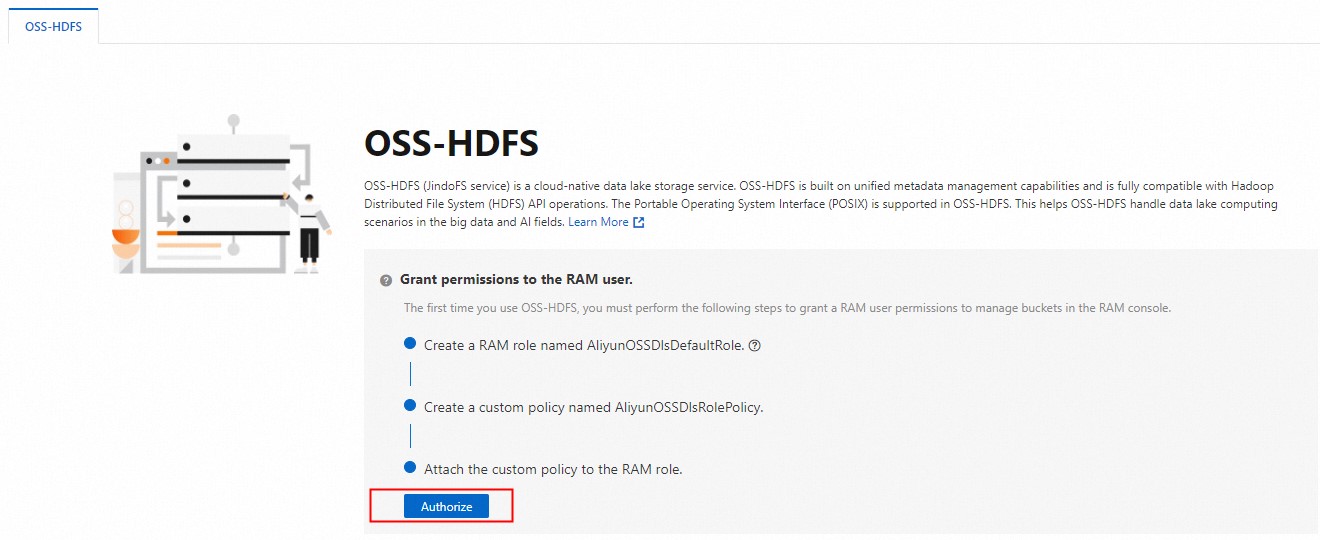
On the OSS-HDFS tab, click Authorize. Then, follow the on-screen instructions to grant the RAM user the permissions to access OSS-HDFS.
Enable OSS-HDFS
On the OSS-HDFS page, click Enable OSS HDFS.
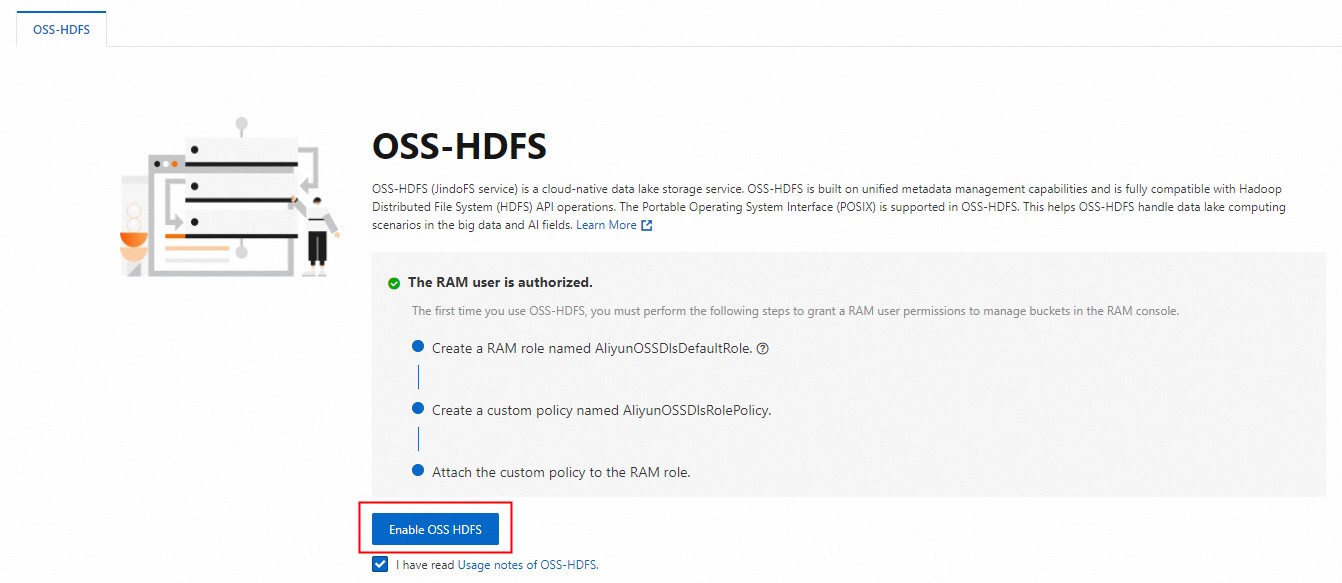
In the message that appears, click OK.
After you enable OSS-HDFS, you can still use OSS. If you want to use OSS-HDFS, you must use the OSS-HDFS endpoint. To obtain the OSS-HDFS endpoint, view the Port section of the Overview page of the bucket. Example:
cn-hangzhou.oss-dls.aliyuncs.com.
What to do next
To authorize a RAM user to access OSS-HDFS from E-MapReduce (EMR) and non-EMR clusters, see Grant permissions to a RAM user to access OSS-HDFS.