When a website attempts to load a resource from Object Storage Service (OSS), the browser may report a "blocked by CORS policy" error. This happens because of the browser's same-origin policy, which restricts a web page to accessing resources only from its own protocol, domain, and port. For example, a page at https://www.example.com cannot directly access an OSS resource from a different domain, such as https://example-bucket.oss-cn-hangzhou.aliyuncs.com/test.jpg. By configuring cross-origin resource sharing (CORS) rules for your OSS bucket, you can securely authorize specific websites to access your OSS resources, allowing web pages to interact with objects directly.
How it works
CORS requests are categorized into two types: simple requests and preflight requests. Simple requests are sent directly. Preflight requests, however, require a preliminary authorization check before the main request can be sent.
A preflight request is required if any of the following conditions are met:
The request uses a method other than
GET,HEAD, orPOST.The request uses the
POSTmethod with aContent-Typeother thantext/plain,application/x-www-form-urlencoded, ormultipart/form-data.The request includes custom headers, such as
x-oss-*.
When a browser sends a simple request to OSS, the following process occurs:
The browser adds an
Originheader to the request. TheOriginheader specifies the origin of the calling page, for example,Origin: https://www.example.com.OSS checks the request's HTTP method and
Originheader against the bucket's CORS rules to find a matching rule. If a match is found, OSS includes theAccess-Control-Allow-Originheader in the response. The value of this header is the value of theOriginheader from the initial request.The browser receives the response. It allows the request to proceed only if the
Access-Control-Allow-Originheader is present and its value matches the page's domain. Otherwise, the request fails.
A preflight request first performs the following steps. If successful, it then proceeds with the same process as a simple request:
The browser sends an
OPTIONSrequest that includes the method (Access-Control-Request-Method) and headers (Access-Control-Request-Headers) of the intended main request.OSS checks if the method and headers in the request are allowed based on the CORS configuration. If the preflight request includes any method or header not allowed by the rules, the request fails, and the main request is not sent.
Load static website resources
A website at https://www.example.com needs to load images, CSS, and JS files stored in an OSS bucket.
Step 1: Configure a CORS rule
Log on to the OSS console. Navigate to the Content Security > CORS page for the destination bucket and create a rule as follows:
Parameter | Value | Description |
Origin |
| Restricts requests to this specific website to ensure resource security. |
Allowed Methods |
|
|
Allowed Headers | Empty | This use case involves simple requests that do not trigger a preflight request, so this parameter is not required. |
Exposed Headers |
|
|
Cached Timeout (Seconds) | 86400 | Caches the preflight response for 24 hours to reduce potential future preflight requests. |
Vary: Origin | Unchecked | Because the origin is single and specific, this option is not needed to handle multi-domain caching issues. |
Step 2: Verify the configuration
Visit https://www.example.com and confirm that OSS resources, such as images, load correctly and that there are no CORS errors in the browser console.
Upload files directly from the frontend
A user on the web page https://app.example.com uploads files, such as avatars and documents, directly to OSS.
Step 1: Configure a CORS rule
Log on to the OSS console. Navigate to the Content Security > CORS page for the destination bucket and create a rule as follows:
Parameter | Value | Description |
Origin |
| Restricts uploads to this authorized application. |
Allowed Methods |
|
|
Allowed Headers |
| Security for direct uploads relies on temporary signatures (e.g., Presigned URLs), not a fixed |
Exposed Headers |
|
|
Cached Timeout (Seconds) | 600 | Upload operations are less frequent, so a 10-minute cache reduces preflight requests while allowing configuration changes to take effect swiftly. |
Vary: Origin | Checked | Prepares for potential future multi-domain deployments, such as a test environment, and prevents CDN cache pollution. |
Step 2: Verify the configuration
Perform an upload operation on the https://app.example.com page and confirm that the file is successfully uploaded to OSS and that there are no CORS errors in the browser console.
Support for multiple environments
Multiple subdomains for development, testing, and production, such as dev.example.com and app.example.com, need to access the same OSS resources.
Step 1: Configure a CORS rule
Log on to the OSS console. Navigate to the Content Security > CORS page for the destination bucket and create a rule as follows:
Parameter | Value | Description |
Origin |
| Uses the |
Allowed Methods |
| Allows both reading and uploading of resources to meet testing needs across multiple environments. |
Allowed Headers |
| Different environments and features in development may introduce different custom headers. Using |
Exposed Headers |
| Supports both download validation and upload result feedback. |
Cached Timeout (Seconds) | 3600 | A 1-hour cache provides flexibility for debugging across multiple environments. |
Vary: Origin | Checked | Required. This instructs the CDN to cache responses based on the |
Step 2: Verify the configuration
Perform access or upload tests on both https://dev.example.com and https://app.example.com to confirm that all operations succeed.
Make API-style calls with authentication
A frontend application at https://api.example.com needs to access protected OSS resources by including custom headers such as Authorization.
Step 1: Configure a CORS rule
Log on to the OSS console. In the destination bucket, navigate to the Content Security > CORS page and create a rule as follows:
Parameter | Value | Description |
Origin |
| For requests with authentication information, the origin must be a precise, trusted domain. |
Allowed Methods |
| Supports full lifecycle management of private resources, including reading, updating, and deleting. |
Allowed Headers |
| Do not use |
Exposed Headers |
| Provides a verification identifier for successful operations and an ID for troubleshooting. |
Cached Timeout (Seconds) | 600 | For authenticated requests, a shorter preflight cache time (10 minutes) helps apply security policy changes more quickly. |
Vary: Origin | Select | Instructs the CDN to cache responses separately for different origins to avoid confusion. |
Step 2: Verify the configuration
Initiate a request with an Authorization header from the https://api.example.com page and confirm that you can access the protected OSS resource.
Apply in production
Security best practices
Follow the principle of least privilege.
Configure
Origin (AllowedOrigin)precisely: Avoid setting*forSourcesunless your bucket is fully public. Specify exact domains, such ashttps://www.example.com.Restrict
Allowed Methods: Expose only the HTTP methods required for your business. For example, if your website only needs to read data, configure onlyGETandHEAD.Specify
Allowed Headersexplicitly: For requests that carry authentication information (such as anAuthorizationheader), do not use*. You must explicitly list all required request headers.
Performance best practices
Optimize the preflight cache: A reasonable
MaxAgeSecondsvalue, such as86400seconds (24 hours) can significantly reduce preflight requests, lowering latency and cost.Evaluate the impact of
Vary: Origin: Enabling theVary: Originresponse header solves cache poisoning issues, but it increases the complexity of CDN caching. This may lead to a lower cache hit ratio and increased back-to-origin traffic, resulting in additional costs and latency. Use this option only after a thorough evaluation.
CDN acceleration
If your bucket is accelerated by Alibaba Cloud CDN and accessed via a CDN domain, cross-origin requests will first reach a CDN Point of Presence (PoP). You must configure CORS rules in the CDN console, not in the OSS console. The CORS configuration in OSS only applies to requests made directly to the OSS origin domain. For details, see Configure CORS.
Parameters of CORS rules
You can configure up to 20 CORS rules for each bucket. OSS evaluates rules sequentially from top to bottom and applies the first one that matches the request. Once a match is found, OSS does not check subsequent rules.
Parameter | Required | Description |
Origin (AllowedOrigin) | Yes | Specifies the websites (origin domains) that are allowed to make cross-origin requests to OSS resources.
|
Allowed Methods (AllowedMethod) | Yes | Specifies the allowed HTTP methods.
|
Allowed Headers (AllowedHeader) | No | Applies to preflight requests and determines which HTTP headers can be included in the actual request.
|
Exposed Headers (ExposeHeader) | No | Specifies which OSS response headers are accessible to client-side JavaScript.
|
Cached Timeout (MaxAgeSeconds) | No | Specifies the time in seconds that a browser can cache the result of a preflight
|
Vary: Origin | No | Determines whether to add the
Important Enabling this option may decrease the CDN cache hit ratio. |
FAQ
Error: No 'Access-Control-Allow-Origin' header is present on the requested resource.
This error typically means the browser has cached an old response without CORS headers, or no CORS rule matches the incoming request.
First, try clearing your browser cache and retesting. If the error persists, follow these steps to check if your CORS rules are set correctly:
In the navigation pane on the left, choose Content Security > CORS.
On the CORS page, click Create Rule.
In the Create CORS Rule panel, set Origin to
*, select all Allowed Methods, set Allowed Headers to*, set Exposed Headers toETagandx-oss-request-id, set Cache Timeout (Seconds) to 0, select Vary: Origin, and click OK.If the issue persists, log on to any server and run the following command to view the cross-origin request headers.
curl -v -o output_file.txt -H 'Origin:[$URL2]' '[$URL1]'Note[URL1] is the URL of the requested OSS resource.
[URL2] is the origin address you configured in the CORS rule.
The system displays an output similar to the following.
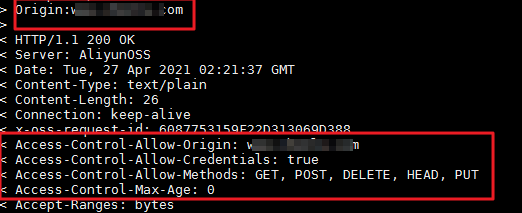
If the response includes a matching CORS header, the problem is likely browser or network caching. Your first request might not have triggered a cross-origin check, and the response was cached locally. A subsequent cross-origin request might have fetched the data from the local cache instead of the server, causing the cross-origin check to fail. Try the following solutions:
Press Ctrl+F5 in your browser to clear the cache, then test if the issue persists.
Set Cached-Seconds for the CORS rule to 0. This prevents the preflight response from being cached on the client, forcing every request to re-fetch authorization information from the server.
NoteYou can set the
cache-controlof an object tono-cachewhen you upload it. For objects that are already uploaded, you can ossutil to change this setting. For more information, see set-meta.Use CDN to accelerate OSS. This ensures that all requests served by the CDN return a CORS header.
If the response contains two CORS headers or a header that does not match your OSS configuration, the issue is likely caused by using CDN to accelerate OSS:
Log on to the CDN console and temporarily disable CDN acceleration for the domain name to confirm that the cross-origin issue is resolved.
After confirmation, click the specific domain name, then navigate to Cache Configuration > Node HTTP Response Header.
Set custom HTTP response headers as needed.
If the CORS issue is still not resolved, see Common errors and solutions for OSS CORS for further troubleshooting.
Error: The 'Access-Control-Allow-Origin' header has a value '...' that is not equal to the supplied origin.
The server returned an Access-Control-Allow-Origin header, but its value does not match the current request's Origin. This is often a caching problem. When multiple domains access the same resource, a browser or CDN might cache the response for one domain and serve it incorrectly to another.
Enable the Vary: Origin option in your CORS rule to prevent cache conflicts between different websites, or clear your browser cache before retrying.
Error: Response to preflight request doesn't pass access control check: The value of the 'Access-Control-Allow-Origin' header in the response must not be the wildcard '*' when the request's credentials mode is 'include'.
This error occurs because the frontend code sent a request with credentials (Access-Control-Allow-Credentials is True), but the Access-Control-Allow-Origin was configured as the wildcard *. For security, browsers prohibit this combination to prevent any site from making credentialed requests and accessing sensitive data like cookies or Authorization tokens.
If you need to include credentials in the request, change the value of
Sourcesfrom the wildcard*to a specific domain (e.g.,https://example.com).If you do not need to include credentials in the request, you can set
xhr.withCredentialstofalsein your frontend code and ensure thatAccess-Control-Allow-Credentialsis set tofalseon the server side.
How to improve slow cross-origin loading from OSS?
A cross-origin request is a standard HTTP request that includes an Origin header. Loading speed depends on network latency between the client and the OSS bucket. For example, a request from a client in China (Hong Kong) to a bucket in the Chinese mainland is considered long-distance access. We recommend using a transfer acceleration endpoint in such cases to optimize the network path. For more information, see Transfer Acceleration.
Transfer Acceleration uses an optimized network to improve data transfer speeds for users globally, enhancing the access experience for users in different regions.