Managed Service for OpenTelemetry provides a fully managed backend for distributed tracing. Instead of deploying and maintaining your own trace storage and query infrastructure, you send trace data from your applications to Alibaba Cloud endpoints and analyze it in the console. The service accepts data from the OpenTelemetry SDK and Collector, Jaeger SDK and Agent, Zipkin, and SkyWalking clients.
To start sending trace data, complete these steps:
Activate the service
Go to the Managed Service for OpenTelemetry product homepage and activate the service as prompted.
Choose an endpoint and protocol
Supported regions and endpoints
Select the endpoint that matches your application's deployment:
Private endpoint: For applications deployed on Alibaba Cloud. Traffic stays within the internal network.
Public endpoint: For applications deployed outside Alibaba Cloud.
| Region | Region ID | Private endpoint | Public endpoint |
|---|---|---|---|
| China (Hangzhou) | cn-hangzhou | tracing-analysis-dc-hz-internal.aliyuncs.com | tracing-analysis-dc-hz.aliyuncs.com |
| China (Shanghai) | cn-shanghai | tracing-analysis-dc-sh-internal.aliyuncs.com | tracing-analysis-dc-sh.aliyuncs.com |
| China (Qingdao) | cn-qingdao | tracing-analysis-dc-qd-internal.aliyuncs.com | tracing-analysis-dc-qd.aliyuncs.com |
| China (Beijing) | cn-beijing | tracing-analysis-dc-bj-internal.aliyuncs.com | tracing-analysis-dc-bj.aliyuncs.com |
| China (Zhangjiakou) | cn-zhangjiakou | tracing-analysis-dc-zb-internal.aliyuncs.com | tracing-analysis-dc-zb.aliyuncs.com |
| China (Hohhot) | cn-huhehaote | tracing-cn-huhehaote-internal.arms.aliyuncs.com | tracing-cn-huhehaote.arms.aliyuncs.com |
| China (Ulanqab) | cn-wulanchabu | tracing-cn-wulanchabu-internal.arms.aliyuncs.com | tracing-cn-wulanchabu.arms.aliyuncs.com |
| China (Shenzhen) | cn-shenzhen | tracing-analysis-dc-sz-internal.aliyuncs.com | tracing-analysis-dc-sz.aliyuncs.com |
| China (Heyuan) | cn-heyuan | tracing-cn-heyuan-internal.arms.aliyuncs.com | tracing-cn-heyuan.arms.aliyuncs.com |
| China (Guangzhou) | cn-guangzhou | tracing-cn-guangzhou-internal.arms.aliyuncs.com | tracing-cn-guangzhou.arms.aliyuncs.com |
| China (Chengdu) | cn-chengdu | tracing-cn-chengdu-internal.arms.aliyuncs.com | tracing-cn-chengdu.arms.aliyuncs.com |
| China (Hong Kong) | cn-hongkong | tracing-analysis-dc-hk-internal.aliyuncs.com | tracing-analysis-dc-hk.aliyuncs.com |
| Japan (Tokyo) | ap-northeast-1 | tracing-analysis-dc-jp-internal.aliyuncs.com | tracing-analysis-dc-jp.aliyuncs.com |
| Singapore | ap-southeast-1 | tracing-analysis-dc-sg-internal.aliyuncs.com | tracing-analysis-dc-sg.aliyuncs.com |
| Malaysia (Kuala Lumpur) | ap-southeast-3 | tracing-ap-southeast-3-internal.arms.aliyuncs.com | tracing-ap-southeast-3.arms.aliyuncs.com |
| Indonesia (Jakarta) | ap-southeast-5 | tracing-analysis-dc-indonesia-internal.aliyuncs.com | tracing-analysis-dc-indonesia.aliyuncs.com |
| Germany (Frankfurt) | eu-central-1 | tracing-analysis-dc-frankfurt-internal.aliyuncs.com | tracing-analysis-dc-frankfurt.aliyuncs.com |
| UK (London) | eu-west-1 | tracing-analysis-dc-lundun-internal.aliyuncs.com | tracing-analysis-dc-lundun.aliyuncs.com |
| US (Silicon Valley) | us-west-1 | tracing-analysis-dc-usw-internal.aliyuncs.com | tracing-analysis-dc-usw.aliyuncs.com |
| US (Virginia) | us-east-1 | tracing-us-east-1-internal.arms.aliyuncs.com | tracing-us-east-1.arms.aliyuncs.com |
| SAU (Riyadh - Partner Region) | me-central-1 | tracing-me-central-1-internal.arms.aliyuncs.com | tracing-me-central-1.arms.aliyuncs.com |
Supported protocols and ports
Managed Service for OpenTelemetry supports multiple protocols over HTTP, HTTPS, and gRPC. On shared ports (80 and 443), protocols are distinguished by URL path.
HTTP and HTTPS protocols (recommended)
For most use cases, use HTTP or HTTPS. These protocols work through standard web ports and are straightforward to configure with the OpenTelemetry SDK.
| Port | Protocol | URL path |
|---|---|---|
| 80 | OpenTelemetry HTTP | /api/otlp/traces |
| 80 | Jaeger HTTP | /api/traces |
| 80 | Jaeger Remote Sampling | /api/sampling |
| 80 | Zipkin HTTP v1 | /api/v1/spans |
| 80 | Zipkin HTTP v2 | /api/v2/spans |
| 443 | OpenTelemetry HTTPS | /api/otlp/traces |
| 443 | Jaeger HTTPS | /api/traces |
| 443 | Jaeger Remote Sampling | /api/sampling |
| 443 | Zipkin HTTPS v1 | /api/v1/spans |
| 443 | Zipkin HTTPS v2 | /api/v2/spans |
gRPC protocols
| Port | Protocol |
|---|---|
| 8090 | OpenTelemetry gRPC |
| 1883 | Jaeger gRPC |
| 1883 | SkyWalking gRPC |
| 8000 | SkyWalking v8 gRPC |
Get an authentication token
After activating the service, get a token to authenticate the trace data your application reports. How the token is used depends on the protocol:
HTTP-based protocols (OpenTelemetry HTTP, Zipkin HTTP, Jaeger HTTP): The token is embedded in the endpoint URL provided by the console.
gRPC-based protocols (OpenTelemetry gRPC, SkyWalking gRPC, Jaeger gRPC): Pass
Authentication=<token>in the gRPCmetadata.
New console
Log on to the Managed Service for OpenTelemetry console. In the left-side navigation pane, click Integration Center.
In the Open Source Frameworks section, click the OpenTelemetry card or the card for the client you want to use.
In the panel that appears, retrieve the token and endpoint.
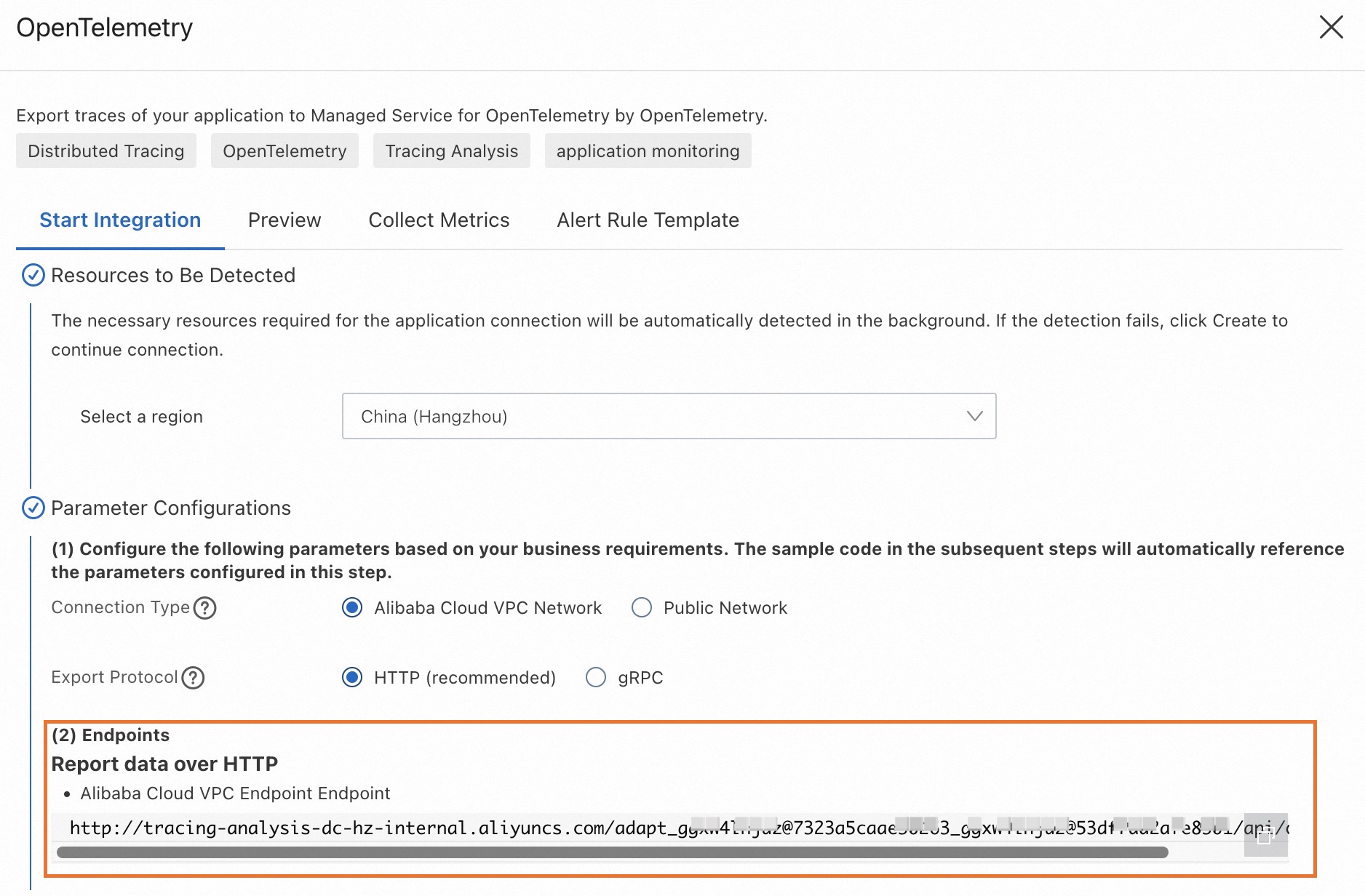
Old console
Log on to the Managed Service for OpenTelemetry console.
In the left-side navigation pane, click Cluster Configurations, and then click the Access point information tab.
At the top of the page, select a region. In the Cluster Information section, turn on the Show Token switch.
In the Client section, select OpenTelemetry or the client you want to use. Find the endpoint in the Related Information column.
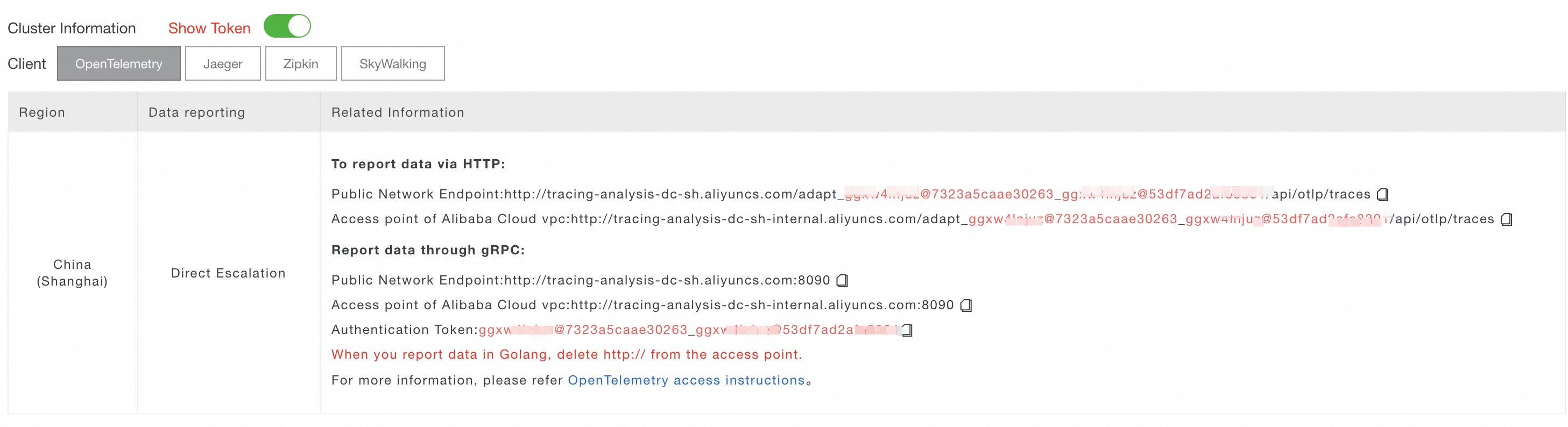
Network requirements for non-Alibaba Cloud applications
If your application runs outside Alibaba Cloud, configure your firewall or security group to allow outbound traffic on the following ports and domain names.
Ports:
80 (OpenTelemetry HTTP, Jaeger HTTP)
443 (OpenTelemetry HTTPS, Jaeger HTTPS, Zipkin HTTPS)
8090 (OpenTelemetry gRPC)
1883 (Jaeger gRPC, SkyWalking gRPC)
Domain names by region:
| Region | Internet | Virtual private cloud (VPC) |
|---|---|---|
| China (Hangzhou) | tracing-analysis-dc-hz.aliyuncs.com | tracing-analysis-dc-hz-internal.aliyuncs.com |
| China (Shanghai) | tracing-analysis-dc-sh.aliyuncs.com | tracing-analysis-dc-sh-internal.aliyuncs.com |
| China (Qingdao) | tracing-analysis-dc-qd.aliyuncs.com | tracing-analysis-dc-qd-internal.aliyuncs.com |
| China (Beijing) | tracing-analysis-dc-bj.aliyuncs.com | tracing-analysis-dc-bj-internal.aliyuncs.com |
| China (Zhangjiakou) | tracing-analysis-dc-zb.aliyuncs.com | tracing-analysis-dc-zb-internal.aliyuncs.com |
| China (Hohhot) | tracing-cn-huhehaote.arms.aliyuncs.com | tracing-cn-huhehaote-internal.arms.aliyuncs.com |
| China (Ulanqab) | tracing-cn-wulanchabu.arms.aliyuncs.com | tracing-cn-wulanchabu-internal.arms.aliyuncs.com |
| China (Shenzhen) | tracing-analysis-dc-sz.aliyuncs.com | tracing-analysis-dc-sz-internal.aliyuncs.com |
| China (Heyuan) | tracing-cn-heyuan.arms.aliyuncs.com | tracing-cn-heyuan-internal.arms.aliyuncs.com |
| China (Guangzhou) | tracing-cn-guangzhou.arms.aliyuncs.com | tracing-cn-guangzhou-internal.arms.aliyuncs.com |
| China (Chengdu) | tracing-cn-chengdu.arms.aliyuncs.com | tracing-cn-chengdu-internal.arms.aliyuncs.com |
| China (Hong Kong) | tracing-analysis-dc-hk.aliyuncs.com | tracing-analysis-dc-hk-internal.aliyuncs.com |
| Japan (Tokyo) | tracing-analysis-dc-jp.aliyuncs.com | tracing-analysis-dc-jp-internal.aliyuncs.com |
| Singapore | tracing-analysis-dc-sg.aliyuncs.com | tracing-analysis-dc-sg-internal.aliyuncs.com |
| Malaysia (Kuala Lumpur) | tracing-ap-southeast-3.arms.aliyuncs.com | tracing-ap-southeast-3-internal.arms.aliyuncs.com |
| Indonesia (Jakarta) | tracing-analysis-dc-indonesia.aliyuncs.com | tracing-analysis-dc-indonesia-internal.aliyuncs.com |
| Germany (Frankfurt) | tracing-analysis-dc-frankfurt.aliyuncs.com | tracing-analysis-dc-frankfurt-internal.aliyuncs.com |
| UK (London) | tracing-analysis-dc-lundun.aliyuncs.com | tracing-analysis-dc-lundun-internal.aliyuncs.com |
| US (Virginia) | tracing-us-east-1.arms.aliyuncs.com | tracing-us-east-1-internal.arms.aliyuncs.com |
| US (Silicon Valley) | tracing-analysis-dc-usw.aliyuncs.com | None |
| SAU (Riyadh - Partner Region) | tracing-me-central-1.arms.aliyuncs.com | tracing-me-central-1-internal.arms.aliyuncs.com |