Overview
After you perform full indexing on an API data source, you can retrieve API-pushed data for up to three days. To preserve the integrity of your API-pushed data, OpenSearch Vector Search Edition lets you restore data from the current full index. This ensures that data from your API data source is carried over to the next full index. The following diagram illustrates this process: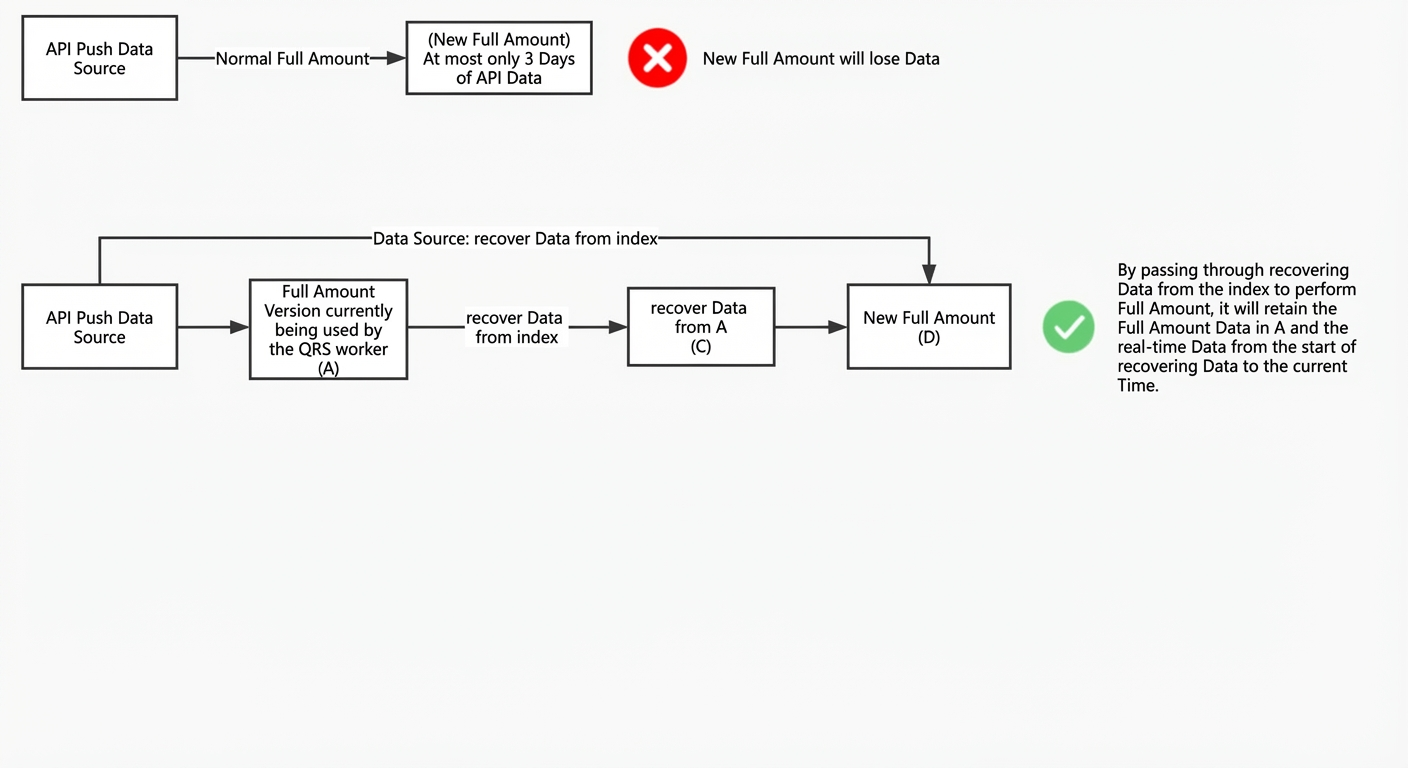
Procedure
Scenario: You need to perform full indexing on an API data source, for example, after you modify an index table or a dictionary. You want to ensure that all data from the previous index is preserved in the new index.
Steps:
-
On the Instance Management > O&M Center > O&M Management page, click Restore Data from Index.
-
Select an existing data source to restore.
The Restore Data from Index dialog box lists the Data Source, Index Table, and Index Version to Restore. Select the target data source and click OK at the bottom.
Note:
-
Only API data sources that have completed at least one full indexing appear.
-
You can select only one data source to restore at a time.
-
-
If the conditions are met, click OK in the confirmation message that appears.
Note:
-
To restore data from an index, ensure that all fields are configured as a search result field.
-
If you proceed without meeting this condition, the restoration process clears the content of any field not configured as a search result field.
-
-
After you submit the request, you can view the restoration progress in O&M Center > Change History > Data Source Changes.
The page displays the FSM recovery in the index process, which goes through the init, create snapshot, generate data, check gen_data status, prepare bs build data, bs build check, update finished time, and kill build task stages in sequence. A green checkmark is displayed after each stage is completed.
-
Once the FSM process in Data Source Changes is complete, you can perform operations that require full indexing, such as modifying an index table or adding a custom intervention entry. When you configure full indexing, select Restore Data from Index as the data source to retain all data from the previous index version.
Usage notes
-
The Restore Data from Index feature only supports API data sources.
-
To ensure data integrity when you restore data from an index, all data fields must be indexed. This means all fields must be configured as a search result field. The restoration process clears the content of any field not configured as a search result field.